Smart Volatility Squeeze
- 지표
- 버전: 1.0
- 활성화: 15

Smart Volatility Squeeze MT5
Smart Volatility Squeeze MT5 is a volatility compression and momentum expansion indicator for MetaTrader 5. It builds on John Carter's Volatility Squeeze framework and extends the usual single-tier squeeze into three compression tiers, so you can see not only whether the market is compressed but how tightly it is compressed before it expands.
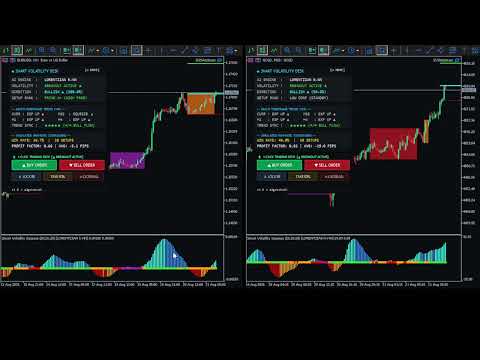
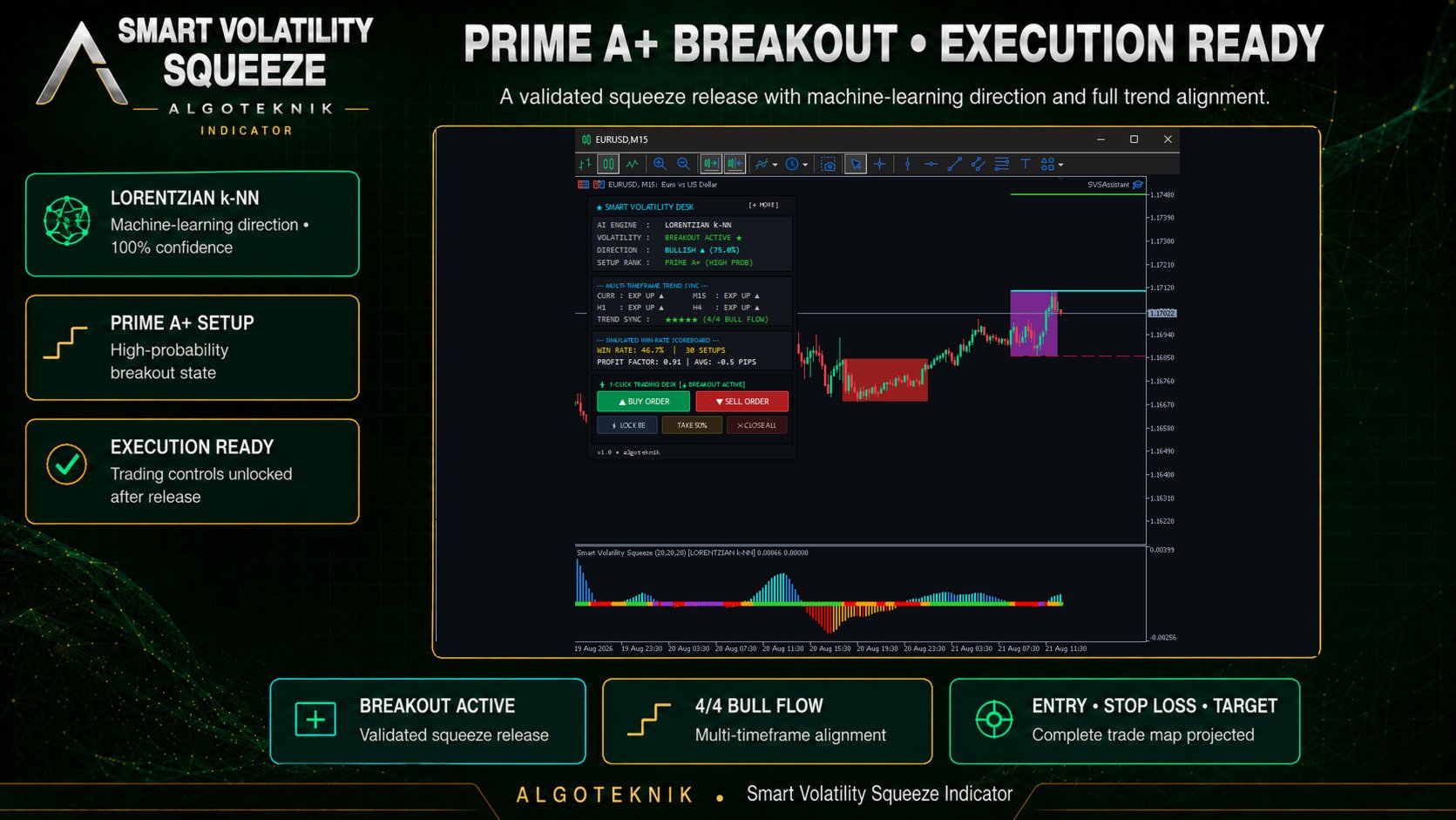
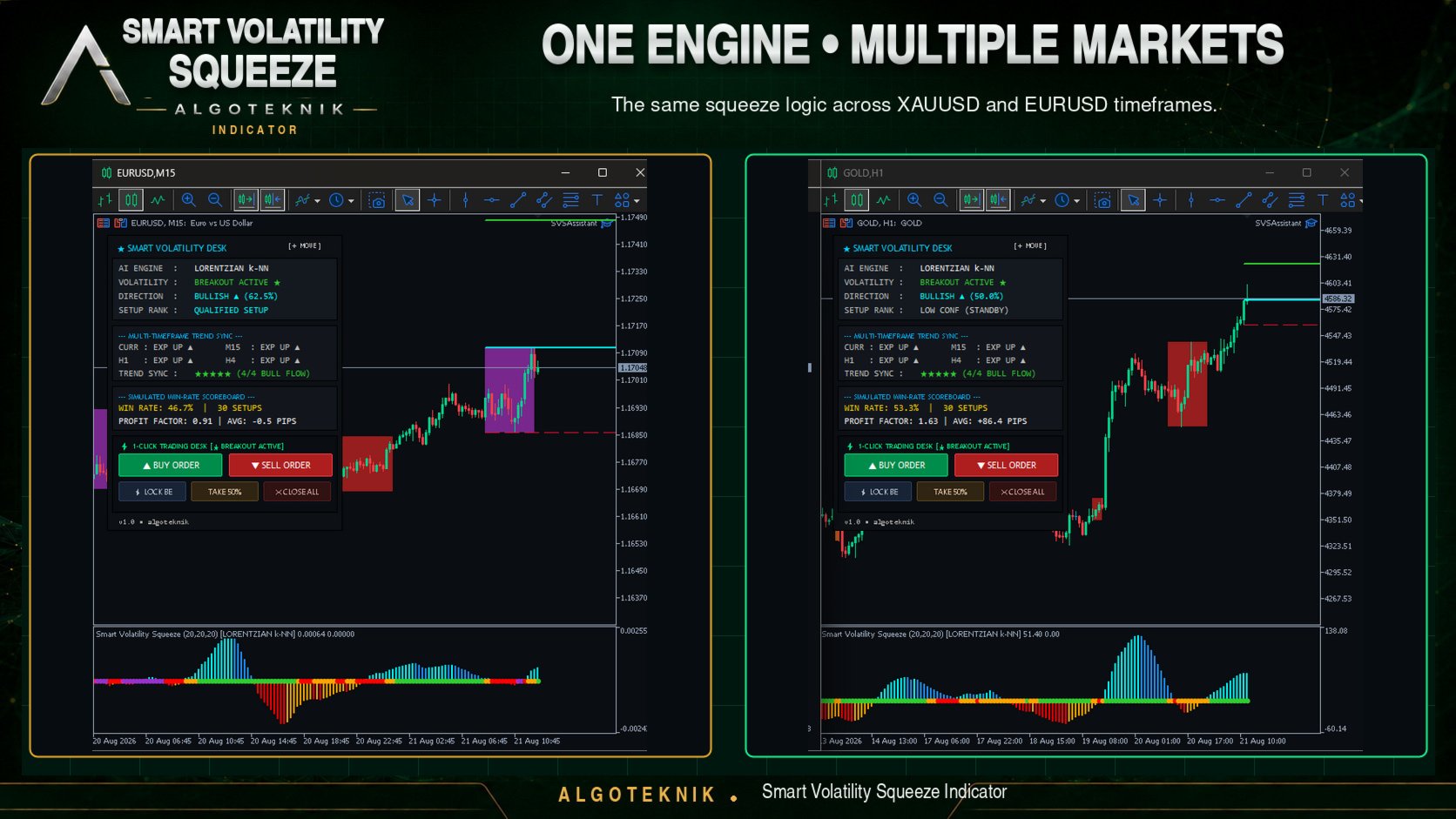
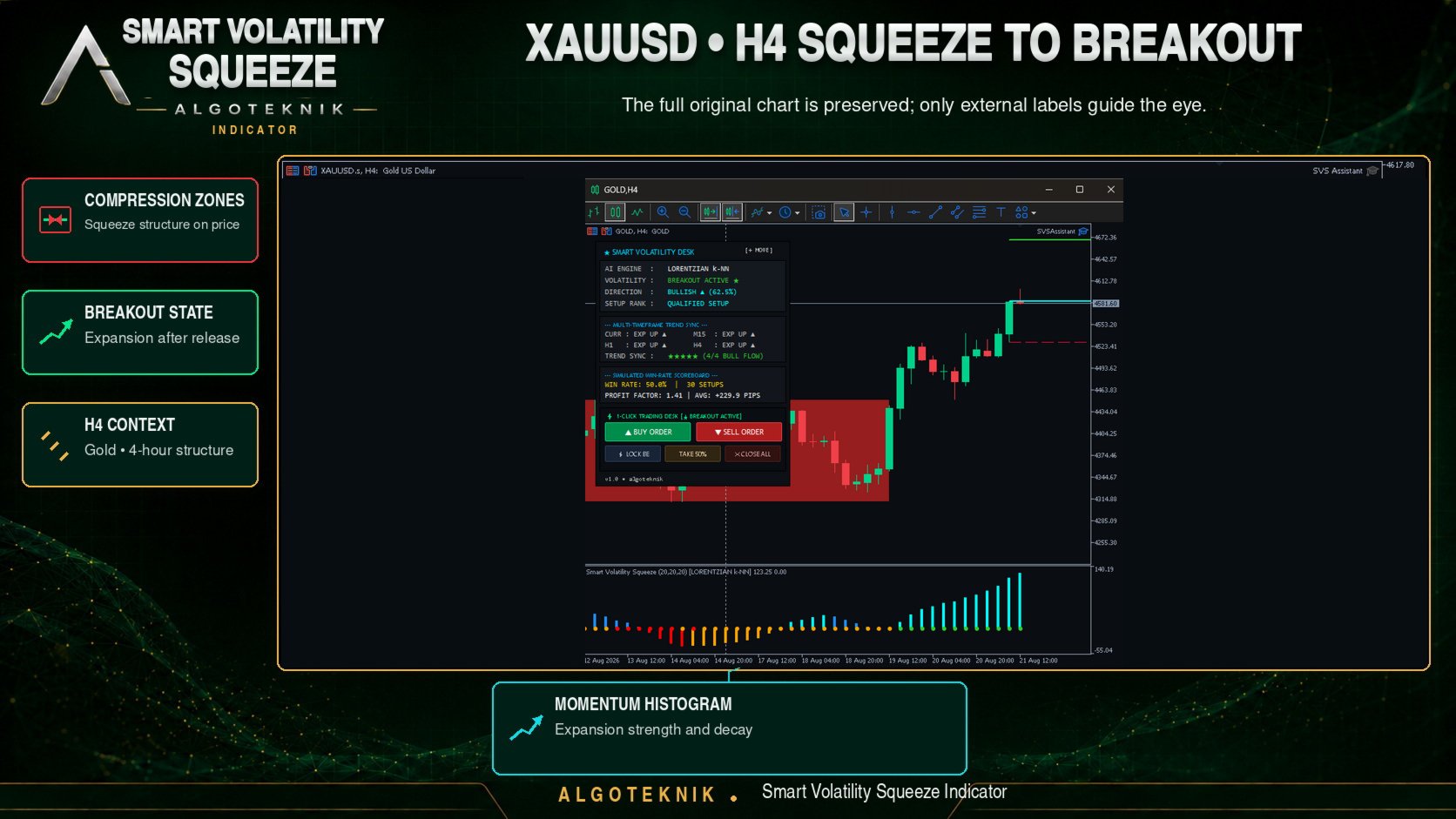
The indicator opens in a separate window and draws two elements: a linear regression momentum histogram and a row of coloured dots showing the current compression tier. Orchid marks the tightest compression, red the middle tier, orange the light tier, and lime green marks a released squeeze with momentum expanding. Alongside those it can shade the compression corridor on the price chart, project Entry, Stop Loss and Target levels once the squeeze releases, and display a movable panel with the active directional engine, a multi-timeframe trend overview and a simulated win-rate scoreboard.
The indicator does not send orders. Order execution is handled by SVS Assistant, a separate companion Expert Advisor published free of charge on the author's MQL5 profile. It is a distinct product rather than a bundled file, so you download and install it yourself, and it is needed only if you want to use the execution pad. Everything else in the indicator works without it.
Release notes, chart examples and new product announcements are posted on the TrendTower channel: https://www.mql5.com/en/channels/trendtower
The three directional engines
Three selectable engines estimate direction after a release. They run natively in MQL5 with no external DLLs and no Python runtime, and all three read the same four scale-invariant features of the current bar: normalised momentum acceleration, compression depth, Donchian price position and volatility ratio.
The first engine is a Lorentzian k-NN pattern classifier and it is the default. It measures the distance between the current feature vector and every bar in the pattern lookback window, keeps the nearest matches, reads what price did over the following bars after each of them, and reports the direction most of those neighbours went together with the share that agreed. That share becomes the confidence percentage on the panel. This is the only engine that learns from your chart data, and the only one that uses the lookback, neighbour count and forward horizon settings. The neighbour scan is the heaviest routine in the indicator, so it is repeated when a new bar opens or the compression tier changes rather than on every incoming tick.
The second engine is a perceptron filter with four inputs, four hidden neurons using hyperbolic tangent activation and one output. The third is a logistic filter over momentum slope, Donchian position and compression depth. Both are deterministic formulas whose coefficients are fixed in the code by the developer. They have no training phase, they do not adapt to your chart, and the third is not a Bayesian or ensemble model despite operating on probabilities. They are offered as simpler, faster alternatives to the classifier, and the engine can also be switched off entirely to work from the momentum histogram alone.
The on-chart panel
The panel can be dragged anywhere on the chart by its title bar, and its position is remembered per chart, per symbol and globally. It is organised into four cards.
The first card shows the active engine, the current compression tier, the direction and confidence reported by that engine, and a setup rank that classifies the confidence against your threshold. The second card compares the current chart against three timeframes of your choosing and summarises how many of the four agree on direction; this card uses the same Bollinger and Keltner comparison as the main window and does not involve the directional engine.
The third card is a simulated scoreboard, not a record of real trades. It walks back through the current chart's history, finds the most recent squeeze releases, and for each one assumes an entry at the squeeze boundary with the stop at the opposite boundary and the target at your chosen risk multiple. It then checks the following bars to see which level was reached first. The resulting win rate, profit factor and average travel describe how this compression pattern behaved on the visible history of that symbol and timeframe. The figures exclude spread, commission, swap and slippage, and they change with settings.
The fourth card is the execution pad. It sends commands to the SVS Assistant Expert Advisor and does nothing on its own. While the market is compressed the order buttons stay locked, so a click during consolidation cannot open a trade; they activate once the squeeze releases. They also stay locked until the first live calculation completes, while the card reads AWAITING DATA. A button that cannot be pressed always says why. LOCKED means the squeeze is still compressed. NO TRADE means this squeeze projected its levels for the opposite direction, so there is no setup to take on that side — the normal state of one button during any breakout, since a long setup cannot be sold into. MISSED means price has moved beyond the projected levels and entering now would put the stop on the wrong side of the market. LIVE ONLY appears in the Strategy Tester. The card header stays on BREAKOUT ACTIVE while one side is live and changes to TARGET REACHED once neither side can be entered; both reopen on the next release.
In the Strategy Tester the execution card is greyed out and reads LIVE CHART ONLY. The tester runs a single program at a time, so the companion Expert Advisor cannot be running beside the indicator there to carry out an order. Everything else behaves normally in a test — compression tiers, direction and confidence, targets, boxes, the multi-timeframe matrix and the scoreboard — so a test still shows you what the indicator does; only the order buttons wait for a live chart. Buttons are also available to move stops to break-even and to close a configurable percentage of an open position. The close-all button deliberately closes only the positions the assistant itself opened on the current symbol; trades you placed by hand or with another Expert Advisor carry a different magic number and are left untouched. Each button can be set to require a second confirming click within four seconds.
Boxes and projected levels
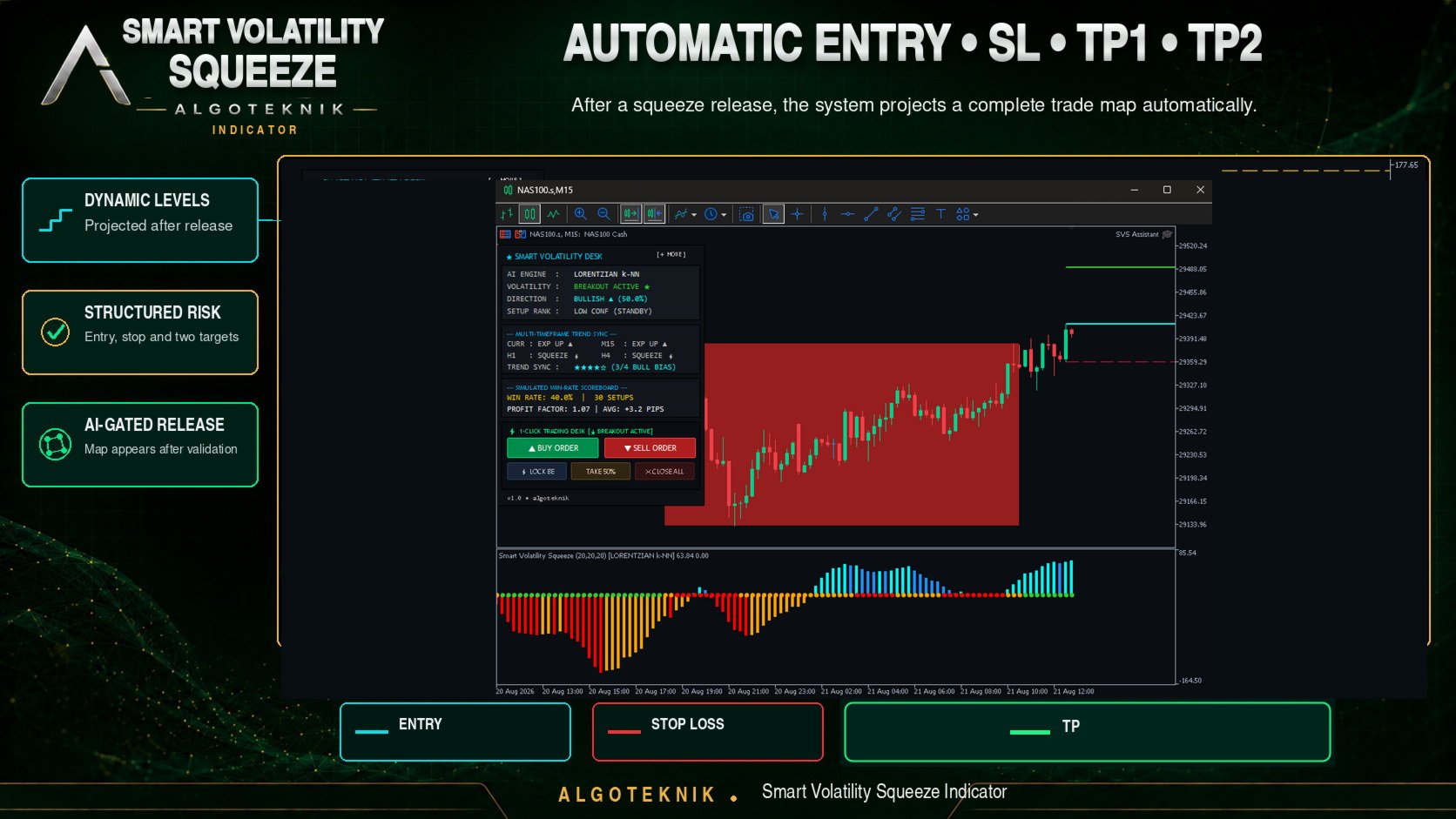
While a squeeze is active the compression corridor is shaded with a box coloured by the deepest tier reached, and the number of boxes kept on the chart is configurable. When the squeeze releases, the indicator projects the entry at the breakout side of the box, the stop at the opposite side, and one or two targets as multiples of the box range. Direction follows the momentum histogram first, then the directional engine, then the position of the close within the box. The box is measured once, at the moment the squeeze releases, and held for as long as the breakout lasts, so the levels do not creep along behind price. A compression window thinner than the cost of trading it is not a setup, so the range never falls below three times the current spread or half the Keltner ATR, whichever is larger. The levels drawn on the chart and the levels sent to the execution pad come from the same source, so the two always agree.
Free companion Expert Advisor: SVS Assistant
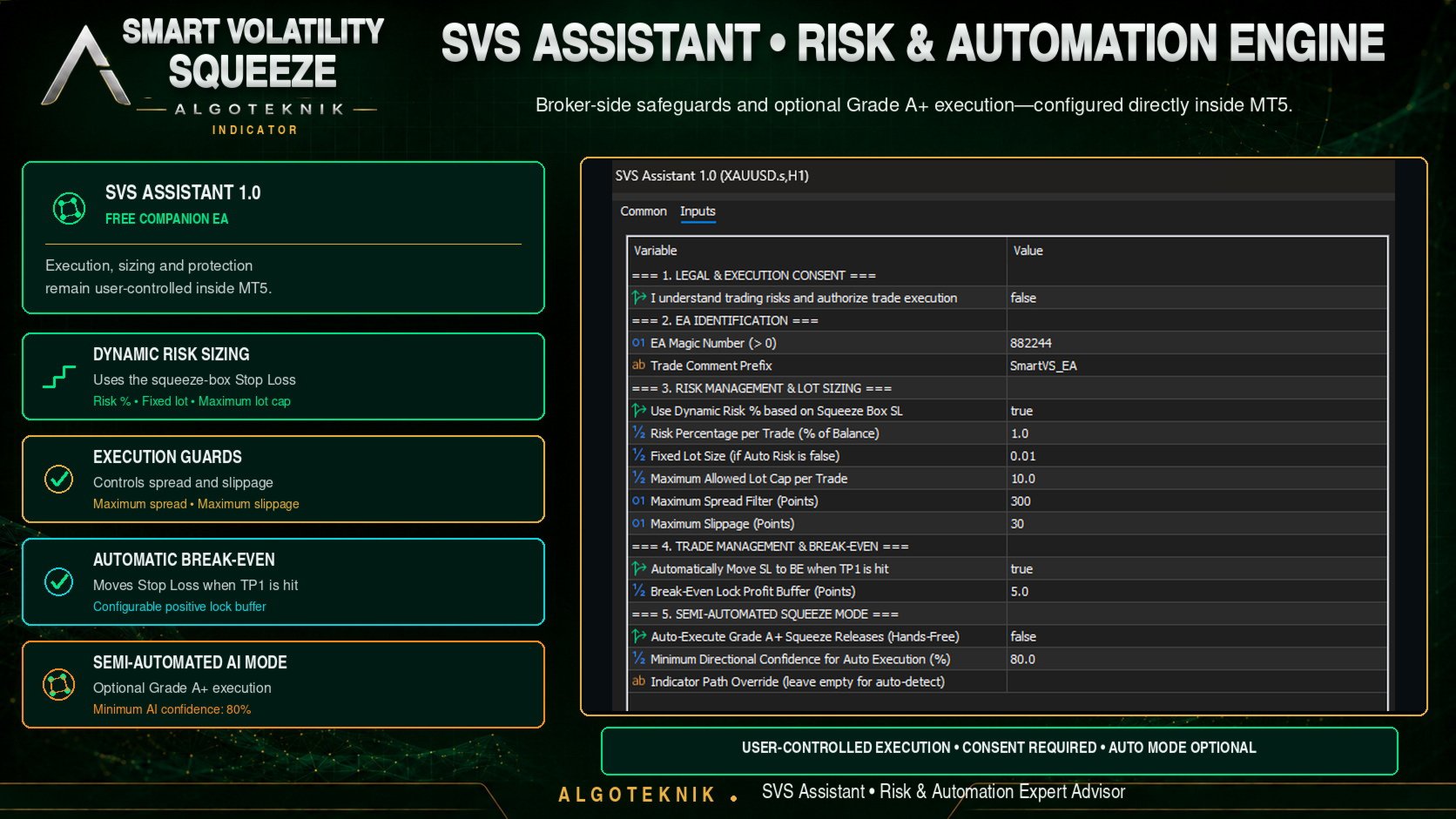
SVS Assistant is published free of charge on the Market under that name: https://www.mql5.com/en/market/product/191812 — a separate product, not included with this indicator, so it has to be downloaded and installed on its own. Setting it up takes four steps: download and install it, attach it to the same chart and symbol as the indicator, switch on the Algo Trading button in the MetaTrader 5 toolbar, and open its settings with F7 to confirm that you understand the risks. Until that confirmation is given it refuses every order and reports the reason in the Experts tab. All of this is optional; skip it and the indicator still shows every signal, box, level and panel card, with only the four execution buttons inactive.
Once running, it sizes lots from a risk percentage and the distance to the stop, clamps the result to the symbol's minimum, step and maximum volume, widens stops that fall inside the broker's minimum stop distance, sends the stop together with the order, and then reads the position back to confirm the stop is registered on the server. If the broker still refuses the stop after three attempts, it closes that position rather than leave it running unprotected, and writes the reason to the Experts tab. It rejects entries when the spread is too wide, ignores any command older than fifteen seconds so that a stale click cannot fire later, and refuses to trade at all until you explicitly confirm in its settings that you understand the risks. Its optional hands-free mode needs to read the indicator's buffers, so on start-up it looks for the indicator in the usual install locations and tells you in the Experts tab if it cannot find one; a path setting is provided for that case, and the 1-Click buttons work either way.
Notes on behaviour
- Values on the bar that is still forming update as price moves and settle when the bar closes. Values on bars that have already closed are not rewritten. If you prefer to act only on settled information, read the previous bar.
- Release alerts fire once per bar, only on live incoming data, and never while the indicator is loading history. An alert can optionally be suppressed unless engine confidence reaches your threshold.
- The optional dark chart theme is switched off by default so that your own chart template is left alone. If you switch it on, note that it is not restored when the indicator is removed.
- Every numeric parameter is validated on load. If a value is out of range the indicator refuses to start and prints the reason in the Experts tab.
Every input carries a descriptive label and a valid range in the settings dialog, grouped by function: Bollinger Bands, Keltner Channels, Momentum, Directional Engine, Breakout Boxes and Levels, Multi-Timeframe Matrix, Simulated Scoreboard, Visual Settings, Execution Pad, Chart Theme, and Alerts. A written reference for every parameter of both products is available on the author's MQL5 profile.
Risk disclaimer
This is an indicator for analysis and decision support. It does not place trades by itself; orders are sent only by the separate SVS Assistant Expert Advisor, and only after you enable it and confirm each action. The win-rate scoreboard is a simulation over past chart data and excludes trading costs. Simulated results and past performance do not indicate future results. Trading foreign exchange, indices, commodities and CFDs carries a high level of risk and may not be suitable for every investor. Test any tool thoroughly on a demo account before using it with real money.
About the author
Smart Volatility Squeeze MT5 is developed and maintained by algoteknik, a developer of trading indicators and Expert Advisors for MetaTrader 5. Questions, bug reports and feature requests are welcome through the author's MQL5 profile, where all published products and updates are listed.
Questions, bug reports and feature requests are welcome on the TrendTower channel: https://www.mql5.com/en/channels/trendtower