Lot Stats
- 유틸리티
- 버전: 1.0
- 활성화: 5

Lot Profit Stats User Manual
I am used to trading with the Martingale strategy. Every time I need to do statistics, I have to export the chart data to Excel for analysis, which is a very tedious process. Although there are already many statistical indicators on the market, there is a lack of one specifically for analyzing lots. With such an indicator, it would be very convenient to easily analyze the profit and loss status under different lot sizes.
1. Overview
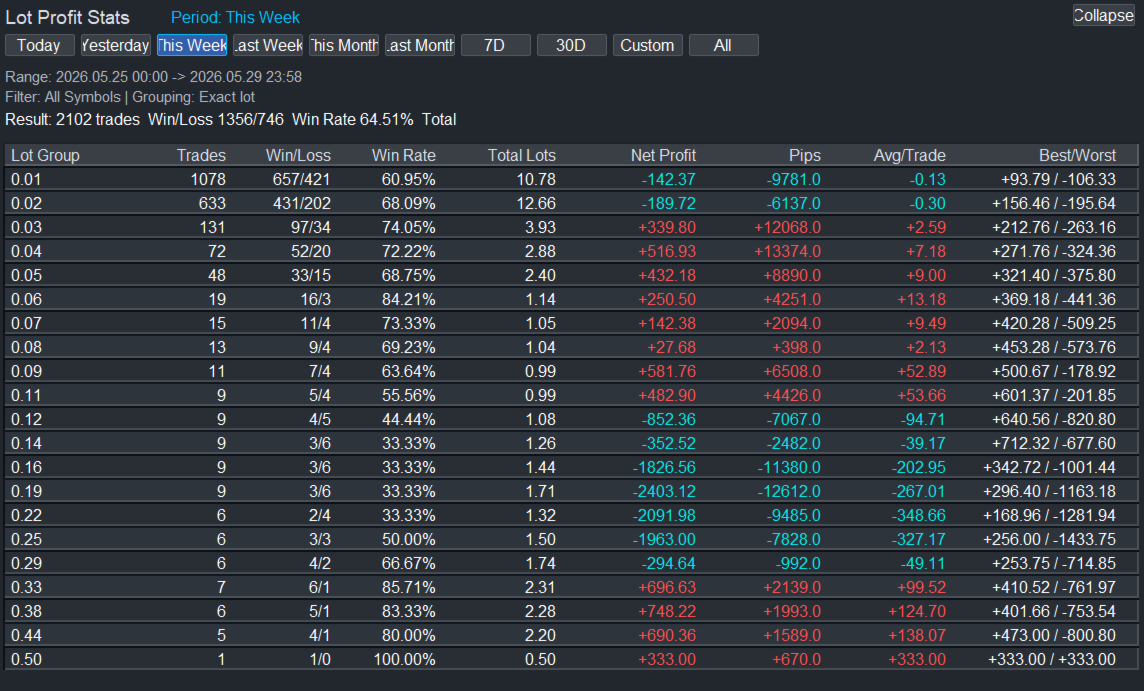
`Lot Profit Stats` is a chart-window indicator that summarizes closed trade performance by time range and lot size.
Main features:
- Time range tabs: Today, Yesterday, This Week, Last Week, This Month, Last Month, Last 7 Days, Last 30 Days, Custom Days, All History.
- Lot grouping: exact lot size or step bucket.
- Filters: current symbol, MagicNumber, order/deal comment keyword, minimum lot, maximum lot.
- Sorting: lot ascending, net profit descending, trade count descending.
- Dashboard columns: trades, win/loss, win rate, total lots, net profit, pips, average profit per trade, best/worst trade.
- Auto refresh: default refresh interval is 5 seconds.
2. Basic Usage
After attaching the indicator, the dashboard appears in the upper-left area of the chart.
Top buttons:
- `Today`: current day.
- `Yesterday`: previous day.
- `This Week`: current week from Monday to now.
- `Last Week`: previous Monday to Sunday.
- `This Month`: current month.
- `Last Month`: previous month.
- `7D`: rolling last 7 days.
- `30D`: rolling last 30 days.
- `Custom`: rolling last `CustomDays` days.
- `All`: all available history.
- `Collapse / Expand`: hide or show the table.
3. Inputs
| Input | Description |
| --- | --- |
| `InitialPeriod` | Default statistics period. Common values: `PERIOD_LAST_7_DAYS`, `PERIOD_THIS_WEEK`, `PERIOD_CUSTOM_DAYS`. |
| `CustomDays` | Custom rolling day count. Used when `InitialPeriod = PERIOD_CUSTOM_DAYS` or when the `Custom` tab is selected. |
| `GroupMode` | Lot grouping mode. `LOT_GROUP_EXACT` groups by exact lot size. `LOT_GROUP_STEP` groups by bucket. |
| `LotStep` | Lot bucket step. Used only when `GroupMode = LOT_GROUP_STEP`. Example: `0.10` creates `0.00 ~ <0.10`, `0.10 ~ <0.20`, and so on. |
| `SortRows` | Row sort mode. `SORT_BY_LOT_ASC`, `SORT_BY_PROFIT_DESC`, or `SORT_BY_TRADES_DESC`. |
| `MinLotFilter` | Minimum lot filter. `0` disables the filter. |
| `MaxLotFilter` | Maximum lot filter. `0` disables the filter. |
| `OnlyCurrentSymbol` | Count only the current chart symbol. |
| `UseMagicFilter` | Enable MagicNumber filtering. |
| `MagicNumber` | MagicNumber value to filter by. |
| `CommentKeyword` | Order/deal comment keyword. Empty means no comment filter. |
| `CommentCaseSensitive` | Case-sensitive comment matching. |
| `RefreshSeconds` | Auto-refresh interval in seconds. |
| `MaxRows` | Maximum number of lot groups displayed in the table. |
| `StartCollapsed` | Start with the dashboard collapsed. |
| `PanelX` / `PanelY` | Dashboard position. |
| `PanelWidth` | Dashboard width. |
| `RowHeight` | Table row height. |
| `FontSize` | Font size. |
| `UIFont` | Dashboard font. The English version defaults to `Arial`. |
4. Columns
| Column | Meaning |
| --- | --- |
| `Lot Group` | Exact lot size or lot bucket range. |
| `Trades` | Number of matching closed trades. |
| `Win/Loss` | Winning trades / losing trades. Break-even trades are not counted as wins or losses. |
| `Win Rate` | Winning trades divided by total trades. |
| `Total Lots` | Total volume in the lot group. |
| `Net Profit` | Net profit including profit, swap, and commission. The MT5 version also includes `DEAL_FEE`. |
| `Pips` | Total pips. For 5-digit or 3-digit symbols, 10 points are treated as 1 pip. |
| `Avg/Trade` | Average net profit per trade. |
| `Best/Worst` | Best trade / worst trade by net profit. |
5. Examples
Last 7 days by exact lot size:
- `InitialPeriod = PERIOD_LAST_7_DAYS`
- `GroupMode = LOT_GROUP_EXACT`
- `MinLotFilter = 0`
- `MaxLotFilter = 0`
Last 20 days with 0.10-lot buckets:
- `InitialPeriod = PERIOD_CUSTOM_DAYS`
- `CustomDays = 20`
- `GroupMode = LOT_GROUP_STEP`
- `LotStep = 0.10`
Current chart symbol only:
- `OnlyCurrentSymbol = true`
One EA only:
- `UseMagicFilter = true`
- `MagicNumber = the EA MagicNumber`
Only trades from 0.10 to 0.50 lots:
- `MinLotFilter = 0.10`
- `MaxLotFilter = 0.50`