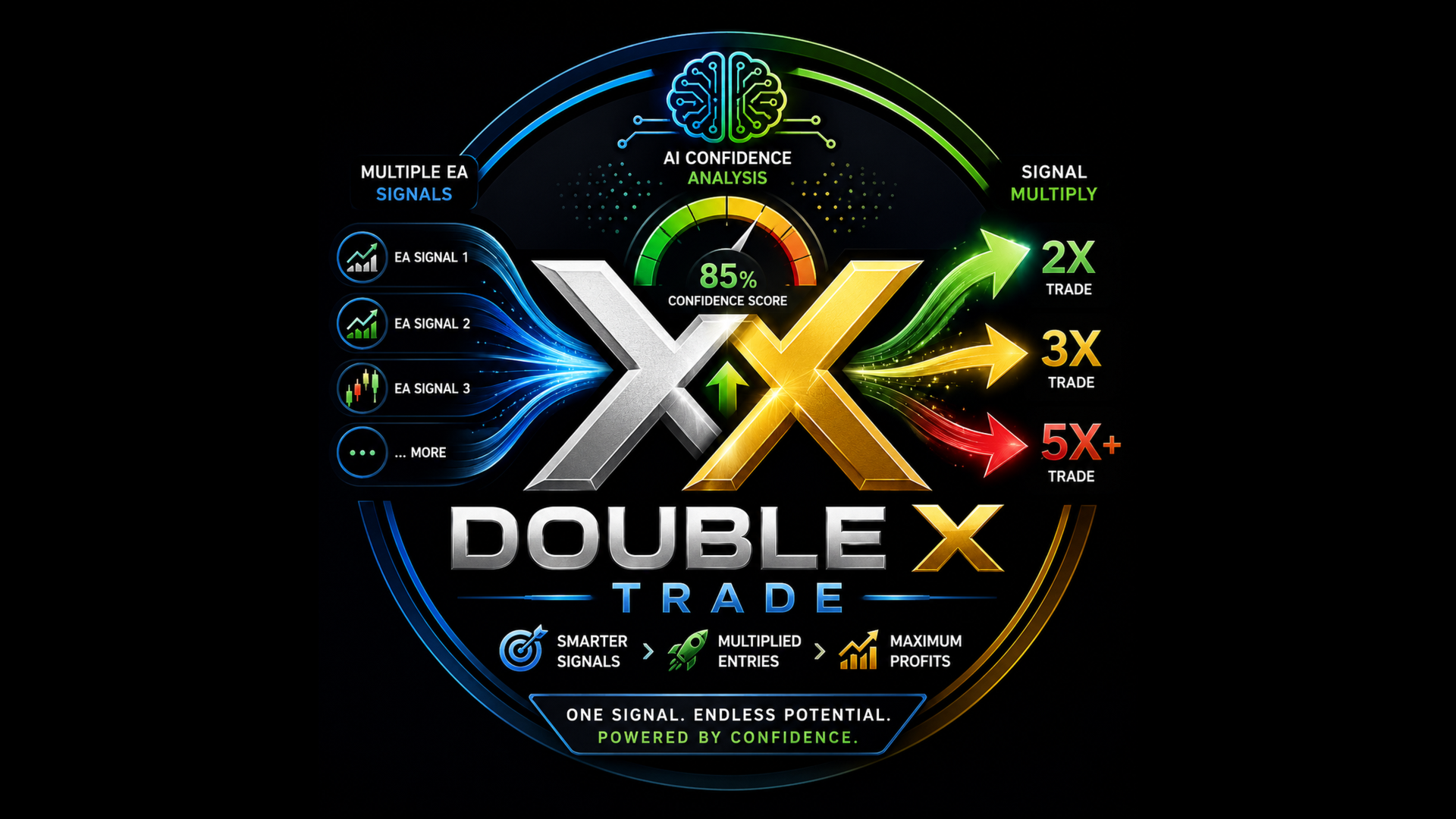
Double X Trade

DOUBLE X TRADE v2.6 PRO

DOUBLE X TRADE is a MetaTrader 5 Expert Advisor designed to work as an additional trade-management layer beside your existing EAs.

Instead of replacing your current trading system, DOUBLE X TRADE monitors trading activity on the account, analyzes new signals, and can open additional multiplier trades when the internal confidence engine detects stronger conditions. It is made for traders who already use one or more EAs and want an advanced, structured way to scale selected signals with risk controls, warmup logic, and a clear dashboard.

The product is designed to be practical, visual, and easy to use. It can run on a dedicated chart, watch the whole MT5 account, detect source EAs, and display important information in one stable dashboard.

DOUBLE X TRADE does not promise future profit. It is a trading utility and automation tool. Results depend on the user’s broker, market conditions, spread, execution, account settings, source EA quality, and risk parameters.

Main Idea

Many traders already have EAs that generate entries, but not every signal has the same quality. DOUBLE X TRADE works as a separate layer that reads the trading activity, evaluates the signal environment, and decides whether extra trades should be added.

The concept is simple:

Your existing EA opens or sends a trade signal.
DOUBLE X TRADE detects the activity.
The internal confidence engine analyzes the market condition.
If the signal passes the selected filters, DXT can add multiplier trades from 2x to 6x, depending on the configured settings and confidence score.
Risk controls and warmup logic help keep the process structured.

This makes DOUBLE X TRADE suitable for users who want to keep their current EAs while adding a second decision layer for scaling.

Key Features

Works Beside Existing EAs

DOUBLE X TRADE is not designed to replace your current EA. It works beside it. Your original EA can continue running on its own chart, while DOUBLE X TRADE runs on a separate chart and monitors the account.

This is useful when you already trust your main EA but want an additional system to evaluate and scale only selected opportunities.

Dedicated Chart Operation

MetaTrader 5 allows only one EA per chart. For this reason, DOUBLE X TRADE should be attached to its own dedicated chart.

The chart symbol and timeframe are not critical because DXT monitors trade activity from the whole account. Your original EAs should remain on their own charts.
Example:

Chart 1: Your existing EA on EURUSD
Chart 2: Your existing EA on XAUUSD
Chart 3: DOUBLE X TRADE on any symbol

This keeps the setup clean and prevents your source EA from being removed by MetaTrader.

35-Layer Confidence Engine

DOUBLE X TRADE uses a multi-layer scoring engine to evaluate trade conditions before adding multiplier trades.

The engine combines different market-analysis groups, including:

Classical market filters such as trend, momentum, volatility, volume, spread, session, multi-timeframe context, and risk-reward structure.

Smart Money Concept style checks such as BOS, CHoCH, order blocks, fair value gap areas, liquidity sweep behavior, and premium/discount zones.

Statistical analysis such as Hurst behavior, Z-score, variance ratio, and market randomness checks.

Order-flow proxy logic such as tick movement, CVD-style behavior, and effort-versus-result analysis.

Pattern-recognition logic including candle confluence and harmonic-style pattern checks.

Volume profile references such as VWAP and POC.

Multi-asset context such as currency strength and correlation checks.

Adaptive learning components that track closed-trade outcomes and adjust internal scoring over time.

The purpose of the engine is not to guarantee a winning trade. Its purpose is to create a more disciplined filtering and scaling process.

Multiplier Trade Logic

When a source EA creates a trade and DOUBLE X TRADE detects strong conditions, it can add extra trades based on the selected multiplier settings.

The multiplier logic can scale from 2x to 6x depending on confidence, risk settings, and account conditions.

This allows the user to apply stronger scaling only when the system detects better-quality conditions, instead of treating every signal equally

30% Safe-Start Warmup

DOUBLE X TRADE includes a warmup system that starts from a reduced trading percentage.

By default, the warmup begins at 30%. This means the EA does not immediately start at full scaling size. The warmup is designed to let the system build gradually based on trade history and user settings.

This feature is useful for new installations, new accounts, and new source EA combinations.

Blocker Is OFF by Default

By default, DOUBLE X TRADE does not close your source EA trades.

The blocker option is disabled by default because many users prefer DXT to act only as a multiplier layer, not as a trade closer.

If the user manually enables the blocker, DXT can be configured to close low-confidence source trades based on the selected settings. This should be used carefully, especially if the source EA may reopen trades automatically.

Default behavior:

It can add multiplier trades.
It does not close host EA trades by default.
It keeps the source EA independent unless the user changes the settings.

Auto-Detection of Host EAs

DOUBLE X TRADE can detect source EA activity by monitoring account trade transactions, magic numbers, symbols, and trade comments.

This helps users run multiple EAs on the same account while DXT identifies which source activity is being evaluated.

The default watch setting can monitor all magic numbers, making the initial setup easier.

Cross-Terminal Bridge Mode

DOUBLE X TRADE also supports a bridge-style setup for users who want source EAs on one MT5 terminal and multiplier trades on another MT5 terminal.

Example:

Terminal 1: Account A with source EAs
Terminal 2: Account B with DOUBLE X TRADE
Shared bridge file: Common\Files\DXT_Bridge.csv

This setup is useful when the trader wants to separate the signal account and multiplier account on the same computer.

Both terminals must be able to access the same Common Files folder.

Trade Journal and Learning Files

DOUBLE X TRADE can create internal files for tracking and learning behavior.

Common files include:

DXT_Bridge.csv for bridge communication
DXT_Journal.csv for trade and signal records
DXT_Learning.bin for saved adaptive state

These files help the system preserve information across restarts and provide a structured record of activity.

Dashboard Overview

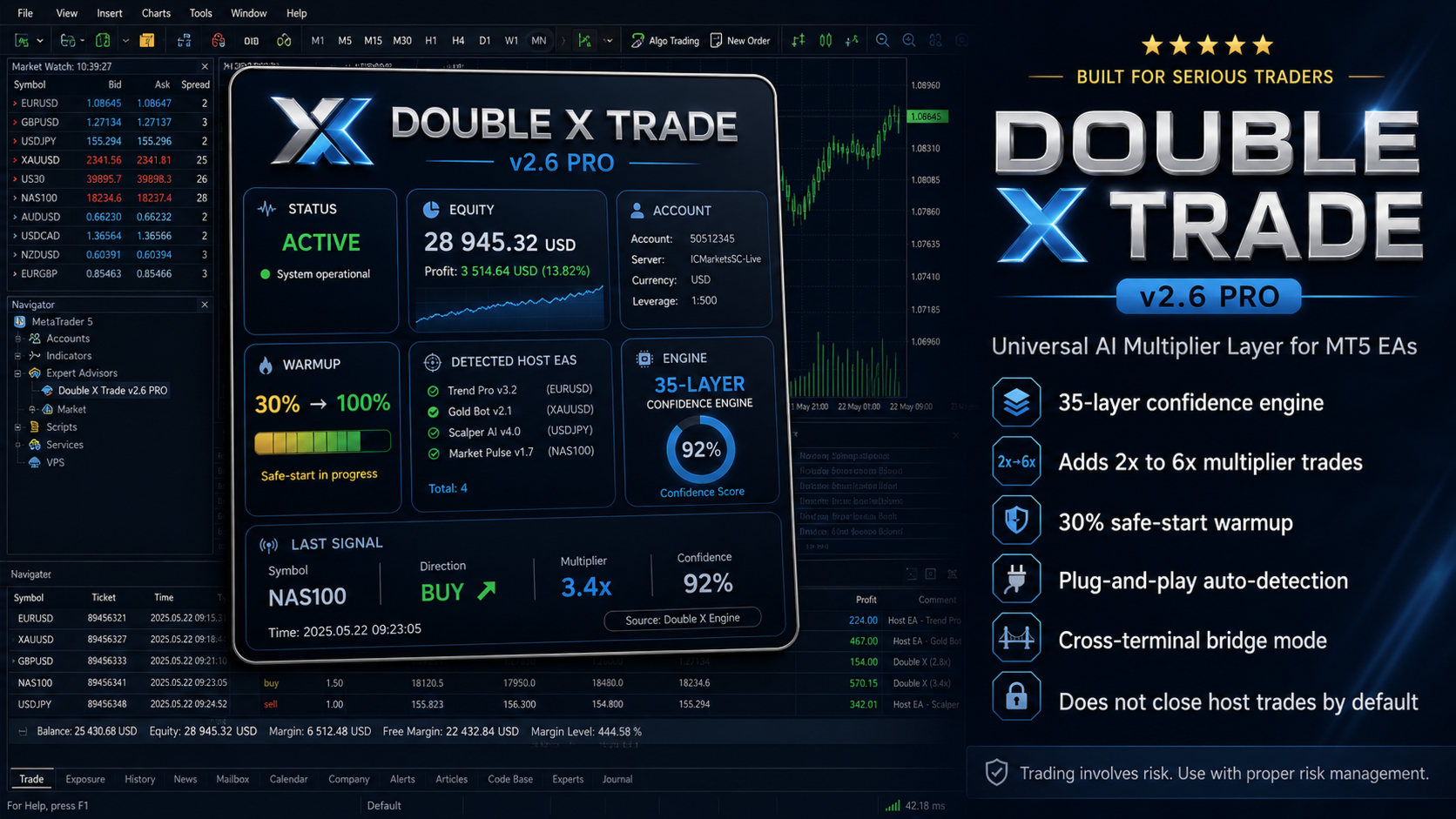
DOUBLE X TRADE includes a visual dashboard designed to show the most important information in one place.

The dashboard displays:

STATUS
Shows whether the system is active, paused, or in recovery mode.

EQUITY
Shows live account balance, equity, and daily performance information.

ACCOUNT
Shows account details such as account number, server, currency, and account mode.

WARMUP
Shows the warmup progress from the starting percentage toward full operation.

DETECTED HOST EAS
Shows detected source EAs and related symbol information.

ENGINE
Shows the confidence score, regime status, drawdown state, and engine activity.

LAST SIGNAL
Shows the latest detected signal, symbol, direction, source, multiplier, and confidence.

The dashboard is designed with an opaque background so chart candles do not interfere with the text.

Operating Modes

DOUBLE X TRADE includes several operating modes.

MODE_LOCAL
Default mode. Used when source EAs and DOUBLE X TRADE are running in the same MT5 terminal and on the same account.

MODE_PUBLISHER
Used on the terminal where the source EAs are running. It publishes signal information to the bridge file.

MODE_BRIDGE_READER
Used on the second terminal. It reads the bridge file and can place multiplier trades on the second account.

HYBRID
Advanced mode for users who want combined behavior, depending on setup and configuration.

Most users should start with MODE_LOCAL.

Important Inputs

InpMode
Selects the operating mode: local, publisher, bridge reader, or hybrid.

InpEnableMultiplier
Master switch for multiplier trades.

InpEnableBlocker
Controls whether DXT can close low-confidence source trades. Default is false.

InpWatchMagics
Controls which magic numbers are monitored. The default value can watch all.

InpWarmupStartPct
Sets the warmup starting percentage. Default is 30.

InpMaxTotalLots
Sets the maximum allowed total lot exposure.

InpDailyLossPct
Pauses trading if the daily loss limit is reached.

InpMaxDrawdownPct
Pauses trading if the drawdown limit is reached.

InpBridgeFile
Sets the bridge file name for cross-terminal mode.

InpSessionStartHr and InpSessionEndHr
Control the trading session filter.

How to Install

  1. Open MetaTrader 5.
  2. Go to File → Open Data Folder.
  3. Open the MQL5 folder.
  4. Open the Experts folder.
  5. Place the DOUBLE X TRADE EA file inside the Experts folder.
  6. Restart MetaTrader 5 or refresh the Navigator panel.
  7. Open any new chart.
  8. Attach DOUBLE X TRADE to the dedicated chart.
  9. Enable Algo Trading.
  10. Keep the default settings for first testing.

Important: Do not attach DOUBLE X TRADE to a chart that already has another EA. MT5 allows only one EA per chart.

Recommended First Setup

For the first test, use the default settings.

Recommended beginner setup:

Use MODE_LOCAL.
Use a demo account first.
Keep InpEnableBlocker set to false.
Keep InpWatchMagics at the default value.
Keep warmup enabled.
Use a reasonable maximum lot limit.
Check the Experts and Journal tabs after attaching the EA.
Allow the EA to collect enough closed trades before judging the adaptive behavior.

This product is designed for practical use, but every broker and every source EA behaves differently. Always test before using on a live account.

Same Account Setup

This is the simplest setup.

Run your existing EAs on their own charts.
Open a new dedicated chart for DOUBLE X TRADE.
Attach DOUBLE X TRADE to that chart.
Keep InpMode as MODE_LOCAL.
Enable Algo Trading.
Let DXT detect activity from the account.

The chart symbol used for DXT does not need to match the source EA symbol because DXT monitors account-level trade transactions.

Cross-Terminal Setup

Use this setup when you want source EAs on one account and multiplier trades on another account.

Terminal 1:

Run your source EAs.
Attach DOUBLE X TRADE on a dedicated chart.

Set InpMode to MODE_PUBLISHER.

Terminal 2:

Open the second MT5 terminal.
Attach DOUBLE X TRADE on a dedicated chart.
Set InpMode to MODE_BRIDGE_READER.

Both terminals must access the same Common\Files folder.
The bridge file name must match in both terminals.

Who This Product Is For

DOUBLE X TRADE is suitable for traders who:

Already use one or more MT5 EAs.
Want an additional scoring layer for source EA signals.
Want a visual dashboard for monitoring multiplier activity.
Prefer safe-start warmup instead of immediate full scaling.
Want to test controlled multiplier logic.
Need same-account or cross-terminal operation.
Want a tool that does not close host EA trades by default.


추천 제품
VR Black Box MT5
Vladimir Pastushak
1 (1)
VR Black Box는 경험 많은 트레이더 겸 프로그래머가 개발한 현대적인 자동 매매 전문가 어드바이저입니다. 검증된 추세 추종 전략을 기반으로 한 강력한 거래 도구입니다. 이 로봇은 오랜 기간에 걸친 개발과 개선 과정을 거쳤으며, 꾸준히 업데이트되고 변화하는 시장 환경에 적응해 왔습니다. 실제 거래 계좌에서 여러 해 동안 운용되면서 초보자와 숙련된 트레이더 모두에게 신뢰할 수 있는 조력자로 입증되었습니다. 세트 파일, 제품의 데모 버전, 지침 및 보너스를 사용할 수 있습니다. [블로그] 버전: [MetaTrader 4] 주요 전략 로봇은 여러 가지 거래 모드를 구현합니다: 매수와 매도 포지션을 번갈아 여는 방식 (Buy and Sell alternately). 동시에 매수와 매도 거래를 수행 (Buy and Sell at the same time). 무작위 방향 선택 (Randomly Buy or Sell, “오рел или решка” 전략과 유사). 매수 전용 (Buy on
SolarTrade Suite Financial Robot: LaunchPad Market Expert - 거래를 시작하도록 설계되었습니다! 이 거래 로봇은 특별하고 혁신적이며 고급 알고리즘을 사용하여 가치를 계산합니다. 금융 시장의 세계에서 여러분의 조수입니다. SolarTrade Suite 시리즈의 지표 세트를 사용하여 이 로봇을 시작할 순간을 더 잘 선택하세요. 설명 하단에서 SolarTrade Suite 시리즈의 다른 제품을 확인하세요. 투자와 금융 시장의 세계를 자신 있게 탐색하고 싶으신가요? SolarTrade Suite Financial Robot: LaunchPad Market Expert는 정보에 입각한 투자 결정을 내리고 수익을 늘리는 데 도움이 되도록 만들어진 혁신적인 소프트웨어입니다. SolarTrade Suite Financial Robot: LaunchPad Market Expert의 장점: - 정확한 계산: 로봇은 고급 알고리즘과 분석 방법을 사
Classic SNR MetaTrader 5 Expert Advisor | Multi-Symbol Support & Resistance Trading with Trend-Based Logic Overview Classic SNR Breakout EA is a professional trading robot that identifies structural Support & Resistance levels using daily swing points and executes trades based on H1 price action relative to these levels. The EA applies   dual logic : in an uptrend, it sells on H1 rejection below an SNR level; in a downtrend, it buys on H1 rejection above an SNR level. Breakout confirmations are
Matrix Arrow EA MT5
Juvenille Emperor Limited
5 (7)
Matrix Arrow EA MT5 는  Matrix Arrow Indicator의 MT5  신호를 차트의 거래 패널과 수동 또는 100% 자동으로 거래할 수 있는 고유한 전문가 조언자입니다.  Matrix Arrow Indicator MT5 는 다음과 같은 최대 10개의 표준 지표에서 정보와 데이터를 수집하여 초기 단계에서 현재 추세를 결정합니다. 평균 방향 이동 지수(ADX) ,   상품 채널 지수(CCI) ,   클래식 하이켄 아시 캔들 ,   이동 평균 ,   이동 평균 수렴 발산(MACD) ,   상대 활력 지수(RVI) ,   상대 강도 지수(RSI) ,   포물선 SAR ,   스토캐스틱 오실레이터 ,   윌리엄스의 백분율 범위 . 모든 지표가 유효한 매수 또는 매도 신호를 제공하면 강력한 상승/하락 추세를 나타내는 다음 캔들/막대가 시작될 때 해당 화살표가 차트에 인쇄됩니다. 사용자는 사용할 표시기를 선택하고 각 표시기의 매개변수를 개별적으로 조정할 수 있습니다.  
| Fully-automated Smart Money Concept (ICT) inspired trading solution with multi-strategy capabilities | Built by a grid trader >> for grid traders.  This is MT5 version, click  here  for  Blue CARA MT4  (settings and logics are same in both versions)     Real monitoring signal  -->  Cara Gold Intro Blue CARA EA   ('CARA') - short for  C omprehensive  A lgorithmic   R esponsive   A dvisor is a next-gen  multi-currency    multi-timeframe  EA base on the widely known (and perhaps the most popul
Elevate your trading experience with Dynamic Trader EA MT5 , a cutting-edge trading robot designed to optimize your investment strategy. This advanced algorithm harnesses the power of four key indicators: RSI ( Relative Strength Index ), Stochastic Oscillator , MACD   ( Moving Average Convergence Divergence ) and ATR ( Average True Range ) to make informed and precise trading decisions. ATR is used to dynamically set stop-loss and take-profit levels based on market volatility. IMPORTANT! Read c
Exclusive EA for FOREX HEDGE account The EA (FuzzyLogicTrendEA) is based on fuzzy logic strategies based on the analysis of a set of 5 indicators and filters. Each indicator and filter has a weight in the calculation and, when the fuzzy logic result reaches the value defined in the EA parameter, a negotiation is opened seeking a pre-defined gain. As additional functions it is possible to define maximum spread, stop loss and so on . Recommended Symbol: EURUSD, AUDUSD, GBPUSD, NZDUSD, USDCAD, AUD
Exp5 The xCustomEA for MT5
Vladislav Andruschenko
4.27 (11)
The xCustomEA for MetaTrader 5 — 사용자 지정 지표용 범용 Expert Advisor 거의 모든 사용자 지정 지표를 자동매매 전략으로 전환할 수 있습니다. The xCustomEA for MetaTrader 5는 사용자의 커스텀 지표에서 신호를 읽고, 설정한 로직에 따라 자동으로 주문을 실행하는 범용 Expert Advisor입니다. 지표 이름, 신호 버퍼, 핵심 파라미터만 지정하면 EA가 해당 정보를 바탕으로 자동매매를 수행합니다. 새로운 아이디어가 생길 때마다 로봇을 처음부터 다시 만들지 않아도 되기 때문에, 지표 기반 전략을 빠르게 실전 운용에 연결하고 싶은 트레이더와 개발자에게 매우 실용적인 솔루션입니다. The xCustomEA는 단순한 신호 연결 도구가 아닙니다. 사용자 지정 지표 연동 기능과 The X 제품군의 강력한 거래 프레임워크를 결합하여, 진입, 청산, 필터, 보호, 포지션 관리까지 하나의 환경 안에서 구성할 수 있습니다. The xCus
The Bitcoin Reaper
Profalgo Limited
3.71 (34)
출시 프로모션: 현재 가격으로는 매우 제한된 수의 사본만 구매 가능합니다! 최종 가격: 999달러 신규(349달러부터) --> 1개 무료 증정(거래 계좌 번호 2개에 한함). 최고의 콤보 상품     ->     여기를 클릭하세요 공개 그룹에 가입하세요:   여기를 클릭하세요   LIVE SIGNAL LIVE SIGNAL V2.0 UPDATE 2.0 INFO 비트코인 리퍼에 오신 것을 환영합니다!   골드리퍼의 엄청난 성공 이후, 저는 동일한 성공 원칙을 비트코인 ​​시장에도 적용할 때가 되었다고 생각했고, 와, 정말 유망해 보이네요!   저는 20년 넘게 거래 시스템을 개발해 왔으며, "단연" 제 전문 분야는 브레이크아웃 전략입니다. 이 간단하지만 효과적인 전략은 역대 최고의 트레이딩 전략 중 하나로 자리매김하며, 사실상 모든 시장에 적용할 수 있습니다.       특히 비트코인처럼 변동성이 큰 시장에서는 더욱 빛을 발합니다!   그렇다면 이 전략은 어떻게 작동할까요? 브레이크
Exclusive Imperium MT5 — 자동화 거래 시스템 Exclusive Imperium MT5 는 MetaTrader 5용 전문가 어드바이저(EA)로, 시장 분석 알고리즘과 리스크 관리에 기반합니다. EA는 완전히 자동으로 작동하며 트레이더의 개입은 최소화됩니다. 주의! 구매 후 즉시 저에게 연락하세요 — 설정 지침을 받으실 수 있습니다! 중요: 모든 예시, 스크린샷 및 테스트는 데모 목적일 뿐입니다. 특정 통화쌍이 한 브로커에서 좋은 결과를 보여도 다른 브로커에서도 동일하다는 의미는 아닙니다. 각 브로커는 고유한 시세, 스프레드 및 거래 조건을 가지고 있습니다. 따라서 각 통화쌍은 사용자가 개별적으로 최적화해야 합니다 그리고 실제 계좌에서는 단일 통화 모드 로만 실행해야 합니다 — 각 쌍을 별도로 실행하세요. 다중 통화 모드 스크린샷은 단순히 예시입니다. 시장 상황은 변하기 때문에 최적화는 최소 연 1회 반복하는 것이 좋습니다. 중요 정보: EA의 데모 버전은 평가용으로
Gyroscopes mt5
Nadiya Mirosh
5 (2)
Gyroscope        professional forex expert   (for EURUSD, GBPUSD, USDJPY, AUDUSD, USDCHF, EURGBP, EURJPY, NZDUSD, USDCAD, EURCHF, AUDJPY, CADJPY pairs)   alyzing the market using the Elliot Wave Index. Elliott wave theory is the interpretation of processes in financial markets through a system of visual models (waves) on price charts. The author of the theory, Ralph Elliott, identified eight variants of alternating waves (of which five are in the trend and three are against the trend). The mov
Dr Gauss EURUSD
Roberto Alvarez
Expert Advisor for EURUSD – MQL5 Expert Advisor simple and robust , designed for use by both beginner and experienced traders , with a primary focus on stability , risk management , and operational consistency . The system does not use martingale , grid , or any progressive risk-increasing techniques. Each trade is independent and executed under strict control rules, with particular attention to equity curve protection . The trading logic is based on classical principles of probability and risk
Renko Logic
Ahmed Mohammed Bakr Bakr
MetaTrader 5 Renko Expert Advisor - User Guide Overview This Expert Advisor implements a complete Renko-based trading system with custom brick calculation, visual display, and automated trading logic. -The EA only for Rent unlimited Version coming soon. Features 1. Renko Engine Custom Renko Calculation : Built from scratch, no offline charts needed No Repainting : Uses only closed Renko bricks Configurable Brick Size : Set in points via input parameters Real-time Brick Formation : Automatically
Magic EA MT5
Kyra Nickaline Watson-gordon
Magic EA is an Expert Advisor based on Scalping, Elliot Waves and with filters such as RSI, Stochastic and 3 other strategies managed and decided with the robot smartly. Large number of inputs and settings are tested and optimized and embedded in the program thus inputs are limited and very simple. Using EA doesn't need any professional information or Forex Trading Knowledge. EA can trade on all symbols and all time frames, using special and unique strategies developed by the author. The EA w
Little Swinger    (Best choice for passive income lovers) Developed by RobotechTrading   key features: Financial Freedom Back testing results will match with real live trading results Proper TP and SL Controlled Risk Highly Optimized settings Running on our Real Live Accounts Little Risk, Little Drawdown, Little Stress, Little BUT stable income, just set and forget. Strategy: Not Indicator based No Martingale  No Grid  No Repaint strategy Safe and Secure calculation of Live data and than take
CosmiCLab FIBO
Kirils Subins
CosmiCLab SMC FIBO CosmiCLab SMC FIBO is a professional trading indicator designed for traders who use Smart Money Concepts (SMC), market structure analysis and Fibonacci retracement levels. The indicator automatically detects market swings and builds Fibonacci levels based on the latest impulse movement. It also identifies market structure changes such as BOS (Break of Structure) and CHOCH (Change of Character), helping traders understand the current market direction. CosmiCLab SMC FIBO also pr
Altanex Trading
Bryson Mukhovi Kayi
Altanex Trading EA Overview Altanex Trading EA is a fully automated MetaTrader 5 Expert Advisor designed for breakout trading using fractal-based signals. It uses pending orders to capture momentum after a breakout, integrates dynamic risk management, and supports both fixed and percentage-based position sizing. Understanding the EA's Strategy The Altanex Trading EA is a breakout strategy that uses the Fractals indicator for its signals. It works by: Identifying a recent significant high (a fra
Stormer RSI 2
Ricardo Rodrigues Lucca
This strategy was learned from Stormer to be used on B3. Basically, 15 minutes before closing the market, it will check RSI and decided if it will open an position. This strategy do not define a stop loss. If the take profit reach the entry price it will close at market the position. The same happens if the maximal number of days is reached. It is created to brazilian people, so all configuration are in portuguese. Sorry Activations allowed have been set to 50.
RSI Master PRO – Professional Expert Advisor for MetaTrader 5 Overview: RSI Master PRO is an Expert Advisor (EA) developed for MT5, designed to trade automatically in the financial markets using the Relative Strength Index (RSI) as its core decision-making engine. Its modular design and fully customizable parameters make it a powerful and flexible tool for traders who base their strategy on this momentum indicator. ️ Key Technical Features: • RSI-Based Logic: Uses RSI readings to generate
The Gold Buyer
Moses Aboliwen Aduboa
Ride the Gold Trend with a Simple Buy-Only EA The  EA is a fully automated Buy-Only Expert Advisor for MetaTrader 5. It is designed to capture upward market opportunities with safe risk management and seamless execution. Why Traders Choose It: Best performance on Gold (XAUUSD) – highly liquid and trending. Buy-Only EA – focuses purely on long positions. Plug & Play setup – attach and let it trade automatically. Built-in Stop Loss & Take Profit protection. Smart one-position contro
SMC Venom Model BPR 지표는 Smart Money(SMC) 개념 내에서 일하는 트레이더를 위한 전문 도구입니다. 가격 차트에서 두 가지 주요 패턴을 자동으로 식별합니다. FVG (공정 가치 갭)는 3개의 캔들의 조합으로, 첫 번째와 세 번째 캔들 사이에 갭이 있습니다. 이는 볼륨 지원이 없는 레벨 사이에 구역을 형성하여 종종 가격 수정으로 이어집니다. BPR (균형 가격 범위)은 두 개의 FVG 패턴의 조합으로, "브리지"를 형성합니다. 이는 가격이 낮은 볼륨 활동으로 움직일 때 브레이크아웃과 레벨로의 복귀 구역으로, 캔들 사이에 갭을 생성합니다. 이러한 패턴은 거래자가 차트에서 거래량과 가격 역학을 분석하여 주요 지지/저항 수준, 돌파 구역 및 진입 지점을 식별하는 데 도움이 되며, 여기서 대형 시장 참여자와 일반 참여자 간의 상호 작용이 발생합니다. 이 지표는 사각형과 화살표 형태로 패턴을 시각화하며 유연한 경고 설정도 지원합니다. 주요 특징: 패턴 표시 모드
Prizmal Logic
Vladimir Lekhovitser
3.5 (2)
실시간 거래 신호 거래 활동의 공개 실시간 모니터링: https://www.mql5.com/ko/signals/2353471 공식 정보 판매자 프로필 공식 채널 사용자 매뉴얼 설정 안내 및 사용 지침: 사용자 매뉴얼 열기 이 전문가 어드바이저는 규칙 기반 거래 전략에 기반하여 설계되었습니다. 이 전략은 시장에 지속적으로 노출되기보다는 특정 시장 조건을 식별하는 데 초점을 둡니다. 시스템은 가격 움직임, 변동성 특성 및 시간 요소를 분석합니다. 이 요소들은 현재 시장 환경이 거래 참여에 적합한지 판단하는 데 사용됩니다. 여러 사전 정의된 기준이 동시에 충족될 때만 거래가 실행됩니다. 조건이 충족되지 않으면 전문가 어드바이저는 비활성 상태를 유지합니다. 그 결과 거래 활동은 일정하지 않습니다. 거래가 전혀 발생하지 않는 기간이 있을 수 있습니다. 이는 포지션이 전혀 없는 하루 전체를 포함할 수 있습니다. 반대로 적절한 시장 국면에서는 비교적 짧은 시간에 여러 거
Expert TP SL v04 - Professional Trading Assistant with AI Motivation System Advanced manual trading tool with automatic risk management, overtrading protection, and intelligent psychological support for disciplined trading. PRODUCT OVERVIEW Expert TP SL v04 is a comprehensive trading assistant designed for manual traders who want to maintain emotional discipline while automating risk calculations. This isn't just another order placement tool - it's a complete trading psychology system that pr
Sonic R Pro Enhanced EA - 버전 2025 249달러 - 첫 5명만! 실시간 신호 Sonic R Pro Enhanced의 실시간 성과 확인하기: 거래 전략 Sonic R Pro Enhanced는 Dragon Band (EMA 34 및 EMA 89)를 기반으로 한 전통적인 Sonic R 전략의 업그레이드 버전으로, 자동화된 거래 시스템입니다. 타임프레임: M15, M30 지원 통화쌍: XAUUSD, BTCUSD, AUDJPY, USDJPY 거래 스타일: 스윙 트레이딩 - 풀백 및 반대 트렌드 최소 자본: 500 USD 레버리지: 1:200 이상 사용자 가이드 Sonic R Pro Enhanced는 단순함을 위해 최적화되었습니다. 사용자는 RiskAmount 하나의 파라미터만 설정하면 됩니다. RiskAmount < 0일 경우: 계좌 잔액의 백분율로 위험을 계산 RiskAmount > 0일 경우: 거래당 고정 USD 금액으로 위험을 설정 예제:
PROMO: ONLY 10 LEFT AT $90! Next price:        $199 Price will be kept high to limit number of users for this strategy. This EA starts trading at the open of   London (UK) Session . It is based on analysis of advanced statistical distributions combined with short to medium term reversal patterns which have mean-reversion attributes. The EA includes several smart features and allows you to trade with a fixed or automatic lot size. The EA is not sensitive to spreads but can be backtested on both
Universal Trend
Maryna Shulzhenko
The Universal Trend indicator was created to detect trends in price movement and allows you to quickly determine not only the direction of the trend, but also understand the levels of interaction between buyers and sellers. The indicator works on all timeframes and currency pairs. The indicator gives fairly accurate signals and it is customary to use it both in trending and flat markets. It is advisable to use the indicator in combination with other tools for more reliable signals and making a
The Fractal Trend Master is one of the most powerful and sophisticated Expert Advisors on the market, designed to protect traders' capital while maximizing profit opportunities. Based on Bill Williams' renowned methodology, this EA uses three essential technical analysis tools: the Alligator indicator , fractals , and the Gator Oscillator , creating a robust and precise framework for identifying and following market trends. This EA was designed with a focus on advanced risk management and capita
SPECIAL LAUNCH OFFER: $30 (1-Month Rent) Limited time offer to build our community and gather feedback! AmbM GOLD Institutional Scalper A high-precision M5 algorithm for XAUUSD (Gold) , engineered to trade exclusively at Institutional Liquidity Levels ($5/$10 psychological marks). PERFORMANCE DATA (BUY ONLY) • Win Rate: 87.09%. • Safe Growth: +$4,113 profit on $10k (13.75% Max Drawdown). • Extreme Stress Test: Successfully generated +$22,997 in a 5-year stress test (2020-2026), proving
Nano Machine
William Brandon Autry
5 (11)
Nano Machine GPT Version 2 (Generation 2) – 지속적 풀백 인텔리전스 우리는 2024년 말 Mean Machine으로 이 변화를 시작했습니다. 실제 최첨단 AI를 라이브 리테일 외환 트레이딩에 도입한 최초의 시스템 중 하나입니다. Nano Machine GPT Version 2는 그 라인의 다음 진화입니다. 대부분의 AI 도구는 한 번 답하고 모든 것을 잊습니다. Nano Machine GPT Version 2는 잊지 않습니다. 분석한 모든 풀백 셋업, 실행한 모든 진입, 거부한 모든 신호, 각 결정 뒤의 논리, 시장의 반응, 그리고 각 Machine Symmetry 바스켓의 실제 성과를 기억합니다. 매 세션의 완전한 컨텍스트. 시간이 지남에 따라 축적되는 집중된 인텔리전스. 이것은 마케팅을 위해 AI를 덧붙인 또 하나의 EA가 아닙니다. 이것은 풀백 트레이딩을 위해 구축된 지속적 전문 인텔리전스입니다. 기존 EA는 고정된 규칙 안에 갇혀 있습니다.
Mine Farm
Maryna Kauzova
Mine Farm is one of the most classic and time-tested scalping strategies based on the breakdown of strong price levels. Mine Farm is the author's modification of the system for determining entry and exit points into the market... Mine Farm - is the combination of great potential with reliability and safety. Why Mine Farm?! - each order has a short dynamic Stop Loss - the advisor does not use any risky methods (averaging, martingale, grid, locking, etc.) - the advisor tries to get the most
이 제품의 구매자들이 또한 구매함
Farmed Hedge Yield Farming | All Markets (Manual - Hybrid - Semi/Automated EA) MULTI-ASSET SUPPORT Trade any asset available on your broker - Forex: Major, Minor, Exotic pairs - Crypto: BTC, ETH, XRP, SOL, BNB - Stocks: Apple, Tesla, Amazon, Google, etc. - Commodities: Gold, Silver, Oil, Gas - Indices: US30, NAS100, SPX500, DAX40 - Any CFD your broker offers VERIFIED TRADING RESULTS - Farmed Hedge Yield Axi Copy:  https://www.mql5.com/en/signals/2356376 - Farmed Hedge Yield Exn Copy:   https:/
파워 캔들 전략 스캐너 - 자체 최적화 다중 종목 설정 찾기 도구 파워 캔들 전략 스캐너는 마켓 워치에 등록된 모든 종목에 대해 파워 캔들 지표와 동일한 자체 최적화 엔진을 동시에 실행합니다. 하나의 패널에서 현재 통계적으로 거래 가능한 종목, 각 종목별 최적의 전략, 최적의 손절매/익절 조합을 알려주며, 새로운 신호가 발생하면 즉시 알림을 전송합니다. 이 도구는 Stein Investments 에코시스템의 일부입니다. 18개 이상의 도구와 함께 당신의 1대1 AI 트레이딩 멘토 Max.  항상 대기 중, 모든 인디케이터를 깊이 있게 이해, 무언가를 차근차근 생각해보고 싶은 순간에 도움을 줍니다.  https://stein.investments 에서 만나보세요 완벽한 시장 모니터링. 종목당 3,000건 이상의 자동 최적화. 2가지 알림 유형. 한 번의 클릭으로 차트를 전환하고 바로 거래하세요. 이 도구가 필요한 이유 대부분의 다중 종목 스캐너는 가격 변동만 보여줍니다. 티커별
AntiOverfit PRO MT5
Enrique Enguix
5 (4)
EA를 구매하기 전에, 이 시스템이 정말 버티는지 아니면 백테스트에서 운 좋게 좋아 보였던 것뿐인지 먼저 확인하세요. 대부분의 로봇은 보기 좋은 백테스트와 함께 판매됩니다. 우상향 곡선. 좋은 Profit Factor. 의심할 이유가 거의 없어 보입니다. 그런데도 그런 EA들 중 많은 수가 시장이 그 과거 구간처럼 움직이지 않기 시작하는 순간 무너지기 시작합니다. 왜 그럴까요? 백테스트가 증명하는 것은 딱 한 가지뿐이기 때문입니다. 그 전략이 특정한 하나의 가격 경로에서는 작동했다는 것. 다른 경로에서도 버틴다는 뜻은 아닙니다. 견고하다는 뜻도 아닙니다. 당연히 당신의 돈을 쓸 가치가 있다는 뜻도 아닙니다. 당신이 EA를 사는 이유는 과거의 예쁜 곡선을 감상하기 위해서가 아닙니다. 계속 변하는 시장에서 실제로 쓰기 위해서입니다. AntiOverfit PRO가 하는 일 AntiOverfit PRO는 MetaTrader 5용 Expert Advisor가 정말 탄탄한지, 아니면 특정한
The product will copy all telegram signal to MT5 ( which you are member) , also it can work as remote copier.  Easy to set up, copy order instant, can work with almost signal formats, image signal,  s upport to translate other language to English Work with all type of channel or group, even channel have "Restrict Saving Content", work with  multi channel, multi MT5 Work as remote copier: with signal have ticket number, it will copy exactly via ticket number. Support to backtest signal. How to s
Footprint Chart Pro — Professional OrderFlow EA for MetaTrader 5 Version 6.34 | Professional tool for real traders | Institutional-Grade Visualization DEMO USERS - PLEASE SELECT EVERY TICK / REAL TICK WHEN TESTING AND YOU HAVE DOWNLOADED HISTORICAL DATA. IF YOU SEE A WAITING SCREEN AND IT IS NOT DOWNLOADING, IT MEANS YOU HAVE LOW HISTORICAL DATA. TRY 1 MIN AND 5 MIN FIRST ON 1 DAY DATA. ONE DAY DATA SHOULD BE THE NEWEST AND MOST CURRENT DATE. PLEASE WAIT UNTIL THE MARKET HAS ROLLED OVER PERIOD.
HINN Lazy Trader
ALGOFLOW OÜ
5 (2)
The core idea: using the user interface, you configure the parameters the chart must meet before entering a position (or positions), choose which entry models to use, and set the rules for when trading and planning should end. Lazy Trader  handles the rest: it  takes over all the routine chart watching and execution! full description  :: 3 key videos [1] ->  [2]   ->  [3] What can it do? - Understands Larry Williams market structure - Understands swing market structure by Michael Huddleston
Bots Builder Pro MT5
Andrey Barinov
4.17 (6)
This is exactly what the name says. Visual strategy builder . One of a kind. Turn your trading strategies and ideas into Expert Advisors without writing single line of code. Generate mql source code files with a few clicks and get your fully functional Expert Advisors, which are ready for live execution, strategy tester and cloud optimization. There are very few options for those who have no programming skills and can not create their trading solutions in the MQL language. Now, with Bots Builde
YuClusters
Yury Kulikov
4.93 (43)
Attention: You can view the program operation in the free version  YuClusters DEMO .  YuClusters is a professional market analysis system. The trader has unique opportunities to analyze the flow of orders, trade volumes, price movements using various charts, profiles, indicators, and graphical objects. YuClusters operates on data based on Time&Sales or ticks information, depending on what is available in the quotes of a financial instrument. YuClusters allows you to build graphs by combining da
Ultimate Extractor
Clifton Creath
5 (9)
Ultimate Extractor - Professional Trading Analytics for MT5 *****this is the local HTML version of Ultimate Extractor. !!!!!it is not compatible with Cloud!!!! For the online version please reach out to me directly****** Ultimate Extractor transforms your MetaTrader 5 trading history into actionable insights with comprehensive analytics, interactive charts, and real-time performance tracking. What It Does Automatically analyzes your MT5 trading history across all Expert Advisors and generates
Custom Alerts AIO: 다중 시장을 동시에 모니터링 – 설정 없이 즉시 사용 가능 개요 Custom Alerts AIO 는 복잡한 설정 없이 즉시 사용할 수 있는 통합 시장 모니터링 도구입니다. FX Power, FX Volume, FX Dynamic, FX Levels, IX Power 등 필요한 모든 지표가 내장되어 있어 별도의 설치나 구성 없이 알림 기능을 바로 사용할 수 있습니다. 차트 그래픽 없이 작동하며, Forex, 금속, 지수, 암호화폐 등 주요 자산군을 모두 지원합니다. 주식(Symbols)은 별도로 입력하여 추가할 수 있으나, MetaTrader에서는 일반적으로 제한적으로만 사용됩니다. 1. 왜 Custom Alerts AIO를 선택해야 하나요? 추가 라이선스가 필요 없습니다 • 모든 Stein Investments 지표가 내장되어 있어 별도 구매가 필요 없습니다. • 즉시 알림 기능을 시작할 수 있어 빠르고 간편합니다. 모든 시장을 하나의 도구로
Telegram To MT5 Receiver
Levi Dane Benjamin
4.31 (16)
가입한 모든 채널에서 (개인 및 제한된 채널 포함) 시그널을 바로 MT5로 복사합니다.   이 도구는 사용자를 고려하여 설계되었으며 거래를 관리하고 모니터하는 데 필요한 많은 기능을 제공합니다. 이 제품은 사용하기 쉽고 시각적으로 매력적인 그래픽 인터페이스로 제공됩니다. 설정을 사용자 정의하고 제품을 몇 분 안에 사용할 수 있습니다! 사용자 가이드 + 데모  | MT4 버전 | 디스코드 버전 데모를 시도하려면 사용자 가이드로 이동하십시오. Telegram To MT5 수신기는 전략 테스터에서 작동하지 않습니다! Telegram To MT5 특징 여러 채널에서 동시에 신호를 복사합니다. 개인 및 제한된 채널에서 신호를 복사합니다. Bot 토큰이나 채팅 ID가 필요하지 않습니다.   (원하는 경우에는 사용할 수 있습니다) 위험 % 또는 고정된 로트로 거래합니다. 특정 심볼을 제외합니다. 모든 신호를 복사할지 또는 복사할 신호를 사용자 정의할지 선택할 수 있습니다. 모든 신호를 인
RiskGuard Management
MONTORIO MICHELE
5 (22)
ATTENTION For a free trial version, visit my website. Manual QUANTUM RiskGuard Management — Your ultimate ally for uncompromising trading. Lot Calculator — Automatic lot size calculation. Quantum — Automatic risk to maximize profits and reduce drawdowns. Automatic Journal — Included and freely downloadable from my website. Automatic Screenshot — Two screenshots: one at entry and one at exit. Partial Profit — Smartly managed partial exits. Smartphone Trading — Place orders from your mobile, mana
FUTURES ORDERFLOW FOOTPRINT CHART Professional OrderFlow EA for MetaTrader 5 Version 1.01| Professional tool for real traders | Institutional-Grade Visualization STRATEGY TESTER USERS - PLEASE SELECT EVERY REAL TICK WHEN TESTING AND YOU HAVE DOWNLOADED HISTORICAL DATA. IF YOU SEE A WAITING SCREEN AND IT IS NOT DOWNLOADING, IT MEANS YOU HAVE LOW HISTORICAL DATA. TRY 1 MIN AND 5 MIN FIRST ON 1 DAY DATA. ONE DAY DATA SHOULD BE THE NEWEST AND MOST CURRENT DATE. PLEASE WAIT UNTIL THE MARKET HAS ROL
ManHedger MT5
Peter Mueller
4.83 (6)
THIS EA IS A SEMI-AUTO EA, IT NEEDS USER INPUT. Manual & Test Version Please TEST this product before BUYING  and watch my video about it. The price of the ManHedger will increase to 250$ after 20 copies sold. Contact me for user support or bug reports or if you want the MT4 version! MT4 Version  I do not guarantee any profits or financial success using this EA. With this Expert Advisor, you can: Implement your own Zone Recovery strategy to capitalize on trending markets. Create Grid trading s
FiboPlusWaves MT5
Sergey Malysh
5 (1)
FiboPlusWave Series products Ready-made trading system based on Elliott waves and Fibonacci retracement levels . It is simple and affordable. Display of the marking of Elliott waves (main or alternative option) on the chart. Construction of horizontal levels, support and resistance lines, a channel. Superposition of Fibonacci levels on waves 1, 3, 5, A Alert system (on-screen, E-Mail, Push notifications).    Features: without delving into the Elliott wave theory, you can immediately open one of
EA Performance Logger Telegram
Abdulqudus Tomiwa Akande-owoo
The Performance Logger is a utility for MetaTrader 5 designed to track and report account metrics. It identifies trades based on specific criteria and provides summaries of account activity. Main Functions Automated Reporting : Generates summaries of account performance and sends them to specified communication channels (Telegram or Discord) on a weekly, monthly, or yearly basis. Strategy Analysis : Organizes performance data based on the specific Expert Advisor or strategy used for each trade.
VOLUME BUBBLES ORDERFLOW FOOTPRINT PROFESSIONAL Expert Advisor for MetaTrader 5 Complete Feature Documentation Introduction: Volume Bubbles OrderFlow Footprint Professional is an advanced order flow visualization tool designed for the MetaTrader 5 platform. It provides institutional-grade market analysis through real-time volume bubbles visualization, volume profiling, and sophisticated order flow analysis. This Expert Advisor transforms raw market data into actionable trading intelligence, hel
What Exactly Is A Smart Trading Tool? Smart Trading Tool   was developed for fast and comfortable trading of the financial markets especially for   ORDER BLOCKS TRADERS .   It provides traders functionalities, such as: A Drawing Tool One-Click Trading Panel Automated Lot Sizes Calculation   based on your risk appetite & Money Management ( Watch this video , how this tool can help manage your risk per trade better!) Built in PRICE LEVELS (Fibonacci, Round Numbers, Daily hi-low, etc) Shows Trading
Gamma Edge Pro MT5 — GexBot Classic API Integration Gamma Edge Pro   brings institutional-grade   Gamma Exposure (GEX) data   directly onto your MetaTrader 5 chart — the same data used by professional options traders to anticipate price magnets, hedging flows, and dealer positioning. Powered by the   GexBot Classic API , this indicator automatically maps options market data from US-listed instruments onto any   MT5 CFD instrument   — Forex pairs, Gold, indices, and more — with intelligent price
Mt5 To InterativeBrokers Copier allows you to copy deals from MT5 account to Interactive Brokers. With this, you can run your EA strategy on a MT5 Demo/Real Account, then copy all the deals to Interactive Brokers account real time. Features: 1. Copy or Invert-Copy deals Realtime from MT5 to IB Account. 2. Synchronizing positions of both accounts periodicaly, in case any missing copying. 3. You can choose only Buy position or Sell position. Symbols Setup: General Format:  {MT Symbol} -> {IB S
The product will copy all  Discord  signal   to MT5   ( which you are member  ) , also it can work as remote copier.  Easy to set up. Work with almost signal formats, support to translate other language to English Work with multi channel, multi MT5. Work with Image signal. Copy order instant, auto detect symbol. Work as remote copier: with signal have ticket number, it will copy exactly via ticket number. How to setup and guide: Let read all details about setup and download Discord To MetaTrader
EasyInsight AIO MT5
Alain Verleyen
4.92 (12)
EASY Insight AIO – 스마트하고 손쉬운 트레이딩을 위한 올인원 솔루션 개요 외환, 금, 암호화폐, 지수, 심지어 주식까지 — 전 시장을 몇 초 만에, 수동 차트 확인이나 복잡한 설치, 인디케이터 설정 없이 스캔할 수 있다고 상상해 보세요. EASY Insight AIO 는 AI 기반 트레이딩을 위한 궁극의 플러그 앤 플레이(Plug & Play) 데이터 내보내기 도구입니다. 단 하나의 깔끔한 CSV 파일로 전체 시장 스냅샷을 제공하며, ChatGPT, Claude, Gemini, Perplexity 등 다양한 AI 플랫폼에서 즉시 분석할 수 있습니다. 창 전환, 복잡함, 차트 오버레이는 더 이상 필요 없습니다. 자동으로 내보내지는 순수하고 구조화된 데이터 인사이트만으로, 반복적인 차트 감시 대신 데이터 기반의 스마트한 의사결정에 집중할 수 있습니다. 왜 EASY Insight AIO인가요? 진정한 올인원 • 별도의 설정, 인디케이터 설치, 차트 오버레이가 필요 없습
Introduction Our system is more than just a tool—it’s your personal guide in the dynamic trading landscape. Expertly developed and optimized using advanced strategies, this groundbreaking predictor gives traders a powerful edge. It’s not just about the features; it’s about a trading journey that stands out from the crowd. Get ready for an enhanced trading experience like never before! What It Does Next Candle Prediction: Imagine gaining insights into the market’s next move before it happens. Our
Active Lines
Yury Kulikov
5 (2)
Attention: Demo version for review and testing can be downloaded here . It does not allow trading and can only be run on one chart. Active Lines - a powerful professional tool for operations with lines on charts. Active Lines provides a wide range of actions for events when the price crosses lines. For example: notify, open/modify/close a position, place/remove pending orders. With Active Lines you can assign several tasks to one line, for each of which you can set individual trigger conditions
Reward Multiplier is a semi-automatic trade manager based on pyramid trading that opens additional orders with the running profit of your trades to maximize return exponentially without increasing the risk. Unlike other similar EAs, this tool shows potential profit/loss and reward to risk ratio before even entering the first trade! Download Demo here  (starting lot is fixed at 0.01) Guide + tips here MT4 version   here You only open the first order. When your trade goes into profit RM opens a ne
Dynamic Fibonacci Grid
Tsvetan Tsvetanov
5 (1)
MT5용 Dynamic Fibonacci Grid Dashboard 최신 버전을 소개합니다. 많은 새로운 기능이 추가된 이번 대시보드는 거래 경험을 완전히 변화시키며, 시장과 가격 움직임을 완전히 새로운 관점에서 볼 수 있게 합니다. 여러 시간대와 여러 심볼을 동시에 분석하여 새로운 가능성을 발견하세요. 수동 거래와 포지션 관리에 친화적인 사용자 인터페이스와 미리 정의된 자동 전략을 적용할 수 있는 확장된 기능을 제공합니다. 또한 DFG는 이제 전략 테스터(Strategy Tester)에서 트레이딩 시뮬레이터로 완벽하게 작동하며, 과거 데이터를 사용하여 다양한 거래 조건을 재현할 수 있습니다. 시각 모드에서 수동 거래를 연습하고, 고속 모드에서 자동 전략을 테스트할 수 있습니다. 주요 기능 • Dynamic Fibonacci Bands 개념을 기반으로 한 다중 시간대 및 다중 심볼 고급 기술 분석 실시간 시장 모니터링 대시보드를 통해 탁월한 효율성을 경험할 수 있습니다. M1,
Mentfx Mmanage mt5
Anton Jere Calmes
4.25 (8)
The added video will showcase all functionality, effectiveness, and uses of the trade manager. Drag and Drop Trade Manager. Draw your entry and have the tool calculate the rest. Advanced targeting and close portions of a trade directly available in tool (manage trades while you sleep). Market order or limit order on either side with factored spread. Just draw the entry, the tool does the rest. Hotkey setup to make it simple. Draw where you want to enter, and the stop loss, the tool calculates al
Unlimited Trade Copier Pro MT5 is a tool to copy trade remotely to multiple MT4, MT5 and cTrader accounts at different computers/locations over internet. This is an ideal solution for you if you are a signal provider and want to copy your trades to other receivers globally on your own rules. One provider can copy trades to multiple receivers and one receiver can get trade from multiple providers as well. The provider can even set the subscription expiry for each receiver, so that receiver will n
GRat Crypto
Ivan Titov
4.5 (2)
Trade on crypto exchanges in MT5! GRat_Crypto is a tool for manual and automated trading , including ANY available EA, ANY  cryptocurrency  on most popular crypto exchanges in the familiar MT5 environment 24/7. Features 1. ALL instruments of the 9 most popular crypto exchanges are available: Binance, BingX, Bybit, Coinbase, CoinEx, Kraken,   KuCoin, MEXC and OKX . 2. The ability to place ANY type of order available in MT5, both market and pending, to modify orders and positions, to delete order
Crystal Trade Manager – Advanced MT5 Risk and Trade Control Utility Overview Crystal Trade Manager (CTM) is a professional MetaTrader 5 utility designed for risk management, trade automation, and instant execution control. It provides traders with an integrated system for protecting equity, managing daily drawdowns, controlling lot sizes, and applying automation features such as automatic SL/TP, break-even, and trailing stop. The tool is suitable for manual traders, prop-firm challenge particip
제작자의 제품 더 보기
Hurdles
Gayathiri Gopalakrishnan
5 (1)
HURDLES EA Refined Gold Trading for XAUUSD on M30 Built with structure. Designed for control. HURDLES EA is an automated trading system for XAUUSD on M30, created for traders who prefer a more refined and structured approach to Gold trading. The EA checks price action, market structure, Murrey Math levels, Gator Oscillator, and trade filter conditions before opening a trade.HURDLES EA Refined Gold Trading for XAUUSD on M30 OVERVIEW HURDLES EA is an automated trading system created for XAUUSD on
Hyper Vision
Gayathiri Gopalakrishnan
HyperVision v1.00 — Smart Money Concepts | All-In-One Institutional Trading System for MT5 The most complete SMC indicator ever built for MetaTrader 5. One tool. Every edge. HyperVision is a professional-grade, all-in-one Smart Money Concepts indicator engineered for traders who want to stop guessing and start trading with institutional precision. Built from the ground up for MetaTrader 5, it combines market structure analysis, order flow detection, machine learning forecasting, and advanced ris
Pattern Detect
Gayathiri Gopalakrishnan
"You can watch the product, too." Hedging Assistant XEROX MT5 Hyper Vision TRADE TODAY HURDLES NEXUS APEX TRADE MANAGER The Elite Algorithmic Pattern & Smart Money Terminal for MetaTrader 5 1. Product Overview Quantum AI - Institutional Pro   is an elite, quantitative technical analysis terminal designed to replace cluttered retail indicators with a sleek, hedge-fund-grade interface. It does not blindly alert you every time a pattern forms. Instead, it utilizes a multi-layered Neural Net ar
FREE
Xerox Mt4
Gayathiri Gopalakrishnan
XEROX Trade Copier FOR SAME SCREEN NO NEED TO DOWNLOAD JUST PLUG AND PLAY Download full setup from Google Drive: INSTALLATION SUPPORT FILE INSTALLATION GUIDE   The EA works in LOCAL mode on the same computer without an external server. For terminals running on different computers or VPS environments, CLOUD mode requires the user to configure a compatible relay endpoint and add the URL to the terminal WebRequest allowed list. XEROX Trade Copier is a utility Expert Advisor for copying trading a
Trade Today
Gayathiri Gopalakrishnan
TRADE TODAY — Advanced Pattern Recognition Indicator for MetaTrader 5 TRADE TODAY is a chart pattern recognition indicator that detects price structures in real time, scores each signal using trend and momentum filters, and displays entry, stop-loss, and take-profit levels directly on the chart. Push notifications, email, and sound alerts are supported. How It Works The indicator scans recent price action for swing points at multiple depths and identifies the following structures: Double Top, Do
Nexus Apex Trade Manager
Gayathiri Gopalakrishnan
Nexus Apex System is a professional MetaTrader 5 trade assistant for visual trade planning, position sizing, risk management and multi-target analysis. It helps traders prepare trades with clear Entry, Stop Loss, Take Profit, lot size, risk amount, reward estimate and account-currency information directly on the chart. The product is designed for traders who want a structured way to review trades before execution. It provides a dashboard with trade direction, entry mode, stop-loss method, posit
Hedging Assistant
Gayathiri Gopalakrishnan
Hedging Assistant MT5 is an Expert Advisor panel designed to help traders organize hedging-based trade execution and trade management inside MetaTrader 5. The panel provides a visual dashboard where the user can prepare lot size, stop loss, take profit, and pending order distance values before placing trades. It includes instant execution, limit order workflow, stop order workflow, pending order management, break-even tools, partial close tools, and close controls. The purpose of this tool is to
Xerox Mt5
Gayathiri Gopalakrishnan
XEROX Trade Copier FOR SAME SCREEN NO NEED TO DOWNLOAD JUST PLUG AND PLAY Download full setup from Google Drive: INSTALLATION SUPPORT FILE INSTALLATION GUIDE   The EA works in LOCAL mode on the same computer without an external server. For terminals running on different computers or VPS environments, CLOUD mode requires the user to configure a compatible relay endpoint and add the URL to the terminal WebRequest allowed list. XEROX Trade Copier is a utility Expert Advisor for copying trading a
필터:
리뷰 없음
리뷰 답변