Trade Visuals

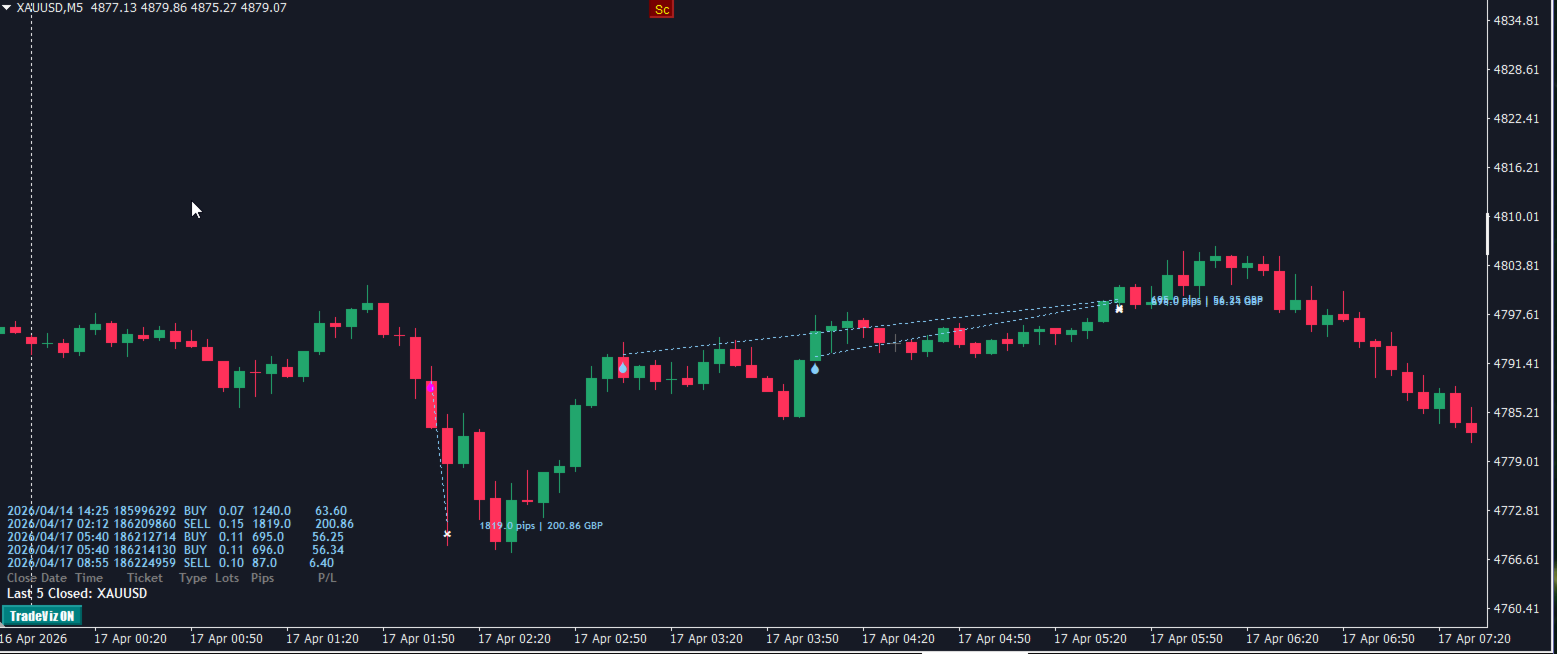
TradeVisualizer is a dynamic chart-based indicator for MetaTrader 4, designed to visually display recent trades directly on the chart. It includes:

Trade arrows for entry and exit points, color-coded by direction and profit/loss.

Dotted lines connecting open and closed trades.

Profit/loss labels in pips and currency.

Interactive toggle button to show/hide drawings.

Trade history panel showing time, ticket, type, lot size, pips, and P/L.

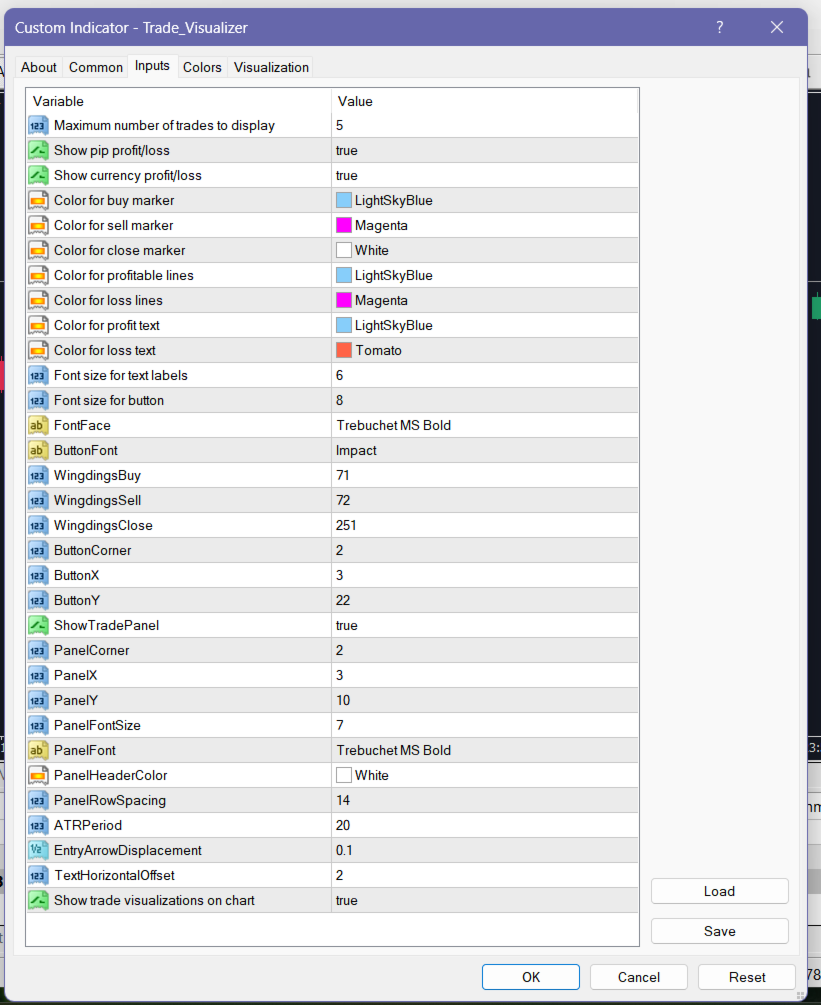
Customizable appearance via inputs for colors, fonts, and layout.

Handles both open positions and closed deals, with correct inversion logic for deal types.

This tool is ideal for traders who want a clear, visual summary of their trading activity without digging through the terminal history.

TradeVisualizer is a lightweight indicator.
It will not slow down MT4, even on older machines.

Why?

No heavy loops

No tick‑based processing

Only simple chart objects

Efficient cleanup

Minimal indicator handles (only ATR)
제작자의 제품 더 보기
Enhanced TP SL
Gordana Batic
Instantly see your TP/SL levels with pip distances, profit in account currency, and risk‑reward ratio—fully customizable lines on the chart. Extended Description for Market Listing: The Enhanced TP/SL Indicator transforms your trading experience by displaying Take Profit and Stop Loss levels directly on the chart for each open position. No more guessing - every line shows the exact distance in pips, the expected profit/loss in your account currency, and even calculates the risk‑reward ratio.
FREE
Session lines that are actually correct. Marks Sydney, Tokyo, London, and NY open/close in your broker's local time — with automatic DST adjustment for all three regions. You set your session times once in GMT, toggle DST for Sydney/London/NY, and forget about it. The indicator handles the rest - broker offset, daylight saving, label positioning - all in the background. Clean labels, toggleable sessions, zero CPU drag. Built for traders who need the market rhythm on their chart without the clut
FREE
MTF HighLow
Gordana Batic
MTF High Low indicator displays key price levels across multiple timeframes directly on your chart,  so you always know where the market has been and what levels matter most. The   NY Session High/Low Levels   indicator automatically plots the highest and lowest prices of the New York trading session on your chart. It provides clear horizontal lines for the   Today (TDY) ,   Yesterday (YTD) ,   Week (7D) , and   Month (30D)   sessions, with customizable display options.           Inspired by

FREE
Features: Sydney, Tokyo, London, and New York session lines — open and close Automatic DST adjustment: Australian (Oct–Apr), European (Mar–Oct), US (Mar–Nov). Tokyo fixed, no DST Toggle each session on or off independently Fully customizable: colors, line styles, line width, label size and position Runs on new bar only — no unnecessary recalculations Works on M1 through H1. Disabled on higher timeframes automatically Inputs: Show/hide each session independently Session open and close times in GM
FREE
Advanced Trade Information Dashboard –  MT5 Everything I need to know about my account and open positions, right on the chart. I got tired of clicking between the terminal, the trade tab, and the calculator just to check my margin, pip value, or total profit in pips. So I built this dashboard to put it all in one place. What It Shows Total P&L   – Real profit/loss from the positions I care about (filter by symbol, magic number, or include swap/commission). Margin Level   – The one number th
FREE
Enhanced TPSL
Gordana Batic
Instantly see your TP/SL levels with pip distances, profit in account currency, and risk‑reward ratio—fully customizable lines on the chart. Extended Description for Market Listing: The Enhanced TP/SL Indicator transforms your trading experience by displaying Take Profit and Stop Loss levels directly on the chart for each open position. No more guessing - every line shows the exact distance in pips, the expected profit/loss in your account currency, and even calculates the risk‑reward ratio.
FREE
MTF High Low
Gordana Batic
MTF High Low indicator displays key price levels across multiple timeframes directly on your chart,  so you always know where the market has been and what levels matter most. Draws High and Low price levels for multiple time periods:       rolling ( 24H, 7D, 30D, 90D, 365D ) and calendar ( Today,           Yesterday, Week, Month, Year, All-Time ) - all aligned to        New York session boundaries (institutional standard).            Inspired by MTF.HighLow.ex4 by FXSSI (https:fxssi.com).   
FREE
Advanced Trade Information Dashboard –  MT4 Everything I need to know about my account and open positions, right on the chart. I got tired of clicking between the terminal, the trade tab, and the calculator just to check my margin, pip value, or total profit in pips. So I built this dashboard to put it all in one place. What It Shows Total P&L – Real profit/loss from the positions I care about (filter by symbol, magic number, or include swap/commission). Margin Level – The one number that k
FREE
TradeVisualizer is a dynamic chart-based indicator for MetaTrader 5, designed to visually display recent trades directly on the chart. It includes: Trade arrows for entry and exit points, color-coded by direction and profit/loss. Dotted lines connecting open and closed trades. Profit/loss labels in pips and currency. Interactive toggle button to show/hide drawings. Trade history panel showing time, ticket, type, lot size, pips, and P/L. Customizable appearance via inputs for colors, fonts
FREE
필터:
리뷰 없음
리뷰 답변