EA Risk Manager

EA Risk Manager is a professional risk‑management Expert Advisor designed to protect your trading account and enforce disciplined money management.
The EA does not open trades by itself – it only monitors and manages all existing positions (manual and automated) on the account.
It is especially useful for traders who want to:
Hard‑limit daily / weekly / monthly losses and profits.
Restrict lot size and the number of open trades.
Trade a basket of G7‑related Forex pairs using one centralized risk engine.
Avoid emotional decisions such as over‑leveraging, revenge trading, and overtrading.
You attach the EA to a single chart and it monitors the entire account in real time.
Main Features
Works on any symbol and any timeframe.
Can focus on major G7 currency pairs (USD, EUR, JPY, GBP, AUD, CAD, CHF) via a built‑in preset, or on a custom symbol list.
Monitors all trades: manual orders and orders opened by other EAs.
Hard limit on maximum lot size per trade.
Limit for maximum number of open positions and maximum number of trades per day.
Per‑trade loss limit (Max Risk per Trade).
Daily, weekly and monthly loss limits.
Daily profit and global profit target (equity or per‑trade).
Trading schedule by day and time, with automatic closing of positions after the session ends.
Optional deletion of pending orders when limits are reached.
Option to include swap and commission in all calculations.
Alert system with configurable alert interval.
The EA is lightweight, does not repaint, and can be used together with any trading system.
How It Works
You attach the EA to one chart (any symbol and timeframe).
The EA reads all open and pending orders on the account.
On every check (for example every 1 second) it evaluates:
Symbol filters (allowed pairs, G7 preset).
Lot size and the number of open trades.
Current profit and loss per trade and per day.
Equity / balance relative to your loss and profit limits.
Trading schedule for the current day and time.
If any rule is violated, the EA will:
Close the violating position(s) and/or pending orders.
Optionally stop trading for the rest of the day (by closing everything when daily limits are reached).
Show alerts in the terminal.
The EA never interferes with your strategy logic. It only enforces risk‑management rules on top of whatever strategy you use.
Input Parameters
1. Symbol and Instrument Settings
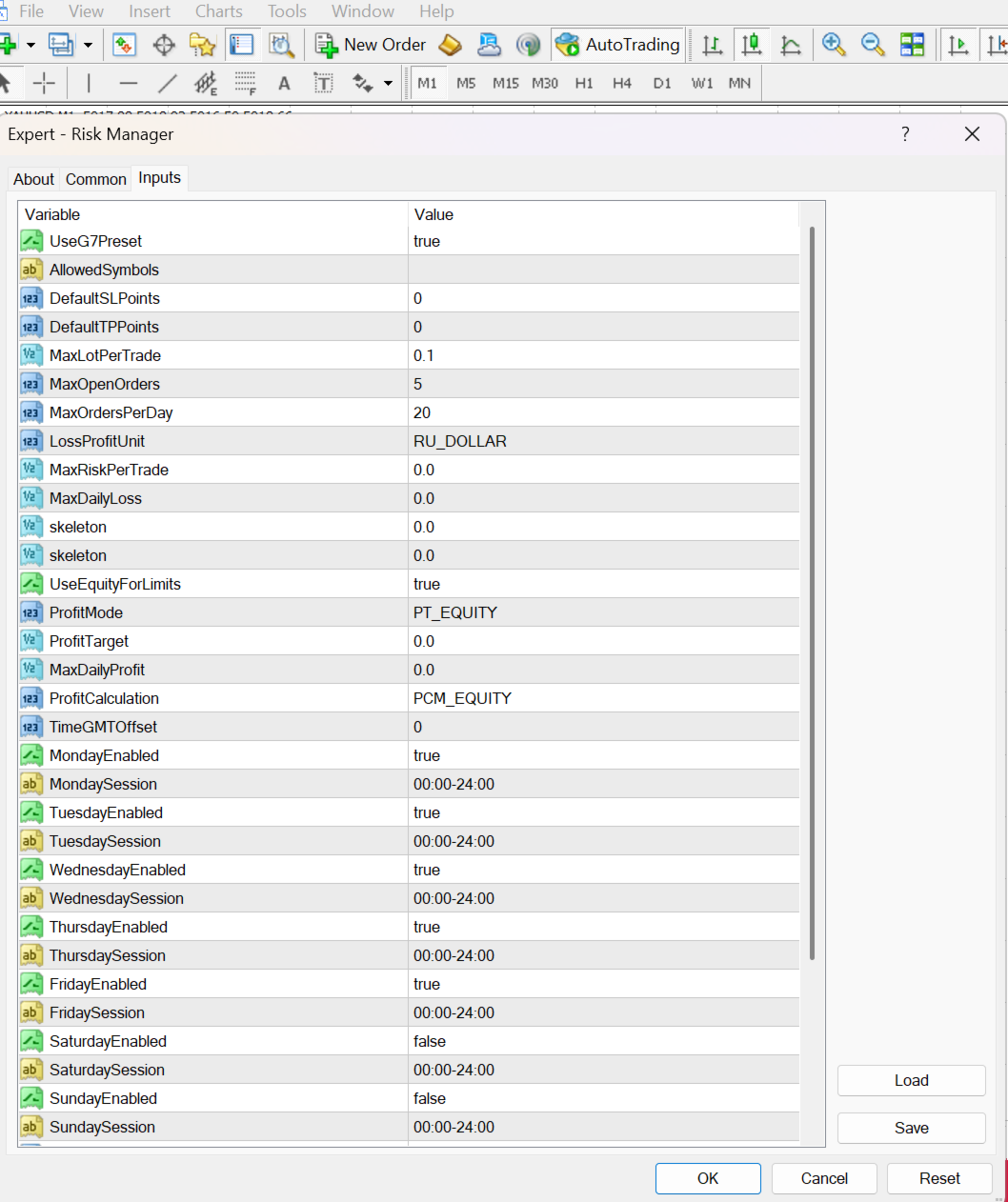
UseG7Preset – if true, the EA uses a built‑in list of major G7 currency pairs (EURUSD, GBPUSD, USDJPY, USDCHF, AUDUSD, USDCAD, etc.).
AllowedSymbols – comma‑separated list of allowed symbols, for example: EURUSD,GBPUSD,USDJPY.
If this is empty and UseG7Preset = true, the EA manages the built‑in G7 list.
If you provide a list here, it overrides the preset.
Any position on a symbol outside this list can be closed automatically.
2. Default SL / TP
DefaultSLPoints – default Stop Loss in points (0 = disabled). If a new trade has no SL, the EA will set this value automatically.
DefaultTPPoints – default Take Profit in points (0 = disabled). If a new trade has no TP, the EA will set this value automatically.
3. Lot Size and Trade Limits
MaxLotPerTrade – maximum allowed lot size for any single trade. Orders larger than this value are closed immediately.
MaxOpenOrders – maximum number of open positions allowed at the same time.
MaxOrdersPerDay – maximum total number of trades (open + closed) allowed per day. This helps prevent overtrading.
4. Loss / Profit Units
LossProfitUnit
RU_DOLLAR – all limits are specified in account currency (for example, USD).
RU_PERCENT – all limits are specified as a percentage of account balance or equity.
5. Loss Limits
MaxRiskPerTrade – maximum loss per trade.
If LossProfitUnit = RU_DOLLAR, value is in account currency.
If LossProfitUnit = RU_PERCENT, value is a percentage of account balance/equity.
When a trade reaches this loss, it is closed automatically.
MaxDailyLoss – maximum allowed loss per day. When reached, all trades are closed and no further trading is recommended for that day.
MaxWeeklyLoss – weekly loss limit (skeleton – can be extended further in updates).
MaxMonthlyLoss – monthly loss limit (skeleton – can be extended further in updates).
UseEquityForLimits – if true, daily/weekly/monthly loss is calculated based on equity; if false, based on balance.
6. Profit Targets
ProfitMode
PT_EQUITY – closes all positions when total profit reaches ProfitTarget.
PT_TRADE – closes individual trades when their profit reaches ProfitTarget.
ProfitTarget – profit target value (in currency or percent).
MaxDailyProfit – maximum profit allowed per day. When reached, all positions are closed and further trading is blocked for that day.
ProfitCalculation
PCM_BALANCE – uses closed profit (balance).
PCM_EQUITY – uses floating profit (equity).
7. Trading Schedule
TimeGMTOffset – broker time offset relative to GMT (for information only).
MondayEnabled … SundayEnabled – enable/disable trading for each day
The EA works on gold (XAUUSD) and on any other symbols your broker provides in MT4 (Forex pairs, indices, commodities, CFDs, etc.). It monitors all trades on the account – both manual and from other EAs – and applies the same risk rules (lot limits, daily loss/profit limits, per‑trade risk, etc.) regardless of the instrument