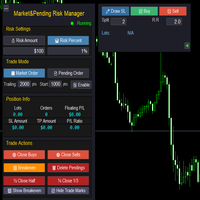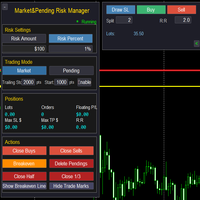
Market Pending Risk Mananger MT4

📊 Market & Pending Risk Manager EA Operation Manual
Market & Pending Risk Manager is a professional MT5 trading panel EA that integrates multiple functions such as market order trading, pending order trading, risk management, and trailing stop loss, providing traders with a comprehensive trading solution.

⭐ Core Advantages

🚀 Intelligent Dual-Mode Trading

  • Market Order Mode: One-click buy/sell for fast execution
  • Pending Order Mode: Precise entry to wait for the optimal timing
  • Seamless Switching: Freely switch between the two modes with a single click

🛡️ Professional Risk Management

  • Fixed Amount Risk: Set the maximum loss amount for each trade
  • Percentage Risk: Control risk based on the proportion of account balance
  • Automatic Lot Size Calculation: Intelligently calculate the optimal trading volume according to the stop-loss distance

📈 Visual Trading Lines

  • Drag-and-Drop Operation: Directly drag on the chart to adjust stop-loss and take-profit prices
  • Real-Time Calculation: Dynamically display risk-reward ratio, lot size, and risk amount
  • Color-Coded Zones: Intuitively show risk zone (red) and profit zone (green)

🔄 Intelligent Trailing Stop Loss

  • Custom Activation Condition: Set the number of pips of profit required to activate the trailing stop loss
  • Flexible Stop-Loss Distance: Adjustable trailing distance for the trailing stop loss
  • Automatic Tracking: No manual intervention required, automatically protecting profits

📊 Comprehensive Position Management

  • Real-Time Information Display: Position lot size, number of orders, and floating P&L
  • One-Click Close Function: Close buy orders, sell orders, or all positions respectively
  • Partial Close: Support closing 1/2 or 1/3 of the position
  • Breakeven Function: One-click move all positions to the breakeven price

📋 Detailed Operation Guide

🎯 1. Risk Settings

💰 Fixed Amount Mode

  1. Click the 💰 Risk Amount button to activate
  2. Set the risk amount in the input box (e.g.: $100)
  3. The system will automatically calculate the lot size based on the stop-loss distance

📊 Percentage Mode

  1. Click the 📊 Risk Percent button to activate
  2. Set the risk percentage in the input box (e.g.: 1%)
  3. The system will calculate the risk amount based on the account balance

🎯 2. Market Order Trading Process

Step 1: Select Mode

  • Click 💹 Market Order to enter the market order trading mode

Step 2: Draw Stop-Loss Line

  • Click the ✏️ Draw SL button
  • A red stop-loss line will appear on the chart
  • Drag to adjust to the appropriate stop-loss position

Step 3: Set Parameters

  • Split: Set the number of split orders (e.g.: 2 means placing orders in 2 batches)
  • R:R: Set the risk-reward ratio (e.g.: 2.0 means the profit target is twice the risk)

Step 4: Execute Trade

  • Click 📈 Buy to execute a buy order
  • Click 📉 Sell to execute a sell order
  • The system will automatically calculate the take-profit position and place the order

🎯 3. Pending Order Trading Process

Step 1: Select Mode

  • Click 📄 Pending Order to enter the pending order trading mode

Step 2: Draw Trading Lines

  • Click ✏️ Draw SL to draw the stop-loss line (red)
  • Click ✏️ Draw Entry to draw the entry line (yellow)
  • Drag to adjust to the appropriate positions

Step 3: Set Parameters

  • Split: Set the number of split orders
  • R:R: Set the risk-reward ratio

Step 4: Submit Pending Order

  • Click ✅ Pend to submit the pending order
  • The system will automatically identify the order type (Buy Stop/Sell Stop/Buy Limit/Sell Limit)

🎯 4. Trailing Stop Loss Settings

Parameter Configuration

  • Trailing: Trailing stop loss distance (e.g.: 2000 pips)
  • Start: Activation condition (e.g.: Activate after 1000 pips of profit)
  • Enable/Disable: Turn the trailing stop loss function on/off

Working Principle

  1. After the position profit reaches the activation pips, the trailing stop loss starts working
  2. When the price moves in a favorable direction, the stop loss automatically tracks it
  3. When the price retraces, the stop loss remains at the highest level

🎯 5. Position Management Functions

One-Click Close

  • 🟢 Close Buys: Close all buy orders
  • 🔴 Close Sells: Close all sell orders
  • 🗑️ Delete Pendings: Delete all pending orders

Partial Close

  • ½ Close Half: Close half of the position
  • ⅓ Close 1/3: Close one-third of the position

Breakeven Function

  • 🟩 Breakeven: Move the stop loss of all positions to the opening price

🎨 Interface Personalization

👁️ Display Control

  • 🟩 Show/Hide Breakeven: Show/hide the breakeven line
  • 📈 Show/Hide Trade Marks: Show/hide trade markers
  • ◄ ►: Hide/show the right-side panel

🎯 Intelligent Tips

  • Hover the mouse over the lines to display detailed information
  • Display a confirmation message after a successful trade
  • Display a warning prompt for incorrect operations

⚠️ Risk Control

  • Minimum stop-loss distance protection
  • Automatic verification of lot size range
  • Automatic correction of invalid parameters

💡 Usage Tips

🎯 Best Practices

  1. Set risk first, then draw lines: Ensure the risk of each trade is controllable
  2. Set a reasonable risk-reward ratio: A risk-reward ratio of 1:2 or higher is recommended
  3. Make good use of the split function: Build and close large positions in batches
  4. Enable trailing stop loss: Protect realized profits

📊 Parameter Recommendations

  • Risk Percentage: It is recommended not to exceed 2% of the account
  • Trailing Stop Loss Distance: Adjust according to the volatility of the trading instrument (usually 20-50 pips)
  • Activation Condition: It is recommended to set it to 1-2 times the stop-loss distance

🎨 Interface Optimization

  • The right-side panel can be hidden to save screen space
  • Trade markers can be turned off to keep the chart clean
  • The breakeven line can be displayed to monitor the breakeven point

추천 제품
Set TP & SL by Price – Auto Order Modifier for MT4 모든 주문에 정확한 TP 및 SL 가격 자동 설정 ️ 모든 심볼 및 EA와 호환되며, 심볼 또는 매직 넘버로 필터링 가능 이 EA는 EURUSD에서 1.12345 와 같은 정확한 가격값을 사용하여 TP 및 SL을 설정할 수 있게 해줍니다. 핍이나 포인트가 아닌 정확한 가격 기준으로 주문을 관리하며, 모든 주문 또는 필터링된 주문(차트 또는 매직 넘버)을 대상으로 적용할 수 있습니다. 주요 기능: 정확한 가격으로 TP 및 SL 즉시 설정 모든 주문, 현재 심볼 또는 특정 매직 넘버에 적용 가능 ️ TP 또는 SL을 제거하려면 0 사용 차트에 붙이기만 하면 자동으로 작동 모든 거래 상품과 호환 가능 이런 트레이더에게 추천: TP/SL을 빠르게 제어하고 싶은 수동 트레이더 출구 전략을 바꾸고 싶은 EA 사용자 다수의 주문을 동시에 관리하는 트
JumpLump
Olga Zhdanova
A great addition to your lucrative portfolio of expert advisors. The strategy is based on an algorithm for breaking through the built levels for a certain period of time. The EA has a fixed StopLoss, which allows you to keep the minimum drawdown. Tested on all ticks using the Tick Data Suite , with the closest possible real trading conditions, watch the video. Price for the first 10 buyers $ 75 (I beg you to post your reports in the comments) Recommendations: Good ECN broker with low spread.
The algorithm of the adviser's work: When the Expert Advisor is launched at a specified distance from the price (first_step), BuyStop and SellStop orders are placed. Further, depending on which way the price went, one of them becomes market, and the other begins to crawl after the price. When the price rolls back, it also becomes market. If we have reached a set profit in some direction, the order is closed and a creeping pending order of the same direction is placed again. If the profit is no
Details of each condition Type 1. Set no use Hedging Martingale, to open the order by yourself only through the push button. TP and SL follow setting. Set Setting_Hedging =false;     Use_Signal =false;  Type 2. Semi Auto Recovery Zone You have to open the order by yourself only through the push button. If in the wrong direction and Set true on Hedging Martingale, EA will fix the order with the zone system by use Hedging Martingale Set Setting_Hedging =true;     Use_Signal =false;  Type 3. Use
Smart Start MT4
Ruslan Papou
5 (1)
Only 1 copies left at a price of $99. Next price $199! actual .set files (click me) interactive panel manual (click me) Version for MT5:   Smart Start Smart Start  is a smart trading system, the indicators of which allow it to be used both for trading with small deposits (fast acceleration) and for conservative trading.  is a modernized trading indicator system that uses the MACD indicator to analyze the market. To analyze entry points,   smart start   takes into account the historical indica
Protect your account from Margin Call when the market is going opposite with your trades. Manage your risk when you're using Martingale, Grid, Average . They are not dangerous anymore, but manageable  Use this EA utilities to accompany your every MT4 installation This EA is a utility to protect your capital when your trading are unfavorable : Maximum loss in money, Maximum Draw-down/ equity loss in percentage, Your minimum equity reached Those are whichever reached first It's simple, straightfor

FREE
AdvisorKing MT4
Artem Grishchenko
AdvisorKing   is a multi-currency scalper that uses proprietary trading algorithms. Entering the market is carried out using filters, which allows the trading advisor to get good results during a low-volatility trading session. This system is designed for long-term trading and is suitable for traders who are used to stability and minimal risk. The trading advisor does not contain such dangerous strategies as grid and martingale. For questions about setting up and installing a trading advisor, y
H4 GBPUSD Trend Scalper is a trend signal scalper The EA trades according to the trend strategy using original built-in indicator for opening and closing orders. The external inputs for limiting trading on Fridays and Mondays are available. The purpose of the strategy is to use the current trend with the most benefit. According to the results of testing and working on demo and real accounts, the best results achieved by using the Н4 timeframe on the GBP/USD pair Works on MetaTrader 4 Build 971+
QuantumGuard Pro - Intelligent Quantum Risk Management Trading System Core Features Five independent fund management groups for smart risk diversification Triple protection mechanism: profit target + drawdown protection + global risk control Professional trading panel for one-stop trade execution 24/7 real-time risk monitoring and protection Automatic display of average price lines for each group One-click close single group orders for precise control Order group highlighting for clear status o
Hamster Grid MT4
Volodymyr Hrybachov
전문 그리드 어드바이저가 RSI(Relative Strength Index) 지표에 대해 작업합니다. 무익한 주문을 중복하여 계정의 손실을 줄이는 기능이 있습니다. 차트는 이익에 대한 정보를 표시합니다. MT5 버전 https://www.mql5.com/ru/market/product/56995 옵션: RSI_PERIOD - 상대 강도 지수를 계산하는 기간. UP_LEVEL - 상한; DN_LEVEL - 하한 RSI_TIMEFRAME - 계산을 위한 시간 프레임. START_LOT - 초기 로트; LOT_MULTIPLIER - 주문 그리드의 로트 승수. MAX_LOT - 최대 로트 STEP_ORDERS - 주문 그리드 단계; STEP_MULTIPLIER - 순서 단계 곱셈 계수, = -1이면 사용되지 않습니다. MAX_STEP - 최대 주문 그리드 단계; OVERLAP_ORDERS - 주문 겹침 기능을 활성화하는 주문입니다. OVERLAP_PIPS - 수익성 없는 주문을
Reiona
Ubaidillah
Reiona is an Expert Advisor (EA) that build based on martingale and hedging method. The main idea is place buy and sell in parallel, save the unprofitable positions with martingale, and keep the profit during trade with hedging. The RSI, iClose, iHighest and iLowest indicators are used for entries. The highest and lowest prices are to indicate the range of new orders, where the next order, with same type must be higher than 75% of difference between this lowest and highest prices. When the bu
Trade with Confidence Using the Trendline Trading ATM (Advanced Trade Management)! Master entries, exits, and risk management with the powerful tools of the MetaTrader Trendline Trading ATM. This expert advisor equips you with a comprehensive suite of tools to trade consistently smarter, not harder.  Take control of your trading risk and drawdown, capture profitable entries, and let your winners run. This innovative Trade Entry/Exit and Risk Management utility empowers you to:   Precision Entry
Fibonacci VCL
Alexander Pekhterev
The Expert Advisor uses a trading strategy based on Fibonacci levels. On the levels of ~38.2,~50.0 and ~61.8, it sets virtual pending orders (Buy Limit, Sell Limit). A grid of virtual pending orders is built in trend direction. Trend is determined using the ZigZag indicator. Orders are closed at a total virtual take profit or a total virtual stop loss. The EA makes a decision at the opening of a new candlestick, so optimization can be performed using open prices. Settings and Input Parameters R
HMA Trend Expert
Alexander Fedosov
5 (1)
HMA Trend robot for professional traders works with a set of Hull moving averages( HMA ). Advisor Parameters Use Trade Panel  — Use the visual panel to configure and trade robot. Lot  — Lot size for a market entry. Take Profit(points)  — Take Profit for an open order. Stop Loss(points)  — Stol Loss for an open order. Max Spread(0 - disabled)  — Maximum allowable spread at which you can enter the market. 0 - disabled. Magic number  — The magic number of the robot. EA Comment  — Comments of robot.
Srf Jpy EA 25
Forex Advice LTD
**Strong Scalper EA** This highly accurate and efficient **scalping strategy** allows you to profit quickly in short timeframes. It is specifically designed for the **USDJPY** currency pair and has shown outstanding results in **backtests**. In addition to USDJPY, this EA can adapt to other currency pairs and indices as well. Suitable for + $500 accounts Balance  Message us to receive settings for prop firm challenges **Features**:   - **High profitability** with numerous trades per day   - **
The Main EA Features Trading is performed using a grid of Buy and Sell orders. A strict Stop Loss level is set for each order to limit the losses. Multicurrency trading is supported. It is not susceptible to large delays and spread value. ‌Monitoring of my accounts: https://www.mql5.com/en/signals/author/mizrael Operation Principle The EA opens a grid of Buy and Sell orders with spacing between them set in the Step parameter. Once the sum of orders in either Buy or Sell direction becomes equal
Gold SWmax EA 4
Sergei Linskii
Gold SWmax EA - Meta Trader 4를 위한 최고의 전문가 자문가 중 하나입니다. 자문가의 고유한 알고리즘은 기술적 및 수학적 분석 요소를 고려하여 자산 가격의 움직임을 분석하고, 수익성 있는 진입 및 종료 시점을 결정하며, 고급 자금 관리 및 로트 배수를 사용합니다.  Contact me immediately after purchase. After confirms the purchase of this EA via MQL5 you will receive Set file for real RoboForex/WorldForex accounts + Set file to optimization at any other broker. Trading this EA in the real account >>>  CLICK HERE My Telegram channel >>>   https://t.me/GoldVenamax   추천: 브로커 - RoboForex , Weltra
Gold SDmax EA 4
Sergei Linskii
Gold SDmax EA - Meta Trader 4를 위한 최고의 전문가 자문가 중 하나입니다. 자문가의 고유한 알고리즘은 기술적 및 수학적 분석 요소를 고려하여 자산 가격의 움직임을 분석하고, 수익성 있는 진입 및 종료 시점을 결정하며, 고급 자금 관리 및 로트 배수를 사용합니다.  Contact me immediately after purchase. After confirms the purchase of this EA via MQL5 you will receive Set file for real RoboForex/WorldForex accounts + Set file to optimization at any other broker. Trading this EA in the real account >>>  CLICK HERE My Telegram channel >>>   https://t.me/GoldVenamax   추천: 브로커 - RoboForex , Weltrad
Harvest GOLD
Sayan Vandenhout
Harvest GOLD USES THE TREND WAVE INDICATOR AND IT CAN IDENTIFY THE BEGINNING AND THE END OF A NEW WAVE TREND MOVEMENT. AS AN OSCILLATOR, THE INDICATOR IDENTIFIES THE OVERBOUGHT AND OVERSOLD ZONES. IT WORKS GREAT TO CATCH THE SHORT TERM PRICE REVERSALS AND USES A MARTINGALE STRATEGY TO CLOSE ALL TRADES IN PROFIT. USE DEFAULT SETTINGS ON H1 OR HIGHER TIME FRAME ON ANY PAIR FOR MORE ACCURATE TRADES WHY THIS EA : Smart entries calculated by 3 great strategies The EA can be run on even a $30000
This automated trading robot uses the capabilities of the macd indicator to create a grid strategy. The algorithm creates a grid strategy at overbought and oversold levels and in times of high volatility. This makes it susceptible to all price fluctuations. The Close Money input is the total amount of earnings in the cycle. We define it as the total take profit amount in the cycle. It has the ability to open more cycles in short periods. However, you can use the robot in medium-term trading. Rea
Smart Hedge
Francesco Baldi
Worried about weekend price crashes wiping your account? Tired of adverse news releases stopping your positions? Trade with peace of mind with Smart Hedge. Smart Hedge protects your positions from weekend gaps and news spikes. MT5 version:  https://www.mql5.com/en/market/product/113024 Description : Have you ever feared that some breaking news during the weekend could wipe your account? Did you ever have your positions stopped by an adverse news release during the market open hours? I did, an
Range Break Scalper is a forex robot designed to trade breakouts of predefined price ranges. The robot has several input parameters including Auto Lot Size, Max Auto Lots, Risk % of the account, Lot size, SL in range percentage, Target in range percentage, Allow Trailing stop, Trailing points, Range start time(Hours), Range start time(Minutes), Range duration(Hours), Range duration(Minutes), Range close time(Hours) and Range close time(Minutes). The Auto Lot Size parameter allows users to choose
| Fully-automated Smart Money Concept (ICT) inspired trading solution with multi-strategy capabilities | Built by a grid trader >> for grid traders.  This is MT4 version, click  here  for  Blue CARA MT5  (settings and logics are same in both versions)     Real monitoring signal  -->  Cara Gold Intro Blue CARA EA   ('CARA') - short for  C omprehensive  A lgorithmic R esponsive A dvisor is a next-gen  multi-currency    multi-timeframe  EA base on the widely known (and perhapse most popular) Inn
Trade Assistant Tool is an utility to support your trading. Just attach it in a chart and it can support/manage your trading even the order opened by phone. Here the function : - There are some important button like close all order, changing SL to be Breakeven for all order by single click, SL Plus, Delete SL, Change SL and TP for all order by single click. - Buy / Sell button can be used to open pending order or market execution. If P>> value is 0, when you click Buy / Sell button, an instant o
이 고문은 마틴 아이디어에 유사,하지만 아주 마틴. 처음에,나는 그 논리를 숨기고 싶었지만,나는 여전히 부분적으로 설정과 함께 그 특성을 공개해야하고 한 곳에서 구매자가 논리에 혼란이 없도록 매개 변수를 지정해야한다는 사실을 소개 할 것입니다.,프로그래머 이후,내 의견으로는,생각의 논리에서 평범한 사람들과 약간 다릅니다. 그리고 이러한 이유로 개인적으로 나는 설명에서이 고문의 작업에 대해 더 많이 밝히려고 노력할 것입니다. 우선,나는이 고문에 대한 계정 잔액의 전체 금액에 제한을 설정했으며,고문은 확립 된 한계의이 금액이 그를 거래하기에 충분할 때까지만 거래를 열 것입니다. 여기서 당신은 고문이 삭감에 가서 주문을 열지 않는 경우 마진 콜 제한 자체가 당신을 저장하지 않습니다 것을 알 필요가 있지만,그는 자신의 오픈 거래에 손실을 초래하기 때문에,고문은 결국 어쨌든 계정의 모든 자본을 배출합니다. 그리고 이러한 이유로,이 무역에 고문을 제공하는 것이 더 나은 상황이있다. 관리자
US30 Break Scalp
Vitor Manuel Goncalves Pinto
This Expert Advisor trades based on a specific range breakout within a specific hour using scalp techniques. It does not use dangerous techniques like martingale. It only opens a maximum of 3 trades per day (default settings). The default settings are optimized for IcMarkets, FTMO and MFF (set file in the comments) although it can be used with other brokers, you just need to confirm the hours input. Despite this Expert Advisor presents good results in backtesting and for this month (January 2023
By :ForextraderEanow   Green Mower 10.0                                                                                                                                                                                                                                                                                                        This EA is Famous Grid Strategy that open grid of trades with the same size (not martingale)  and make PROFIT even when the Forex price moves in the WRONG Direction
Automated EA Robot
Yapo Thierry Hermann Yapo
WARNING :  You can use the Expert Advisor only on  M30   Period This price of $348 is a promotional offer, the next price will be $999 . Automated EA Robot  power is based on minimal risk management for all our customers. The gains sought are maximum while the risk is minimal and customizable based on the Account of the Trader. You therefore have the possibility with this expert advisor to define the risk yourself for each trading order automatically. What's the Strategy   of Automated EA Robo
Max ScalperSpeed
Paranchai Tensit
Max ScalperSpeed   is a fully automated expert advisor. This system has been developed to improve the efficiency of generating more returns. Rely on scalping trading strategies and recovery strategies with appropriate trading frequencies, and also able to work well in all market conditions, whether trend or sideways, able to trade full time in all conditions. Enable or disable news filtering according to user needs. Added a proportional lot size adjustment function, where users can choose to ad
By :ForextraderEanow   SnowBall 2028 Ea. 1.0                                                                                                                                                                                                                                                                                                      This EA is Famous Grid Strategy that open positive grid of trades with the larger size first and smaller size after. It makes PROFIT when the Forex price moves i
이 제품의 구매자들이 또한 구매함
Trade Manager EA에 오신 것을 환영합니다. 이 도구는 거래를 보다 직관적이고 정확하며 효율적으로 만들기 위해 설계된 궁극적인 리스크 관리 도구 입니다. 단순한 주문 실행 도구가 아닌, 원활한 거래 계획, 포지션 관리 및 리스크 제어를 위한 종합 솔루션입니다. 초보자부터 고급 트레이더, 빠른 실행이 필요한 스캘퍼에 이르기까지 Trade Manager EA는 외환, 지수, 상품, 암호화폐 등 다양한 시장에서 유연성을 제공합니다. Trade Manager EA를 사용하면 복잡한 계산은 이제 과거의 일이 됩니다. 시장을 분석하고 진입, 손절 및 익절 수준을 차트의 수평선으로 표시한 후 리스크를 설정하면, Trade Manager가 이상적인 포지션 크기를 즉시 계산하고 SL 및 TP 값을 실시간으로 표시합니다. 모든 거래가 간편하게 관리됩니다. 주요 기능: 포지션 크기 계산기 : 정의된 리스크에 따라 거래 크기를 즉시 결정합니다. 간단한 거래 계획 : 진입, 손절, 익절을 위한
The product will copy all telegram signal to MT4   ( which you are member  ) , also it can work as remote copier.  Easy to set up, copy order instant, can work with almost signal formats, image signal, s upport to translate other language to English Work with all type of channel or group, even channel have "Restrict Saving Content", work with  multi channel, multi MT5 Work as remote copier: with signal have ticket number, it will copy exactly via ticket number. Support to backtest signal. How to
Exp COPYLOT CLIENT for MT4
Vladislav Andruschenko
4.69 (65)
MetaTrader 4용 트레이드 복사기.       모든 계정의 외환 거래, 포지션, 주문을 복사합니다. 그것은 최고의 무역 복사기 중 하나입니다       MT4 - MT4, MT5 - MT4       위해       카피롯 MT4       버전(또는       MT4 -  MT5   MT5 - MT5       위해       카피롯 MT5       버전). MT5 버전 전체 설명   +DEMO +PDF 구입 방법 설치하는 방법     로그 파일을 얻는 방법     테스트 및 최적화 방법     Expforex의 모든 제품 복사기   버전         MetaTrader 5   터미널 (   МТ5 - МТ5, МТ4 - МТ5   ) -   Copylot Client MT5 고유한 복사 알고리즘은 마스터 계정에서 고객 계정으로 모든 거래를 정확하게 복사합니다. 이 제품은 또한 높은 작동 속도에서 높은 오류 처리로 유명합니다. 강력한 기능 세트. 프로그램은 여러 터
Ultimate Extractor - Professional Trading Analytics for MT4 Ultimate Extractor transforms your MetaTrader 4 trading history into actionable insights with comprehensive analytics, interactive charts, and real-time performance tracking. Ability to combine multiple accounts and MT4 and MT5 into a single dashboard. What It Does Automatically analyzes your MT4 trading history across all Expert Advisors and generates detailed HTML reports with interactive visualizations. Tracks live performance metric
MT4 to Telegram Signal Provider 는 사용하기 쉽고 완전히 사용자 정의가 가능한 도구로, 텔레그램으로 신호를 보내어 계정을 신호 제공자로 변환할 수 있습니다. 메시지 형식은 완전히 사용자 정의가 가능합니다! 그러나 간단한 사용을 위해 미리 정의된 템플릿을 선택하고 메시지의 특정 부분을 활성화하거나 비활성화할 수도 있습니다. [ 데모 ]  [ 매뉴얼 ] [ MT5 버전 ] [ 디스코드 버전 ] [ 텔레그램 채널 ]  New: [ Telegram To MT5 ] 설정 단계별 사용자 가이드 가 제공됩니다. 텔레그램 API에 대한 지식이 필요 없으며, 개발자가 필요한 모든 것을 제공합니다. 주요 기능 구독자에게 보낸 주문 세부 정보를 사용자 정의할 수 있는 기능 예를 들어 브론즈, 실버, 골드와 같은 계층 구독 모델을 만들 수 있습니다. 골드 구독은 모든 신호 등을 받게 됩니다. ID, 심볼 또는 코멘트별 주문 필터링 주문이 실행된 차트의 스크린샷을 포함 보낸
TradePanel MT4
Alfiya Fazylova
4.84 (89)
Trade Panel은 다기능 거래 보조원입니다. 이 애플리케이션에는 수동 거래를 위한 50개 이상의 거래 기능이 포함되어 있으며 대부분의 거래 작업을 자동화할 수 있습니다. 전략 테스터에서는 애플리케이션이 작동하지 않습니다. 구매하기 전에 데모 계정에서 데모 버전을 테스트할 수 있습니다. 데모 버전 여기 . 전체 지침 여기 . 거래. 한 번의 클릭으로 거래 작업을 수행할 수 있습니다: 자동 위험 계산을 통해 지정가 주문 및 포지션을 엽니다. 한 번의 클릭으로 여러 주문과 포지션을 열 수 있습니다. 주문 그리드를 엽니다. 그룹별 대기 주문 및 포지션을 마감합니다. 포지션 반전(매수 청산 후 매도 개시 또는 매도 청산 후 매수 개시). 포지션 고정(매수 포지션과 매도 포지션의 양을 동일하게 하는 추가 포지션 개설). 한 번의 클릭으로 모든 포지션을 부분 청산합니다. 모든 포지션의 이익실현과 손절매를 동일한 가격 수준으로 설정합니다. 모든 포지션에 대한 손절매를 해당 포지션의 손익 분기
Copy Cat More Trade Copier MT4 (복사 고양이 MT4) 는 단순한 로컬 트레이드 카피어가 아니라, 오늘날의 거래 환경을 위해 설계된 완전한 리스크 관리 및 실행 프레임워크입니다. Prop Firm 챌린지부터 개인 계좌 관리까지, 강력한 실행력, 자본 보호, 유연한 설정, 고급 거래 처리 기능을 통해 모든 상황에 적응합니다. 이 카피어는 Master(송신자) 와 Slave(수신자) 모드 모두에서 작동하며, 실시간으로 시장가/지정가 주문, 거래 수정, 부분 청산, Close By 작업을 동기화합니다. 데모 및 실계좌 모두 호환되며, 거래용 비밀번호 또는 투자자 비밀번호로도 사용할 수 있습니다. Persistent Trade Memory 기술을 통해 EA, 터미널, VPS가 재시작되더라도 거래가 복원됩니다. 여러 Master와 Slave를 동시에 관리할 수 있으며, 브로커 간 차이는 접두사/접미사 자동 감지 또는 심볼 매핑으로 처리됩니다. 매뉴얼/설정: Copy C
Effortlessly calculate lot sizes and manage trades to save time and avoid costly errors The Trade Pad Pro EA is a tool for the Metatrader Platform that aims to help traders manage their trades more efficiently and effectively. It has a user-friendly visual interface that allows users to easily place and manage an unlimited number of trades, helping to avoid human errors and enhance their trading activity. One of the key features of the Trade Pad Pro EA is its focus on risk and position manageme
복사기->편리하고 빠른 인터페이스 상호작용으로 사용자가 바로 사용 가능       ->>>> Windows 컴퓨터 또는 VPS Windows에서 사용하는 것이 좋습니다. 특징: 다양하고 개인화된 복사 거래 설정: 1. 다양한 신호 소스에 대해 다양한 로트 모드를 설정할 수 있습니다. 2. 다양한 신호 소스를 포워드 및 리버스 복사 거래에 대해 설정할 수 있습니다. 3. 신호는 주석으로 설정할 수 있습니다. 4. 계약 로트에 따라 로트를 교정할지 여부 다양하고 개인화된 복사 주문 설정 2: 1. 다양한 품종에 대해 다양한 로트 모드를 설정할 수 있습니다. 2. 정방향 및 역방향 복사 주문에 대해 다양한 품종을 설정할 수 있습니다. 3. 주석으로 신호를 설정할 수 있습니다. 4. 계약 로트에 따라 로트를 교정할지 여부 댓글 필터링, MAGIC 필터링, 시그널 로트 필터링, 로컬 제품 필터링 근무시간 설정 역동기화 SLAVE 닫힘 주문 바인딩 기능: 모든 주문은 설정된 신호 소스 주문
The News Filter
Leolouiski Gan
5 (25)
이 제품은 뉴스 시간 동안 모든 전문가 어드바이저 및 수동 차트를 필터링하여 수동 거래 설정이나 다른 전문가 어드바이저가 입력한 거래가 파괴될 수 있는 급격한 가격 상승으로부터 걱정하지 않아도 됩니다. 이 제품은 또한 뉴스 발표 전에 열린 포지션과 대기 주문을 처리할 수 있는 완전한 주문 관리 시스템이 함께 제공됩니다. The News Filter  를 구매하면 더 이상 내장 뉴스 필터에 의존할 필요가 없으며 이제부터 모든 전문가 어드바이저를 여기서 필터링할 수 있습니다. 뉴스 선택 뉴스 소스는 Forex Factory의 경제 캘린더에서 얻어집니다. USD, EUR, GBP, JPY, AUD, CAD, CHF, NZD 및 CNY와 같은 어떤 통화 기준으로 선택할 수 있습니다. Non-Farm (NFP), FOMC, CPI 등과 같은 키워드 식별을 기준으로 선택할 수도 있습니다. 저, 중, 고 영향을 가지는 뉴스를 필터링할 수 있도록 선택할 수 있습니다. 차트와 관련된 뉴스만 선택하
Draw Agent는 모든 차트 분석, 낙서, 메모 등을 만들고 관리할 수 있는 아름답고 혁신적인 방법으로 설계되었습니다. 이 도구는 차트 공간을 칠판으로 취급하고 손으로 그리는 자유 그리기 방법을 제공합니다. 이 자유형 그리기 도구를 사용하면 차트에서 이벤트를 표시하거나 강조 표시하기 위해 MT4/MT5 차트에 그릴 수 있습니다. Elliott 파동을 손으로 작성하거나, 차트에 선을 긋거나, 차트에 아이디어를 설명하려는 경우   유용한 도구입니다. 클라이언트를 위한 라이브 웨비나를 실행하거나 사람들에게 스크린샷 또는 차트 파일을 배포하는 경우 특히 유용합니다. 또한. Draw Agent 설치 및 입력 가이드 EA 추가 URL(   http://autofxhub.com   ) MT4/MT5 터미널(스크린샷 참조)   에 대한 알림을 받으려면   . MT4 버전   https://www.mql5.com/en/market/product/14929 MT5 버전   https://www.
TPSpro Trade PRO
Roman Podpora
4.67 (6)
주어진 손절매 수준에 따라 포지션 규모 또는 위험을 즉시 계산할 수 있는 도구는 전문 트레이더와 초보 트레이더 모두에게 필수적입니다. TRADE PRO 거래 유틸리티는 빠르고 정확한 계산을 제공하여 시간적 제약이 있고 변동성이 큰 시장 상황에서 의사 결정을 내리는 데 도움을 줍니다. MT5 버전        /   추가 설치 자재 주요 기능: 독창적이고, 간결하며, 효과적입니다. 메인 거래 패널을 여는 독특하고 편리한 방법: 차트 오른쪽에 마우스 커서를 올려놓고 원하는 방향을 클릭하여 선물 주문을 하세요. 시장가 주문을 빠르게 설정할 수 있습니다. TRADE PRO를 사용하여 잔액 또는 자본 대비 백분율로 위험 수준을 설정하거나 특정 위험 금액을 지정할 수 있습니다. 차트에서 손절매 수준을 시각적으로 정의하면 도구가 각 통화 쌍에 대한 최적의 포지션 크기를 자동으로 계산합니다. 또한 지정된 위험-보상 비율을 기반으로 목표 수익(익절)을 자동으로 설정할 수 있습니다. 총 위험을 분
Ultimate Trailing Stop EA
BLAKE STEVEN RODGER
4.33 (15)
This EA Utility allows you to manage (with advanced filtering) unlimited open orders (manual or EA) with 16 trailing stop methods: fixed, percent, ATR Exit, Chandelier Exit, Moving Average, Candle High Low Exit, Bollinger Bands, Parabolic, Envelope, Fractal, Ichimoku Kijun-Sen, Alligator, Exit After X Minutes or Bars, RSI and Stochastic. The trailing stop can be either real or virtual, and you can exit fully or with a partial close percent on touch or bar close.  Moreover, you can add (overrid
Trade Manager MT4 DaneTrades
Levi Dane Benjamin
4.09 (11)
거래 관리자는 위험을 자동으로 계산하는 동시에 거래를 빠르게 시작하고 종료하는 데 도움을 줍니다. 과잉 거래, 복수 거래 및 감정 거래를 방지하는 데 도움이 되는 기능이 포함되어 있습니다. 거래를 자동으로 관리할 수 있으며 계정 성과 지표를 그래프로 시각화할 수 있습니다. 이러한 기능은 이 패널을 모든 수동 거래자에게 이상적으로 만들고 MetaTrader 4 플랫폼을 향상시키는 데 도움이 됩니다. 다중 언어 지원. MT5 버전  |  사용자 가이드 + 데모 트레이드 매니저는 전략 테스터에서 작동하지 않습니다. 데모를 보려면 사용자 가이드로 이동하세요. 위기 관리 % 또는 $를 기준으로 위험 자동 조정 고정 로트 크기 또는 거래량과 핍을 기반으로 한 자동 로트 크기 계산을 사용하는 옵션 RR, Pips 또는 Price를 사용한 손익분기점 손실 설정 추적 중지 손실 설정 목표 달성 시 모든 거래를 자동으로 마감하는 최대 일일 손실률(%)입니다. 과도한 손실로부터 계정을 보호하고 과도한
DFGX Dashboard
Tsvetan Tsvetanov
5 (2)
Take your trading to the next level with DFGX - our second generation Dynamic Fibonacci Grid. This new, powerful and easy to use application is specially designed and optimized for contrarian intraday trading, scalping and news trading on the Forex market. This system is the ideal solution for active professional traders and scalpers who are looking for innovative ways to optimize their strategy. The system also provides excellent opportunity for new traders who want to learn to trade in a syste
Telegram Signal pro
Sara Sabaghi
4.86 (7)
What is it? Think about it, you can send all the orders/positions info to your telegram channel or group to create your community or VIP signals on telegram. Position info means this EA forward all of your new positions open details (Open price, Open time, Position Type, position Symbol and volume), positions changes ( SL or TP modifying or pending price changes) and position close (Close price, profit or loss, position duration time) and also EA Send NEWS alert (Economic calendar event) on you
Averaging Helper
Sergey Batudayev
5 (2)
평균화 도우미 - 이러한 종류의 거래 도우미 도구는 두 가지 기술을 사용하여 이전에는 수익성이 없었던 포지션의 평균을 맞추는 데 도움이 됩니다. 표준 평균화 추세에 따라 포지션을 이후 오픈하여 헤지 이 유틸리티는 매수 및 매도 포지션 모두 여러 방향의 여러 미결제 포지션을 한 번에 정리할 수 있습니다   . 예를 들어, 하나는 매도 포지션이고 다른 하나는 매수 포지션인데, 두 포지션 모두 수익이 없거나, 하나는 수익이 없고 하나는 수익이지만 수익이 충분하지 않은 경우, 두 포지션의 평균을 계산하여 더 높은 수익률로 거래를 마감하려는 경우, 이 유틸리티는 평균화 도우미(Averaging Helper)를 사용하는 데 도움이 될 것입니다. 평균화 도우미 유틸리티를 사용하면 다음 포지션의 크기, 주문 가격, 포지션을 평균화하고 지정한 이익 실현 크기에 맞춰 포지션을 마감하는 방향을 자동으로 계산할 수 있습니다. 이 유틸리티는 매수 및 매도 버튼을 사용하여 포지션을 오픈할 수 있도록 지원합니
With this Expert Advisor, you can seamlessly integrate various channel, arrow, and reversal indicators. It offers the flexibility to use all popular channel trading strategies, while also providing powerful tools to customize your trading conditions and risk management system.   The Expert Advisor opens orders when the price crosses the channel boundaries. Multiple crossing conditions are available for customization: Price touches boundary on re-entry into the channel Price touches boundary on
Custom Alerts AIO: 다중 시장을 동시에 모니터링 – 설정 없이 즉시 사용 가능 개요 Custom Alerts AIO 는 복잡한 설정 없이 즉시 사용할 수 있는 통합 시장 모니터링 도구입니다. FX Power, FX Volume, FX Dynamic, FX Levels, IX Power 등 필요한 모든 지표가 내장되어 있어 별도의 설치나 구성 없이 알림 기능을 바로 사용할 수 있습니다. 차트 그래픽 없이 작동하며, Forex, 금속, 지수, 암호화폐 등 주요 자산군을 모두 지원합니다. 주식(Symbols)은 별도로 입력하여 추가할 수 있으나, MetaTrader에서는 일반적으로 제한적으로만 사용됩니다. 1. 왜 Custom Alerts AIO를 선택해야 하나요? 추가 라이선스가 필요 없습니다 • 모든 Stein Investments 지표가 내장되어 있어 별도 구매가 필요 없습니다. • 즉시 알림 기능을 시작할 수 있어 빠르고 간편합니다. 모든 시장을 하나의 도구로
일별 및 주별 마감 거래 내역, 현재 진행 중인 거래, 외환 노출을 한 차트에서 즉시 확인하세요! 히트맵을 사용하여 수익성 있는 거래와 거래 포트폴리오 내에서 현재 하락이 있는 위치를 파악하세요. 빠른 마감 버튼 빠른 마감 버튼을 사용하여 단일 심볼에 대한 모든 거래를 마감하거나, 개별 거래를 전체적으로 마감하거나, 버튼을 클릭하여 일부 수익 또는 손실을 실현하세요. 더 이상 목록에서 거래를 찾아 거래의 일부를 마감하는 방법을 알아낼 필요가 없습니다. 대시보드는 외환 쌍을 거래하는 동안 각 통화 심볼에 대한 현재 노출도 표시하므로 주요 뉴스 이벤트에 앞서 과도하게 노출될 수 있는 영역을 파악하는 데 도움이 됩니다. 버튼을 사용하여 뉴스가 나오기 전에 노출을 즉시 빠르게 줄이거나, 이미 뉴스가 발생하여 수익을 창출한 경우 클릭 한 번으로 빠르게 수익을 확보할 수 있습니다! 진행 중인 거래 히트맵 거래 히트맵은 달러 비용 평균화를 사용하여 거래의 확장 및 축소를 수행하는 포지션 거
️ Hedge Trade — Smart Fixed-Offset Hedging EA Turn adverse moves into controlled recovery cycles. Hedge Trade is a professional-grade MetaTrader 4 Expert Advisor that protects any open trade by automatically placing and managing one intelligent hedge order. It’s built for traders who prefer to open their own base position but want an automated, disciplined hedging system to manage drawdown and capture counter-moves — safely, transparently, and without martingale. Key Features Automatic Hedg
거래하고자 하는 주요 영역을 파악한 후 자동으로 거래 지원 및 저항 또는 공급 및 수요 구역을 설정합니다. 이 EA를 사용하면 한 번의 클릭으로 매수 및 매도 구역을 그린 다음 가격이 바뀔 것으로 예상되는 정확한 위치에 배치할 수 있습니다. 그런 다음 EA는 해당 구역을 모니터링하고 구역에 대해 지정한 가격 액션에 따라 자동으로 거래를 수행합니다. 초기 거래가 수행되면 EA는 대상 구역이 되는 반대 구역에서 이익을 얻습니다. 그런 다음 거래를 종료하고 진입할 새 구역을 그리거나 이익을 얻고 즉시 반대 방향으로 거래를 역전하여 "항상 시장" 스타일 전략을 만드는 두 가지 선택이 있습니다. 입력 및 전략이 포함된 전체 매뉴얼은 여기에 있습니다: https://www.mql5.com/en/blogs/post/760256 이 EA는 시장에서 고정 또는 하드 스톱 로스를 사용하지 않는 포지션 트레이더 또는 달러 비용 평균 거래 전략을 위해 설계되었습니다. 대신, 다음에 가능한 지지 또는
VirtualTradePad mt4 Extra
Vladislav Andruschenko
4.86 (59)
한 번의 클릭으로 거래할 수 있는 거래 패널.   위치 및 주문 작업!   차트 또는 키보드에서 거래. 거래 패널을 사용하면 차트에서 클릭 한 번으로 거래하고 표준 MetaTrader 컨트롤보다 30배 빠르게 거래 작업을 수행할 수 있습니다. 거래자의 삶을 더 쉽게 만들고 거래자가 훨씬 빠르고 편리하게 거래 활동을 수행할 수 있도록 도와주는 매개변수 및 기능의 자동 계산. 차트의 무역 거래에 대한 그래픽 팁 및 전체 정보. MT5 버전 전체 설명   +DEMO +PDF 구입 방법 설치하는 방법     로그 파일을 얻는 방법     테스트 및 최적화 방법     Expforex의 모든 제품 열기 및 닫기, 반전 및 잠금, 부분 닫기/오토로트. 가상/실제 손절매/이익 실현/후행 정지/손익분기점, 주문 그리드 .... MetaТrader 4   의 주요 요청 거래 제어판   : 구매, 판매, 구매 중지, 구매 제한, 판매 중지, 판매 제한, 닫기, 삭제, 수정, 후행 중지, 손절매,
Crystal Trade Manager PRO – MT4 고급 리스크 및 트레이드 관리 시스템 무료 버전: https://www.mql5.com/en/market/product/150632 개요 Crystal Trade Manager PRO(CTM)는 MetaTrader 4를 위한 전문급 거래 실행 및 리스크 관리 유틸리티입니다. 엄격한 실행, 견고한 자본 보호, 그리고 똑똑한 자동화를 필요로 하는 트레이더를 위해 설계되었습니다. 본 시스템은 계좌 리스크를 관리하고, 자본(EQ)을 보호하며, 일일 제한을 적용하고, SL/TP를 자동으로 설정하며, 전문급 기능을 갖춘 초고속 원클릭 트레이딩 패널을 제공합니다. Prop Firm 챌린지, 데이트레이딩, 스캘핑, 포트폴리오 매니저에게 최적화되어 있습니다. MT5 버전도 제공됩니다. 주요 기능 1. 고급 리스크 및 드로우다운 보호 기능 하루 드로우다운을 1%~70% 범위에서 설정 가능 설정한 한도를 초과할 경우 모든 포지션 즉시 종료 조건
Remote Trade Copier   is an advanced tool designed for efficiently copying trades between accounts in both   local   and   remote   modes. It allows for lightning-fast order replication from a master account to a slave account. In local mode, trades are copied instantly, while in remote mode, the copying process takes a second.  In new version, in remote mode , the copy operation can be performed with a delay of milliseconds or zero . After purchase, ask how to activate it MT4 Version (Only Loc
Trade Copier Pro
Vu Trung Kien
4.57 (14)
Trade Copier Pro is a tool to copy trade remotely to MT4, MT5 and cTrader accounts at different computers/locations over internet. This is an ideal solution for you if you are a signal provider and want to copy your trades to other receivers globally on your own rules. One provider can copy trades to multiple receivers and one receiver can get trade from multiple providers as well. The provider can even set the subscription expiry for each receiver, so that receiver will not be able to receive t
X2 Copy MT4
Liubov' Shkandrii
혁신적인 X2 Copy MT4로 즉각적인 트레이드 복사를 발견하세요. 단 10초의 설정만으로 단일 Windows 컴퓨터 또는 VPS에서 MetaTrader 터미널 간에 전례 없는 속도(0.1초 미만)로 트레이드를 동기화하는 강력한 도구를 얻을 수 있습니다. 여러 계정을 관리하든, 신호를 따르든, 전략을 확장하든, X2 Copy MT4는 비교할 수 없는 정밀도와 제어로 여러분의 워크플로우에 적응합니다. 기다림을 멈추세요 — 시장을 선도하는 속도와 신뢰성으로 복사를 시작하세요. 지금 체험판 을 다운로드하세요. *중요: MT5 터미널 작업에는 별도의 X2 Copy MT5 버전이 필요합니다 X2 Copy MT4/5 설정 및 기능 설명 | X2 Copy 체험판 설치 방법 주요 기능 고속 복사 — 0.1초 미만의 트레이드 전송 모든 복사 유형에 대한 범용 지원: MT4>MT4, MT4>MT5, MT5>MT4, MT5>MT5 직관적인 인터페이스로 10초 만에 즉시 설정 연중무휴 안정적 작동 —
Take a Break
Eric Emmrich
5 (31)
The most advanced news filter on MQL market - free demo available Take a Break has transformed from a basic news filter into a comprehensive account protection solution. It seamlessly pauses any other Expert Advisors during news events or based on your custom filters, all while safeguarding your EA settings - restoring them automatically when trading resumes for complete peace of mind. Typical use cases: A single news filter for all your EAs. Stop trading during news/high volatility (+ close all
If you need an advisor on any arrow indicator signals - this utility will definitely help you.  You will be able, with the help of this utility to form an unlimited number of EAs on YOUR signals , with your set of settings, with your copyright and complete source code . You will be able to use the resulting EAs unlimitedly , including adding them to the Market and other resources. Free simple version of the generation script to help you understand how it works - here What does the utility do? 
Gann Model Forecast
Kirill Borovskii
5 (1)
I present to your attention a powerful utility for predicting the future movement of an asset based on W.D. Ganna’s law of vibration. This utility analyzes the selected market model and provides codes for future possible market movement patterns. If you enter the selected code into the appropriate box, you will receive a forecast of the potential market movement. The utility has the ability to display several potential forecast models. The forecast is not yet tied to time and price and gives th
제작자의 제품 더 보기
Market & Pending Risk Manager EA Operation Manual Market & Pending Risk Manager is a professional MT5 trading panel EA that integrates multiple functions such as market order trading, pending order trading, risk management, and trailing stop loss, providing traders with a comprehensive trading solution. Core Advantages Intelligent Dual-Mode Trading Market Order Mode: One-click buy/sell for fast execution Pending Order Mode: Precise entry to wait for the optimal timing Seamless Switching
FREE
Market & Pending Risk Manager EA Operation Manual Market & Pending Risk Manager is a professional MT5 trading panel EA that integrates multiple functions such as market order trading, pending order trading, risk management, and trailing stop loss, providing traders with a comprehensive trading solution. Core Advantages Intelligent Dual-Mode Trading Market Order Mode: One-click buy/sell for fast execution Pending Order Mode: Precise entry to wait for the optimal timing Seamless Switching:
필터:
리뷰 없음
리뷰 답변