 MetaTrader 5
 Experts
 지표
 스크립트
 라이브러리
 보관함
거래 로봇을 무료로 다운로드 하는 법을 시청해보세요
당사를 Twitter에서 찾아주십시오!
당사 팬 페이지에 가입하십시오
스크립트가 마음에 드시나요? MetaTrader 5 터미널에서 시도해보십시오

Account Recorder - balance, equity and day drawdown to CSV every minute (service) - service for MetaTrader 5
Daniel Reynolds

MQL4 and MQL5 developer building Expert Advisors, indicators, trade panels and utilities for MetaTrader 4 and 5.
What I build:
- 조회수:
- 65
- 평가:
- 게시됨:
-
 이 코드를 기반으로 한 로봇이나 지표가 필요하신가요? 프리랜스로 주문하세요
프리랜스로 이동


Account Recorder is a service: it runs in the terminal's background without a chart, and keeps writing even when you change charts or templates. At a fixed interval (every minute by default) it adds one row to a CSV file:
Server time, local time, balance, equity, floating result, credit, margin, free margin, margin level, open positions, pending orders, first balance of the day, the highest equity recorded today, and the drawdown from that peak (money and %).
That gives you an equity curve that includes open trades, and a record of your daily drawdown, which is useful for prop firm rules.
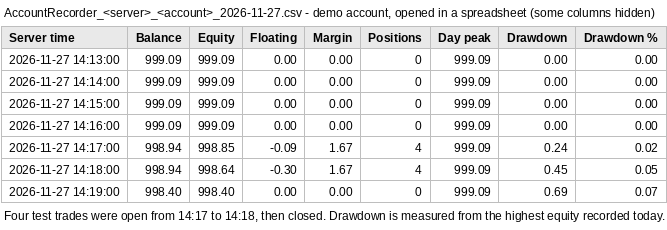
Rows recorded on a demo account, one per minute.
How it works
- Rows land on whole multiples of the interval (for example on each minute). If the PC clock goes back (end of summer time), the schedule follows it.
- One file per account and server day by default (AccountRecorder_<server>_<account>_<date>.csv), or one file for everything. The server is part of the name, so two accounts with the same number at different brokers never share a file.
- The day's first balance and highest equity are kept in terminal global variables, so a restart of the service or terminal on the same day continues the same figures. The peak is the highest equity the service has recorded, so it can miss a spike between two rows.
- While the terminal is not connected, no rows are written (you can change this).
- If the file is locked (for example, open in a spreadsheet), rows are kept in memory and written when it is free; the Experts tab says so once.
- It only reads account information. It never opens, changes or closes trades.
How to start it: in the Navigator, right-click Services > Account Recorder > Add Service, set the inputs and press OK. To stop it, right-click the running copy and choose Stop or Remove.
Inputs
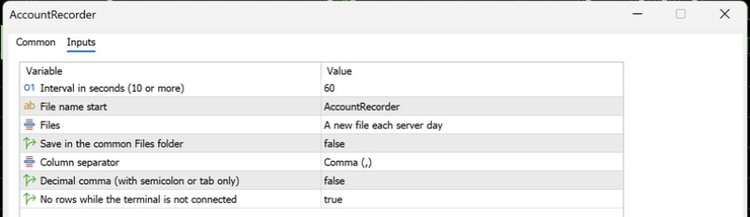
The service's inputs
- Interval in seconds (10 or more).
- File name start.
- Files: a new file each server day, or one file.
- Save in the common Files folder.
- Column separator: comma, semicolon or tab.
- Decimal comma (with semicolon or tab only).
- No rows while the terminal is not connected: true by default.
 GotobiDays - include file to find Gotobi days (Japanese payment dates)
Include file with small functions to find the Gotobi days: the 5th, 10th, 15th, 20th, 25th and the last day of each month, moved back to the previous business day when they fall on a weekend or a holiday you list. Information only, no trading functions.
 GSLP Active Research EA for Gold
Free MT5 research EA with three closed-bar entry models, ATR stops, fixed-R targets and a tester cost ledger. Version 2.31 uses the chart symbol and timeframe. Historical research: XAUUSD M5. Educational source; published tests were loss-making.
 Export Closed Trades to CSV with a summary per magic number
Saves the closed trades of your MT5 account history to a CSV file, one row per trade, plus a second file with totals for each magic number.
 MACD Signals
Indicator edition for new platform.