 MetaTrader 5
 Experts
 지표
 스크립트
 라이브러리
 보관함
거래 로봇을 무료로 다운로드 하는 법을 시청해보세요
당사를 Facebook에서 찾아주십시오!
당사 팬 페이지에 가입하십시오
스크립트가 마음에 드시나요? MetaTrader 5 터미널에서 시도해보십시오

Break-Even Stop Mover with Locked Profit - MetaTrader 5용 expert
Saad Ferdi

MQL5 and Python developer focused on gold and forex.
I build and fix MT5 Expert Advisors and indicators, with clean source code and clear input settings.
- 조회수:
- 181
- 평가:
- 게시됨:
-
 이 코드를 기반으로 한 로봇이나 지표가 필요하신가요? 프리랜스로 주문하세요
프리랜스로 이동


Break-Even Stop Mover is a small Expert Advisor that protects open positions. When a position on the chart symbol reaches InpTrigger points of profit, it moves the stop loss to the entry price plus InpLock points. From then on the trade can no longer turn into a loss (except for gaps and slippage).
It manages positions that are already open: manual trades, trades opened from the phone, or trades from any other Expert Advisor. It never opens or closes a trade.
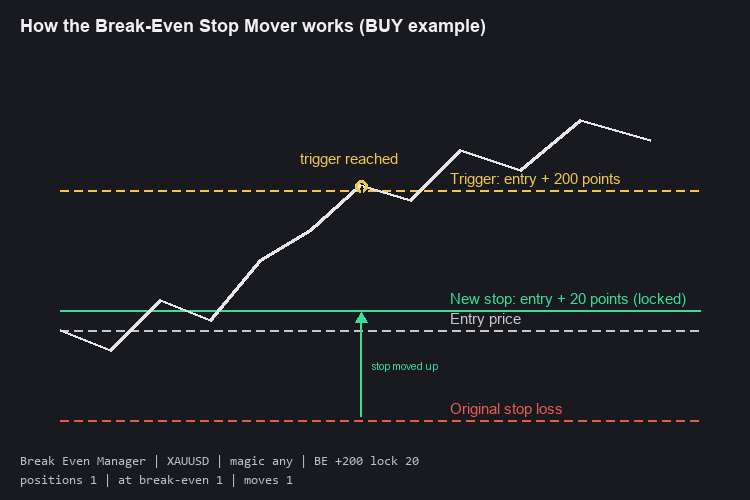
How it works
- Checks the positions of the chart symbol on every tick and once per second (timer).
- Profit is measured in points from the open price, at the price the position would close at (Bid for buys, Ask for sells).
- The new stop is only set if it is better than the current one, so it never moves a stop backwards. A position that already has a stop at or beyond break-even is left alone.
- Respects the symbol's stop level (SYMBOL_TRADE_STOPS_LEVEL) and freeze level (SYMBOL_TRADE_FREEZE_LEVEL). The take profit is kept unchanged.
- If the broker rejects a modification, the position is paused for InpRetrySec seconds before the next attempt, so the log is not flooded.
- A three-line status on the chart shows the settings, how many positions are managed and at break-even, and the last action.
Inputs
- InpTrigger (200) - profit in points that triggers the move.
- InpLock (20) - points of profit locked beyond the entry price (must be smaller than the trigger).
- InpMagic (-1) - -1 = all positions, 0 = manual trades only, any other value = one EA's magic number.
- InpRetrySec (60) - pause after a broker rejection.
- InpPanel (true) - show the status lines.
Notes
- Distances are in points of the symbol. On XAUUSD with 2 digits, 100 points = 1.00 USD of price; on EURUSD with 5 digits, 10 points = 1 pip.
- Attach it to one chart per symbol you want to protect, and allow Algo Trading.
- The picture is an illustration of the rule, not a trading result.
- A version with trailing stop (points or ATR), partial close, initial SL/TP and all-symbol management is available in the Market as Stop Pilot Trade Manager.
 Candle Streak Statistics: What Happens After N Same-Color Bars
Counts run of bars of the same color and measures what the next bar did after a run of every length: how often the run continued, how often it reversed, and how far the next bar moved in ATR. The figures are built from the history of your own symbol and timeframe, each row is compared with the share of bars of that color, and the histogram shows the length of the run at every bar. A panel gives the table and one line that can be pasted into a comment to compare symbols.
 CustomStopOut: your own margin call and stop-out levels, worst position closed first
A script that sets your own margin call and stop-out levels above the broker's. It alerts when the margin level falls below your margin call level and, below your stop-out level, closes positions one at a time, the worst net result first, until the level is back up, the way a broker stop-out works.
Daily Loss Limit Guard - close all and stay flat after the daily limit
A simple account guard: once the day's loss (equity against the balance at the start of the day) reaches your limit, it closes all positions, deletes pending orders and keeps the account flat until the next day. Works on manual trades and on any EA. Never opens trades.
Inside-Bar Outcome Tracker: Breakout Direction, Failure Rate and Time to Resolve
Finds every inside-bar pattern in the history of your chart and follows it to the end: which side of the mother bar broke first, whether the breakout held or failed within a few bars, and how many inside bars came before it. The histogram marks each breakout, boxes show the patterns on the chart, and a panel gives the statistics for your own symbol and timeframe, split by the number of inside bars and by the size of the mother bar, plus one line that can be pasted into a comment to compare symbols.