 MetaTrader 5
 Experts
 지표
 스크립트
 라이브러리
 보관함
거래 로봇을 무료로 다운로드 하는 법을 시청해보세요
당사를 Telegram에서 찾아주십시오!
당사 팬 페이지에 가입하십시오
당사 팬 페이지에 가입하십시오
스크립트가 마음에 드시나요? MetaTrader 5 터미널에서 시도해보십시오

- 조회수:
- 40
- 평가:
- 게시됨:
-
 이 코드를 기반으로 한 로봇이나 지표가 필요하신가요? 프리랜스로 주문하세요
프리랜스로 이동


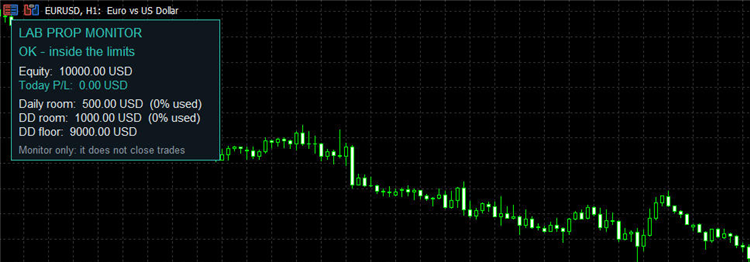 This indicator answers one question at a glance for traders on funded / prop-firm accounts: how much can I still lose today, and in total, before I break a rule?
What it shows
- Equity and today's profit or loss.
- Daily loss limit: money left and % of the limit already used.
- Maximum drawdown (static, measured from the initial balance): money left, % used and the equity floor.
- A status line: OK, WARNING (close to a limit) or LIMIT REACHED.
How it works
- It is an indicator, so it can stay on the same chart as any Expert Advisor.
- When it is added in the middle of the day, it rebuilds the balance at the start of the day from the deals closed today (profit, swap, commission and fee; deposits and withdrawals are skipped).
- The day start and the alert flags are kept in terminal global variables keyed by account login, so they survive a restart or a timeframe change.
- It alerts once when the warning level is passed (70% of a limit by default) and once when a limit is reached.
Limitations
- It is a monitor only: it never opens, closes or blocks trades, and a price gap can take an account through a limit before anyone can react.
- The daily reference is the balance at the day start (rebuilt from history) on the first run of the day, and the higher of balance and equity at the rollover while the indicator is running. Firms measure their limits in different ways: check your own rules.
- The day change is detected with TimeCurrent(), so after a weekend it happens on the first tick received by the terminal.
Inputs
- Initial account size (0 = current balance on first run)
- Daily loss limit, % of the initial balance (0 = off)
- Max drawdown, static, % of the initial balance (0 = off)
- Daily reset hour (server time)
- Warn when this % of a limit is used
- Show alerts
- Panel X / Y position
Not financial advice. Past results do not guarantee future results.
 Trade History Export to CSV with Summary (win rate, profit factor, drawdown)
Exports the closed positions of the account to a CSV file (one row per position) and shows a summary: trades, win rate, profit factor, net result, max drawdown and results per symbol. Read-only.
 Market Watch Mini Scanner: RSI Overbought/Oversold Across Symbols
A compact on-chart scanner that shows the RSI of the Market Watch symbols (or of a custom list) in a sorted, color-coded dashboard, marks overbought and oversold symbols, and can send alerts when a symbol enters one of these zones.
Net Currency Exposure and Hedged Margin Simulator Panel
A real-time CCanvas on-chart utility for MetaTrader 5 that calculates net lot exposure per currency across all open positions and simulates the exact margin, Margin Level (%), and Stop-Out buffer impact of a new Buy or Sell order—automatically accounting for your broker's hedged margin rules.
Export candles and indicators data to external csv file
Dynamically export customizable historical bar data (OHLC, Tick Volume) and selected technical indicators (RSI, MACD, ATR, ADX, Stochastic, CCI, MFI, Momentum) directly to a clean .csv file with automatic header generation.