 MetaTrader 5
 Experts
 지표
 스크립트
 라이브러리
 보관함
거래 로봇을 무료로 다운로드 하는 법을 시청해보세요
당사를 Telegram에서 찾아주십시오!
당사 팬 페이지에 가입하십시오
당사 팬 페이지에 가입하십시오
스크립트가 마음에 드시나요? MetaTrader 5 터미널에서 시도해보십시오

Session Boxes with DST-correct clocks - MetaTrader 5용 지표
Bayram Erhan Partal

MQL5 / MQL4 developer: Expert Advisors, indicators, Pine Script to MT5.
I deliver code that matches your specification, and I show the proof.
With every job you get
- Source code (.mq5/.mq4) and the compiled file, inputs named as in your spec
I deliver code that matches your specification, and I show the proof.
With every job you get
- Source code (.mq5/.mq4) and the compiled file, inputs named as in your spec
- 조회수:
- 140
- 평가:
- 게시됨:
-
 이 코드를 기반으로 한 로봇이나 지표가 필요하신가요? 프리랜스로 주문하세요
프리랜스로 이동


Most session indicators shift every session by one fixed offset from the server time. The United States and Europe change their clocks on different weekends, so for a few weeks every spring and autumn those boxes sit one hour away from the real London or New York session.
This indicator starts from each city's local session hours, converts them to UTC through that city's own daylight saving calendar, and then to your broker's server time. The boxes stay on the right hours through every clock change, and the history drawn for past days uses the rules that were valid on those days.
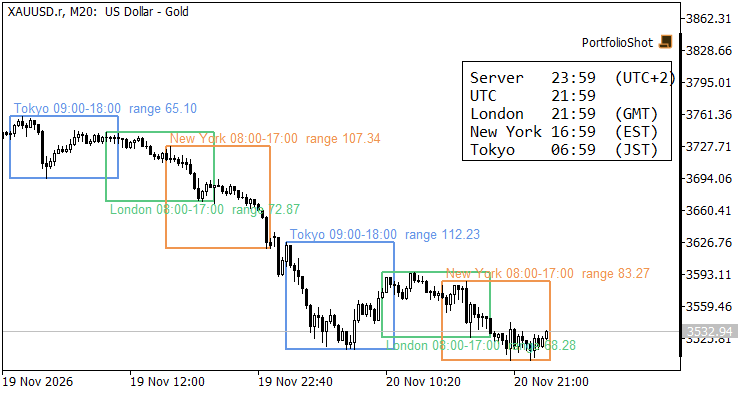
XAUUSD M20: Tokyo, London and New York boxes with their ranges, and the clock panel
Sessions
- Tokyo 09:00-18:00 JST (Japan has no daylight saving time)
- London 08:00-17:00 local time (UK daylight saving: last Sunday of March to last Sunday of October)
- New York 08:00-17:00 local time (US daylight saving: second Sunday of March to first Sunday of November)
How to read it
Each box spans the session from its open to its close and from its high to its low. The label shows the session hours in local time and the range (high minus low) in price units. A session that is still running grows with every new bar. The London label sits below its box and the other labels above, so overlapping sessions stay readable.
The clock panel shows the live time on the server, in UTC, London, New York and Tokyo, each with its current offset or zone name (GMT/BST, EST/EDT). It updates every second, also when no new quotes arrive, and takes its colors from the chart's color scheme.
Input parameters
- Broker server clock: "New York + 7h" means the server runs at GMT+2 in winter and GMT+3 in summer, switching with US daylight saving time. Most MT5 brokers use this clock. "Fixed" applies today's server offset to all history; use it when your broker's server keeps another rule.
- Days to draw: how many days of sessions are drawn, counted back from today.
- Tokyo / London / New York: show or hide each session.
- Tokyo / London / New York box color: color of each session's box and label.
- Clock panel: show or hide the clock panel.
Notes
In "Fixed" mode today's boxes are always right, but boxes on past days can be one hour off around the clock changes if your broker's offset changed then. The indicator draws objects only and has no buffers. Intraday timeframes (M5 to H1) show the session edges best. Tested on XAUUSD M15 and M20.
Prop Firm News Window Countdown and Spread Monitor
Tracks live MQL5 economic calendar events and real-time Bid-Ask spread in a chart HUD, exposing three iCustom buffers for EA news and spread gating.
False Breakout Envelope
False breaks at an ATR envelope, drawn as trades: price pushes through a band, closes back inside, and a box runs from the entry to the moving midline, with the stop as a thick line. Each label prints the win rate of earlier signals in the same RSI zone, and a corner card charts it for every zone.
 Noise Band Momentum - intraday Nasdaq breakout of the noise area (Zarattini 2024 rules)
Intraday momentum EA for the Nasdaq 100: trades breakouts of a noise band around the New York open (rules of Zarattini, Aziz and Barbon, 2024), exits inside the band or across the session VWAP, flat at 16:00 New York.
Spread and Liquidity Clock: Time-of-Day Spread, Activity and Cost-to-Range Profile from Your Broker's History
Builds a time-of-day profile from your own broker's history: the typical spread, the typical tick activity and the typical spread-to-range cost of every time slot of the trading day. Cheap and expensive slots are marked in the indicator window, the daily rollover window is flagged, and a panel lists the best and worst slots and ranks the current spread against its own slot.