 MetaTrader 5
 Experts
 지표
 스크립트
 라이브러리
 보관함
거래 로봇을 무료로 다운로드 하는 법을 시청해보세요
당사를 Telegram에서 찾아주십시오!
당사 팬 페이지에 가입하십시오
당사 팬 페이지에 가입하십시오
스크립트가 마음에 드시나요? MetaTrader 5 터미널에서 시도해보십시오

Opening Range Breakout EA Gold - MetaTrader 5용 expert
Cristhian Alexander Gaibor Cuasquer

2017년부터 트레이더이자 MQL5 회원입니다.
9년 동안, 대부분 XAUUSD 차트 앞에서 보낸 뒤, 제가 실제 매매에서 쓰는 도구들을 공개하기로 했습니다. 팔기 위해 만든 것은 하나도 없습니다. 모두 제게 필요해서 만들었습니다. 더 명확한 차트 해석, 모든 거래를 위한 계획, 정직한 통계, 통제된 리스크, 그리고 휴대폰으로 오는 알림입니다.
9년 동안, 대부분 XAUUSD 차트 앞에서 보낸 뒤, 제가 실제 매매에서 쓰는 도구들을 공개하기로 했습니다. 팔기 위해 만든 것은 하나도 없습니다. 모두 제게 필요해서 만들었습니다. 더 명확한 차트 해석, 모든 거래를 위한 계획, 정직한 통계, 통제된 리스크, 그리고 휴대폰으로 오는 알림입니다.
- 조회수:
- 222
- 평가:
- 게시됨:
- 업데이트됨:
-
 이 코드를 기반으로 한 로봇이나 지표가 필요하신가요? 프리랜스로 주문하세요
프리랜스로 이동

The first 30 minutes after the open on Gold (XAUUSD) set a high and a low, and this EA trades the first candle that closes outside them. It reads the range once the window is over, from 10:00 server time by default, and then waits up to 180 minutes for a close above the high or below the low. A wick through the level is not enough, the candle has to close beyond it.
One market position per day by default. The stop goes on the other side of the range, or in the middle if you prefer, the target is 1.5 times the stop distance and the lot is sized to risk 1 percent of the balance. Whatever is still open at 22:00 server time is closed, so nothing stays overnight.
Ranges that are too tight or too wide can be skipped with a minimum and maximum height in points. A breakout can fail and come back into the range, so test the session time and the target on your broker before going live.
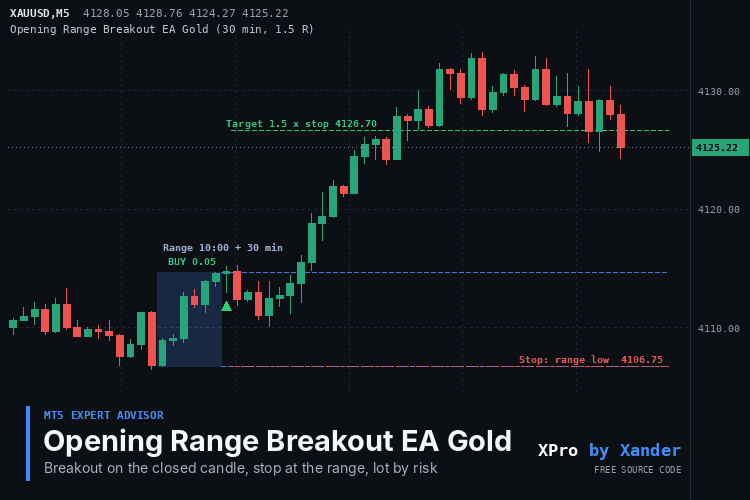
Settings
- Range start (10:00, server time, HH:MM), Range length (30 minutes) and Minutes after the range in which a breakout is taken (180).
- Breakout buffer: extra distance beyond the range, in points. Default 0.
- Allowed direction: buy and sell, buy only or sell only. Maximum trades per day: 1.
- Lot mode: fixed lot or risk percent of balance or equity. Defaults: risk 1 percent, fixed lot 0.01.
- Stop loss placement: other side of the range (default) or middle of the range. Take profit: 1.5 times the stop distance, 0 turns it off.
- Close at the end time (on) and End time (22:00 server time).
- Minimum and maximum range height in points (0 = no limit) and maximum spread to open (0 = no limit).
- Trade on Monday and Trade on Friday: both on.
- Magic number, order comment, slippage and show status with the range box on the chart.
What it needs
Any symbol. Use a timeframe equal to or lower than the range length, M1 to M30 for a 30 minute range. On a higher timeframe it writes a message in the log and does not trade. Times are broker server time, so set them for your broker: 10:00 is the London open on a GMT+2 server and 16:30 the New York stock open. Decisions are made on closed candles only. It manages only positions with its own magic number on the chart symbol and checks the free margin before every order. Netting and hedging accounts both work, since it holds one position at a time.
Make it yours
Run your own backtests on XAUUSD, XAGUSD, EURUSD, GBPUSD, US30 or NAS100 and compare a 15, 30 and 60 minute range, M5 against M15, and a target of 1.0, 1.5 and 2.0. XP_OnNewBar holds the whole decision, so it is the place to add a trend filter, a news pause, Smart Money Concepts structure or a second session. XP_Lot, XP_MarginOk and XP_CloseAll are ready to copy into your own EA. If you only want the range drawn, the free Opening Range Breakout Box indicator does that.
About this code
Open source. Use it as it is, adapt it, build your own version on top of it. Questions, suggestions and your own tests are welcome in the comments below.
Changelog
v1.0 (2026-11-20): initial release.
 Spectar Prop Challenge Dashboard
Read-only panel with the numbers a prop-style challenge is judged on: today's result from server midnight (closed plus floating), room to your daily loss limit, static or trailing overall floor, profit target and trading days.
 PassRecorder
A library for MetaTrader 5 that writes every pass of an optimization to a SQLite file: result, test statistics, your own metrics and the inputs of the pass. A demo Expert Advisor optimizes the Rosenbrock function in the mode "Math calculations".
Premium Discount OTE Zones
Premium and discount zones for MT5 on Gold (XAUUSD), forex and indices: dealing range from confirmed swings, equilibrium 50 percent, 25 and 75 percent lines and the OTE band of the last leg. Open source code.
Daily Loss and Profit Lock
Daily loss limit EA for MT5 on prop firm and funded accounts, Gold (XAUUSD), forex and indices: closes every position at the daily loss or profit limit, deletes pending orders and locks trading until the next day. Open source code.