 MetaTrader 5
 Experts
 지표
 스크립트
 라이브러리
 보관함
거래 로봇을 무료로 다운로드 하는 법을 시청해보세요
당사를 Facebook에서 찾아주십시오!
당사 팬 페이지에 가입하십시오
당사 팬 페이지에 가입하십시오
스크립트가 마음에 드시나요? MetaTrader 5 터미널에서 시도해보십시오

Giano Session Range Breakout EA - MetaTrader 5용 expert
Alessandro Lupi

AI Specialist and multi-stack developer (Python, Rust, MQL5). I build GIANO, a research platform that learns from today's markets, focused on XAUUSD session strategies for MetaTrader 5. Free tools: Giano Session Range Breakout (indicator) and its open-source EA.
- 조회수:
- 85
- 게시됨:
-
 이 코드를 기반으로 한 로봇이나 지표가 필요하신가요? 프리랜스로 주문하세요
프리랜스로 이동


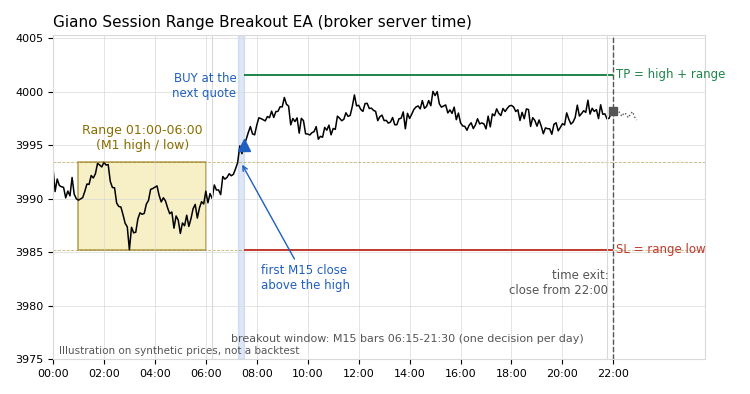
Giano Session Range Breakout EA is an Expert Advisor that trades the breakout of the night session range on XAUUSD. It takes one decision per day with a fixed volume. No martingale, no grid, no averaging.
How it works (broker server time)
- Range: high and low of the M1 bars from 01:00 to 06:00. The range counts only if at least 30 of the 60 five-minute slots have quotes.
- Breakout: the first M15 bar, opened between 06:15 and 21:30, that closes above the high (buy) or below the low (sell). The first breakout decides the day. There is no second attempt.
- Entry: at the first quote after that bar closes. The stop loss goes on the opposite side of the range. The take profit goes one range size beyond the broken side. If the price is already past the target, the day is skipped.
- Exit: stop loss, take profit, or a close from 22:00.
Execution safety
- Every decision is written to a hash-chained journal (CSV in MQL5\Files) before the order is sent.
- After a restart, the EA rebuilds its state from the journal, positions, orders and deals. It never sends a second entry for the same day.
- If the EA starts after the breakout bar has closed, it does not enter late.
- A lost server reply is marked "uncertain" and resolved from the trade history, never by sending again.
- If the journal is missing or corrupted, the EA takes no new entry that day. Open positions are still managed.
- Prices are handled as whole numbers of ticks, so there is no rounding at half a tick.
- Before sending, the EA checks volume limits, stop distance and free margin.
Inputs
- InpLots – fixed volume in lots (default 0.01).
- InpMagic – magic number (default 20261029). Use a different value on each chart.
- InpSaveExitTicks – save the BID/ASK ticks around each SL/TP exit to a CSV file (default false).
Notes
- All times are broker server time. The rule was designed on a server at GMT+2 in winter and GMT+3 in summer. On other servers the session hours shift.
- Recommended symbol and timeframe: XAUUSD, M15 chart (any timeframe works). Designed and tested on a hedging account.
- In the Strategy Tester each run starts with an empty journal. "Every tick based on real ticks" gives the most faithful results.
- Files: GianoRangeBreakout.mq5 (Experts) and GianoRangeBreakout_Logic.mqh (Include\GianoRangeBreakout).
Disclaimer
This is research code. Our own out-of-sample results do not show a proven edge. It is shared as a clean, tested example of a breakout EA with a safe execution layer. Test it on a demo account first. Trading involves risk of loss.
 Spread and Tick Velocity Monitor
Lightweight real-time HUD for MetaTrader 5 that monitors live spread (points and pips), session Min/Avg/Max spread, and tick arrival velocity (ticks/sec and ticks/min) with automatic market regime classification.
 One-Click Close All Positions with Slippage Guard
Execution-safe utility script to close open positions in one click with configurable slippage deviation, spread guard protection, symbol/P&L/Magic filters, and automatic retry handling.
Chart Pattern Breakout Indicator
Breakout status and measured targets for 13 chart patterns: channels, wedges and triangles found on zigzag swings, each shaded by what price did after its last swing (forming, broke up, broke down, target hit, failed) and rated with a quality score. Larger patterns stay around the smaller ones inside them, and same-size patterns never pile up.
No Hedge Guard - close the newer side when a buy and a sell are open on one symbol
Closes the newer side when a buy and a sell are open on the same symbol (manual trades or any EA). For prop firm accounts that forbid hedging. Never opens trades.