 MetaTrader 5
 Experts
 지표
 스크립트
 라이브러리
 보관함
거래 로봇을 무료로 다운로드 하는 법을 시청해보세요
당사를 Twitter에서 찾아주십시오!
당사 팬 페이지에 가입하십시오
당사 팬 페이지에 가입하십시오
스크립트가 마음에 드시나요? MetaTrader 5 터미널에서 시도해보십시오

Prop Firm Equity Guard - daily loss and max drawdown protection - MetaTrader 5용 expert

- 조회수:
- 82
- 평가:
- 게시됨:
-
 이 코드를 기반으로 한 로봇이나 지표가 필요하신가요? 프리랜스로 주문하세요
프리랜스로 이동


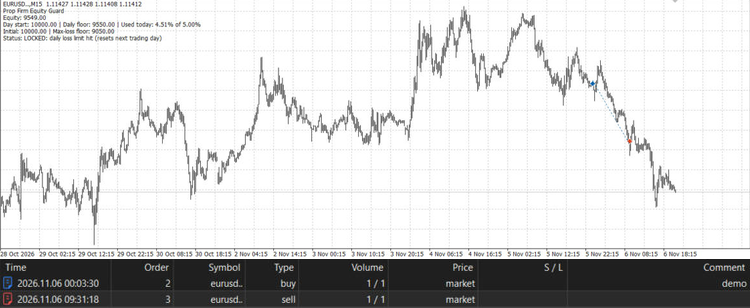
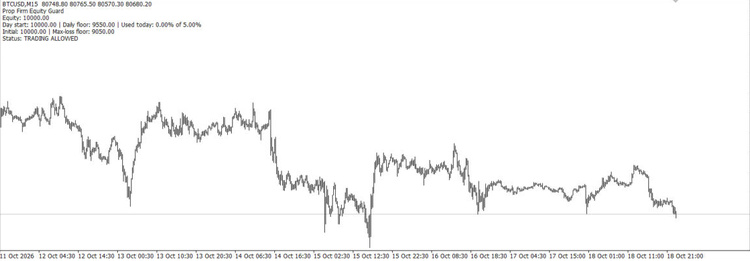 Prop Firm Equity Guard protects a funded or challenge account from breaking the two rules most prop firms enforce: the daily loss limit and the maximum overall loss. Attach it to any one chart; it watches the whole account (all symbols, manual trades and other EAs). When a limit is reached it closes all positions, deletes pending orders and keeps the account flat until the next trading day (daily limit) or until you reset it (max loss).
How the limits are calculated:
- Daily floor = day-start value x (1 - (DailyLoss% - Buffer%) / 100). The day-start value is the higher of balance and equity at the reset hour, as most prop firms do.
- Max-loss floor = initial balance x (1 - (MaxLoss% - Buffer%) / 100).
- Optional profit target closes everything when equity reaches initial balance + target %.
Inputs:
- InpDailyLossPercent (5.0): daily loss limit in %, 0 = off.
- InpMaxLossPercent (10.0): maximum overall loss in % of the initial balance, 0 = off.
- InpInitialBalance (0): initial balance of the challenge; 0 = balance when first attached.
- InpSafetyBufferPercent (0.5): acts this many % before the real limit, to absorb slippage.
- InpDayResetHour (0): server hour when the trading day resets.
- InpProfitTargetPercent (0): close all at this profit %, 0 = off.
- InpBlockAfterBreach (true): closes any new trade opened after a limit was hit.
- InpMagicFilter (-1): magic number to guard, -1 = all trades including manual.
- InpSendAlerts (true): alert and push notification on breaches and at 80% of the daily allowance.
- InpResetLocks (false): clears a saved max-loss or target lock on start.
State (day start, locks, initial balance) is stored in terminal global variables, so it survives terminal or VPS restarts. Close requests are throttled to one pass every 2 seconds to stay within server request limits. A chart comment shows equity, the floors, the share of today's allowance used and the current status.
Works on any symbol and timeframe, hedging and netting accounts. Always check your prop firm's exact rules and set the inputs to match them.
 Thanos AI Level Strength
Unbroken swing highs and lows, shaded by strength: how old each level is and how many times price was turned away from it.
Spread and Cost Monitor Panel
A panel showing the current spread, the average spread since the indicator was attached and the spread cost of a 1-lot trade in account currency.
Smart Break-Even and Partial Close - R-based trade manager
Trade manager for manual trades and other EAs: moves the stop to break-even at a chosen R multiple, closes part of the position at a second target, then trails the stop in steps. Survives terminal restarts.
Equivalence Checker: Regression Testing for MQL5 Indicators
A regression-test harness for indicator code. It compares an incremental, tick-by-tick calculation (the way OnCalculate runs live) with an independent from-scratch reference on a fixed dataset, flags every deviation, and prints a regression digest you can compare between versions of your code.