 MetaTrader 5
 Experts
 지표
 스크립트
 라이브러리
 보관함
거래 로봇을 무료로 다운로드 하는 법을 시청해보세요
당사를 Telegram에서 찾아주십시오!
당사 팬 페이지에 가입하십시오
당사 팬 페이지에 가입하십시오
스크립트가 마음에 드시나요? MetaTrader 5 터미널에서 시도해보십시오

- 조회수:
- 61
- 평가:
- 게시됨:
-
 이 코드를 기반으로 한 로봇이나 지표가 필요하신가요? 프리랜스로 주문하세요
프리랜스로 이동


ATR Risk Planner answers the three questions you ask before every trade: where does the stop go, where are the targets, and how many lots can I trade for the money I am willing to lose?
It measures current volatility with the Average True Range (ATR), places the stop loss a set number of ATRs away from the entry, and lists targets as multiples of that risk (1R, 2R, 3R). It then uses the symbol's tick value and tick size from your broker to size the position, so the same panel works on gold (XAUUSD), oil (Brent/WTI), forex pairs and indices without any manual pip-value maths.
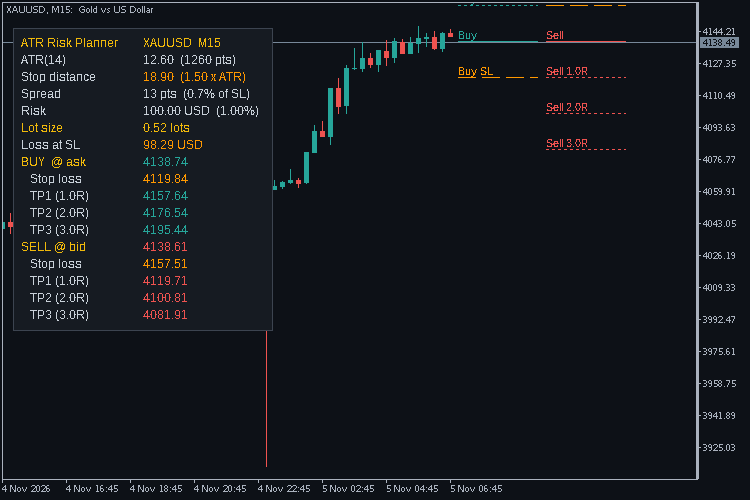
What the panel shows
- ATR value in price and points, on the chart timeframe or any timeframe you choose.
- Stop distance = ATR x multiplier (1.5 by default).
- Spread in points and as a percentage of the stop, turning red when it is too wide for the stop (10% by default), which is handy around news and the rollover hour.
- Risk in account currency: a percent of balance, a percent of equity, or a fixed amount.
- Lot size rounded down to your broker's volume step, plus the actual loss at SL for that rounded size. If even the minimum lot would risk more than you allowed, it says so instead of showing a size.
- Buy plan (entry at ask) and sell plan (entry at bid) with stop loss and up to three targets each.
On the chart
Short level lines with small tags mark the entry, stop and targets for each side to the right of the last candle, buy lines first and sell lines next to them so they never sit on top of each other. Lines can be turned off, or you can plan only the buy or only the sell side.
Notes
- Uses the ATR of the last closed bar by default, so levels don't jump around inside a candle.
- Lot size follows the broker's tick value for loss (SYMBOL_TRADE_TICK_VALUE_LOSS), so cross pairs and non-USD accounts are handled.
- The panel refreshes on every tick and once a second.
- Levels far from price may be outside the visible chart; scroll or zoom out to see all lines.
The indicator only reads prices and account values and draws objects. It never opens, modifies or closes trades. It is a planning aid, not a signal service, and it makes no promise about results.
Inputs
| Input | Default | Meaning |
| ATR timeframe | Current | Timeframe used for the ATR |
| ATR period | 14 | ATR length |
| Use ATR of last closed bar | true | false = live bar |
| Stop loss distance (x ATR) | 1.5 | Stop distance as a multiple of ATR |
| Target 1 / 2 / 3 (R multiple) | 1 / 2 / 3 | 0 hides a target |
| Risk mode | Percent of balance | Or percent of equity, or a fixed amount |
| Risk percent | 1.0 | Used by the percent modes |
| Risk amount | 50 | Used by the fixed mode, in account currency |
| Warn if spread exceeds % of SL | 10 | Spread row turns red above this |
| Sides to draw | Buy and sell | Or buy only, or sell only |
| Draw level lines on chart | true | Turn the chart lines off |
| Line length per side | 10 bars | Length of each level line |
| Panel corner / X / Y offset | Top left / 10 / 25 | Panel position |
| Font size | 9 | The panel scales with it |
| Colours | dark theme | Panel, text, buy, sell, stop and warning colours |
 MTF Trend Matrix
A compact dashboard that shows the EMA trend direction and ADX strength of several symbols across several timeframes at once.
Session Ranges + ADR Panel
Asian, London and New York session boxes with high/low range, plus a clean panel showing ADR, today's % of ADR, spread and time to candle close.
Spread and Swap Monitor
Shows the spread of every bar as a histogram with its average, flags unusually wide spreads, and lists the live spread, swap long/short, the triple-swap day and a bar countdown.
MACD Signals
Indicator edition for new platform.