 MetaTrader 5
 Experts
 지표
지표
 스크립트
스크립트
 라이브러리
라이브러리
 보관함
보관함
당사 팬 페이지에 가입하십시오

Trade Excursion Report - MAE and MFE of your closed trades (script) - MetaTrader 5용 스크립트

- 조회수:
- 165
- 평가:
- 게시됨:
-
 이 코드를 기반으로 한 로봇이나 지표가 필요하신가요? 프리랜스로 주문하세요
프리랜스로 이동
이 코드를 기반으로 한 로봇이나 지표가 필요하신가요? 프리랜스로 주문하세요
프리랜스로 이동

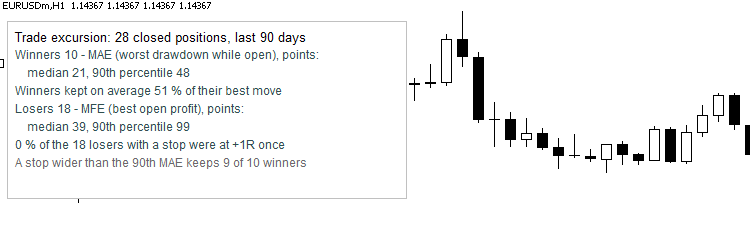 A trade result tells you what happened at the end. It does not tell you how the trade got there. Two numbers fill the gap:
- MAE (maximum adverse excursion): the worst the price went against the position while it was open.
- MFE (maximum favourable excursion): the best the price went in the position's favour while it was open.
With them you can ask: how much drawdown do my winners really need (is my stop too tight)? How far did my losers go my way before they turned (did I give profit back)? How much of the best move did my winners keep?
Files
- TradeExcursionReport.mq5 - the script.
- TradeExcursion.mqh - the class CTradeExcursion (put both files in the same folder; the class can be used in your own code).
What the script shows
- A table in the Experts tab, newest trades first: ticket, symbol, side, lots, open and close time, result, MAE, MFE and stop distance in points.
- A summary on the chart: number of positions; for the winners the median and the 90th percentile of the MAE; the share of the best move the winners kept on average; for the losers the median and the 90th percentile of the MFE; and the share of the losers (with a stop loss) that were at +1R at some moment (the price went at least as far in their favour as the stop distance). A stop wider than the 90th percentile MAE of the winners would have kept nine of ten winners alive.
- A CSV file MQL5\Files\TradeExcursion.csv with every position (price, result, stop, MAE, MFE, realized points).
Inputs: days of history, one symbol (empty = all), one magic number (-1 = all, 0 = manual trades), rows in the table, CSV on/off, summary on the chart on/off.
How the numbers are made
- A position is all its deals: the first entry deal gives the open time, the exit deals give the close time; the result adds profit, commission, swap and fee. Partial closes count as one position. A position with several entry deals uses the volume weighted open price. Positions that are still open, or opened before the history window, are left out.
- MAE and MFE come from the 1-minute bars from the minute of the entry to the minute of the exit (bid prices). The first and the last minute can contain prices before the entry or after the exit, so both numbers can be a little generous (at most one minute of price range). Sell positions are measured on the bid as well, so their MAE is understated and their MFE overstated by about the spread.
- The stop loss is the stop of the opening order. A stop that you set or moved later is not known to the history.
- Points are the points of each symbol: when you mix symbols, read the summary as "points of each symbol" or filter one symbol.
Use in your own code
#include "TradeExcursion.mqh" CTradeExcursion ex; ex.Load(TimeCurrent() - 90 * 86400, TimeCurrent(), "", -1); // from, to, symbol ("" = all), magic (-1 = all) STradeEx t; for(int i = 0; i < ex.Total(); i++) if(ex.Get(i, t)) Print(t.id, " MAE ", t.mae / t.point, " MFE ", t.mfe / t.point);
Also: Count(), Stat(winners, which, percentile), LosersReachedOneR(), WinnersCapture(), StillOpen(), SkippedNoBars().
How it was tested
- Strategy Tester, EURUSD H1, two months: 57 closed positions with and without a stop loss, buys and sells, some with a partial close. The unchanged class was run on the tester history, and Python recomputed every number from the exported deals and the exported 1-minute bars (positions, open and close time, volume, prices, result, stop, MAE, MFE, realized distance, bars used): 627 comparisons, 0 differences.
- The script itself ran on a Strategy Tester history of simulated trades with different stops; the picture is a real screenshot of that run.
- MetaEditor: 0 errors, 0 warnings.
 Spread Heatmap - typical spread for every hour and weekday, in server time or New York time
A table on the chart: the typical spread of the symbol for every hour and weekday, read from the history of your broker. Green is cheap, red is expensive. Hours in server time, UTC or a city with the right summer time. Read-only.
 Awesome Oscillator Pullback EA for EURUSD, +209 Percent in a 2021-2026 Backtest
EURUSD EA that trades both directions: when the Awesome Oscillator turns against a weighted moving average filter, it places a stop order at the daily low or high of three days ago, with an ATR stop. Self-contained, no custom indicators. Backtest on EURUSD H1, October 2021 to October 2026: +209% on a 1,000 USD deposit with a fixed 20 USD risk per trade, 15.55% maximum equity drawdown.
 MeanReversion: Ornstein-Uhlenbeck fit and optimal trading bands
Exact maximum likelihood of an Ornstein-Uhlenbeck spread and Bertram's optimal entry and exit levels for a given cost, with the expected length of a trade cycle.
ChangePoint: Bayesian online change point detection
Online detection of changes in the mean or volatility (Adams-MacKay): probability of a change in the last k bars, current segment length, forecast, and an indicator.