거래 로봇을 무료로 다운로드 하는 법을 시청해보세요
당사를 Twitter에서 찾아주십시오!
당사 팬 페이지에 가입하십시오
스크립트가 흥미로우신가요?
그렇다면 링크 to it -
하셔서 다른 이들이 평가할 수 있도록 해보세요
스크립트가 마음에 드시나요? MetaTrader 5 터미널에서 시도해보십시오
Experts

Opening Range Breakout with NR4 / NR7 Contraction Filters - MetaTrader 5용 expert

Panduleni Nambala
Panduleni Nambala
I build Expert Advisors and indicators for MetaTrader 5 in MQL5, focused on gold (XAUUSD) and prop-firm rules.
What I've built:
• An 1,800-line XAUUSD scalping EA with regime-based setups (liquidity sweeps, break-of-structure pullbacks, fair value gaps), session filters and a spread filter.
조회수:
609
평가:
(1)
게시됨:
MQL5 프리랜스 이 코드를 기반으로 한 로봇이나 지표가 필요하신가요? 프리랜스로 주문하세요 프리랜스로 이동

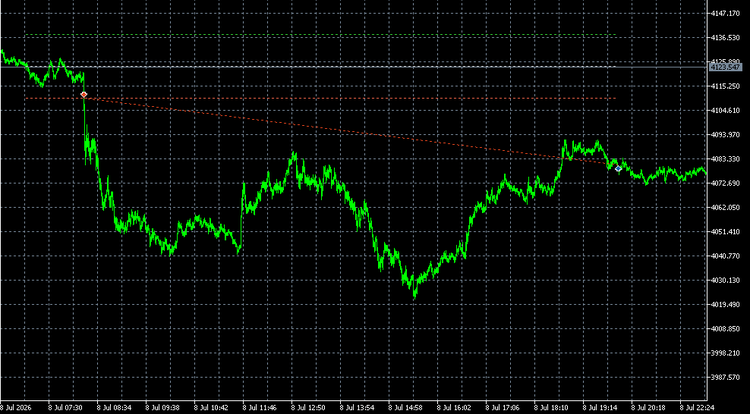
This Expert Advisor tests a classic idea: after a quiet, narrow-range day, the next day is more likely to move strongly in one direction from its open. The method is based on the opening range breakout and contraction/expansion concepts described by Toby Crabel in "Day Trading with Short Term Price Patterns and Opening Range Breakout" (1990). The code is an original implementation, adapted for a 24-hour market such as XAUUSD.
Recommended symbol and timeframe
- Symbol: XAUUSD (gold). It also runs on other liquid symbols, but the default settings were chosen for gold.
- Timeframe: any. The EA reads M1 and D1 data itself, so the chart timeframe does not change its behavior. M1 is best for watching it in the visual tester.

How it works
1. At the session start, the EA records the session open. By default, the start is 08:00 London time, converted to the broker's server time with daylight saving handled automatically.
2. It calculates an offset in one of two ways: the "stretch" (the average distance from each recent session's open to its nearest extreme) or a fixed multiple of yesterday's daily ATR.
3. It checks yesterday's daily bar against the selected filter.
4. If the day qualifies, it places a buy stop above the open and a sell stop below it. Each order's stop loss is the opposite level.
5. When one order fills, the other is deleted. Unfilled orders are removed when the entry window ends.
6. All trades are closed a set number of minutes after the start (default 13 hours, before gold's daily break), so the EA is flat overnight.

Filters
- None: the control group. It trades every day, so you can measure whether the filters add anything.
- NR4: yesterday's range was narrower than each of the 3 days before it.
- NR7: yesterday's range was narrower than each of the 6 days before it.
- Inside day + NR4.
- 3-bar NR: the last 3 days' combined range was the narrowest of any 3-day window in the previous 20 days.
- Any of the above.
- Optional: skip the day after a wide-range day (WS4 or WS7).

Risk controls
- Lot size from % risk per trade and the stop distance
- Daily loss limit based on account equity (useful for prop-firm rules)
- Maximum fills per session
- Spread filter measured as a % of the offset (works for 2- and 3-digit gold quotes), stops-level and freeze-level checks, free-margin and volume-limit checks
- Skips the day if price already passed a level before the EA was ready

Input parameters
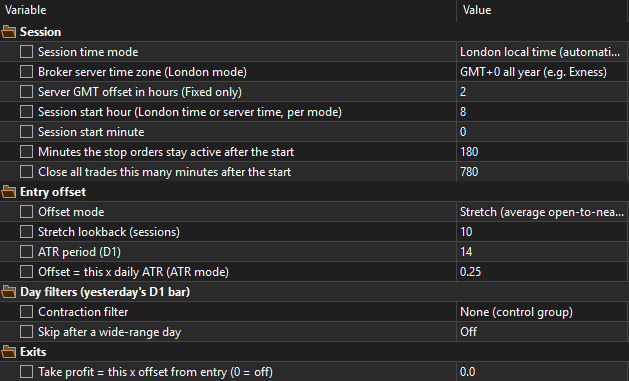
- Session: time mode (London time with automatic daylight saving, or broker server time), broker server time zone (GMT+0, GMT+2/+3 New York close, or fixed offset), session start hour and minute, entry window (minutes), exit (minutes after the start)
- Entry offset: offset mode (stretch or ATR), stretch lookback, ATR period, ATR multiple
- Day filters: contraction filter, skip after a wide-range day
- Exits: take-profit multiple (0 = off)
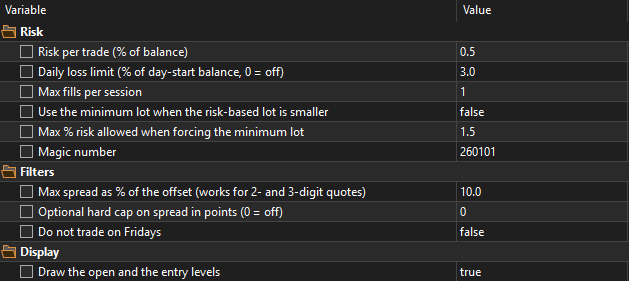
- Risk: risk % per trade, daily loss limit %, max fills per session, use the minimum lot when the risk-based lot is smaller, max risk at the minimum lot, magic number
- Filters: max spread as % of the offset, optional hard cap in points, skip Fridays
- Display: draw the open and entry levels on the chart

Notes
- Set the broker's server time zone correctly. London mode then places the session at 08:00 London time all year.
- Narrow-range filters use the broker's daily candles. Short Sunday candles (common on GMT+0 servers) are ignored.
- On small accounts the risk-based lot is often below the minimum lot, so the EA skips the day unless "use the minimum lot" is switched on.
- This is a research and learning tool, not a profit promise. Test it on your own broker's data before any live use.


APEX VELOCITY APEX VELOCITY

ApexVelocity is a professional-grade Expert Advisor designed to capture explosive momentum in high-volatility instruments like XAUUSD (Gold). Moving away from rigid, hard-coded parameters, v1.0 introduces a robust, fully dynamic architecture that adapts to market conditions and broker specifications in real-time.

Daily PnL Percentage Overlay - prop firm daily loss limit Daily PnL Percentage Overlay - prop firm daily loss limit

Displays today's floating PnL as % of balance plus how much of the daily-loss budget is consumed — the number that actually matters for prop firm rules (FTMO, Apex, TopStep). Color code: green under 50% of limit, orange under 80%, red above. Configurable reset hour. Free to use. Inputs: InpLimitPct (daily loss limit %), InpResetHour (day reset, server time), colors, font size. Attach to any chart — reads account equity live.

Gold  MT5 Fractal Breakout EA Gold MT5 Fractal Breakout EA

A MetaTrader 5 (MT5) Expert Advisor based on breakouts of prior swing highs and lows. The EA places pending orders around confirmed fractal structures and manages each trade with defined stop-loss, take-profit, and optional position-management rules.

CLiveTradeInfo - CHistoryTradeInfo CLiveTradeInfo - CHistoryTradeInfo

The library reconstructs a complete MQL4-style order model on top of the native MQL5 Position, Order, Deal, and History APIs. This design allows legacy MQL4 Expert Advisors to operate with minimal code changes while preserving MQL5.