 MetaTrader 5
 Experts
 지표
지표
 스크립트
스크립트
 라이브러리
라이브러리
 보관함
보관함
당사 팬 페이지에 가입하십시오

Manual Trade Pad for Strategy Tester - MetaTrader 5용 expert

- 조회수:
- 124
- 평가:
- 게시됨:
-
 이 코드를 기반으로 한 로봇이나 지표가 필요하신가요? 프리랜스로 주문하세요
프리랜스로 이동
이 코드를 기반으로 한 로봇이나 지표가 필요하신가요? 프리랜스로 주문하세요
프리랜스로 이동

Manual Trade Pad for MT5 is a chart-based manual trading panel designed for traders who want a simple and efficient way to execute and manage trades directly from the MetaTrader 5 chart.
The same EA can be used in two environments:
-
Live Market — for manual trade execution and position management.
-
Strategy Tester — for manual strategy testing and historical trading practice.
The panel uses standard MQL5 functionality and does not require external libraries or additional installations.
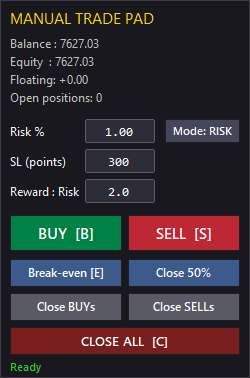
Main Features
Market Order Execution
Open market positions directly from the panel:
-
BUY
-
SELL
The EA uses the current market price and automatically calculates the corresponding Stop Loss and Take Profit levels according to the selected settings.
Position Sizing
Two position-sizing modes are available.
Fixed Lot
Enter the desired trading volume directly.
Example:
0.10 lots
Risk Percentage
Specify the percentage of account balance to risk on the trade.
Example:
1.0%
The EA estimates the required volume from the selected Stop Loss distance and the symbol's tick size and tick value information.
The resulting volume is normalized according to the broker's minimum, maximum and volume-step requirements.
Stop Loss
A Stop Loss distance can be specified in points.
The EA also checks the symbol's minimum stop distance before sending the order.
This helps avoid sending orders with Stop Loss levels that are closer to the market than allowed by the trading server.
Risk / Reward Take Profit
The panel can calculate Take Profit automatically using a Risk/Reward ratio.
For example:
Stop Loss = 300 points Risk/Reward = 2.0
The corresponding Take Profit is calculated automatically.
Set the Risk/Reward value to 0 when no automatic Take Profit is required.
Position Management
Opening a trade is only one part of the workflow. The panel also provides several basic position-management operations.
Break-Even
Move managed positions to their open price with an optional point offset.
For BUY positions, the Stop Loss can be moved above the entry price.
For SELL positions, the Stop Loss can be moved below the entry price.
The EA checks the broker's minimum stop-distance requirements before modifying the position.
Existing Take Profit values are preserved.
Partial Close
The panel provides a quick partial-close function.
The default operation attempts to close approximately half of the selected position volume while respecting the broker's volume-step and minimum-volume requirements.
This can be useful when securing part of a position while leaving the remainder open.
Directional Position Closing
Positions can be closed by direction:
-
Close BUY positions
-
Close SELL positions
-
Close all managed positions
This is useful when several positions are open and only one direction needs to be closed.
Live Trading
When attached to a normal MT5 chart, the panel can be used as a manual trading interface.
A typical workflow is:
-
Select the desired position-sizing mode.
-
Enter the lot size or risk percentage.
-
Set the Stop Loss distance.
-
Set the desired Risk/Reward ratio.
-
Press BUY or SELL.
-
Manage the resulting position using Break-Even, Partial Close or Close functions.
The panel is intended as a trading utility rather than a signal generator.
It does not analyze the market or generate automatic trading signals.
The trading decision remains with the user.
Strategy Tester
The same EA can also be used in the MetaTrader 5 Strategy Tester for manual historical testing.
This allows traders to move through historical market data and manually execute trades using the same interface used for live trading.
Possible applications include:
-
Manual strategy testing
-
Discretionary trading practice
-
Entry and exit testing
-
Risk-management experiments
-
Trade-management testing
-
Learning and practicing trading setups
This approach can be useful when a trading idea is discretionary and cannot easily be expressed as a fully automated Expert Advisor.
Position Identification
The EA does not manage every position on the account.
A position is considered managed only when it belongs to:
-
the current chart symbol;
-
the configured Magic Number.
This allows the panel to coexist with other Expert Advisors and positions on the account without intentionally modifying positions outside its management scope.
Keyboard Shortcuts
Several frequently used actions can also be triggered from the keyboard:
| Key | Action |
|---|---|
| B | Open BUY |
| S | Open SELL |
| E | Move managed positions to Break-Even |
| C | Close all managed positions |
Keyboard shortcuts can be useful when performing rapid manual tests in the Strategy Tester or when working with the panel on a live chart.
Panel Interface
The interface is implemented using native MetaTrader 5 chart objects.
No third-party GUI framework is required.
The panel includes:
-
Trading buttons
-
Position-sizing controls
-
Stop Loss and Risk/Reward inputs
-
Account information
-
Position information
-
Status messages
The panel is designed to remain lightweight and easy to understand.
Input Parameters
Magic Number
Unique identifier used to distinguish positions managed by this EA.
Positions belonging to other Magic Numbers are ignored.
Initial Sizing Mode
Selects the default position-sizing method:
-
Fixed Lot
-
Risk Percentage
Default Fixed Lot
Default trading volume used when Fixed Lot mode is selected.
Default Risk Percentage
Default percentage of account balance used for risk-based position sizing.
Default Stop Loss
Default Stop Loss distance in points.
Default Risk/Reward
Default Risk/Reward ratio used to calculate Take Profit.
Set to 0 to disable automatic Take Profit.
Break-Even Offset
Optional offset in points applied when moving a position to Break-Even.
Maximum Deviation
Maximum allowed price deviation used when sending or closing trades.
Panel X / Y
Horizontal and vertical position of the panel on the chart, measured in pixels.
Requirements
-
MetaTrader 5
-
A trading account supported by MetaTrader 5
-
No external DLLs
-
No third-party libraries
-
No additional indicators required
The EA is designed as a standalone source-code example for the MQL5 Code Base.
Important Notes
This program is a manual trading and trade-management utility.
It does not provide trading signals, investment recommendations or guarantees of trading results.
Risk-based position sizing is an estimation based on the symbol's tick size, tick value and Stop Loss distance. Actual trading costs and execution conditions may affect the final result.
Always verify the behavior of the panel with your broker and test your intended workflow in the Strategy Tester or on a demo account before using it with real funds.
Source Code
The source code is intentionally provided as an MQL5 Code Base project so that developers can study, modify and extend the implementation.
The program uses the standard CTrade class and native MetaTrader 5 chart objects.
It can therefore also serve as an example of implementing a lightweight trading interface without relying on external GUI libraries.
Summary
Manual Trade Pad for MT5 provides a simple interface for:
-
Manual BUY/SELL execution
-
Fixed-lot position sizing
-
Risk-percentage position sizing
-
Stop Loss management
-
Risk/Reward based Take Profit
-
Break-Even
-
Partial Close
-
Directional position closing
-
Live manual trading
-
Manual Strategy Tester operation
-
Keyboard shortcuts
The goal is simple: provide the essential manual trading and position-management controls directly on the chart, using the same interface for both live trading and historical testing.
 Symbol Spec Export - volume step, filling mode and stops level to CSV
Writes the trading specification of every symbol to a CSV file: volume step, filling modes, stops level, tick value and more.
DailyLossGuard — Hard Daily Loss Protection
DailyLossGuard — Hard Daily Loss Protection (Prop-Firm Challenge Essential)
AgentGuard — Independent Risk Guard for AI Agents in MetaTrader 5
Independent Risk Guard for AI Agents in MetaTrader 5.
Broker Basket Preflight — read-only contract and minimum-volume diagnostics
Read-only MT5 script for exact Market Watch symbols: contract and volume rules, quote age and spread, isolated BUY/SELL margin, one-tick price moves and spread-only results in account currency. MIT source; Experts journal output.