 MetaTrader 5
 Experts
 지표
지표
 스크립트
스크립트
 라이브러리
라이브러리
 보관함
보관함
당사 팬 페이지에 가입하십시오

Trade Guardian - stop loss watchdog and drawdown limiter that re-arms - MetaTrader 5용 expert

I trade on live accounts myself, so I build EAs the way I'd want to run them.
What I build:
• Expert Advisors and indicators for MetaTrader 4 and 5 (MQL4 / MQL5)
- 조회수:
- 1168
- 평가:
- 게시됨:
- 업데이트됨:
-
 이 코드를 기반으로 한 로봇이나 지표가 필요하신가요? 프리랜스로 주문하세요
프리랜스로 이동
이 코드를 기반으로 한 로봇이나 지표가 필요하신가요? 프리랜스로 주문하세요
프리랜스로 이동


Trade Guardian is a defensive Expert Advisor. It never opens a trade. It supervises the positions you already have and steps in when a risk rule is broken.
It does three things, and each one can be switched off on its own. Closing positions is disabled by default, so you can attach the EA to a live chart and let it only warn until you trust it.
1) Missing stop loss. On every timer tick the EA walks the open positions and finds the ones with no stop loss. With InpEnforceStopLoss it attaches one at InpATR_Mult times the ATR (period InpATR_Period) of the chart timeframe, on the correct side of the entry, and never closer to the price than InpMinStopPoints points or the broker minimum stop level. Stops are only placed on the chart symbol, because the ATR handle belongs to the chart.
2) Daily loss limit. InpMaxDailyLossPct is measured against the balance recorded at the opening of the trading day, so the limit follows the account instead of drifting away from a fixed starting figure. The reference is refreshed automatically when a new day begins.
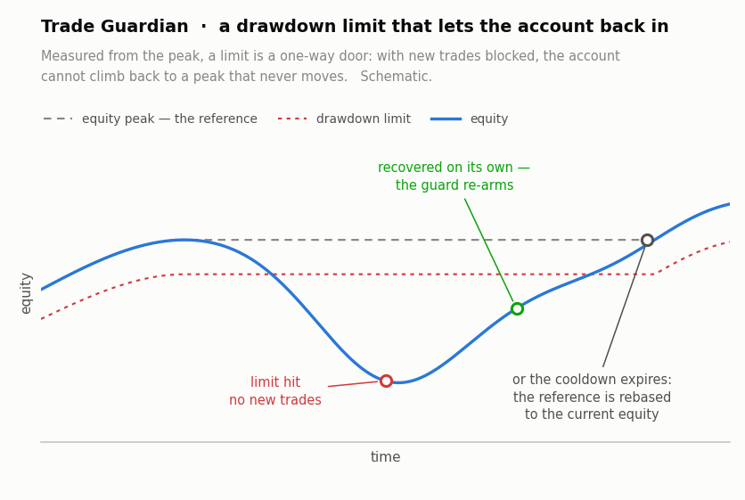
3) Total drawdown limit that re-arms. InpMaxTotalDDPct is measured from the equity peak. A peak-referenced limit has a well known failure mode: once it fires, equity can never climb back to a frozen peak, so the guard stays latched forever and the account is dead. InpCooldownHours solves it. After the given number of hours the peak is rebased to the current equity, the guard re-arms and normal work continues. The rebase is written to the log, so you can see exactly when it happened.
Scope. InpCurrentSymbolOnly restricts the guard to the chart symbol, InpMagicFilter restricts it to one magic number (-1 guards every position). When a limit is hit, InpCloseOnBreach decides whether the guarded positions are closed or only reported, InpAlertOnBreach raises a terminal alert, and InpPanel draws a small status panel on the chart with the current daily loss, the drawdown from the peak and the state of the guard.
The picture below shows the two limits: the daily one measured from the day's opening balance, the total one measured from the equity peak, and the cooldown after which the peak is rebased and the guard re-arms.
CalendarExport
This Expert Advisor is that missing bridge. Attach it to any chart and it periodically writes the calendar to a CSV file in `MQL5\Files`, where anything outside the terminal can read it.
TradeHistoryLogger
Exporting your deal history is easy and a dozen scripts already do it..
 Tick Audit - check real tick history and backtest quality month by month
Reports, month by month, whether your symbol really has ticks or only bars - so you know which part of your backtest ran on generated ticks before you trust the curve. The Strategy Tester gives you one History Quality figure after the test has finished, and it never says which months were the problem. This script asks first.
 Advanced Harmonic Scanner
The Advanced Harmonic & RSI Reversal Scanner solves both problems. By combining precise Fibonacci geometry (to find the location of a reversal) with an RSI exhaustion filter (to time the exact moment of the reversal), this script prevents you from catching falling knives