 MetaTrader 5
 Experts
 지표
지표
 스크립트
스크립트
 라이브러리
라이브러리
 보관함
보관함
당사 팬 페이지에 가입하십시오

Advanced Risk Manager: Auto Suffix Detection Multi Currency Lot Sizer - MetaTrader 5용 라이브러리

- 조회수:
- 1203
- 평가:
- 게시됨:
- 업데이트됨:
-
 이 코드를 기반으로 한 로봇이나 지표가 필요하신가요? 프리랜스로 주문하세요
프리랜스로 이동
이 코드를 기반으로 한 로봇이나 지표가 필요하신가요? 프리랜스로 주문하세요
프리랜스로 이동


Purpose of the File
The Underlying Strategy and Core Concept
The core architecture utilizes a high-performance triangular currency conversion algorithm to map the profit currency of the target asset directly to the trader's account currency. By scanning direct, inverse, and USD cross-pairs in fractions of a millisecond, the module calculates the exact current tick value, completely eliminating the risk of over-leveraging due to currency mismatches.
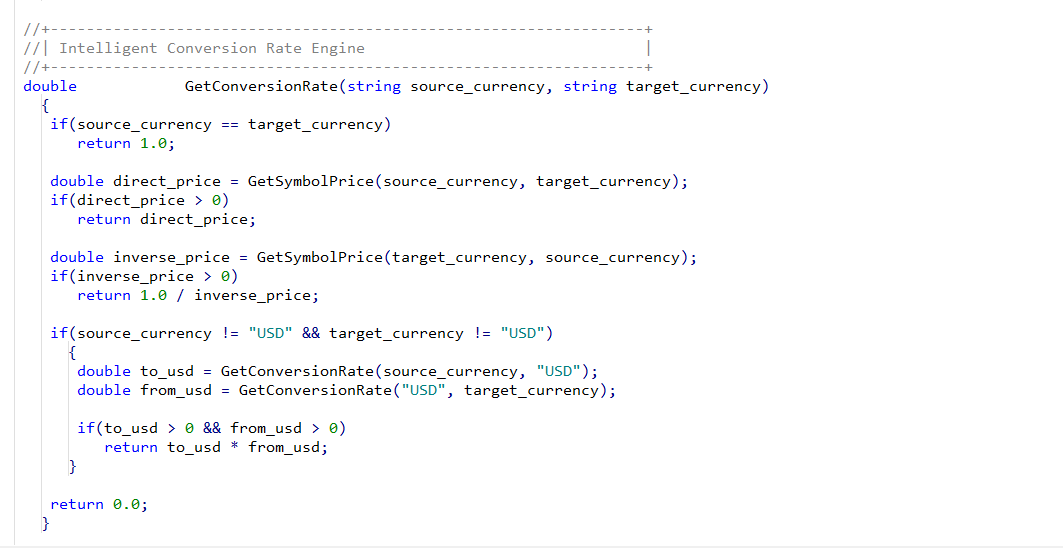
Key Architecture Components and Methods
How to Integrate
 Channel Sun Signals
Overview Channel Sun Signals plots an adaptive, triangular-weighted moving-average channel (a center line plus an upper and lower band) around price, and marks potential reversal points where price pierces a band and then closes back inside it. It is built on the same "band-break-then-reversal" logic used by classic TMA/CG-style channel indicators, but rewritten natively for MT5 — including its own multi-timeframe engine that does not rely on iCustom() or an external .ex5 file, so the indicator works standalone once compiled.
SimpleTradeStats
Statistics on closed trades. The indicator shows trading results, filtered by magic number.
Mediana Trendline
Draws parallel trend channels (Median, High, Low) on the current chart based on the last two closed candles of up to 7 higher timeframes (MN1, W1, D1, H4, H1, M30, M15), with individually configurable colors and line styles for each timeframe.
Clock (Spread)
What this indicator does Clock (Spread).mq5 is a MetaTrader 5 chart indicator that displays a small text label in the corner of the chart showing: Countdown timer until the current candle closes (in HH:MM:SS or MM:SS format, depending on timeframe) Current spread (Ask − Bid, in points), shown in parentheses next to the timer. Changelog: Version 2.20: - Spread now colors dynamically based on direction (green = increasing, red = decreasing) - Added configurable inputs for the spread colors