 MetaTrader 5
 Experts
 지표
지표 스크립트
스크립트 라이브러리
라이브러리 보관함
보관함당사 팬 페이지에 가입하십시오

Correlation Matrix Heatmap with Interactive Dashboard - MetaTrader 5용 지표

- 조회수:
- 3273
- 평가:
- 게시됨:
- 업데이트됨:
-
 이 코드를 기반으로 한 로봇이나 지표가 필요하신가요? 프리랜스로 주문하세요
프리랜스로 이동
이 코드를 기반으로 한 로봇이나 지표가 필요하신가요? 프리랜스로 주문하세요
프리랜스로 이동

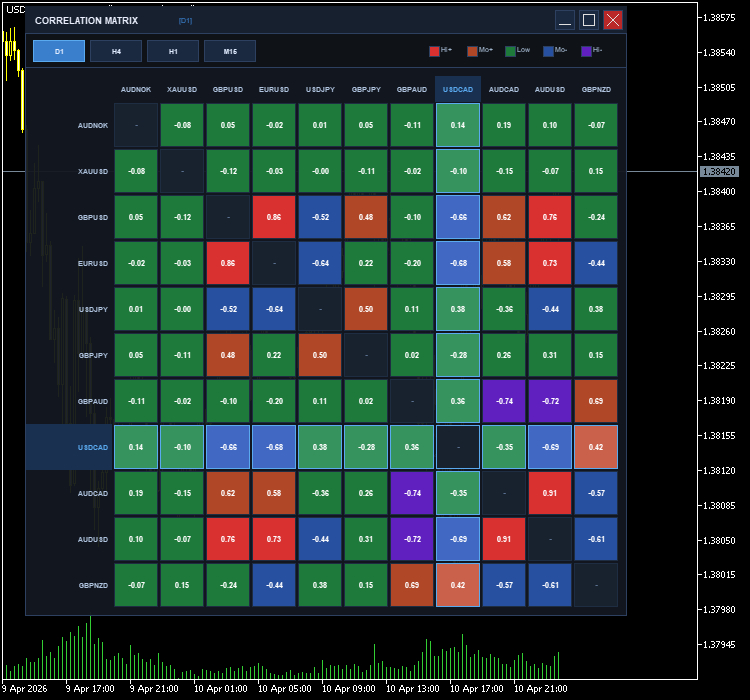


Interactive Correlation Matrix Dashboard
Stop guessing how your pairs move together. This professional-grade heatmap provides a clear, real-time bird's-eye view of the entire market's relationships directly on your chart.
Key Trading Features
-
Live Heatmap Visualization: High-contrast color coding (Red for positive, Blue/Purple for negative) allows you to spot strong relationships in milliseconds.
-
On-Chart Workspace Control:
-
Draggable: Click and move the panel so it never blocks your price action.
-
Minimize/Restore: One-click "Dash" mode to hide the grid and keep only the title bar visible when you're focusing on a trade.
-
-
Instant Timeframe Analysis: Switch between D1, H4, H1, and M15 . Understand if a correlation is a long-term structural trend or just a short-term intraday move.
-
High-Precision Values: Displays exact Pearson coefficients (e.g., 0.85, -0.72) so you can distinguish between "correlated" and "perfectly synced."
Real-World Use Cases
1. Risk Management (Avoiding Over-Exposure)
If you are Long $EURUSD$ and Long $GBPUSD$, you might think you have two trades. The matrix will show you if they have a 0.90+ correlation, alerting you that you are actually holding a double-sized position on "USD weakness."
2. Finding Hedge Opportunities
Identify pairs with a strong Negative Correlation (e.g., $EURUSD$ and $USDCHF$). If you want to stay in the market but reduce risk during high volatility, these pairs can act as natural hedges.
3. Confirmation & Confluence
Use the matrix to see if a breakout in $Gold$ is being reflected in correlated pairs like $AUDUSD$. If $Gold$ moves but $AUD$ stays flat, the matrix helps you spot the "divergence" that might save you from a fake-out.
4. Cleaning up your Market Watch
The dashboard automatically pulls from your Market Watch. Use it to quickly see which pairs are currently "active" and moving in sync, helping you focus only on the most tradable setups.
Built for Performance
-
Pure MQL5: No external files or complex setups. Just drag, drop, and trade.
-
Ultra-Lightweight: Optimized to ensure your MT5 terminal remains snappy, even when analyzing 12+ symbols at once.
-
Broker-Friendly: Automatically cleans symbol names (stripping suffixes like .m or +) so it works on any account type.
 Prime Quantum AI — TRADE WITH AI (Anthropic Claude, OpenAI GPT, Google Gemini, DeepSeek, xAI Grok).
Prime Quantum AI is an MT5 Expert Advisor combining a classical pre-filter (ADX + Alligator) with AI vision-based chart confirmation from major AI providers (Anthropic Claude, OpenAI GPT, Google Gemini, DeepSeek, xAI Grok). When the pre-filter detects a trend setup, the EA captures three adaptive- timeframe chart screenshots and sends them to the configured AI provider, which returns direction, confidence, stop-loss and take-profit. A trade is opened only when the AI confirms the pre-filter signal with sufficient confidence. Features: dual Standard Broker / Prop Firm risk modes, configurable lot sizing, optional martingale, multiple SL/TP modes, trailing stop, partial close, news/time/day/spread filters, draggable on-chart info panel, and fully exposed indicator parameters. Requires MetaTrader 5, WebRequest enabled for your provider's URL, and a valid API key. Provider auto-detected from key format.
Institutional Fourier Transform (DFT) Dominant Cycle Language: MQL5
A digital signal processing (DSP) engine that applies the Discrete Fourier Transform (DFT) to market data, isolating the dominant cyclical frequency to project turning points and eliminate phase-lag.
Swap Fee Monitor Panel
Swap Monitor Panel is a lightweight, fully customizable indicator that overlays a live swap rate dashboard directly on your MT5 chart. It scans every symbol in your MarketWatch window and presents long swap, short swap, estimated daily cost, and weekly cost side by side — all in one clean, readable panel.
Chart Water Mark
Chart Water Mark Transform your MetaTrader 5 charts to look as elegant and professional as TradingView.