George Ciprian Mandache
  • 情報
5+ 年
経験
5
製品
7
デモバージョン
0
ジョブ
0
シグナル
0
購読者
Software Engineer において Self-Employed
Mostly writing code that does stuff...

User guides are on my blog. For questions or bugs, write in the product's Comments tab or send me a message.
George Ciprian Mandache
Video of the rule language: https://youtu.be/i5lHA5d0JRE Multi Timeframe Signal Workshop marks every bar where a signal you build fires. Every signal is a rule written in a small text language: the condition cards write it for you as you click, and a signal file takes it as you type it...
George Ciprian Mandache
Multi Timeframe Signal Workshop watches signals you build from indicators on any timeframe and marks every bar where one fires...
George Ciprian Mandache パブリッシュされたプロダクト

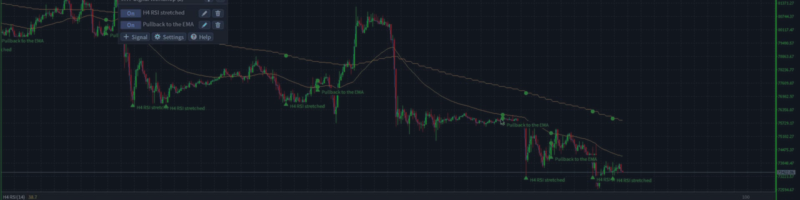
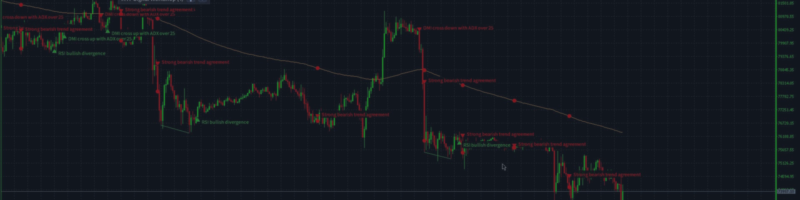
Multi Timeframe Signal Workshop は、どの時間足のインジケーターからでも作れるシグナルを監視し、シグナルが発生したすべての足に印を付ける MetaTrader 4 用のインジケーターです。「H4 の RSI が売られすぎで、価格が日足の EMA 200 より上」のようなシグナルをコードなしでクリックだけで作れ、発生のたびに、そのシグナルが読んだゾーン、ライン、インジケーターの値と一緒にチャートに描かれます。36 個のシグナルが最初から付いており、新しい発生はアラートでお知らせします。 発売価格: 最初の 10 本は 49 USD、その後は 79 USD です。 できること クリックでシグナル作成。 時間足、インジケーターとそのパラメータ(RSI の期間、ボリンジャーバンドの偏差)、何を調べるか(売られすぎ、クロス、ダイバージェンス、ゾーン内の価格、ラインが別のラインより上)と、いつ成立していればよいかを選びます。条件はグループにまとめられます。すべて、いずれか、または指定した数以上です。 1 つのシグナルで複数の時間足。 ある条件は H4、次の条件は

George Ciprian Mandache パブリッシュされたプロダクト

Multi Timeframe Signal Workshop は、どの時間足のインジケーターからでも作れるシグナルを監視し、シグナルが発生したすべての足に印を付ける MetaTrader 5 用のインジケーターです。「H4 の RSI が売られすぎで、価格が日足の EMA 200 より上」のようなシグナルをコードなしでクリックだけで作れ、発生のたびに、そのシグナルが読んだゾーン、ライン、インジケーターの値と一緒にチャートに描かれます。36 個のシグナルが最初から付いており、新しい発生はアラートでお知らせします。 発売価格: 最初の 10 本は 49 USD、その後は 79 USD です。 できること クリックでシグナル作成。 時間足、インジケーターとそのパラメータ(RSI の期間、ボリンジャーバンドの偏差)、何を調べるか(売られすぎ、クロス、ダイバージェンス、ゾーン内の価格、ラインが別のラインより上)と、いつ成立していればよいかを選びます。条件はグループにまとめられます。すべて、いずれか、または指定した数以上です。 1 つのシグナルで複数の時間足。 ある条件は H4、次の条件は

George Ciprian Mandache
Multi Timeframe Indicator Suite 1.9 for MT5 and MT4:
- Fixed: on a chart with docks of different timeframes or different Draw last settings, a dock could stay blank and leave empty space at the bottom of the chart, or draw its line off its candles. Every dock now draws under its own candles.

MT5: https://www.mql5.com/en/market/product/203076
MT4: https://www.mql5.com/en/market/product/203387
User guide: https://www.mql5.com/en/blogs/post/779070
George Ciprian Mandache
Multi Timeframe Indicator Suite 1.8 for MT5 and MT4:
- On every new bar, an entry updates only the bars it draws (its Draw last setting) instead of every bar on the chart. Charts with a long history, such as M1 charts, and the Strategy Tester use much less CPU.

MT5: https://www.mql5.com/en/market/product/203076
MT4: https://www.mql5.com/en/market/product/203387
User guide: https://www.mql5.com/en/blogs/post/779070
George Ciprian Mandache
Multi Timeframe Indicator Suite 1.7 for MT5 and MT4:
- Trend settings: each method shows its On/Off button first and its own numbers right under it, two per line, while it is On. A VWAP's band widths sit under Bands the same way.
- Hovering over a Trend method shows what it checks, with your numbers.
- A settings window of several pages no longer splits a method from its numbers or ends a page on a heading.

MT5: https://www.mql5.com/en/market/product/203076
MT4: https://www.mql5.com/en/market/product/203387
User guide: https://www.mql5.com/en/blogs/post/779070
George Ciprian Mandache
Multi Timeframe Indicator Suite 1.6 for MT5 and MT4:
- Supertrend flips on the bar where the close crosses the current band, one bar earlier than before; new entries use ATR period 10.
- Parabolic SAR never moves inside the range of the two bars before it.
- Bollinger Bands use the population standard deviation, so at 20 bars they are about 2.6% narrower.
- Keltner Channels are the 20 EMA plus and minus 2 times the ATR, with a new ATR period setting.
- S/R zones break only on a close from the other side; supply and demand zones need opposite moves into and out of the base; a fair value gap needs a middle candle that closes past the first candle and fills only when price trades past its edge.
- The Trend entry's settings window shows each method's own numbers.
- Fixed: a click into a number box of the settings window no longer loses what you type next.

MT5: https://www.mql5.com/en/market/product/203076
MT4: https://www.mql5.com/en/market/product/203387
User guide: https://www.mql5.com/en/blogs/post/779070
George Ciprian Mandache
Multi Timeframe Indicator Suite 1.5 for MT5 and MT4:
- Fixed: closing MetaTrader with the indicator on a chart could leave errors about deleting its panel and drawings ("Wrong chart ID") in the Experts log.

MT5: https://www.mql5.com/en/market/product/203076
MT4: https://www.mql5.com/en/market/product/203387
User guide: https://www.mql5.com/en/blogs/post/779070
George Ciprian Mandache
All my MQL code lives in one repository: a library of shared headers and the experts, indicators and scripts built on it. Every program ships for MetaTrader 5 and MetaTrader 4 from the same source...
George Ciprian Mandache
Multi Timeframe Indicator Suite 1.4 for MT5 and MT4:
- MT4: the weekly VWAP of the Default and MA Ribbon + VWAP + Quad Stoch presets stayed empty when the terminal held only a few days of M1 history. It now draws on coarser bars from the start of the week, with a note such as "(on M15 bars until M1 history loads)", and moves to M1 once that history is there.
- MT5: a VWAP does the same while its M1 history loads, instead of staying empty.

MT5: https://www.mql5.com/en/market/product/203076
MT4: https://www.mql5.com/en/market/product/203387
User guide: https://www.mql5.com/en/blogs/post/779070
George Ciprian Mandache
Multi Timeframe Indicator Suite 1.3 for MT5 and MT4:
- Fixed: in the settings window, an On/Off button could keep showing its old state after a click when the window had just changed to another indicator, such as Trend picked after adding Supply/Demand. The setting itself changed and was saved; the button now shows it too.
- Calculations are unchanged: every indicator shows the same values as in 1.2.

MT5: https://www.mql5.com/en/market/product/203076
MT4: https://www.mql5.com/en/market/product/203387
User guide: https://www.mql5.com/en/blogs/post/779070
George Ciprian Mandache
Multi Timeframe Indicator Suite 1.2 is out for MT5 and MT4, free as before.

What changed:
- Eight price structure indicators: Swings, Market structure with BOS and CHoCH, Fib, FVG, Order blocks, S/R, Supply/Demand, and Trend, a dock strip that shows where the trend methods you switch on agree. Their labels, lines and boxes do not count toward the 32 lines.
- The Indicator list groups the indicators under headers, and typing filters it by an indicator's name or its group's.
- Number fields have - and + buttons, On/Off settings are toggle buttons, and the panel's buttons carry icons.
- A space in a dropdown's filter no longer opens the terminal's quick navigation bar.
- MT4: switching the chart's timeframe no longer takes about two seconds.
- Calculations of the indicators from 1.1 are unchanged: they show the same values.

MT5: https://www.mql5.com/en/market/product/203076
MT4: https://www.mql5.com/en/market/product/203387
User guide: https://www.mql5.com/en/blogs/post/779070
George Ciprian Mandache
Multi Timeframe Indicator Suite 1.1 is out for MT5 and MT4, free as before.

What changed:
- ATR and Volume can draw the average of their line in the same dock. Set its length with Average; it is off by default.
- On a timeframe where the broker keeps only a short history, an indicator now draws the bars there are and says so, instead of showing (loading) forever.
- Every dropdown has a filter on top, and a refused Save shows its reason in red.
- MT5: switching the timeframe with the indicator editor open no longer freezes the chart.
- MT4: the indicator no longer drops off the chart after a timeframe switch.
- Calculations are unchanged: every indicator shows the same values as in 1.0.

MT5: https://www.mql5.com/en/market/product/203076
MT4: https://www.mql5.com/en/market/product/203387
User guide: https://www.mql5.com/en/blogs/post/779070
George Ciprian Mandache
Multi Timeframe Indicator Suite draws indicators from any timeframe on one chart. You pick an indicator, a timeframe and how many bars to draw...
George Ciprian Mandache パブリッシュされたプロダクト

Multi Timeframe Indicator Suite は、上位足の移動平均線、バンド、一目均衡表 (Ichimoku)、VWAP、オシレーター、価格構造を、取引している MetaTrader 4 のチャートに表示します。H4 の一目均衡表の雲、日足のサポート・レジスタンスゾーン、クアッドストキャスティクス (quad stochastic) を 1 枚の M15 チャートにまとめて表示でき、それぞれが自分の時間足で計算されるので、チャートを切り替えずに大きな流れを確認できます。オシレーターはサブウィンドウではなく、メインチャート下部の表示エリア (ドック) に表示されます。 主な機能 項目ごとに時間足を指定。 インジケーターごとに時間足、パラメーター、色を個別に設定でき、同じインジケーターを複数回追加することもできます。 チャート内の下部エリア。 オシレーターはメインウィンドウ下部の、高さを指定したエリアに積み重ねて表示され、ローソク足はその上に表示されます。 アンカード VWAP。 起点は日、週、月、四半期、年、または入力した日時から選べ、標準偏差 1 倍と 2

George Ciprian Mandache パブリッシュされたプロダクト

Multi Timeframe Indicator Suite は、上位足の移動平均線、バンド、一目均衡表 (Ichimoku)、VWAP、オシレーター、価格構造を、取引している MetaTrader 5 のチャートに表示します。H4 の一目均衡表の雲、日足のサポート・レジスタンスゾーン、クアッドストキャスティクス (quad stochastic) を 1 枚の M15 チャートにまとめて表示でき、それぞれが自分の時間足で計算されるので、チャートを切り替えずに大きな流れを確認できます。オシレーターはサブウィンドウではなく、メインチャート下部の表示エリア (ドック) に表示されます。 主な機能 項目ごとに時間足を指定。 インジケーターごとに時間足、パラメーター、色を個別に設定でき、同じインジケーターを複数回追加することもできます。 チャート内の下部エリア。 オシレーターはメインウィンドウ下部の、高さを指定したエリアに積み重ねて表示され、ローソク足はその上に表示されます。 アンカード VWAP。 起点は日、週、月、四半期、年、または入力した日時から選べ、標準偏差 1 倍と 2

George Ciprian Mandache パブリッシュされたプロダクト

Average Trader は MetaTrader 4 用のエキスパートアドバイザー(EA)で、利益目標の小さい短期の取引を手動、自動、またはその両方で行います。取引が逆行したときは取引を追加し、平均建値を市場価格に近づけます。買いはナンピン買い下がり、売りはナンピン売り上がりです。 機能 手動、自動、ハイブリッド。 自分で取引を開くことも、Sven シグナルに開かせることも、同じチャートで両方を使うこともできます。買いと売りはそれぞれ無効にできます。 小さな目標。 すべての取引は、pips で設定する利益目標を狙います。 セーフティトレード。 価格が最初の取引に対して設定した pips 数だけ逆行すると、EA はセーフティトレードを開き、平均価格を現在の価格に近づけます。開くのは許可した最大取引数までです。自動のセーフティトレードは無効にできます。 残高に応じたロット数。 Conservative は利用可能な残高 1000 につき 0.01 ロット、積極的なスタイルは 0.02 ロットで取引します。 各取引の前のチェック。

George Ciprian Mandache
MQL5.communityに登録されました