George Ciprian Mandache
  • 信息
5+ 年
经验
5
产品
7
演示版
0
工作
0
信号
0
订阅者
Mostly writing code that does stuff...

User guides are on my blog. For questions or bugs, write in the product's Comments tab or send me a message.
George Ciprian Mandache
Video of the rule language: https://youtu.be/i5lHA5d0JRE Multi Timeframe Signal Workshop marks every bar where a signal you build fires. Every signal is a rule written in a small text language: the condition cards write it for you as you click, and a signal file takes it as you type it...
George Ciprian Mandache
Multi Timeframe Signal Workshop watches signals you build from indicators on any timeframe and marks every bar where one fires...
George Ciprian Mandache 已发布产品

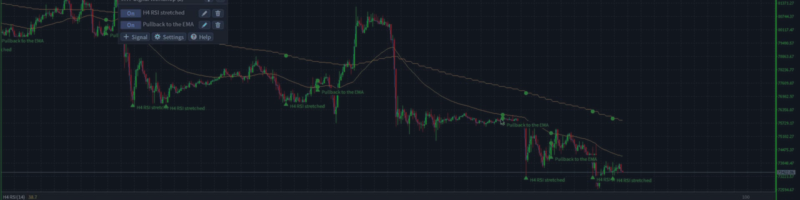
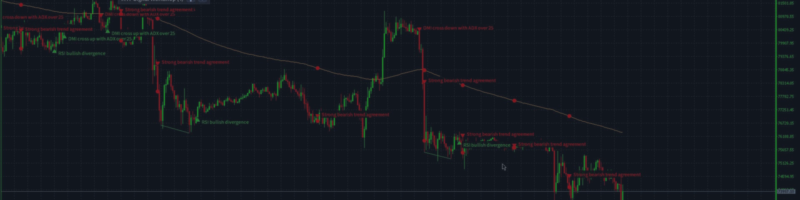
Multi Timeframe Signal Workshop 是一款 MetaTrader 4 指标,它监视您用任意时间周期的指标搭建的信号,并标出每一个信号触发的 K 线。像"H4 RSI 超卖且价格位于日线 EMA 200 之上"这样的信号,只需点击即可搭建,无需编写代码;每次触发都会连同它所读取的区域、线条和指标数值一起画在图表上。它自带 36 个现成信号,出现新的触发时会向您发出警报。 首发价: 前 10 份 49 美元,之后 79 美元。 功能 点击搭建信号。 选择时间周期、带有自身参数的指标(例如 RSI 的周期、布林带的偏差)和要检验的内容(超卖、交叉、背离、价格位于区域内、一条线高于另一条线),以及条件必须在何时成立。条件可以组合成组:全部满足、任意一个满足,或至少满足指定数量。 一个信号使用任意时间周期。 一个条件读取 H4,下一个读取 D1,另一个读取图表本身的时间周期。 在图表上标出。 每次触发都有一个箭头,旁边标有信号名称;相近触发的名称重叠时,较新的一个画在上面。成立的部分也会一同画出:线条交叉处的圆点、背离两个拐点之间的连线、信号所读取的区域或水平。

George Ciprian Mandache 已发布产品

Multi Timeframe Signal Workshop 是一款 MetaTrader 5 指标,它监视您用任意时间周期的指标搭建的信号,并标出每一个信号触发的 K 线。像"H4 RSI 超卖且价格位于日线 EMA 200 之上"这样的信号,只需点击即可搭建,无需编写代码;每次触发都会连同它所读取的区域、线条和指标数值一起画在图表上。它自带 36 个现成信号,出现新的触发时会向您发出警报。 首发价: 前 10 份 49 美元,之后 79 美元。 功能 点击搭建信号。 选择时间周期、带有自身参数的指标(例如 RSI 的周期、布林带的偏差)和要检验的内容(超卖、交叉、背离、价格位于区域内、一条线高于另一条线),以及条件必须在何时成立。条件可以组合成组:全部满足、任意一个满足,或至少满足指定数量。 一个信号使用任意时间周期。 一个条件读取 H4,下一个读取 D1,另一个读取图表本身的时间周期。 在图表上标出。 每次触发都有一个箭头,旁边标有信号名称;相近触发的名称重叠时,较新的一个画在上面。成立的部分也会一同画出:线条交叉处的圆点、背离两个拐点之间的连线、信号所读取的区域或水平。

George Ciprian Mandache
Multi Timeframe Indicator Suite 1.9 for MT5 and MT4:
- Fixed: on a chart with docks of different timeframes or different Draw last settings, a dock could stay blank and leave empty space at the bottom of the chart, or draw its line off its candles. Every dock now draws under its own candles.

MT5: https://www.mql5.com/en/market/product/203076
MT4: https://www.mql5.com/en/market/product/203387
User guide: https://www.mql5.com/en/blogs/post/779070
George Ciprian Mandache
Multi Timeframe Indicator Suite 1.8 for MT5 and MT4:
- On every new bar, an entry updates only the bars it draws (its Draw last setting) instead of every bar on the chart. Charts with a long history, such as M1 charts, and the Strategy Tester use much less CPU.

MT5: https://www.mql5.com/en/market/product/203076
MT4: https://www.mql5.com/en/market/product/203387
User guide: https://www.mql5.com/en/blogs/post/779070
George Ciprian Mandache
Multi Timeframe Indicator Suite 1.7 for MT5 and MT4:
- Trend settings: each method shows its On/Off button first and its own numbers right under it, two per line, while it is On. A VWAP's band widths sit under Bands the same way.
- Hovering over a Trend method shows what it checks, with your numbers.
- A settings window of several pages no longer splits a method from its numbers or ends a page on a heading.

MT5: https://www.mql5.com/en/market/product/203076
MT4: https://www.mql5.com/en/market/product/203387
User guide: https://www.mql5.com/en/blogs/post/779070
George Ciprian Mandache
Multi Timeframe Indicator Suite 1.6 for MT5 and MT4:
- Supertrend flips on the bar where the close crosses the current band, one bar earlier than before; new entries use ATR period 10.
- Parabolic SAR never moves inside the range of the two bars before it.
- Bollinger Bands use the population standard deviation, so at 20 bars they are about 2.6% narrower.
- Keltner Channels are the 20 EMA plus and minus 2 times the ATR, with a new ATR period setting.
- S/R zones break only on a close from the other side; supply and demand zones need opposite moves into and out of the base; a fair value gap needs a middle candle that closes past the first candle and fills only when price trades past its edge.
- The Trend entry's settings window shows each method's own numbers.
- Fixed: a click into a number box of the settings window no longer loses what you type next.

MT5: https://www.mql5.com/en/market/product/203076
MT4: https://www.mql5.com/en/market/product/203387
User guide: https://www.mql5.com/en/blogs/post/779070
George Ciprian Mandache
Multi Timeframe Indicator Suite 1.5 for MT5 and MT4:
- Fixed: closing MetaTrader with the indicator on a chart could leave errors about deleting its panel and drawings ("Wrong chart ID") in the Experts log.

MT5: https://www.mql5.com/en/market/product/203076
MT4: https://www.mql5.com/en/market/product/203387
User guide: https://www.mql5.com/en/blogs/post/779070
George Ciprian Mandache
All my MQL code lives in one repository: a library of shared headers and the experts, indicators and scripts built on it. Every program ships for MetaTrader 5 and MetaTrader 4 from the same source...
George Ciprian Mandache
Multi Timeframe Indicator Suite 1.4 for MT5 and MT4:
- MT4: the weekly VWAP of the Default and MA Ribbon + VWAP + Quad Stoch presets stayed empty when the terminal held only a few days of M1 history. It now draws on coarser bars from the start of the week, with a note such as "(on M15 bars until M1 history loads)", and moves to M1 once that history is there.
- MT5: a VWAP does the same while its M1 history loads, instead of staying empty.

MT5: https://www.mql5.com/en/market/product/203076
MT4: https://www.mql5.com/en/market/product/203387
User guide: https://www.mql5.com/en/blogs/post/779070
George Ciprian Mandache
Multi Timeframe Indicator Suite 1.3 for MT5 and MT4:
- Fixed: in the settings window, an On/Off button could keep showing its old state after a click when the window had just changed to another indicator, such as Trend picked after adding Supply/Demand. The setting itself changed and was saved; the button now shows it too.
- Calculations are unchanged: every indicator shows the same values as in 1.2.

MT5: https://www.mql5.com/en/market/product/203076
MT4: https://www.mql5.com/en/market/product/203387
User guide: https://www.mql5.com/en/blogs/post/779070
George Ciprian Mandache
Multi Timeframe Indicator Suite 1.2 is out for MT5 and MT4, free as before.

What changed:
- Eight price structure indicators: Swings, Market structure with BOS and CHoCH, Fib, FVG, Order blocks, S/R, Supply/Demand, and Trend, a dock strip that shows where the trend methods you switch on agree. Their labels, lines and boxes do not count toward the 32 lines.
- The Indicator list groups the indicators under headers, and typing filters it by an indicator's name or its group's.
- Number fields have - and + buttons, On/Off settings are toggle buttons, and the panel's buttons carry icons.
- A space in a dropdown's filter no longer opens the terminal's quick navigation bar.
- MT4: switching the chart's timeframe no longer takes about two seconds.
- Calculations of the indicators from 1.1 are unchanged: they show the same values.

MT5: https://www.mql5.com/en/market/product/203076
MT4: https://www.mql5.com/en/market/product/203387
User guide: https://www.mql5.com/en/blogs/post/779070
George Ciprian Mandache
Multi Timeframe Indicator Suite 1.1 is out for MT5 and MT4, free as before.

What changed:
- ATR and Volume can draw the average of their line in the same dock. Set its length with Average; it is off by default.
- On a timeframe where the broker keeps only a short history, an indicator now draws the bars there are and says so, instead of showing (loading) forever.
- Every dropdown has a filter on top, and a refused Save shows its reason in red.
- MT5: switching the timeframe with the indicator editor open no longer freezes the chart.
- MT4: the indicator no longer drops off the chart after a timeframe switch.
- Calculations are unchanged: every indicator shows the same values as in 1.0.

MT5: https://www.mql5.com/en/market/product/203076
MT4: https://www.mql5.com/en/market/product/203387
User guide: https://www.mql5.com/en/blogs/post/779070
George Ciprian Mandache
Multi Timeframe Indicator Suite draws indicators from any timeframe on one chart. You pick an indicator, a timeframe and how many bars to draw...
George Ciprian Mandache 已发布产品

Multi Timeframe Indicator Suite 把更高时间周期的移动平均线、通道、一目均衡表 (Ichimoku)、VWAP、振荡指标和价格结构显示在您交易的 MetaTrader 4 图表上。H4 的一目均衡表云图、日线支撑和阻力区域以及四重随机指标 (quad stochastic) 可以同时放在一张 M15 图表上,每个指标都按自己的周期计算,无需切换图表就能看到大周期的走势。振荡指标显示在主图底部的指标栏 (dock) 中,而不是子窗口(副图)里。 功能 每个条目单独设置周期。 每个指标都有自己的周期、参数和颜色,同一个指标可以添加多次。 指标栏位于图表内。 振荡指标叠放在主窗口底部、由您设定大小的区域内,K 线始终显示在它们上方。 锚定 VWAP。 可锚定到日、周、月、季、年,或您输入的日期和时间,可选显示一倍和两倍标准差通道。点击图表或切换周期都不会移动锚点。 预设。 内置布局,例如 Ichimoku Trend、Scalper、Swing 和 Donchian Quad Stoch Stack,以及您自己保存的布局,所有图表共用。 按交易品种保存布局。

George Ciprian Mandache 已发布产品

Multi Timeframe Indicator Suite 把更高时间周期的移动平均线、通道、一目均衡表 (Ichimoku)、VWAP、振荡指标和价格结构显示在您交易的 MetaTrader 5 图表上。H4 的一目均衡表云图、日线支撑和阻力区域以及四重随机指标 (quad stochastic) 可以同时放在一张 M15 图表上,每个指标都按自己的周期计算,无需切换图表就能看到大周期的走势。振荡指标显示在主图底部的指标栏 (dock) 中,而不是子窗口(副图)里。 功能 每个条目单独设置周期。 每个指标都有自己的周期、参数和颜色,同一个指标可以添加多次。 指标栏位于图表内。 振荡指标叠放在主窗口底部、由您设定大小的区域内,K 线始终显示在它们上方。 锚定 VWAP。 可锚定到日、周、月、季、年,或您输入的日期和时间,可选显示一倍和两倍标准差通道。点击图表或切换周期都不会移动锚点。 预设。 内置布局,例如 Ichimoku Trend、Scalper、Swing 和 Donchian Quad Stoch Stack,以及您自己保存的布局,所有图表共用。 按交易品种保存布局。

George Ciprian Mandache 已发布产品

Average Trader 是一款 MetaTrader 4 智能交易系统 (EA),以手动、自动或两者结合的方式开立目标较小的短线交易。当交易走向不利方向时,它会追加交易,让平均入场价格向市场价格靠拢:买入向下摊平,卖出向上摊平。 功能 手动、自动或混合。 您可以自己开仓,让 Sven 信号开仓,或在同一图表上两者并用。买入和卖出可以分别关闭。 小目标。 每笔交易都瞄准您以 pips 设定的目标利润。 安全订单。 当价格逆着第一笔交易移动设定的 pips 数时,EA 会开立一笔安全订单,使平均价格更接近当前价格,最多开到您允许的最大交易数。自动安全订单可以关闭。 按余额计算手数。 Conservative 每 1000 可用余额交易 0.01 手,激进风格交易 0.02 手。 每笔交易前的检查。 只有满足最低余额、最低净值和最大点差的条件,才会开立交易。 预警。 每笔交易完成时都可以显示预警。 摊平是向逆着您移动的仓位加仓,因此持仓量会随每笔安全订单增加,直到达到设置中的最大交易数。 策略 自动交易时,Average Trader 通过 Sven

George Ciprian Mandache
已在MQL5.community注册