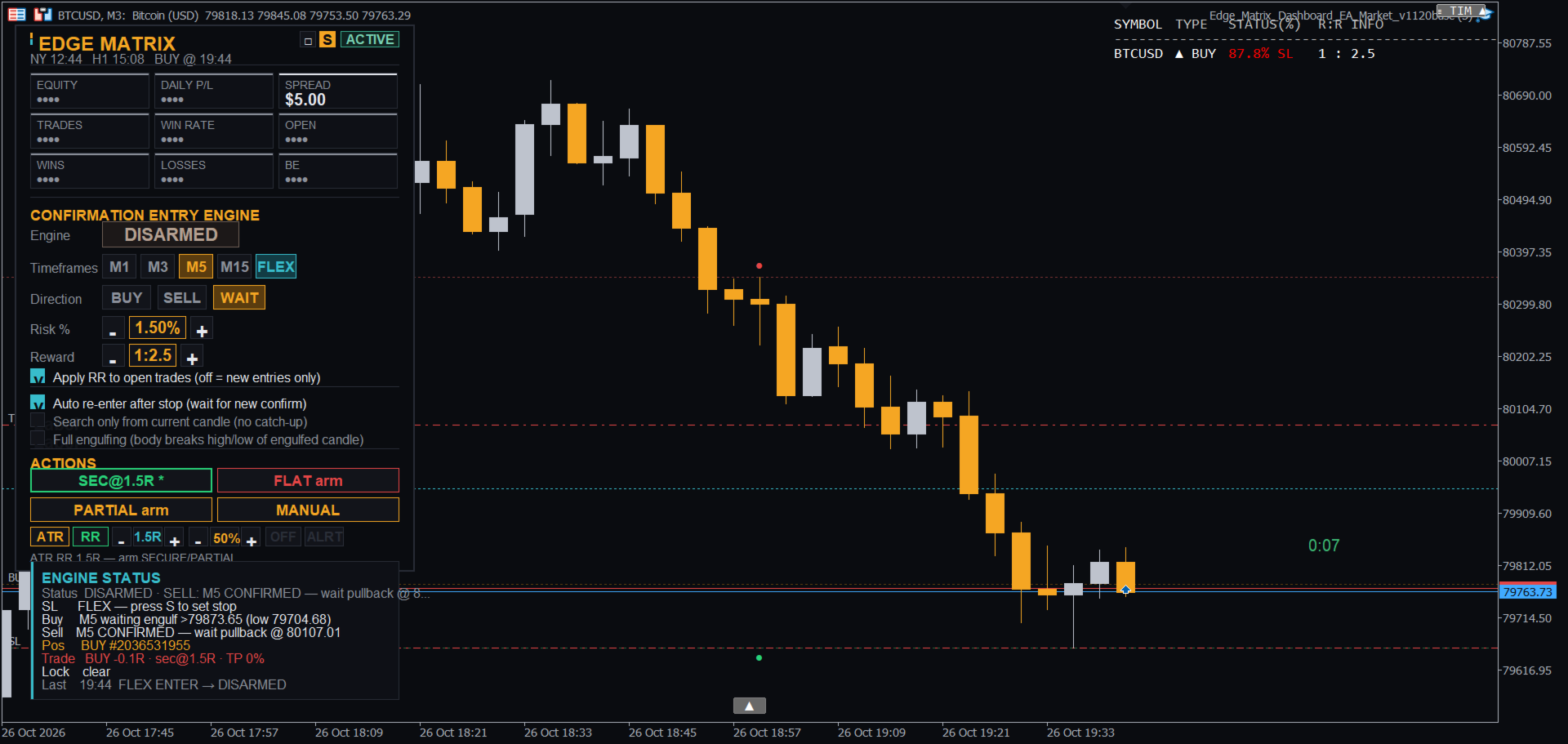
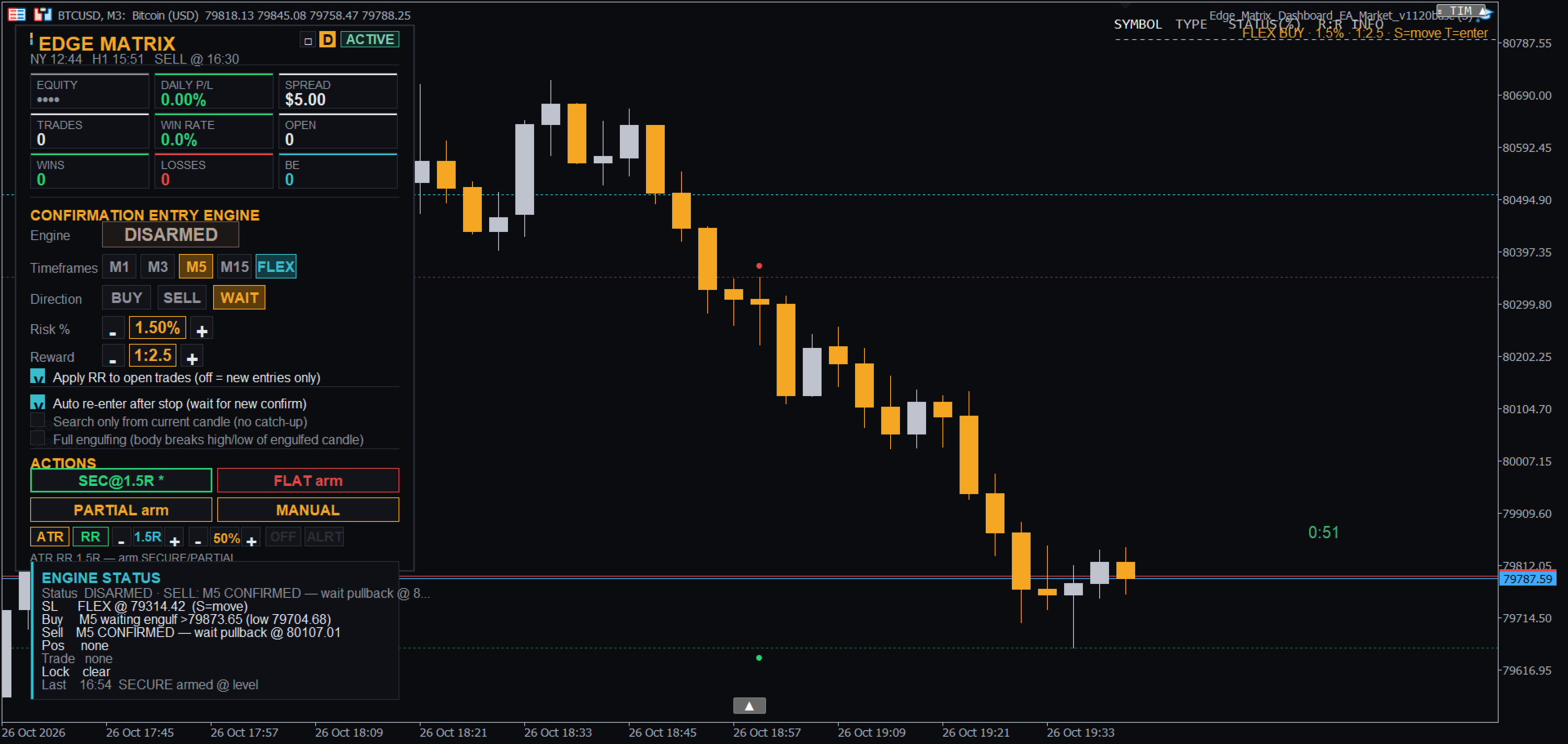
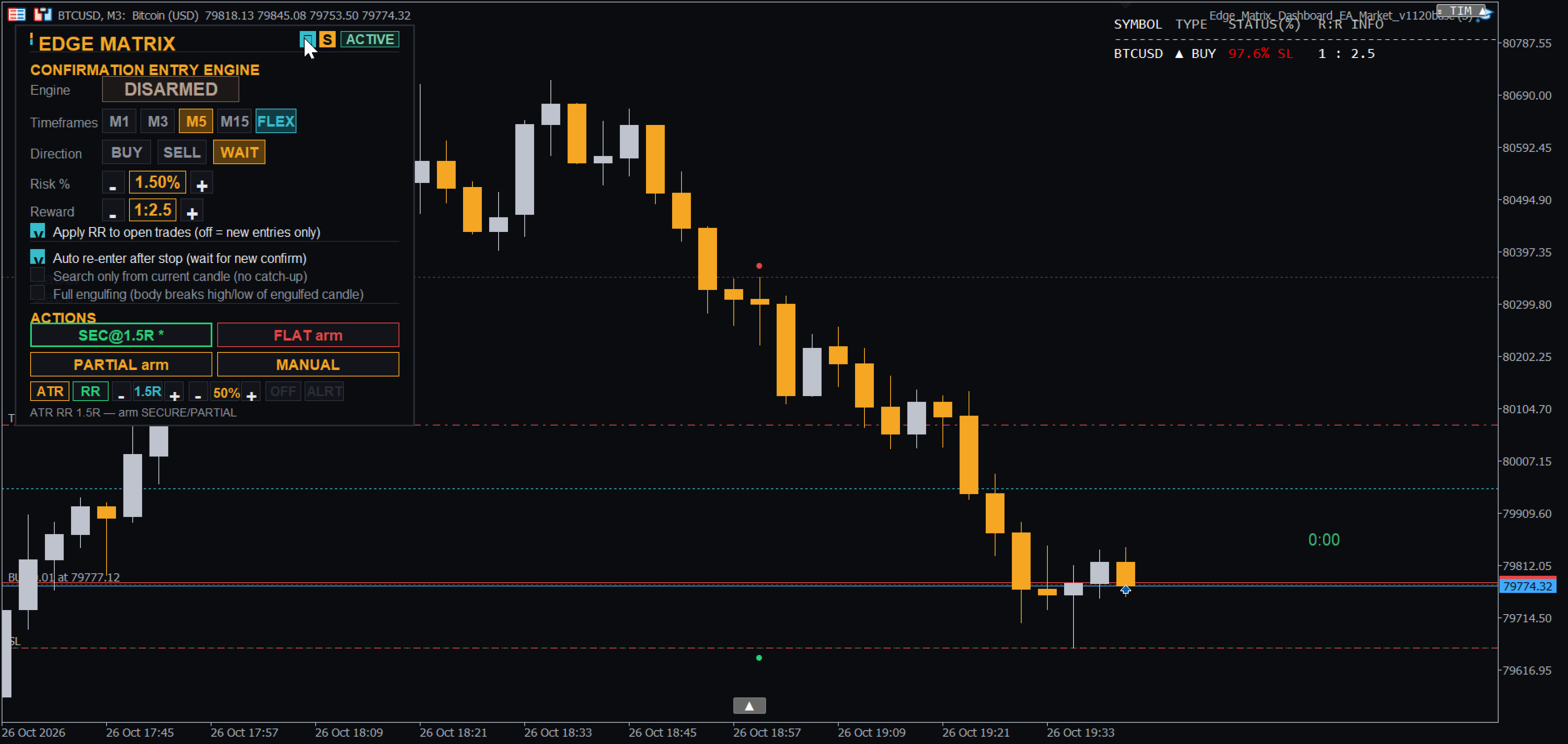
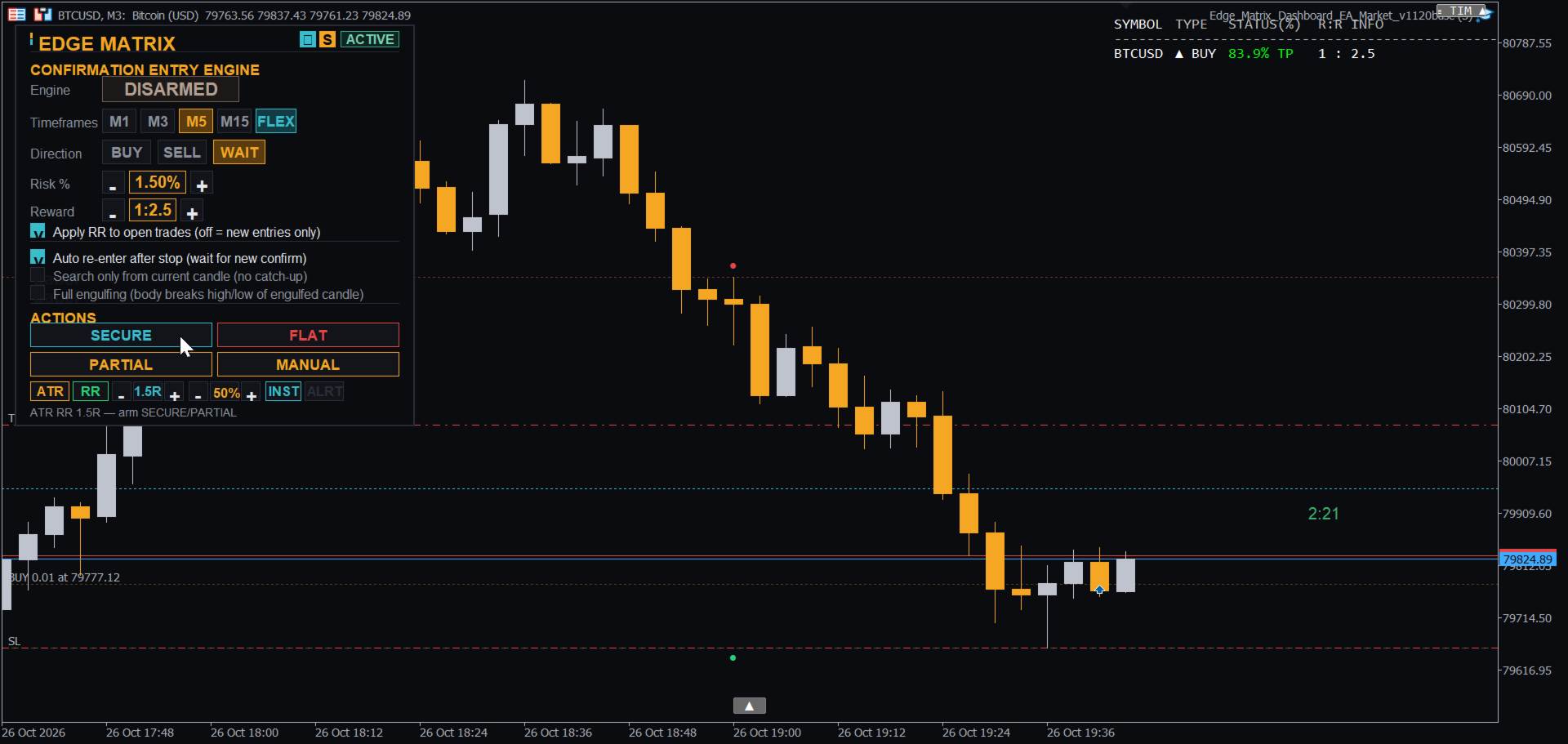
Edge Matrix Trade Manager Panel

チャート上のクリーンなコントロールパネル1つで、トレードを計画し、リスクを把握し、すべてのイグジットを管理します。

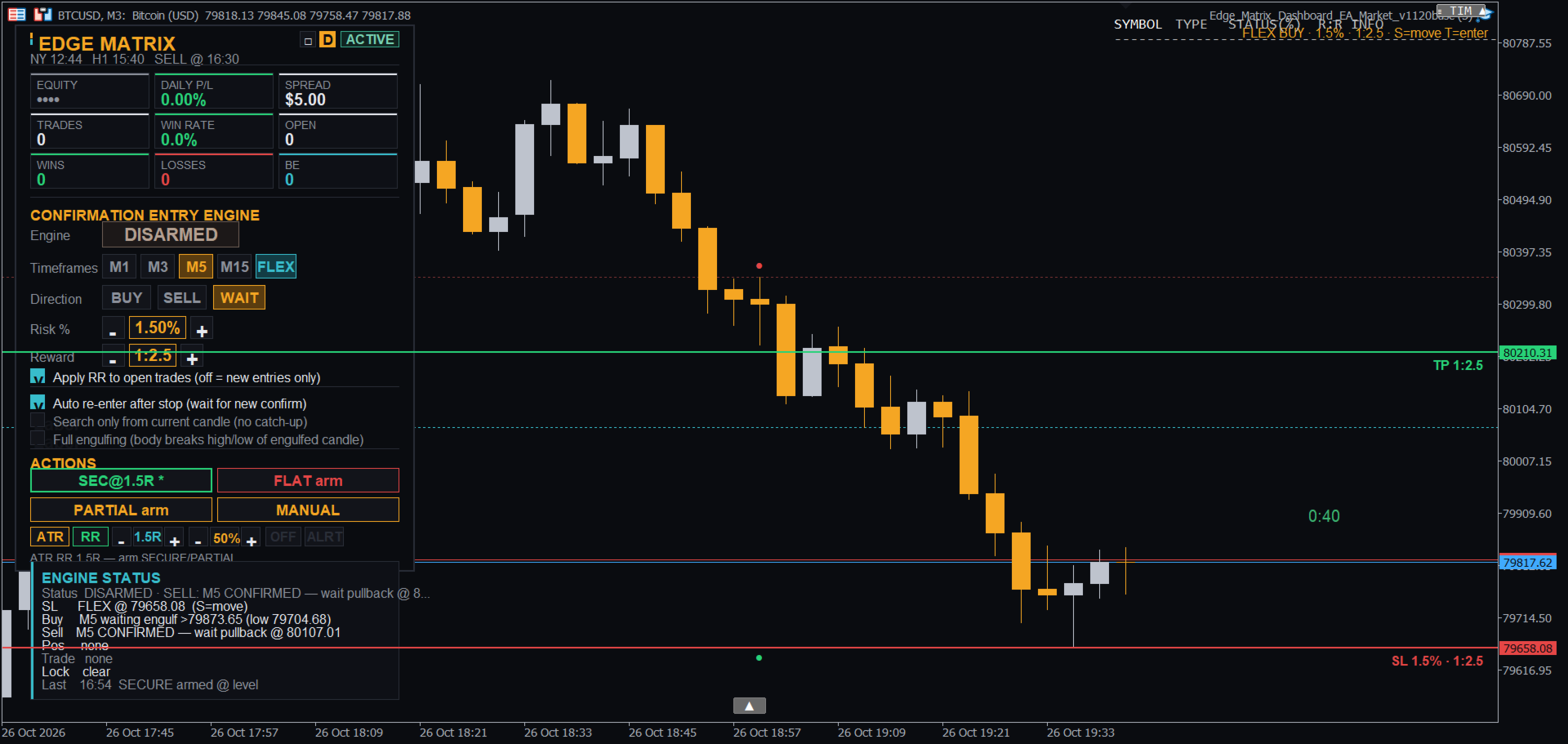
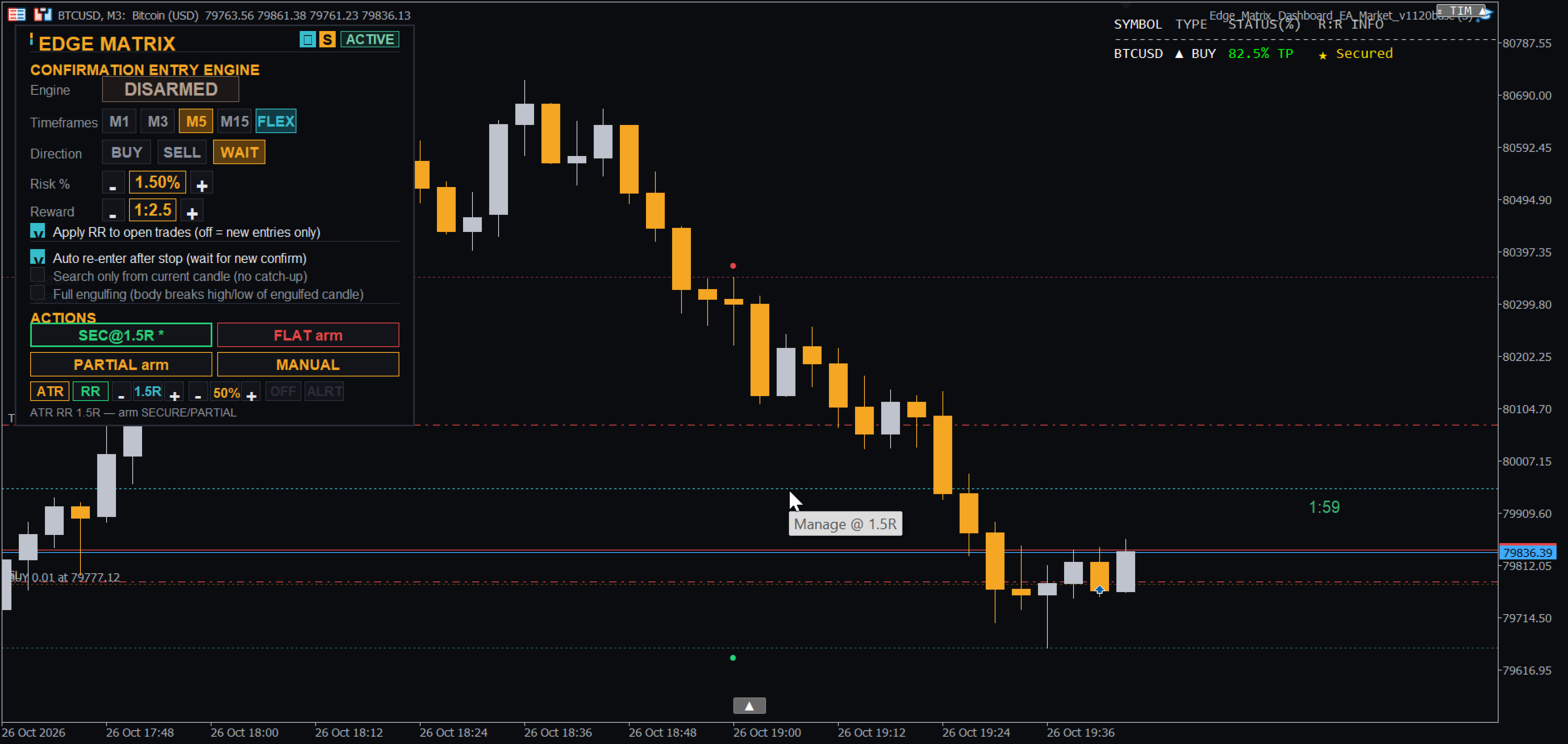
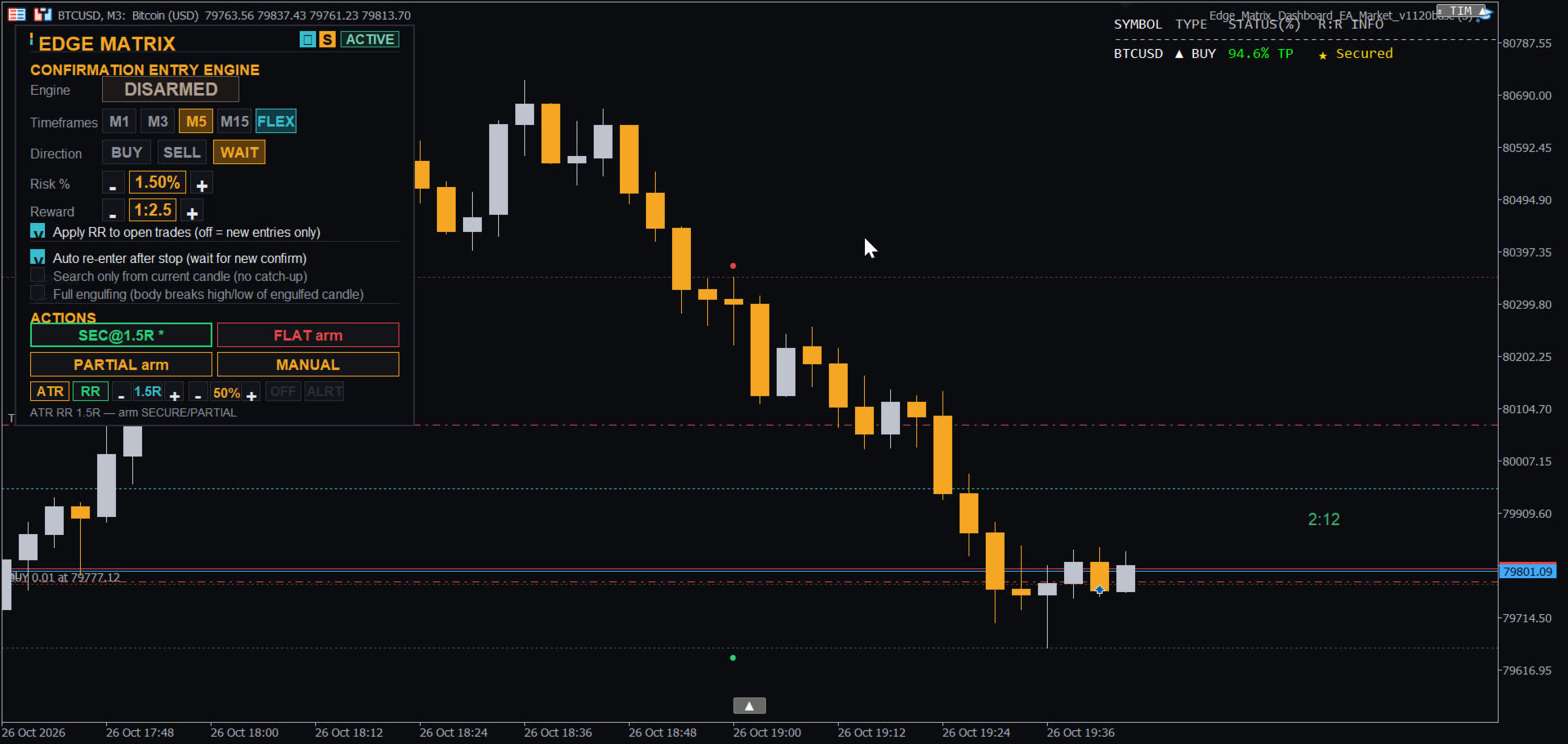
Edge Matrixは、MetaTrader 5用のトレードアシスタントです。アイデアを計画的なトレードへと変換します。リスク%に基づくロットサイズの自動計算、エントリー前にチャート上に描画されるストップとターゲット、そしてポジション保有後の明確な管理ツールを提供します。あなたが主導権を握り続け、パネルが推測や手動計算の手間を省きます。 トレーダーに選ばれる理由

  • クリックする前にリスクを把握:ロットサイズはリスク%とストップから計算されます。注文送信前に、ストップライン、ターゲットライン、RR(リスク・リワード)ラベルがチャートに表示されます。

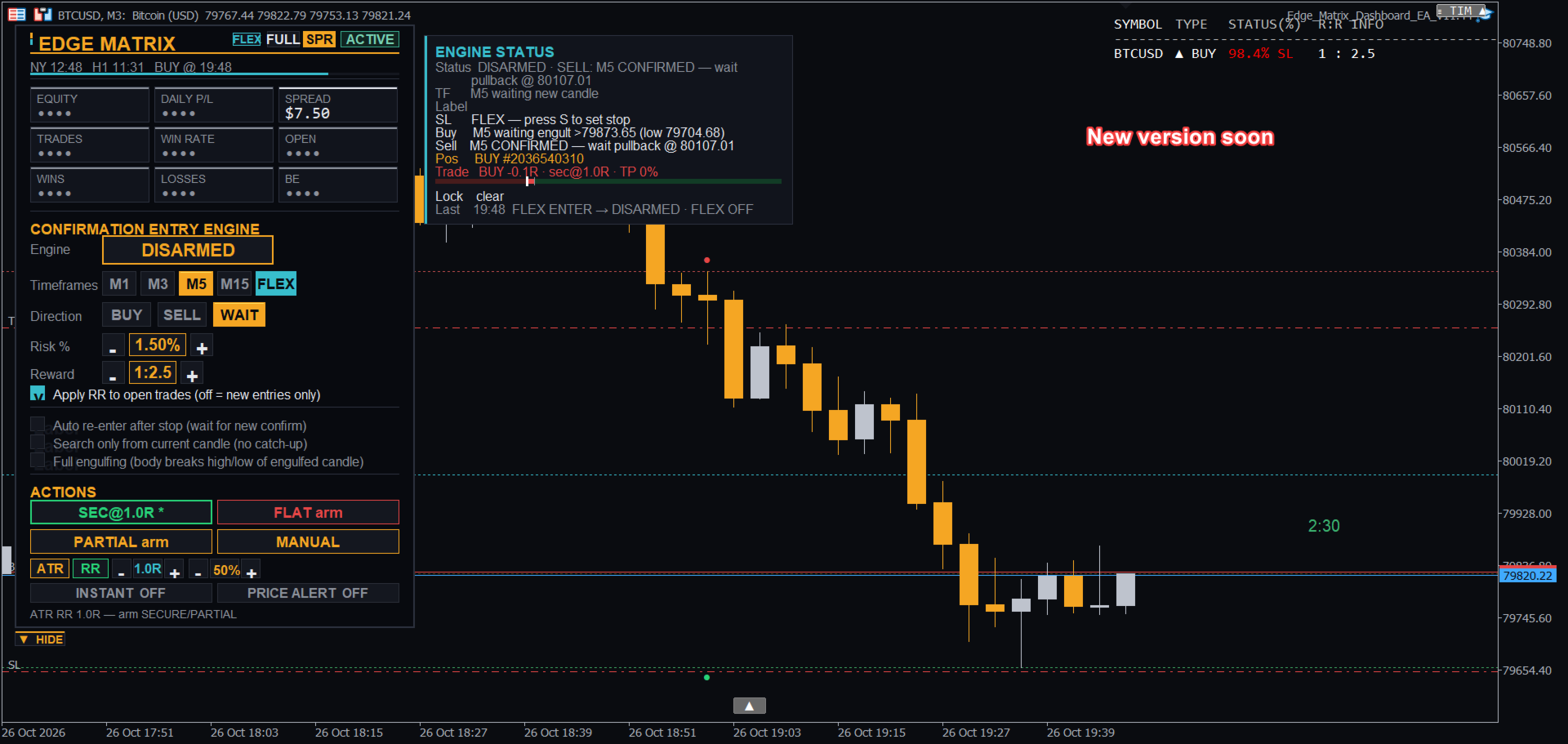
  • 勘ではなく、根拠のある確証エントリー:内蔵エンジンがM1、M3、M5、M15で1時間の極端なローソク足を監視し、包み足(エンゴルフィング)の確認後のみエントリーします。ライブステータス行で何待ちの状態かを確認できます。

  • 必要なときに使えるフルマニュアルコントロール(FLEXモード):1つのキーで独自のストップを配置し、別のキーでエントリーすれば、ターゲットはRRに追従して自動的に動きます。

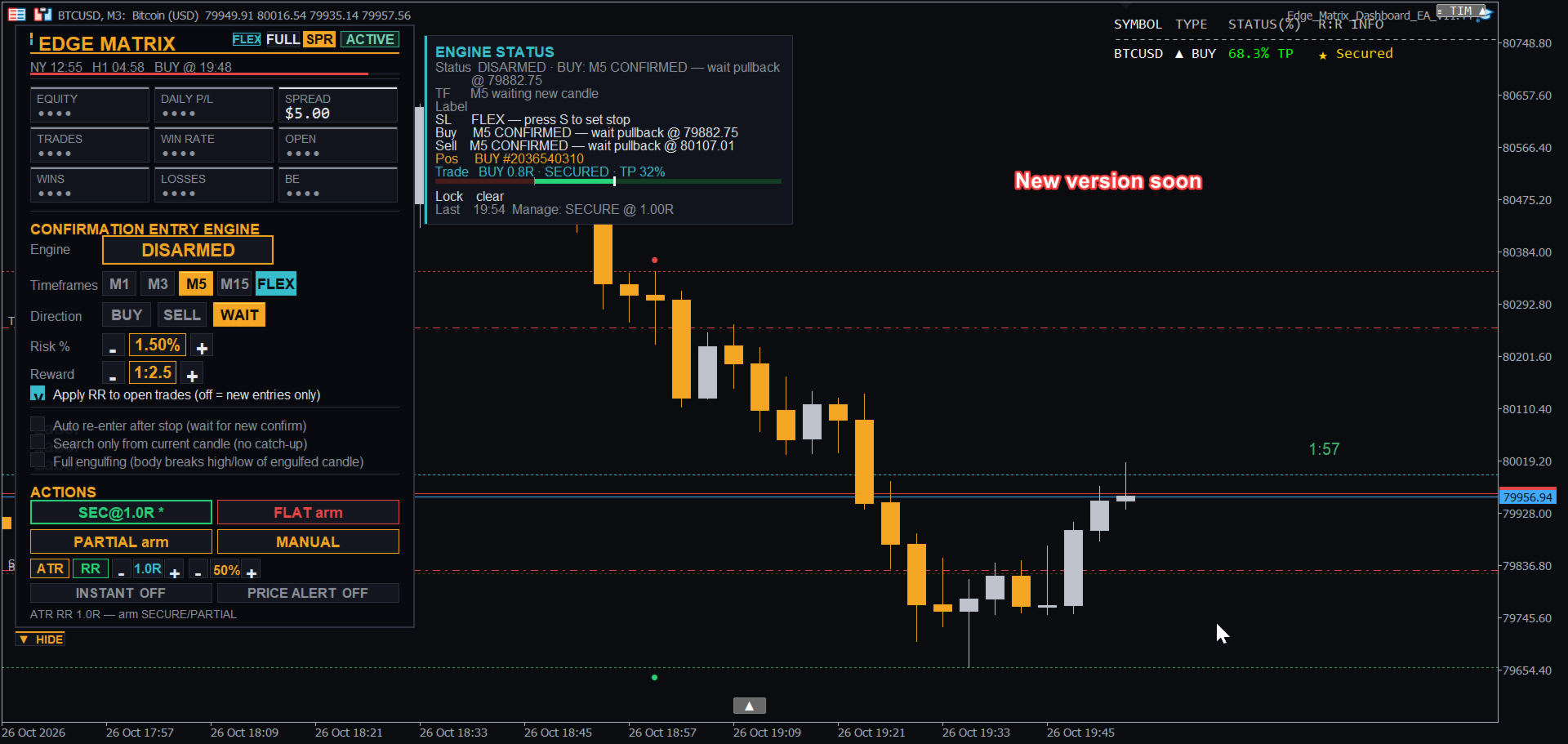
  • 自分流のトレード管理:SECURE(建値移動)、PARTIAL(一部決済)、FLAT(全決済)を、特定のRRレベル、ATRレベル(H1 / M30)、または自由に動かせるMラインで発動できます。

  • 徹底した規律の維持:日次損失制限、日次目標アラート、最大オープンポジション数、オプションのスプレッドフィルター、週明けクローズ保護。

  • アラート機能:サウンドまたはプッシュ通知付きの価格アラートラインに加え、エントリー、セキュア、利食い、損切りのサウンド通知。

  • ダークテーマとライトテーマを選べるクリーンなダッシュボード。 他のツールとの違い

  • トレード全体を1つのパネルで完結:ロット計算機、エントリーツール、トレードマネージャーを切り替える必要なく、同じダッシュボードから計画、エントリー、セキュア、部分利食い、決済まで行えます。

  • 自分のスタイルに合わせたイグジットプラン:RRレベル、H1 / M30のATRレベル、またはドラッグしたラインでSECURE / PARTIAL / FLATを発動。

  • キーボード優先のFLEXエントリー:ストップ用(S)とエントリー用(T)のキーを使い、ロットサイズとRRターゲットが即座に計算されます。

  • ブローカーの仕様を考慮した注文サイジング:ストップはブローカーの最小距離を尊重し、証拠金やブローカーのボリューム制限を超える場合は自動的にロットが縮小されます。 ローンチ期間:アーリーユーザー向けの導入特別価格。今後のアップデートで価格が値上がりする可能性があります。 今後の予定 - すべての購入者に無料アップデート すでに完成している大型アップデートが、ローンチ期間終了後間もなく、すべての購入者に向けて無料アップデートとしてリリースされます。以下の機能が追加されます:

  • 折りたたみ可能なダッシュボード:1クリックで小さな「EDGE MATRIX」バッジに縮小し、もう1クリックで元に戻せます。

  • 他のシンボルのオープンポジションを一覧表示する「OTHER SYMBOLS」カード。

  • シンボルごとの独立した管理プラン(SECURE / PARTIAL / FLAT、レベル、ロック):あるシンボルのプランが稼働したまま、別のシンボルに切り替えることができます。

  • エンジンステータスのタイムフレーム別ビュー:M1、M3、M5、M15のそれぞれが何を監視し、なぜ待機しているのかを表示。

  • よりスマートなエントリー:有効化されている最小のタイムフレームを優先し、すでに包み足が形成されている場合は即座にエントリー。

  • 他のシンボルでも機能する価格アラート。 「COMING IN THE NEXT UPDATE」とマークされたプレビュー画像は、スクリーンショットセクションにあります。機能や時期は変更される場合があります。 はじめに

  1. チャートにEAをアタッチします。ダッシュボードでリスク%(Risk %)とRR(リワード倍率)を設定します。

  2. BUYまたはSELLを選択し、ARMを押してエンジンに確認を待たせるか、下のFLEXを使用して手動エントリーを行います。

  3. エントリー後、SECURE / PARTIAL / FLATまたはMラインを使用してトレードを管理します。 FLEXモードの使い方

  4. FLEXをオンにします(ダッシュボードのボタン、またはチャートを選択した状態でFキーを押す)。

  5. ストップを置きたい価格までマウスを動かし、Sを押します。ストップライン、ターゲットライン、RRラベルが表示されます。これはプレビューにすぎず、注文は送信されず、既存のオープンポジションも変更されません。

  6. 方向は自動検出し、価格より下でストップ=BUYプラン、価格の上でストップ=SELLプランとなります。

  7. ロットサイズはリスク%から算出され、ターゲットはRR(RR 2=ストップ距離の2倍の場所)に配置されます。ストップを動かすにはもう一度Sを押すか、ダッシュボードでRR / Risk %を変更します。

  8. Tを押してエントリーします。エントリー後はエンジンが武装解除(disarm)されるため、連続して自動発動することはありません。 キーボードショートカット(最初にチャートをクリックしてください) S - マウスポインターの価格にストップラインを配置/移動する T - 計画されたストップで今すぐエントリー(Sの後) M - 管理ラインを配置/移動する(触れると武装されたSECURE / PARTIALを実行) A - 価格アラートラインを配置/移動する(サウンド/プッシュのみ) F - FLEXモードのオン/オフを切り替える ストラテジーテスター ストラテジーテスターでクリックせずにエンジンを動かすには、「Auto-arm the engine in the Strategy Tester」を有効(デフォルト)のままにしてください。これはテスターのみに影響し、ライブチャートには影響しません。 主な入力設定 (KEY INPUTS) マジックナンバー、ロットモード(リスク%または固定)、リスク%(Risk %)、リワード倍率、日次損失制限、日次目標、最大オープンポジション数、最大スプレッド(0=オフ)、監視するタイムフレーム、デフォルト方向、FLEXのデフォルト、サウンドとプッシュのオプション、ダッシュボードの位置とテーマ。 注意事項 任意のシンボルで動作します。まずデモ口座でテストし、小さなリスク%から始めてください。トレードにはリスクが伴い、過去またはテストされた結果は将来の結果を保証するものではありません。このツールはトレードアシスタントであり、利益を約束するものではありません。
作者のその他のプロダクト
Smart Bulk SL Setter
Muhammad Hassan Muhammad Ahmad Atiyah
Smart Bulk SL Setter MT5 Script – Bulk Stop Loss Management Overview Smart Bulk SL Setter is a trade management script for MetaTrader 5 designed to modify the Stop Loss level of multiple existing open positions at once. The script executes once per attachment and applies a user-defined Stop Loss price based on selected filters. It does not run in the background, does not open trades, and does not generate signals. Core Functionality The script allows setting a unified Stop Loss level for multip
SL Based TP Multiplier
Muhammad Hassan Muhammad Ahmad Atiyah
Smart TP by Risk Ratio MT5 Script – Take Profit Calculation Based on Stop Loss Overview Smart TP by Risk Ratio is a script for MetaTrader 5 that calculates Take Profit levels using the distance between the Open Price and Stop Loss, multiplied by a user-defined ratio (R-Multiple). The script can be applied once per execution to the current chart symbol or to all open positions. It does not open trades and requires a Stop Loss to be set for the calculation. Functionality TP Calculation: Take Prof
Advanced Breakeven & Partial Close Manager MT5 Script – One-Click Trade Management Overview Advanced Breakeven & Partial Close Manager is a trade management script for MetaTrader 5. It works only on existing open positions and applies actions strictly based on user-defined rules. The script runs once per attachment and performs only the actions explicitly enabled in the inputs. It does not run in the background, does not trade automatically, and does not generate signals. Core Functionality The
Smart Bulk TP Setter
Muhammad Hassan Muhammad Ahmad Atiyah
Smart Bulk TP Setter MT5 Script – Bulk Take Profit Management Overview Smart Bulk TP Setter is a trade management script for MetaTrader 5 designed to modify the Take Profit level of multiple existing open positions at once. The script executes once per attachment and applies a user-defined Take Profit price based on selected filters. It does not run in the background, does not open trades, and does not generate signals. Core Functionality The script allows setting a unified Take Profit level fo
Smart Bulk Order Closer
Muhammad Hassan Muhammad Ahmad Atiyah
Smart Bulk Order Closer MT5 Script – PnL-Based Trade Closer Overview Smart Bulk Order Closer is a script for MetaTrader 5 that closes open positions based on their current floating profit or loss in account currency. The script executes once per attachment and only closes trades that meet the user-defined PnL conditions. It does not run in the background, does not modify Stop Loss or Take Profit, and does not open trades. Core Functionality The script evaluates each position individually and ap
Apex StopLoss Manager
Muhammad Hassan Muhammad Ahmad Atiyah
Apex StopLoss Manager MT5 Script – Stop Loss Control Utility Overview Apex StopLoss Manager is a trade management script for MetaTrader 5 designed to provide precise, rule-based control over Stop Loss behavior on existing open positions . The script focuses on manual execution and accuracy. It does not use automated trading logic, does not open trades, and runs once per attachment . Core Functionality The script provides two independent Stop Loss control functions, both enabled only through exp
Active Trade Monitor
Muhammad Hassan Muhammad Ahmad Atiyah
Stop switching to the terminal tab while price is moving. Active Trade Monitor places a clean, real-time dashboard directly on your chart showing all open positions at once — symbol, direction, lot size, profit in dollars, profit in pips, and current R:R ratio. Everything you need to manage your trades is visible without leaving the chart. FEATURES: — Displays all open positions directly on the chart — Shows: symbol, type (BUY/SELL), lot size — Live profit in dollars and pips — Current R:R r
One Click Symbol Hub
Muhammad Hassan Muhammad Ahmad Atiyah
Twenty open chart tabs is not a workspace — it's noise. One-Click Symbol Hub replaces all of that with a single small button on your chart. Press it and a clean symbol panel appears, centered on your screen. Tap any pair and the chart switches instantly — preserving your current timeframe. Press the button again and everything disappears. FEATURES: — Switch between symbols with a single click — Preserves current timeframe on every switch — Clean pop-up panel — appears and disappears on deman
Session Clock Advanced
Muhammad Hassan Muhammad Ahmad Atiyah
Know exactly where you are in the trading day — at a glance. Session Clock Advanced displays two live clocks directly on your chart: your local time (auto-detected from your PC) and New York time. No manual offset needed. But it goes further than a simple clock. The indicator detects the active trading session in real time — Asia, London, New York, or any overlap — and changes color automatically so you always know the market context without reading the time. A live countdown shows exactly
Equity and Balance
Muhammad Hassan Muhammad Ahmad Atiyah
Your account health deserves a live dashboard — not a number buried in the terminal corner. Equity & Balance Monitor displays your real-time equity, balance, margin usage, drawdown, and growth metrics directly inside your chart window. No extra windows. No switching screens. FEATURES: — Live equity and balance display on chart — Real-time margin and free margin tracking — Drawdown monitoring — Historical growth indicators — Always visible — updates on every tick — Clean dashboard layout — Cus
Time and Spread
Muhammad Hassan Muhammad Ahmad Atiyah
Two numbers define whether your entry is clean or expensive: the spread, and the time left on the current candle. Candle Timer & Spread Monitor tracks both in real time, displayed as a single compact label directly on your chart. See the current spread widen during session transitions. Know when you're entering in the last seconds of a candle. Place it in any corner of your chart. FEATURES: — Live spread display (in points) — Countdown timer to next candle close (MM:SS) — Updates every secon
Ultimate Trade Manager Panel EA
Muhammad Hassan Muhammad Ahmad Atiyah
Stop managing trades manually under pressure. Ultimate Trade Manager (UTM) Pro is a professional trade-management panel for MetaTrader 5. Set your exit rules once, arm the trigger, and let the panel execute them the instant price reaches your level — partial closes, breakeven, profit booking, or full exits, with zero manual clicking and zero emotional decisions. HOW IT WORKS Attach the EA, configure your rules in the panel, and drop a trigger line on the chart (press X , or click "Create Lines"
フィルタ:
レビューなし
レビューに返信