Simba Cloud EA
- エキスパート
-
Emmanuel Ndacyayisenga
 NDACYAYISENGA Emmanuel is a quantitative trader and MQL5 Expert Advisor developer focused on transforming practical trading concepts into systematic and automated trading solutions.
 - バージョン: 4.18
- アクティベーション: 10
ADAPTIVE TRADING • INTELLIGENT RISK CONTROL • AUTOMATED POSITION MANAGEMENT
Read the market. Adapt to the regime. Control the risk. Protect the profit.
SIMBA CLOUD EA is a regime-adaptive Expert Advisor for MetaTrader 5, designed to combine market analysis, adaptive risk management, capital protection, multi-symbol monitoring, and automated position management in one system.
Markets do not behave the same way all the time.
A strong trend, a normal trend, a range, and a choppy market may require different levels of risk and different position-management decisions.
SIMBA CLOUD EA is designed to recognize these changing conditions and respond according to predefined rules.
WHAT IS SIMBA CLOUD EA?Don't try to predict everything. Build a system that can adapt.
SIMBA CLOUD EA is an automated trading and position-management system built around four core processes:
1. READ THE MARKET
Analyze trend, momentum, volatility, structure, and market activity.
2. CLASSIFY THE ENVIRONMENT
Evaluate whether current conditions are more consistent with:
STRONG TREND • TREND • RANGE • CHOPPY
3. ADAPT THE RISK
Adjust effective risk according to market conditions and recent trading performance.
4. MANAGE THE POSITION
Protect the trade, secure partial profits, manage the runner, trail the position, and respond to changing market conditions.
The objective is to avoid using one rigid approach in every market environment.
1. MULTI-SYMBOL MARKET MONITORINGSIMBA CLOUD EA can monitor and trade multiple symbols from a single EA installation.
The system can be configured for up to 20 symbols, depending on your broker, terminal resources, and configuration.
Supported instruments depend on your broker and account.
Examples include:
-
XAUUSD — Gold
-
XBRUSD — Brent Oil
-
US30
-
US100
-
US500
-
EURUSD
-
GBPUSD
-
Other broker-supported instruments
Each symbol is evaluated independently.
This means the system does not assume that Gold, Forex and indices will behave in the same way.
ONE EA
MULTIPLE MARKETS
ONE RISK FRAMEWORK
2. ADAPTIVE MARKET REGIME DETECTIONMarket conditions continuously change.
SIMBA CLOUD EA uses multiple technical measurements to evaluate the current environment.
EMA — Directional Bias
Used as a reference for short-term directional structure and market bias.
Ichimoku Kinko Hyo — Market Structure
Used to evaluate equilibrium, trend structure, momentum relationships and potential changes in market direction.
Stochastic — Momentum
Provides additional information about short-term momentum and market pressure.
ATR — Volatility
Measures current volatility and helps identify relatively quiet or active market conditions.
ADX — Trend Strength
Helps evaluate the strength of directional movement.
Volume — Market Activity
Provides an additional measurement of market activity.
These components are combined to classify conditions into categories such as:
STRONG TREND
TREND
RANGE
CHOPPY
The purpose is not to predict the market with certainty.
The purpose is to make the trading system aware of the environment before determining how aggressively it should operate.
3. REGIME-BASED RISK MANAGEMENTSIMBA CLOUD EA does not have to treat every market condition identically.
The configured risk can be adjusted according to the detected market regime.
Example configuration:
| Market Regime | Example Risk |
|---|---|
| Strong Trend | 0.90% |
| Normal Trend | 0.70% |
| Range | 0.50% |
| Choppy | 0.30% |
| Maximum Risk Ceiling | 1.00% |
These values are examples and can be changed according to the EA settings, trading strategy, account size and personal risk tolerance.
The underlying principle is:
4. STATE-BASED CAPITAL PROTECTIONMore favorable conditions can allow greater configured exposure. Less favorable conditions require greater caution.
Market regime is only one part of the risk framework.
SIMBA CLOUD EA can also monitor the recent sequence of trading results.
When consecutive losses occur, the system can progressively reduce risk according to the configured state model.
Example:
| Consecutive Losses | State | Risk Multiplier |
|---|---|---|
| 0–1 | NORMAL | 100% |
| 2 | CAUTION | 70% |
| 3 | PROBATION | 50% |
| 4 | RECOVERY | 30% |
| 5+ | SUSPENDED | 0% |
These are example values and are configurable according to the EA settings.
The philosophy is straightforward:
A losing trade should not automatically justify greater risk on the next trade.
Instead:
Losses → Greater Caution → Lower Exposure
Depending on the configured recovery logic, profitable trades can help restore the system toward normal operation.
5. EMERGENCY SHIELDSIMBA CLOUD EA includes an additional drawdown-protection layer.
When account equity reaches a configured drawdown threshold, the Emergency Shield can activate.
Example:
3% Equity Drawdown
↓
Emergency Shield Activated
↓
Risk Capped at 0.60%
The exact thresholds and risk levels depend on the configuration.
The purpose is to reduce exposure during periods of significant unfavorable performance.
This creates multiple levels of protection:
Normal Trading → Caution → Stronger Protection
6. DAILY LOSS PROTECTIONSIMBA CLOUD EA can monitor daily trading performance and stop opening new positions when the configured daily-loss threshold is reached.
For example:
Maximum Daily Loss: 3%
Once the configured limit is reached, new trades can be blocked for the applicable trading period.
This can help prevent continued trading during a session that has already reached its predefined loss boundary.
7. INTELLIGENT STOP-LOSS MANAGEMENTStop-loss distance should take market conditions into consideration.
SIMBA CLOUD EA uses ATR and market-regime information as part of its risk and trade-management framework.
The system is designed to recognize that:
-
Quiet markets behave differently from volatile markets.
-
Strong trends may require more room.
-
Choppy conditions may require greater caution.
-
A wider stop should not automatically mean greater account risk.
Broker-aware calculations are also used for position sizing and stop placement according to the trading environment.
8. R-MULTIPLE POSITION MANAGEMENTSIMBA CLOUD EA manages positions through configurable R-multiple stages rather than relying only on one fixed take-profit level.
A typical configuration can follow:
1R — PROTECT
When the trade reaches approximately 1R, the EA can move the position toward breakeven according to the configured settings.
2R — FIRST PARTIAL
A configurable portion of the position can be closed around 2R.
3R — SECOND PARTIAL
Another portion can be closed around 3R.
4R — RUNNER
The remaining position can continue as a runner while market conditions continue to support the trade.
The general progression is:
PROTECT → SECURE → SECURE MORE → LET IT RUN
The exact percentages, R levels and management rules depend on the EA configuration.
9. ICHIMOKU KINKO HYO EXIT LOGICStrong trends can continue beyond an initial profit target.
At the same time, market structure and momentum can change.
SIMBA CLOUD EA incorporates Ichimoku Kinko Hyo into its exit-management framework.
The relationship between the Tenkan-sen and Kijun-sen can provide additional information about changing short-term market structure and momentum.
The configured Kinko Hyo exit logic can therefore be used as an additional mechanism for managing positions when the market begins showing signs of a potential change.
This can be particularly useful when managing runner positions.
Instead of relying exclusively on a fixed target, the system can evaluate whether the market continues to provide conditions for keeping the position open.
10. ATR INTELLIGENCEVolatility is constantly changing.
A market can transition from quiet conditions to high volatility within a relatively short period.
SIMBA CLOUD EA uses ATR together with measurements such as ADX and volume to evaluate the current market environment.
The system can distinguish between conditions such as:
STRONG TREND
Higher directional strength with sufficient market activity.
NORMAL TREND
Directional movement under more moderate conditions.
RANGE
Limited directional movement and weaker trend characteristics.
CHOPPY
Unstable or conflicting market conditions where aggressive trading may be less desirable.
The EA can then adapt its risk and position-management behavior according to the configured rules.
11. PROFIT PROTECTION & RUNNER MANAGEMENTA common trading problem is allowing a profitable position to return too much profit—or closing a strong position too early.
SIMBA CLOUD EA provides staged position management that can include:
-
Breakeven protection
-
Partial profit taking
-
Additional profit protection
-
Runner management
-
Volatility-aware trailing
-
EMA-based management
-
Kinko Hyo exit conditions
The objective is not to capture every market point.
The objective is to provide a structured process for reducing risk while allowing favorable positions the opportunity to continue.
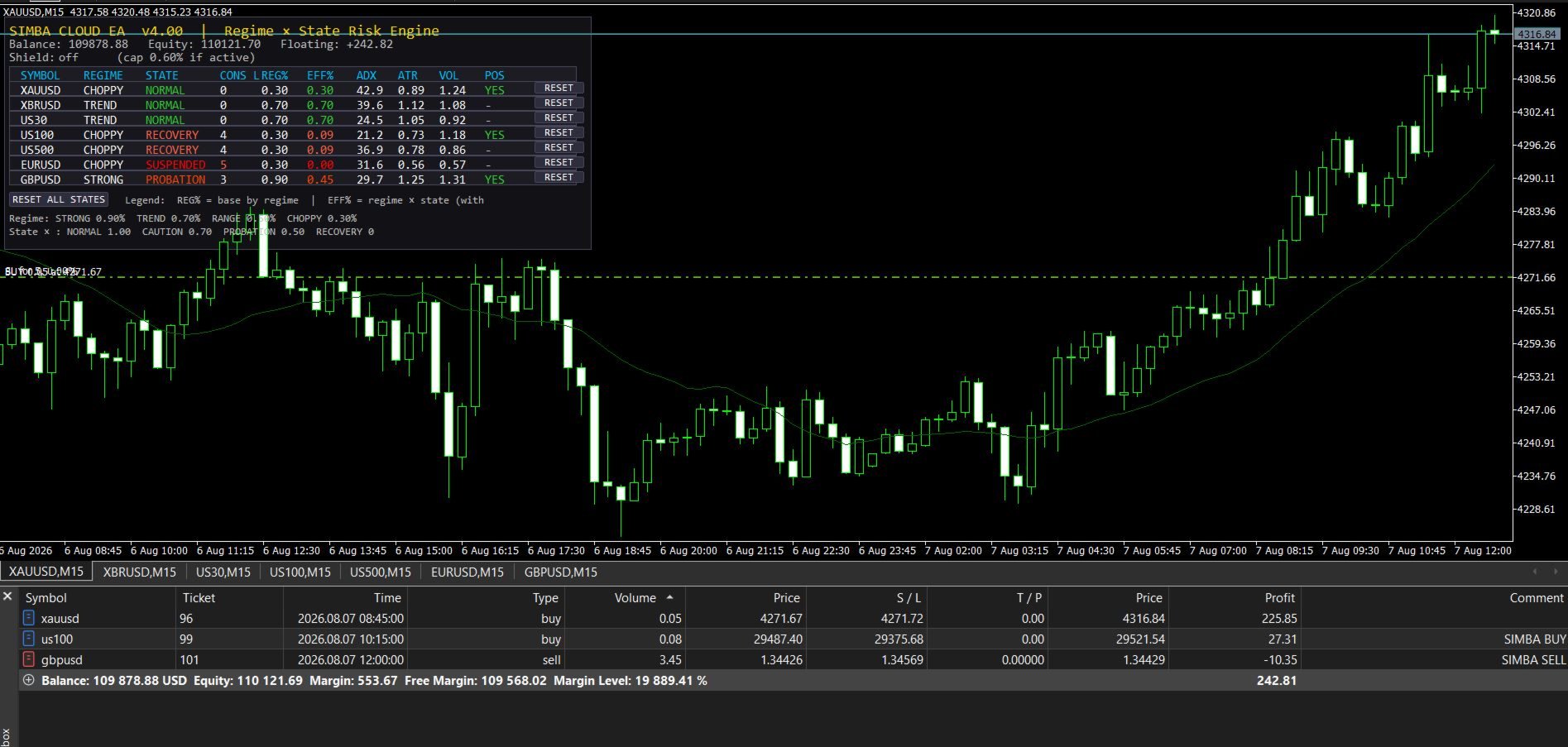
12. REAL-TIME TRADING DASHBOARDSIMBA CLOUD EA includes a dashboard for monitoring the current trading environment and system state.
Depending on configuration, the dashboard can display information such as:
-
Symbol
-
Market regime
-
Trading state
-
Current risk
-
ADX
-
ATR
-
Volume information
-
Position status
-
Drawdown information
-
Protection status
-
Trading activity
This helps you understand not only what the EA is doing, but also the market context associated with its decisions.
13. BROKER-AWARE MT5 EXECUTIONSIMBA CLOUD EA is designed around practical MetaTrader 5 trading requirements.
Broker-Aware Position Sizing
Position sizing can use MT5 broker-specific calculations such as OrderCalcProfit() .
Volume Normalization
Trade volume is checked against broker requirements including:
-
Minimum volume
-
Maximum volume
-
Volume step
Stop-Level Validation
The EA takes broker restrictions such as:
-
SYMBOL_TRADE_STOPS_LEVEL
-
SYMBOL_TRADE_FREEZE_LEVEL
into consideration when performing stop-loss and position-management operations.
Spread Protection
An optional maximum-spread filter can help avoid trading when transaction costs exceed the configured threshold.
Session Filter
Trading can be restricted to selected trading hours.
Magic Number Separation
The EA uses its configured magic-number identification to help separate its positions from other Expert Advisors.
Multi-Symbol Operation
Multiple instruments can be monitored from one EA installation, subject to broker specifications and terminal resources.
Trade Confirmation
The EA is designed to verify trade operations before continuing with dependent management logic.
14. NO MARTINGALE. NO GRID. NO UNCONTROLLED RECOVERY.SIMBA CLOUD EA is not based on aggressive recovery techniques.
It does not require:
-
Martingale lot multiplication
-
Grid averaging
-
Doubling exposure after losses
-
Unlimited recovery positions
Its risk philosophy is:
When conditions improve:
PARTICIPATE.
When conditions weaken:
REDUCE RISK.
When losses accumulate:
PROTECT CAPITAL.
When protection limits are reached:
STOP.
WHO IS SIMBA CLOUD EA FOR?BUSY TRADERS
For traders who cannot monitor charts continuously.
The EA can monitor configured markets, evaluate conditions, manage positions and apply predefined risk rules while you focus on other responsibilities.
SYSTEMATIC TRADERS
For traders who prefer predefined rules over emotional decision-making.
SIMBA can automate processes such as:
-
Market-regime detection
-
Risk allocation
-
Stop-loss management
-
Breakeven protection
-
Partial profits
-
Runner management
-
Trailing
-
Exit management
MULTI-MARKET TRADERS
For traders who want to monitor several instruments from one MT5 installation.
Multiple configured markets can be evaluated without manually switching between charts throughout the trading session.
EXPERIENCED TRADERS
You may already know how to identify your setups.
The challenge may be what happens after the entry.
SIMBA CLOUD EA focuses heavily on the repetitive part of trade management:
Risk → Protection → Partial Profit → Trailing → Exit
PROP-FIRM & FUNDED TRADERS
Prop-firm trading introduces additional risk-management requirements.
Depending on the configuration, SIMBA can incorporate:
-
Daily-loss limits
-
Maximum drawdown protection
-
Risk ceilings
-
Consecutive-loss protection
-
Emergency drawdown protection
-
Position-risk controls
However, SIMBA CLOUD EA does not guarantee passing a prop-firm challenge or receiving a funded account.
Always verify the current rules of your specific prop firm before configuring or using the EA.
RISK-CONSCIOUS TRADERS
If capital protection is as important to you as finding entries, SIMBA CLOUD EA is designed around that principle.
Sometimes the most important trading decision is not:
"When should I enter?"
It is:
"When should I reduce risk or stop?"
THE SIMBA ARCHITECTURESIMBA CLOUD EA is built around multiple connected layers:
MARKET ANALYSIS
↓
REGIME DETECTION
↓
SIGNAL EVALUATION
↓
ADAPTIVE RISK
↓
STATE PROTECTION
↓
POSITION MANAGEMENT
↓
PROFIT PROTECTION
↓
EXIT / RUNNER MANAGEMENT
A trading system is not only about finding an entry.
It must also define:
How much should I risk?
What happens after a loss?
What happens after a win?
When should I protect the position?
When should I take partial profit?
When should I allow a runner to continue?
When should I stop trading?
SIMBA CLOUD EA is designed around these questions.
IMPORTANT — BEFORE DEPLOYMENTSIMBA CLOUD EA is a configurable trading software system. It is not a plug-and-play EA where the same settings are appropriate for every trader, broker, account or market.
AFTER DOWNLOADING OR RENTING THE EA
Please contact the developer before deploying SIMBA CLOUD EA on a live or prop-firm account.
After you download or rent the EA, contact me to receive the recommended manual settings and initial configuration guidance based on your intended account, trading conditions and risk tolerance.
The EA contains multiple risk, market-regime and position-management parameters. Using inappropriate settings can produce results that are very different from the intended system behavior.
Recommended process:
1. Download or rent the EA
↓
2. Contact the developer
↓
3. Receive the recommended manual settings
↓
4. Apply and review the configuration
↓
5. Test the EA on a demo account
↓
6. Observe its behavior under different market conditions
↓
7. Only after proper testing, consider live deployment
This manual configuration guidance is particularly important when using the EA with:
-
Different account sizes
-
Different brokers
-
Different symbols
-
Different leverage
-
Different risk tolerances
-
Prop-firm challenges
-
Funded accounts
Do not immediately deploy the EA on a live account using unverified settings.
The purpose of the initial guidance is to help you understand how the EA's risk controls, market-regime settings, position management and protection features should be configured before live use.
DEMO TESTING IS STRONGLY RECOMMENDED
Before using the EA with real funds:
-
Install it on a demo account.
-
Configure the symbols and risk settings.
-
Test the strategy under different market conditions.
-
Verify broker-specific execution requirements.
-
Understand the position-management rules.
-
Make sure the settings match your risk tolerance.
-
Only then consider live deployment.
Never assume that default settings are appropriate for every account, broker, symbol or trader.
THE SIMBA PHILOSOPHYYou cannot control the market.
You cannot eliminate losing trades.
You cannot know with certainty what the next candle will do.
But you can control your response.
You can control:
RISK
EXPOSURE
POSITION SIZE
PROFIT PROTECTION
TRADING FREQUENCY
WHEN TO STOP
That is the philosophy behind SIMBA CLOUD EA.
The objective is not to build a machine that claims to know everything about the market.
The objective is to build a system that can:
OBSERVE
ADAPT
PROTECT
MANAGE
Because the market changes continuously.
Your trading system should be able to respond to those changes.
BUILT FOR ONE PURPOSEWhether you are a busy trader, systematic trader, multi-market trader, experienced trader, prop-firm trader, or simply focused on disciplined risk management, SIMBA CLOUD EA is built around one philosophy:
READ THE MARKET.
ADAPT TO THE REGIME.
CONTROL THE RISK.
PROTECT THE PROFIT.
LET STRONG MOVES RUN.
You cannot control the market.
You can control how you respond to it.
SIMBA Cloud EA
PRODUCT IDENTITY
Developed by: ShieldNexus
Developer: NDACYAYISENGA Emmanuel
Trading Engine: SIMBA Trading Engine
Product Edition: SIMBA Community EditionSIMBA Cloud EA
Powered by the SIMBA Trading Engine© NDACYAYISENGA Emmanuel / ShieldNexus
Product version and features may be updated over time.
Risk Warning: Trading financial markets involves substantial risk. Past or simulated performance does not guarantee future results. Use appropriate risk management and test the EA on a demo account before live deployment.