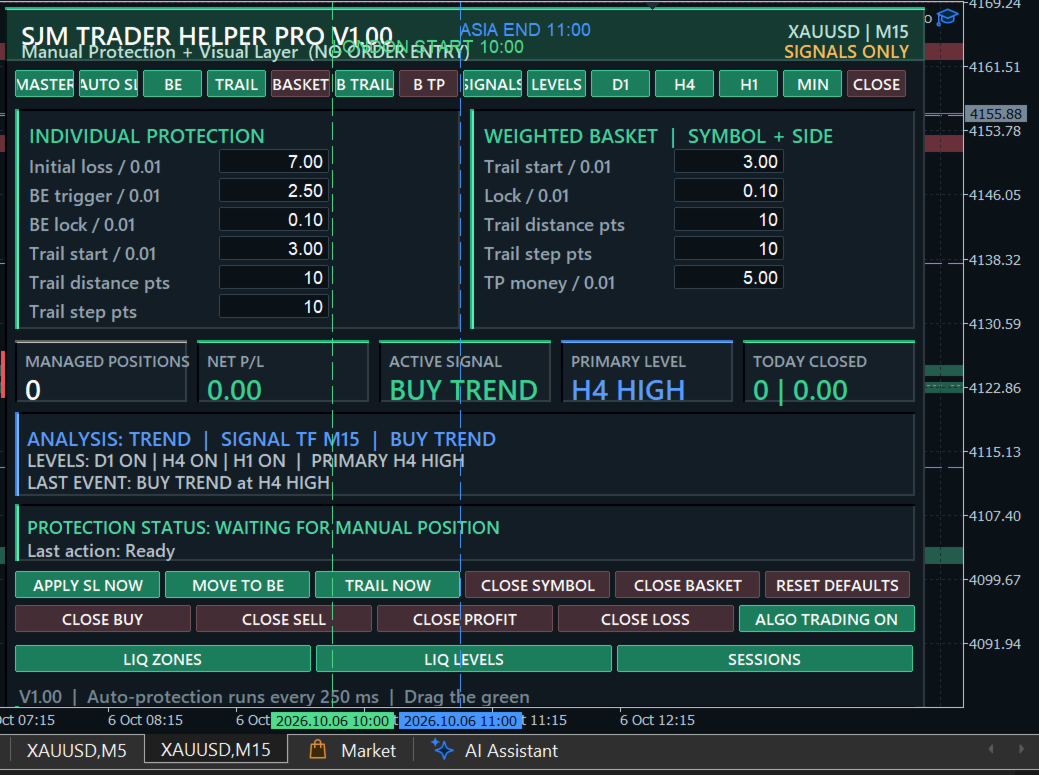
SJM Trader Helper Pro
- ユーティリティ
- バージョン: 1.0
- アクティベーション: 5

Short Description
Stop watching green trades turn red. SJM Trader Helper Pro is the ultimate MT5 manual position-protection dashboard that automatically locks in profits, trails stops, manages position baskets, and alerts you to high-impact news and liquidity sweeps. Keep 100% control over your entries while automating 100% of your risk management.
Full Description
Never Let a Winning Trade Turn Into a Loss Again
Most traders don't fail because of bad entries—they fail because of greed, hesitation, and poor trade management. SJM Trader Helper Pro turns MetaTrader 5 into an automated, risk-eliminating fortress.
You take the entries; the dashboard handles the defense. The second you open a trade, SJM Trader Helper Pro takes over: applying protective stops, locking in breakeven profits, dynamically trailing price, and protecting multi-entry baskets—all while overlaying high-probability liquidity zones and news warnings directly on your chart.
100% Controlled Execution: This tool never opens orders automatically and uses no hidden black-box strategies. You retain total freedom over your entries while enjoying institutional-grade profit preservation.
Why Top Traders Use SJM Trader Helper Pro
- Instant Risk Elimination: Automatically calculates risk based on your money-per-0.01-lot preference and applies a protective Stop Loss immediately.
- Profit Locking Engine: Snaps your stop loss to breakeven + locked profit the moment your trade surges in your favor.
- Weighted Basket Defense: Scale into positions with peace of mind. The dashboard calculates net profit across multiple entries and protects your total exposure as a single weighted unit.
- Institutional Chart Overlays: Spot key market liquidity zones, higher timeframe levels (D1, H4, H1), UTC session markers, and real-time sweep/trend bar signals.
- High-Impact News Guard: Integrated economic reader alerts you to impending high-impact events before volatile spikes hit.
- 1-Click Bulk Execution: Close all trades, specific buy/sell sides, losing positions, or profitable positions instantly with panic-button speed.
Key Features at a Glance
- Automated Rules: Auto SL · Breakeven Lock · Dynamic Trailing Stop · Weighted Basket Management.
- Visual Edge: Liquidity zones & levels · D1/H4/H1 structure levels · UTC sessions · Live high-impact news countdown · Signal sweep engine.
- Emergency Control: 1-click execution for Apply SL, BE, Trail, Close Symbol, Close Basket, Close Profit, Close Loss.
- Clean & Respectful: Sleek draggable/minimizable UI · Fully respects broker freeze levels and minimum stop distances · Per-account auto-saving · Restores your custom chart themes automatically upon removal.
Dashboard Manual & Quick Reference
1. Top Control Switches (Green = ON | Red = OFF)
| Switch | Function |
| MASTER | Arm or pause all automatic protection rules instantly. |
| AUTO SL | Apply an initial protective stop loss to unprotected manual positions. |
| BE | Move stop loss to breakeven + locked profit once the trigger is hit. |
| TRAIL | Dynamically trail the stop loss behind price. |
| BASKET | Switch protection mode from individual trades to a weighted position basket. |
| B TRAIL | Enable dynamic trailing for the net basket profit. |
| B TP | Enable target money take-profit for the entire basket. |
| SIGNALS | Toggle visual chart signals and sweep/trend bar text. |
| LEVELS | Show/hide higher timeframe horizontal levels. |
| D1 / H4 / H1 | Toggle individual level timeframes on/off. |
| MIN / CLOSE | Minimize dashboard to a compact bar / remove tool from chart. |
2. Risk & Trailing Parameters (Values set per 0.01 Lot)
Press Enter in any field to save your custom parameters.
Individual Position Management (Left Column)
- Initial Loss / 0.01: Maximum cash risk allocated per 0.01 lot for initial Auto SL.
- BE Trigger / 0.01: Profit required per 0.01 lot before Stop Loss shifts to breakeven.
- BE Lock / 0.01: Net cash profit secured per 0.01 lot when breakeven triggers.
- Trail Start / 0.01: Profit required per 0.01 lot to initiate the trailing stop.
- Trail Distance pts: Trailing distance maintained behind the current price (in points).
- Trail Step pts: Minimum favorable movement required before updating the stop loss.
Weighted Basket Management (Right Column)
- Trail Start / 0.01 & Lock / 0.01: Activation profit and secured lock threshold for the combined basket.
- Trail Distance pts & Step pts: Trailing rules applied to the basket's average price.
- TP Money / 0.01: Target cash profit per 0.01 lot to automatically close the entire basket.
3. Action Buttons & Status Indicators
Direct Execution Buttons
- APPLY SL NOW / MOVE TO BE / TRAIL NOW: Force immediate application of protection rules.
- CLOSE SYMBOL: Instant panic-close for all managed positions on the active symbol.
- CLOSE BASKET: Close only positions linked in a weighted basket (2+ trades on the same side).
- CLOSE BUY / CLOSE SELL: Wipe out all long or short positions in one click.
- CLOSE PROFIT / CLOSE LOSS: Mass-close only trades currently in gain or loss.
- RESET DEFAULTS: Instantly restore factory risk settings.
Live Display Cards & Overlays
- Metric Cards: Real-time visibility for Managed Positions, Net P/L, Active Signal, Primary Level, and Today's Closed P/L.
- Status Dashboard: Shows active mode, signal TF, active signal state, level statuses, protection alerts, and last performed action.
- Visual Toggles & Footer: LIQ ZONES, LIQ LEVELS, and SESSIONS toggles; footer displays current UTC offset and time remaining until the next high-impact news release.
Note: Drag the green header strip to position the dashboard anywhere on your chart without triggering accidental order placements.