Multi Stochastic Viewer
- インディケータ
- バージョン: 2.0
- アクティベーション: 5

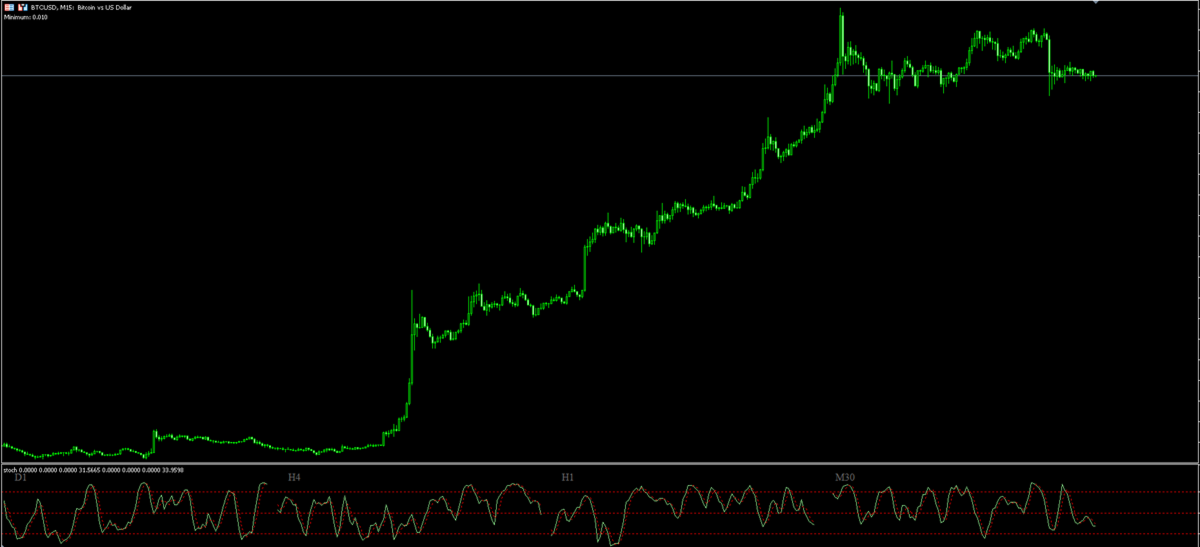
Analyze up to 4 Stochastic timeframes side-by-side in a single window. Perfect your entry timing, confirm higher timeframe trends, and streamline your analysis without switching charts.
MultiStochViewer is an essential visual tool designed for Forex, Index, and Commodity traders who rely on the Stochastic Oscillator to validate trade setups.
Instead of cluttering your screen with multiple indicator windows or constantly switching timeframes, MultiStochViewer organizes and displays 4 custom Stochastic timeframes side-by-side inside a single sub-window.
🎯 Why Your Trading Strategy Needs This Tool
-
Seamless Top-Down Analysis: Instantly confirm if higher timeframes (e.g., H4 or D1) are overbought or oversold while fine-tuning your entry on lower timeframes (e.g., M15, M30, or H1).
-
Clean & Clutter-Free Charts: Keep your main chart area clear for Price Action, Market Structure, or Key Levels while maintaining full visibility over multi-timeframe momentum.
-
Complete Customization:
-
Custom Timeframes: Set any combination of 4 timeframes (from M1 up to Monthly).
-
Independent Parameters: Adjust %K, %D, Slowing, and MA Method for each individual Stochastic.
-
Toggle Views: Enable or disable any of the 4 Stochastic panels with a simple True/False switch.
-
Full Visual Control: Customize colors, line widths, and styles (solid main lines and dotted signal lines).
-
-
Clear & Dynamic Layout: Automatic dynamic scaling adjusts to your zoom level, accompanied by clear timeframe labels and pre-configured key levels (20 / 50 / 80) for instant overbought/oversold identification.
⚙️ Technical Specifications
-
Platform: MetaTrader 5 (MT5).
-
Supported Timeframes: M1, M5, M15, M30, H1, H4, D1, W1, MN1.
-
Optimized Performance: Written in pure, high-performance MQL5 using native indicator handles to ensure lightweight execution without slowing down your terminal.
📌 Input Parameters
-
TF_1 to TF_4: Select the timeframe for each panel section.
-
KPeriod / DPeriod / Slowing / Method: Configure parameters for each Stochastic oscillator.
-
MainColor / SignalColor / LineWidth: Customize visual styles for Main (%K) and Signal (%D) lines.
-
ShowStoch_1 to 4: Toggle individual Stochastic displays on or off.
🎁 SPECIAL LIMITED OFFER: Master Multi-Timeframe Precision!
Take your technical analysis to the next level! Buy MultiStochViewer today and get MultiRSIViewer for FREE.
💡 The Ultimate Dual-Oscillator Edge:
-
MultiStochViewer gives you the exact timing for entry and exit trigger points.
-
MultiRSIViewer ensures you never trade against strong higher-timeframe momentum.
📩 How to claim: Simply purchase MultiStochViewer, send me a direct message on MQL5 with your proof of purchase, and receive your full version of MultiRSIViewer right away!