Main Scalping Smart Grid Expert Advisor
- エキスパート
- バージョン: 1.33
- アクティベーション: 5

MAIN SCALPING | Smart Grid Expert Advisor
MAIN SCALPING is a professional, Professional Grid & Martingale EA for Serious Traders. Fully automated trading system designed for smart grid and scalping strategies. It combines trend confirmation with an intelligent averaging system to maximize profits while strictly controlling risk. Built with capital protection in mind, this EA ensures safe trading through advanced margin checks, drawdown protection, and market session filters.
🏆 Key Advantages
- Smart Grid System: Not a blind martingale. The EA uses dynamic distance expansion to survive market spikes and avoid margin calls.
- Capital Protection Shield: Automatically closes all positions if the account drawdown reaches a specified percentage, protecting your funds from blowing up.
- Intelligent Overlap: Cuts the oldest losing position with the profit from the latest position when the grid reaches a certain layer, reducing exposure without waiting for the entire grid to hit take profit.
- Safe Trading Environment: Built-in validation checks for broker Stops Levels, trading sessions (avoids "Market Closed" errors), and margin requirements (auto-adjusts lot size if free margin is insufficient).
- Multi-Depth Trend Filter: Opens initial trades only when 4 layers of MACD confirm the trend direction, ensuring high-probability entries.
⚙️ Core Features
- Smart Averaging Grid: Configurable fixed distance for the first layers, automatically switching to a multiplying dynamic distance for deeper layers.
- Virtual Take Profit: Option to hide the Take Profit level from the broker, preventing hunting or manipulation, while still closing positions at the exact target.
- Auto Lot Sizing: Automatically calculates the starting lot size based on your current account balance.
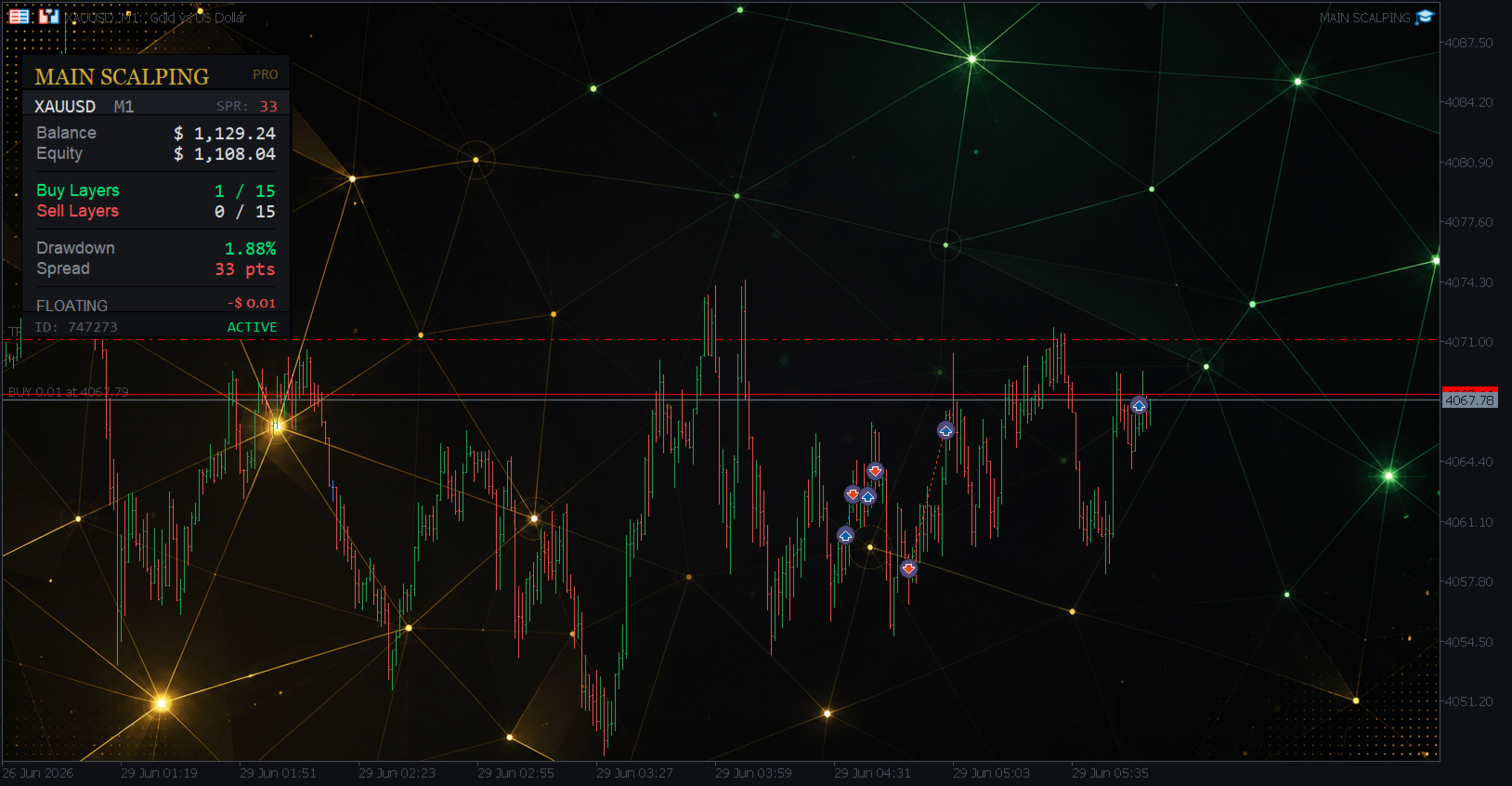
- Real-Time Dashboard: A premium, elegant dark-themed dashboard displaying account balance, equity, floating P/L, drawdown, spread, and active layers at a glance.
- Market Session Filter: Prevents the EA from attempting to open or modify trades during weekends or outside the broker's trading session.
📋 Input Parameters
Basic Settings
- Allow Buy & Sell simultaneously (InpUseHedge) — Allow the EA to open both Buy and Sell positions at the same time.
- Allow BUY trades (InpTradeBuy) — Enable or disable BUY entries.
- Allow SELL trades (InpTradeSell) — Enable or disable SELL entries.
- Max BUY grid layers (InpMaxBuyOrders) — Maximum number of Buy averaging levels allowed.
- Max SELL grid layers (InpMaxSellOrders) — Maximum number of Sell averaging levels allowed.
Lot Management
- Starting lot size (InpInitialLot) — The initial volume for the first trade.
- Auto lot based on balance (InpAutoLot) — Automatically calculates the starting lot based on account balance.
- Balance per 0.01 lot (InpAutoLotSize) — Amount of balance required for every 0.01 lot when Auto Lot is enabled.
- Lot multiplier per grid layer (InpLotMultiplier) — Multiplier applied to the lot size for each subsequent grid layer (e.g., 1.09).
- Maximum lot size allowed (InpMaxLot) — Hard cap for the lot size to prevent overly large trades.
Exit & Targets
- Use hidden/virtual TP (InpVirtualTP) — If true, the TP is managed internally and hidden from the broker. If false, a real TP is set on the position.
- Take Profit (InpTPPoints) — Take Profit distance in points.
- Enable max drawdown protection (InpUseMaxDrawdown) — Activates the capital protection shield.
- Max drawdown % to close all (InpMaxDrawdownPercent) — If account drawdown reaches this percentage, all positions are closed to protect the balance.
Distance Settings
- Grid distance (InpFixDistance) — The fixed distance between grid layers in points.
- Layer to start dynamic distance (InpOrderDynamicDistance) — The grid layer number at which the dynamic distance starts applying.
- Initial dynamic distance (InpDynamicDistanceStart) — The starting distance (in points) when dynamic mode activates.
- Dynamic distance multiplier (InpDistanceMultiplier) — Multiplier applied to the distance for each subsequent dynamic layer.
Overlap Settings
- Enable overlap (InpOverlapLastOrder) — Allow the EA to cut the worst loss using the best profit.
- Layer to trigger overlap (InpOverlapLastOrderNum) — The minimum number of active layers required before the overlap logic activates.
- Min profit ($) to execute overlap (InpOverlapPercent) — The minimum total profit (in account currency) required between the newest and oldest position to execute the overlap closure.
EA Identification
- Unique ID for this EA (InpMagic) — Magic number to distinguish this EA's trades from others.
- Order comment (InpOrderComment) — Custom text comment attached to every order for easy tracking in history.
⚠️ DISCLAIMER & RISK DISCLOSURE
1. High-Risk Trading Warning Trading in foreign exchange (Forex), commodities (like XAUUSD/Gold), and other speculative markets carries a high level of risk and may not be suitable for all investors. The high degree of leverage available can work against you just as easily as it can work for you. Before deciding to trade, you should carefully consider your investment objectives, level of experience, and risk appetite. There is a possibility that you could sustain a loss of some or all of your initial investment and therefore you should not invest money that you cannot afford to lose.
2. Nature of Grid & Martingale Strategies The "MAIN SCALPING" Expert Advisor utilizes grid averaging and lot multiplication (Martingale-style) techniques. While these strategies are designed to recover from adverse market movements and are equipped with advanced Drawdown Protection and Overlap features, they inherently carry a high-risk profile. In extreme, volatile, or strongly trending market conditions without pullbacks (e.g., Black Swan events, sudden central bank announcements, or flash crashes), the EA may open multiple grid layers that can rapidly consume your margin. If the market continues to move against the positions and hits the broker's margin call level before the Drawdown Protection triggers, it can result in a total loss of your trading account.
3. Past Performance is Not Indicative of Future Results Any backtesting results, demo account performance, or historical trading records presented for this EA are purely hypothetical. Hypothetical or simulated performance results have certain inherent limitations. Unlike an actual performance record, simulated results do not represent actual trading. Also, since the trades have not actually been executed, the results may have under-or-over compensated for the impact, if any, of certain market factors, such as lack of liquidity, real-time slippage, and broker requotes. No representation is being made that any account will or is likely to achieve profits or losses similar to those shown in the backtests.
4. Broker Dependency & Technical Factors The performance of this EA is highly dependent on your broker's trading conditions. Factors such as spread widening (especially during news events), slippage, execution speed, swap rates (overnight fees), and margin requirements can significantly impact the EA's profitability. The EA includes features like "Market Session Filter" and "Stops Level Validation" to minimize errors, but it cannot guarantee 100% immunity from broker-side technical issues, server disconnections, or platform freezes.
5. User Responsibility By purchasing, downloading, or using the "MAIN SCALPING" Expert Advisor, you acknowledge that you are the sole person responsible for your trading account and the funds within it. The developer/seller of this EA is not liable for any financial losses, damages, or margin calls incurred while using this software. You are strongly advised to:
- Always test the EA on a Demo Account for a sufficient period before risking real money.
- Use proper risk management, including setting an appropriate Max Drawdown % and not allocating your entire account balance to a single EA instance.
- Use a reliable VPS (Virtual Private Server) to ensure the EA runs 24/5 without interruption.
- Regularly monitor your account, especially during high-impact news events.
6. Not Financial Advice This software is a tool for automated trading. Nothing contained in this product, its descriptions, or its documentation constitutes financial advice, investment advice, trading advice, or any other sort of advice. You should consult with a qualified financial advisor before making any trading decisions.
By activating the "MAIN SCALPING" EA on your trading terminal, you automatically agree to this Disclaimer and Risk Disclosure.