Market Cheat Sheet
- エキスパート
- バージョン: 2.4
- アップデート済み: 14 9月 2026

Market Cheat Sheet — Multi-Timeframe Currency Flow & SMC Expert Advisor for MT5
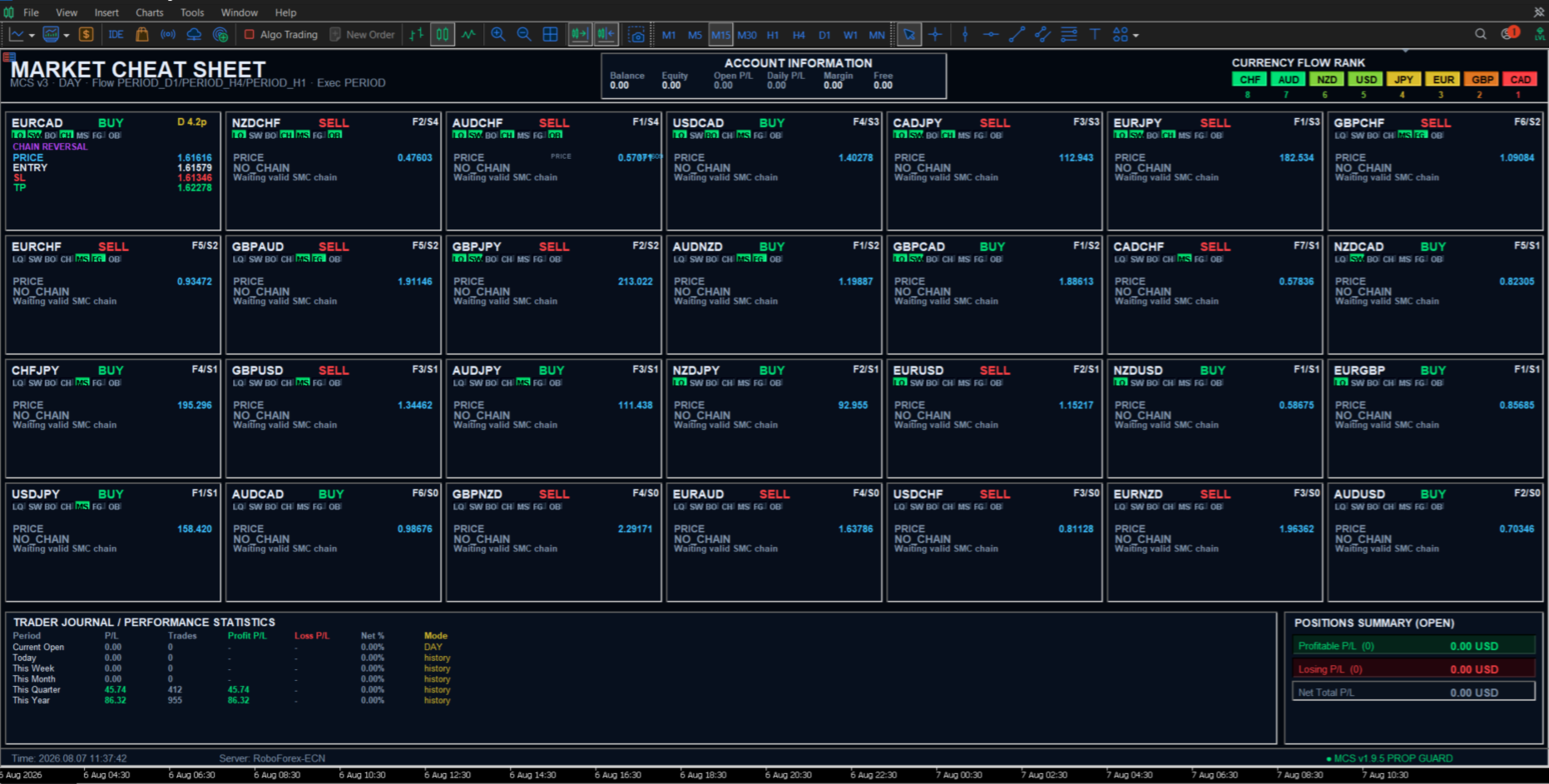
Market Cheat Sheet (MCS) is a multi-currency Expert Advisor for MetaTrader 5 that analyzes 28 major and cross Forex pairs as one interconnected currency system.
Instead of analyzing each chart independently, MCS first evaluates the relative strength of the eight major currencies:
EUR, GBP, USD, JPY, CHF, CAD, AUD and NZD.
This creates a Currency Flow ranking that defines the directional context for all 28 supported pairs.
MCS then combines this Currency Flow with Smart Money Concepts (SMC) market structure to search for structured pending-entry opportunities.
Trading model
The core logic is:
Currency Flow → SMC structure → latest valid Order Block → pending entry → structural Stop Loss → Risk/Reward Take Profit
Currency Flow is calculated from three timeframes using closed candles, reducing unnecessary changes caused by every price refresh.
The same strategy is used in all three operating modes. Only the timeframes change.
| Mode | Currency Flow timeframes | SMC / execution timeframe | Typical use |
|---|---|---|---|
| SCALP | H4 / H1 / M15 | M15 | Short-term active trading |
| DAY | D1 / H4 / H1 | H1 | Intraday / daily trading |
| SWING | W1 / D1 / H4 | H4 | Longer-term setups |
SMC execution
MCS evaluates market structure and can use SMC elements such as:
Liquidity, Sweep, BOS, CHoCH, MSS, FVG, Order Block and Displacement.
The EA looks for an entry in the direction supported by Currency Flow and the current SMC structure.
For Order Block based setups, MCS focuses on the latest relevant structural setup, rather than deliberately searching for old historical entries.
Pending entries are placed according to the detected setup.
Structural Stop Loss
Stop Loss is based on market structure.
For BUY setups:
SL is placed below the latest confirmed local swing low.
For SELL setups:
SL is placed above the latest confirmed local swing high.
Take Profit is calculated from the actual Entry-to-SL risk:
TP = Risk × RiskReward
Example:
RiskReward = 3.0
A structural risk of 20 pips gives a theoretical TP distance of 60 pips.
Pending order lifetime
VirtualPendingExpiryMinutes controls how long an unfilled setup remains valid.
For example:
- 60 = expire after 60 minutes
- 120 = expire after 2 hours
- 360 = expire after 6 hours
The expiration mechanism applies to both virtual and broker-visible pending execution.
When an expired setup is removed, MCS can evaluate the market again and look for a new valid setup.
How to use MCS1. StrategyMode
Choose according to the trading horizon you want.
MODE_SCALP
Uses M15 for SMC execution.
Best when you want more frequent opportunities and can accept more market noise.
Recommended for active sessions and shorter trade duration.
MODE_DAY
Uses H1 for SMC execution.
This is a balanced mode between trade frequency and market structure.
Suitable for traders who do not want the activity level of SCALP but still want regular opportunities.
MODE_SWING
Uses H4 for SMC execution.
Signals are less frequent, but setups normally develop over a larger market structure.
Suitable when you prefer longer-lasting positions and do not need frequent entries.
2. Lots
Lots defines the fixed trade size.
Example:
0.01 = minimum-style conservative testing size on many Forex accounts.
Start small, especially on a new broker or account.
MCS does not guarantee that the same lot size produces the same monetary risk on every symbol because pip value differs between currency pairs.
3. MagicNumber
MagicNumber identifies MCS trades.
Normally leave the default value unchanged.
Change it only if you intentionally run multiple independent MCS instances or need to separate them from another EA.
Different independent EA groups should use different Magic Numbers.
4. MinFlowScore
MinFlowScore controls the minimum difference in Currency Flow strength required for a pair to qualify.
A lower value allows more pairs.
A higher value requires a stronger difference between the two currencies.
Typical interpretation:
| MinFlowScore | Behaviour |
|---|---|
| 1–2 | More setups, weaker Flow differences allowed |
| 3 | Balanced default |
| 4–5 | More selective |
| 6–7 | Only very strong currency-strength differences |
For normal use, 3 is a reasonable starting value.
If MCS produces too many weak setups, increase it.
If too few pairs qualify, reduce it carefully.
5. UseChainEngine
When true , MCS uses its SMC chain / confirmation logic.
For normal strategy operation:
recommended: true
Turning it off changes how SMC confirmation is handled and should normally be done only for testing.
6. RiskReward
Controls the TP distance relative to structural risk.
Examples:
1.0 = 1R
2.0 = 2R
3.0 = 3R
The current example setting:
RiskReward = 3.0
means that if Entry-to-SL risk is 25 pips, TP is approximately 75 pips from Entry.
Higher RiskReward increases the required target distance and does not automatically improve profitability.
7. MaxOpenTrades
Maximum number of simultaneous MCS positions/setups allowed by the configured logic.
The EA monitors 28 pairs, but that does not mean all 28 should always be traded simultaneously.
For smaller accounts, a lower limit may reduce aggregate exposure.
For portfolio-style operation across the full 28-pair universe, a larger value can be used.
Remember that many Forex pairs are correlated.
8. VirtualPendingExpiryMinutes
Defines how long an unfilled pending setup remains valid.
Suggested interpretation:
| Trading mode | Practical starting range |
|---|---|
| SCALP | 30–120 min |
| DAY | 120–480 min |
| SWING | 240–1440 min |
These are operational starting points, not guaranteed optimal settings.
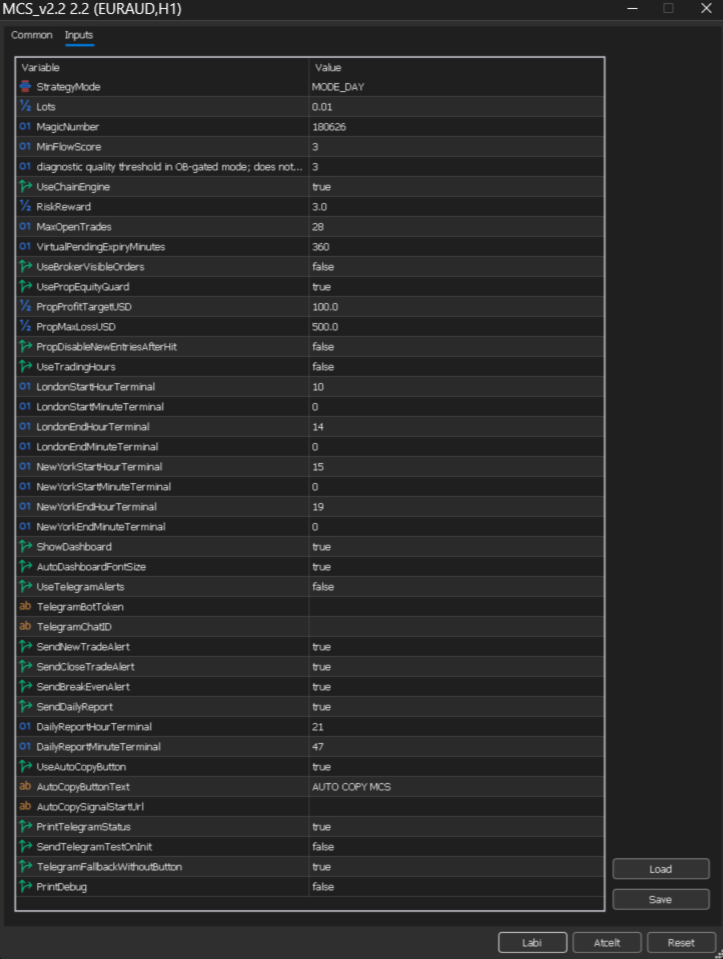
For the screenshot configuration:
360 means 6 hours.
If you want faster replacement of old setups, reduce this value.
9. UseBrokerVisibleOrders
false
MCS keeps pending execution virtual until its own entry conditions are reached.
This reduces the amount of pending-order information visible to the broker.
true
MCS sends the pending order to the broker.
Use this if you prefer broker-side pending execution.
Both modes should follow the same strategy logic; only execution visibility differs.
10. Prop Equity Guard
UsePropEquityGuard = true
activates the account-protection layer.
PropProfitTargetUSD
defines the configured profit threshold.
PropMaxLossUSD
defines the configured loss threshold.
Example from the screenshot:
PropProfitTargetUSD = 100
PropMaxLossUSD = 500
These values must be adapted to the account size and the rules of the account being traded.
They are not recommended universal values.
For a prop-firm account, configure them according to the actual firm's daily and overall loss rules.
11. PropDisableNewEntriesAfterHit
If true , new entries remain disabled after the configured Prop Guard threshold is reached.
If false , MCS may reset its cycle according to its internal guard logic and continue.
For strict daily risk control, true is the more conservative behaviour.
12. UseTradingHours
false
MCS can operate without session restrictions.
true
entries are restricted to the configured London and New York windows.
Default-style configuration:
London: 10:00–14:00 terminal time
New York: 15:00–19:00 terminal time
The times are based on MT5 terminal/server time, not necessarily your local clock.
Session filtering can be useful if you want MCS active primarily during liquid Forex periods.
13. Dashboard
ShowDashboard = true
shows the full MCS panel.
AutoDashboardFontSize = true
automatically adapts text sizing.
For normal use both can remain enabled.
14. Telegram
UseTelegramAlerts = true
enables configured Telegram notifications.
You must provide your own:
TelegramBotToken
TelegramChatID
Never share these credentials publicly.
The individual switches control new-trade, close-trade, break-even and daily-report notifications.
15. Auto Copy
Auto Copy settings are intended for users who deliberately configure an external copy workflow.
If you do not use this feature, leave the URL empty.
Recommended first setup
For a new user, a practical starting configuration is:
MODE_DAY
Lots = small test size
MinFlowScore = 3
UseChainEngine = true
RiskReward = 3.0
UseBrokerVisibleOrders = false
UseTradingHours = false initially
Prop Guard = configured according to account limits
Run MCS first on a demo account and observe how Currency Flow, SMC setups, pending entries, SL, TP and expiry behave with your broker.
Broker spread, symbol specifications, execution and market conditions can affect results.
MCS is a trading tool, not a profit guarantee.