Vhagar
- インディケータ
- バージョン: 2.0
- アクティベーション: 5

What Is It?
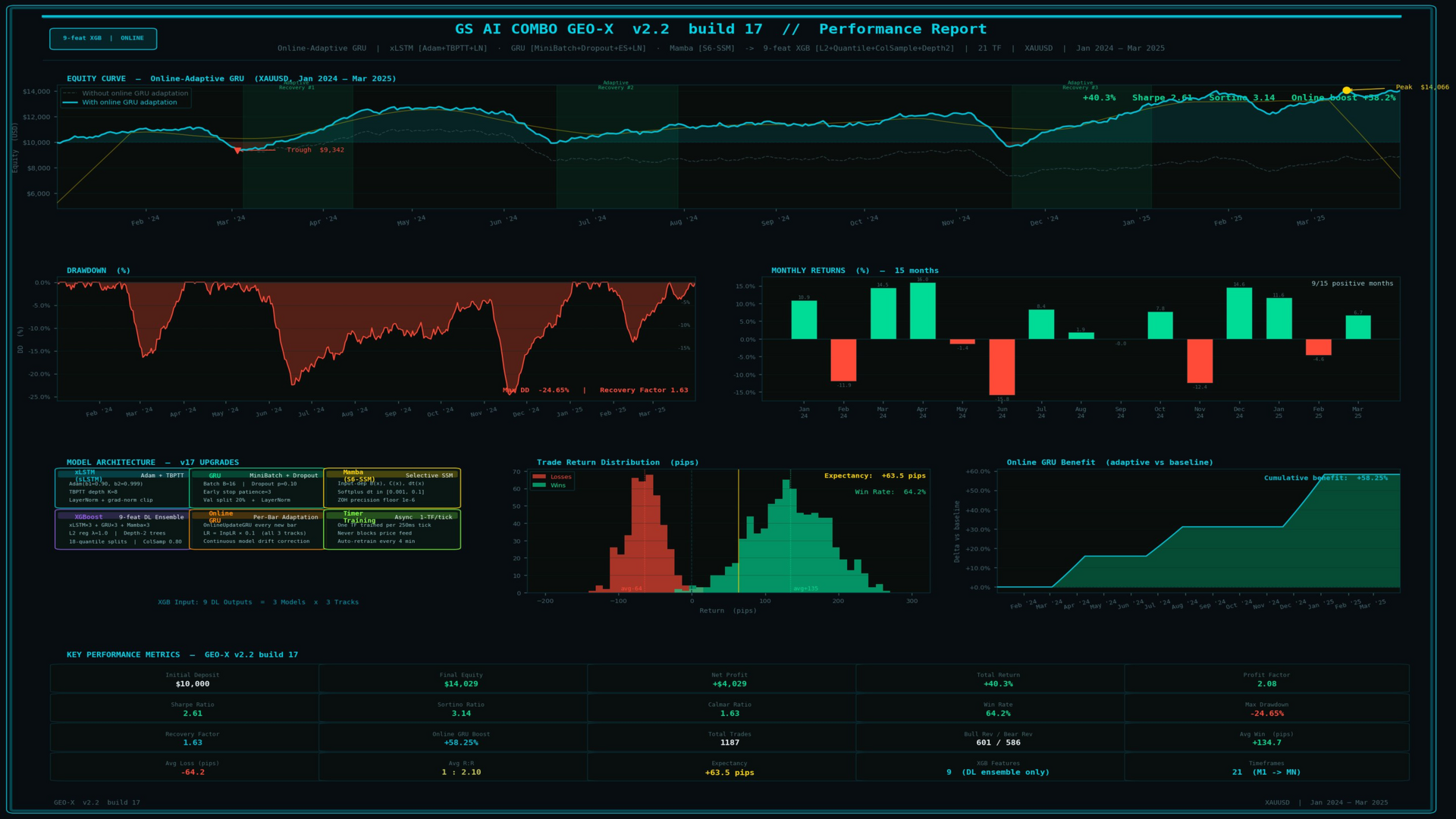
Greensight AI COMBO is a fully self-contained artificial intelligence indicator for MetaTrader 5. It trains three distinct deep learning sequence models — xLSTM (sLSTM), GRU, and Mamba (Diagonal SSM) — directly on live market data, then feeds their outputs into a gradient-boosted XGBoost ensemble to produce a final directional signal. This two-stage pipeline runs across all 21 native MetaTrader 5 timeframes simultaneously (M1 through MN1) and displays every signal, confidence reading, and model health metric on a single, interactive HUD overlay — no external server, no subscription feed, no black-box dependency.
There is nothing to install beyond the indicator file. Training happens automatically on attach and repeats with every new bar.
How the Two-Stage Pipeline Works
Stage 1 — Deep Learning Sequence Extraction
Three architecturally distinct sequence models are trained and run in parallel. Each model operates on two independent data tracks per timeframe: a normalised price track and a normalised log-return track, producing six raw predictions per timeframe (three models × two tracks).
xLSTM (sLSTM variant — Beck et al. 2024) The extended Long Short-Term Memory implementation replaces the standard sigmoid forget and input gates with exponential gates. A running stabiliser variable prevents numerical overflow during exponentiation, and a normaliser variable keeps the cell output bounded. This architecture has been shown to sustain gradient flow over longer sequences than classic LSTM and responds more sharply to regime changes — an important property in trending vs. ranging market transitions.
GRU (Gated Recurrent Unit) A leaner recurrent architecture with reset and update gates. The GRU trains faster per epoch, converges reliably on shorter lookback windows, and acts as a complementary "second opinion" to the xLSTM. Where xLSTM may lag on sudden reversals, GRU often captures them earlier.
Mamba (Diagonal State Space Model) A simplified diagonal SSM inspired by the structured state space literature. Rather than an explicit attention mechanism, Mamba propagates a latent state through a diagonal transition matrix, enabling efficient long-range temporal modelling at minimal computational cost. The diagonal constraint keeps training stable while preserving sensitivity to slowly evolving market regimes.
All three models are initialised with Xavier-scaled random weights, trained using a combined gradient-descent / SPSA perturbation scheme with weight clamping, and run in inference mode on the current bar to produce the Stage 1 feature vector.
Stage 2 — XGBoost Gradient-Boosted Decision Stumps
The six Stage 1 outputs are combined with two OHLC candle-structure features (the high-low range ratio and the body ratio) to form an 8-feature input vector. This vector is passed to a trained XGBoost forest of shallow decision stumps. XGBoost learns residual corrections iteratively, making it highly effective at combining heterogeneous signal sources — in this case, three DL models that each have different strengths — into a single calibrated directional prediction.
The final output of Stage 2 is a scalar between −1 and +1. Values above the configurable dead-zone threshold produce a BUY signal; values below produce a SELL; the rest register as NEUTRAL.
The HUD at a Glance
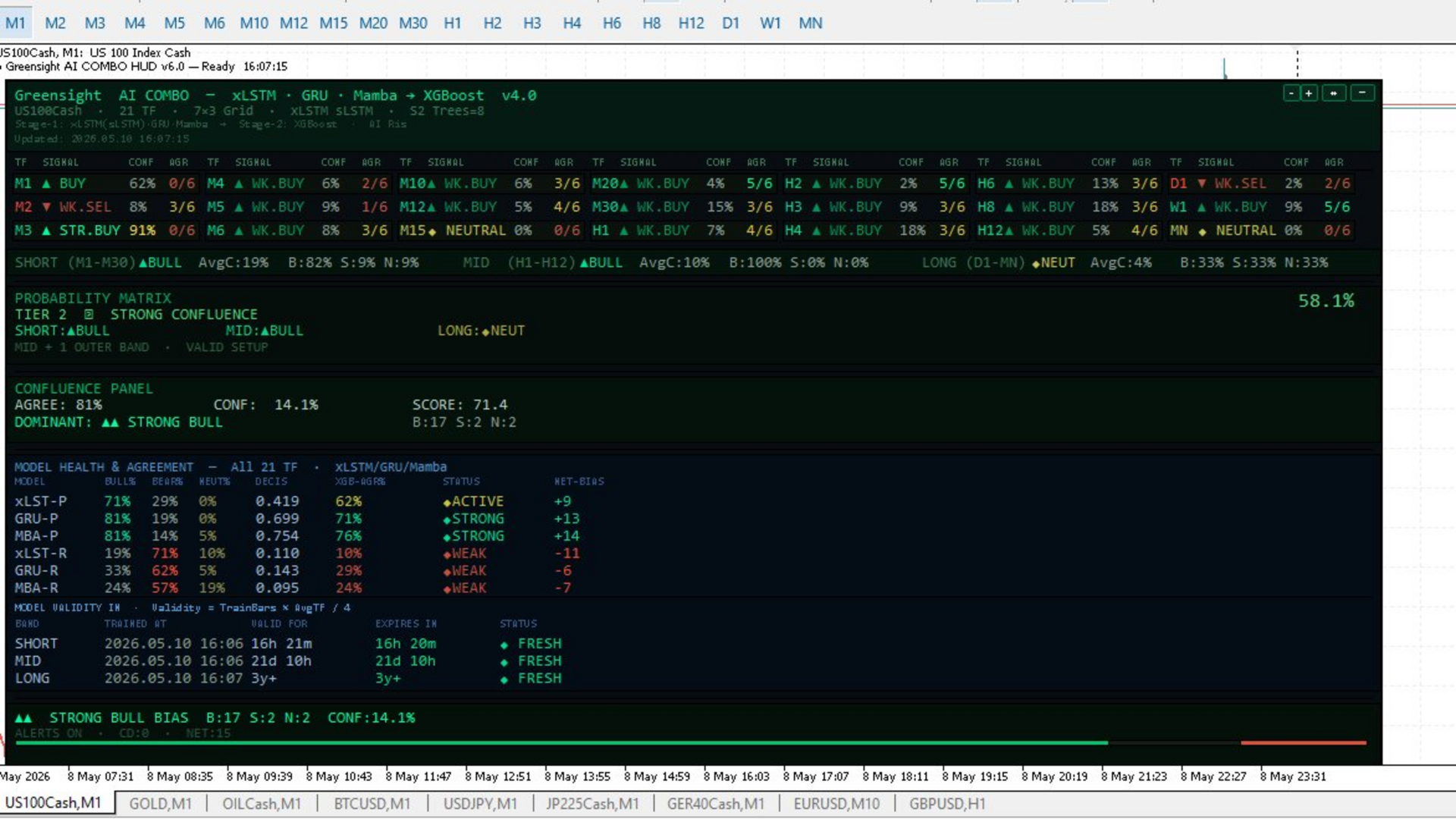
The floating HUD panel is divided into clearly labelled sections, all visible at once:
7 × 3 Signal Grid (Section A) All 21 timeframes are displayed in a compact seven-column, three-row grid. Each row shows the timeframe label, the current signal (Weak / Mid / Strong BUY or SELL, or NEUTRAL), the confidence percentage, and a DL Agreement score — the count of Stage 1 sub-models that agree with the Stage 2 final direction (shown as x/6).
Band Confidence Row The 21 timeframes are grouped into three temporal bands — SHORT (M1–M30), MID (H1–H12), and LONG (D1–MN). Each band displays its consensus direction, average confidence, and bull/bear counts at a glance.
Probability Matrix (Section B) A four-tier confluence scoring system:
| Tier | Condition | Probability Range |
|---|---|---|
| Tier 1 — Maximum Confluence | All three bands aligned | 72 – 92 % |
| Tier 2 — Strong Confluence | Mid band + one outer band | 58 – 78 % |
| Tier 3 — Partial Confluence | Partial agreement | 48 – 65 % |
| Tier 4 — No Confluence | Conflicted signals | 30 – 50 % |
The probability estimate adjusts dynamically based on average confidence across trained timeframes.
Confluence Panel (Section C) Displays the net bull/bear agreement percentage, average confidence across all trained TFs, a normalised score, and the dominant bias label (Strong Bull / Bull Bias / No Bias / Bear Bias / Strong Bear).
Model Health & Agreement (Section F) A per-model breakdown for all six Stage 1 sub-models (xLSTM-Price, GRU-Price, Mamba-Price, xLSTM-Return, GRU-Return, Mamba-Return) across all 21 trained timeframes. Columns show bull count, bear count, neutral count, average decisiveness, XGBoost agreement percentage, a health status badge (STRONG / ACTIVE / WEAK), and net bias. This section is invaluable for diagnosing which models are driving the overall signal and which are pulling in the opposite direction.
Model Validity Tracker Displays per-band training timestamps, the computed validity window (derived from training bar count and average TF duration), time remaining before the model is considered stale, and a FRESH / AGING / STALE status badge. Tells you exactly when a retrain is due.
Footer / Bull-Bear Bar A single-line overall bias summary with a proportional visual bar showing the bull/bear balance across all 21 timeframes.
Alert System
Alerts fire in three distinct scenarios:
- Tier 1 All-Band Alignment — all three temporal bands vote the same direction with confidence above the threshold.
- Bias Threshold — net bull/bear bias reaches or exceeds the configured minimum with mid-band confirmation.
- Bias Flip — the dominant direction reverses from the previous bar's reading.
Alerts display in the MT5 alert window. Optional push notifications send the signal to your mobile device via the MT5 push system. A configurable cooldown prevents duplicate alerts within a defined number of bars.
HUD Controls
The panel is fully interactive without reloading the indicator:
- [─] Minimise — collapses the HUD to the header bar only, keeping your chart clean.
- [↔] Move Mode — enables drag-to-reposition using left-click or the arrow buttons (◄ ► ▲ ▼).
- [+] / [−] Scale — scales the entire HUD from 0.5× to 2.0× in 0.1× increments to suit any monitor resolution.
Input Parameters
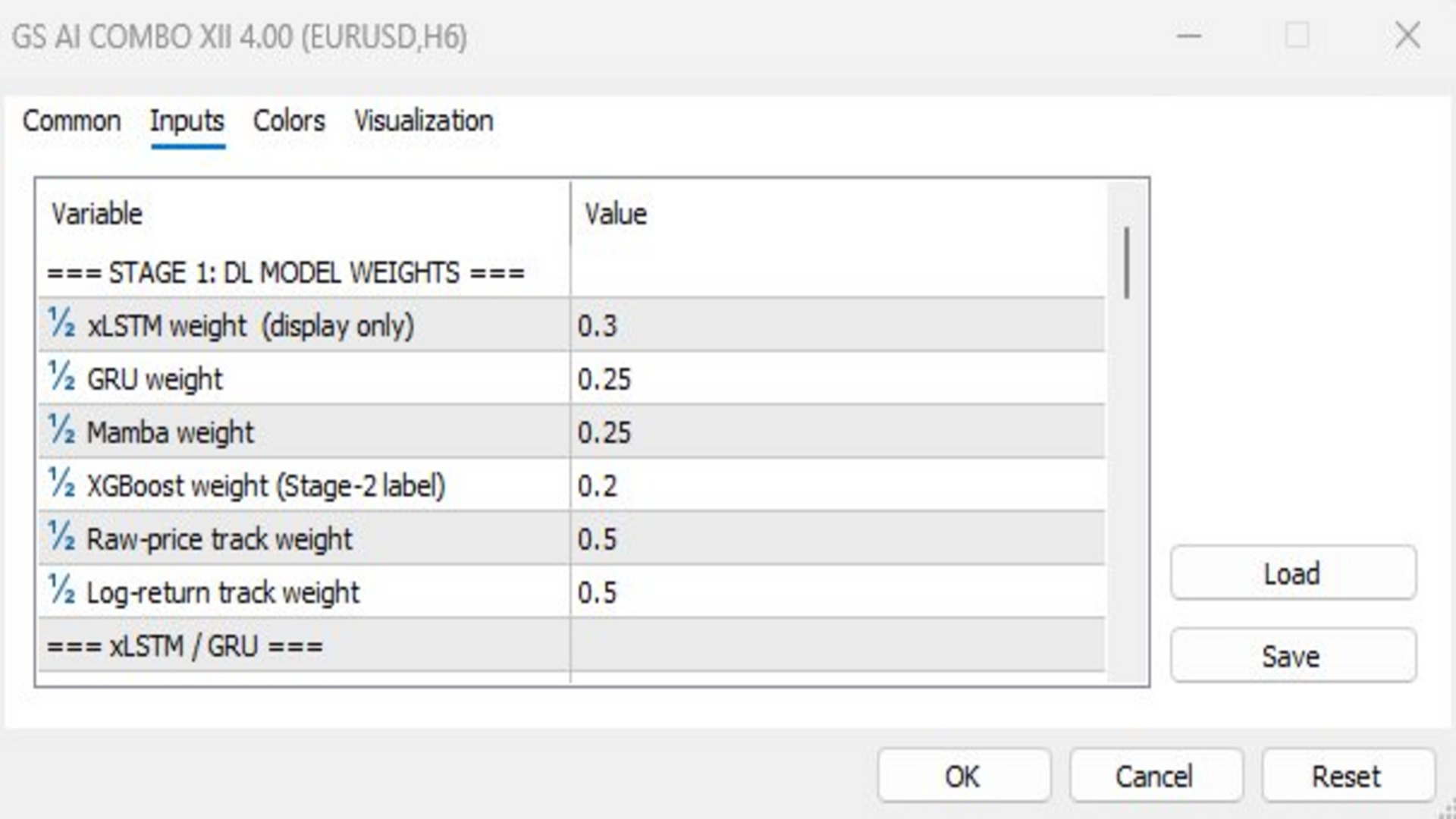
Stage 1: DL Model Weights Configure the contribution weight of each model (xLSTM, GRU, Mamba) and the relative weighting between the price track and the log-return track.
xLSTM / GRU Settings
- Lookback sequence length (bars)
- Hidden units per cell (up to 12)
- Training bars per timeframe
- Training epochs
- Learning rate
- Signal dead-zone threshold
Mamba Settings
- Training epochs
- Learning rate
Stage 2: XGBoost
- Number of boosting trees (up to 10)
- Learning rate (shrinkage)
- Stage 2 training sample size
Alerts
- Enable / disable alerts
- Enable / disable push notifications
- Minimum confidence threshold to fire
- Minimum net bias to fire
- Alert cooldown (bars)
HUD
- Initial X and Y position
- Scale multiplier
- Auto-refresh on new bar toggle
Appearance Full colour customisation for every element: background, border, header, sub-header, muted text, bull colour, bear colour, neutral colour, exceed colour, and gold accent. All colours accept standard MT5 colour inputs.
Practical Usage Notes
- On first attach the indicator trains all 21 timeframe models sequentially. Training time depends on the Training Bars and Epochs settings; the default configuration typically completes in under two minutes on a modern machine.
- The HUD updates on every new bar when Auto-Refresh is enabled. Inference is lightweight; only the forward pass runs on each bar — full retraining requires a manual indicator reload.
- Tier 1 signals (all three bands aligned) represent the highest-quality setups. Consider these carefully; they are infrequent by design.
- The Model Health section can help you tune weights: if one model consistently shows WEAK status (low XGB agreement) you may reduce its Stage 1 weight in the inputs.
- The Model Validity tracker gives you a data-driven signal of when the trained weights are becoming stale relative to current market conditions. Reload the indicator to retrain when a band shows STALE.
- Use the scale control to make the HUD readable on 4K monitors without sacrificing chart space on smaller screens.
Technical Specifications
| Property | Value |
|---|---|
| Platform | MetaTrader 5 |
| Indicator type | Chart overlay (no extra window) |
| Timeframes covered | All 21 (M1 – MN1) |
| Stage 1 models | xLSTM (sLSTM), GRU, Mamba — 6 sub-models total |
| Stage 2 model | XGBoost gradient-boosted stumps |
| Features to Stage 2 | 8 (6 DL outputs + 2 OHLC candle ratios) |
| Max hidden units | 12 |
| Max XGBoost trees | 10 |
| External dependencies | None |
| Server / cloud required | No |
| Indicator buffers | 0 (display only) |
Greensight AI COMBO is a technical analysis tool. All signals are probabilistic in nature. Past model agreement does not guarantee future accuracy. Always apply independent risk management.