
Nfi Sniper EA
- エキスパート
- バージョン: 4.70
- アップデート済み: 4 5月 2026
- アクティベーション: 5

From $1,000 to $18,000 — one trade per month, fully automated.
Every first Friday of the month, the US Nonfarm Payrolls report drops at 13:30 UTC. The market explodes. Most traders panic, hesitate, miss the entry, or chase the spike and get stopped out.
NFI Sniper EA does it for you — automatically, precisely, every single time.
While you are asleep, at work, or simply living your life, the EA is already armed and waiting. It knows when NFP releases. It places its orders at the perfect moment. It trails the spike tick by tick. And when the move is done, it locks in profit and waits for next month.
No screens to watch. No buttons to press. No stress.
How It Works
NFI Sniper EA uses a proven straddle strategy: it places a Buy Stop above price and a Sell Stop below price seconds before the NFP release. The market decides the direction.
-
EA detects next NFP date automatically from the MT5 Economic Calendar
-
60 seconds before release — Buy Stop and Sell Stop are placed
-
NFP fires — one side triggers instantly
-
Opposite order cancelled on the next tick
-
Trailing stop activates and follows price every tick — no fixed Take Profit
-
Trade closes when the move reverses into the trail
-
EA resets and waits for next month
One trade. One event. Every month.
Why NFI Sniper EA?
Automatic NFP Detection Version 4.5 uses the MT5 Calendar API to detect the next NFP release date and time — in your broker's server time. No manual time setup. No winter/summer confusion. If NFP gets rescheduled, the EA detects the change automatically.
MinProfitToTrail — Anti-Shakeout Protection NFP spreads spike massively at release. Without protection, your trailing stop gets triggered by spread noise before the real move even starts. MinProfitToTrail prevents the trail from moving your stop loss past entry until the trade has enough profit to survive the spread storm.
No Take Profit — Let Winners Run Most NFP EAs set a fixed TP of 20-50 pips and leave money on the table. NFI Sniper has no TP. The trailing stop rides the move for as long as it goes — 50 pips, 100 pips, or 500 pips. You capture the full spike.
Spread-Adjusted Everything Stop loss, trail activation, and trail distance are all adjusted for the live spread at order placement. What you configure is what you get — no nasty surprises from spread widening.
Built for Real Execution Tested on 100% real tick data on Pepperstone UK with slippage simulation. Not curve-fitted to perfect historical data — validated against real market conditions including NFP spread spikes.
Backtest Results (100% Real Ticks — Pepperstone UK — EURUSD)
Starting balance: $1,000 Final balance: $175,258 Profit Factor: 4.48 Sharpe Ratio: 220.07 Recovery Factor: 5.49 Win Rate: 70.83% Total Trades: 24 Period: January 2024 — April 2026 Longs won: 87.50% LR Correlation: 0.86
100% real tick data, Pepperstone UK, RAW/ECN account. Past performance does not guarantee future results.
Parameters
=== LOT SIZING === LotMode — Fixed Lot or % of Available Margin FixedLot — Lot size when using Fixed Lot mode (default: 1.0) MarginPercent — 10% to 100% of available margin in dropdown (default: 100%)
=== ORDER SETUP === PlaceBefore — Seconds before NFP to place orders (default: 60 sec) StopOffset — Distance from price for pending stops (default: 50 pts) StopLoss — Hard stop loss, spread-adjusted (default: 50 pts) OrderExpiry — Cancel pending orders after N minutes (default: 1 min)
=== TRAILING STOP === TrailActivation — Profit needed to activate trail (default: 30 pts) TrailDistance — Trail distance behind price (default: 100 pts) MinProfitToTrail — Min profit before trail moves past entry (default: 50 pts)
=== BROKER TIME (backtest only) === BrokerUTC — Your broker's UTC offset for backtesting (default: UTC+2) On live charts, time is detected automatically from MT5 Calendar — no setup needed.
=== MISC === FillMode — Order filling mode (default: RETURN) Magic — Unique EA identifier (default: 20250416) Slippage — Max slippage in points (default: 30)
Setup — 2 Steps
-
Attach NFI Sniper EA to any EURUSD M15 chart
-
Set your lot size or margin percentage
That is it. The EA detects the next NFP automatically from the MT5 Calendar. No time settings to configure on live charts.
For backtesting: set BrokerUTC to match your broker (Pepperstone = UTC+2, MetaQuotes = UTC+0).
Optimization Guide
NFI Sniper EA includes a custom OnTester() fitness function. To find the smoothest equity curve:
-
Open Strategy Tester (Ctrl+R)
-
Set optimization to "Custom Max"
-
Configure parameter ranges in the Inputs tab
-
Run optimization — the top result = smoothest equity with best risk-adjusted return
The fitness formula rewards: high Sharpe ratio, high profit factor, fast recovery from drawdowns, and penalizes consecutive losses.
Important Notes
-
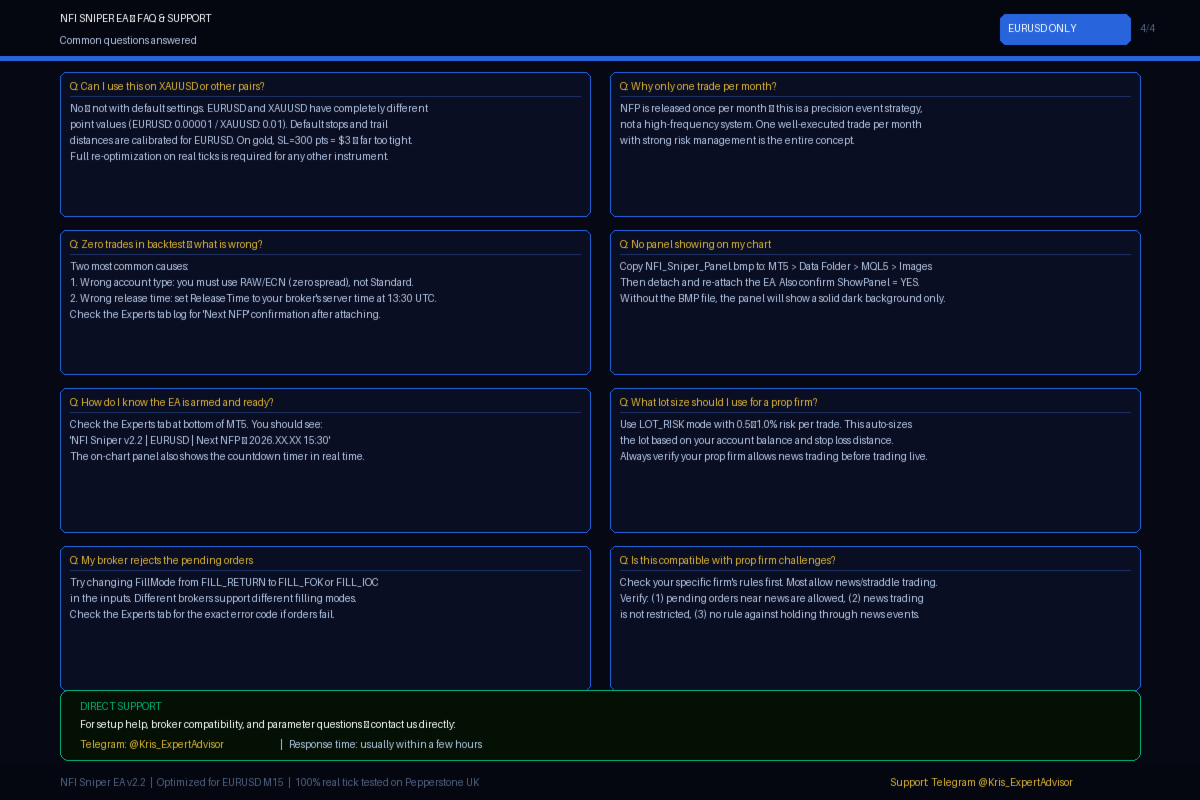
This EA is optimized exclusively for EURUSD. Do not use default parameters on other pairs.
-
Always backtest on a RAW/ECN account (zero spread) — never Standard.
-
Use 100% real tick data for backtesting — generated ticks produce unreliable results.
-
The EA trades once per month on NFP day only. This is by design.
-
Verify your broker allows news trading and pending orders near high-impact events.
-
Every broker handles NFP differently. Backtest on YOUR broker before going live.
FAQ
Q: Only one trade per month — is that enough? A: Quality over quantity. One precisely executed, high-probability trade per month with strong trailing stop management. The backtest speaks for itself.
Q: Can I use this on gold or other pairs? A: The EA will run on any symbol, but default parameters are calibrated for EURUSD only. Gold has completely different point values and spread behavior. Full re-optimization on real tick data is required for any other instrument.
Q: Zero trades in my backtest — what is wrong? A: Two common causes: (1) Wrong account type — must be RAW/ECN, not Standard. (2) Wrong BrokerUTC setting — check what UTC offset your broker uses.
Q: How does the EA know when NFP releases? A: On live charts, it reads the MT5 Economic Calendar API automatically — correct server time, handles rescheduled events. In Strategy Tester, it uses a hardcoded schedule with your BrokerUTC offset.
Q: What if NFP gets rescheduled? A: The EA checks the MT5 Calendar every 6 hours. If the date changes, it updates automatically and logs the change.
Support
Direct support via Telegram: @Kris_ExpertAdvisor I respond to every message — setup help, broker compatibility, parameter advice.
NFI Sniper EA — One event. One trade. Every month.































I'm after second month of using this EA and two news events. I rented it, of course. As recommended by the author I run thorough backtesting and optimization on my brokers data. The first month it didn't fire on real account (ICMarketsSC) due to my wrong calibration of levarage/margin (I went with Autolot in settings). The next month it went smooth and covered cost of past rentals and the one to come. If it delivers with upcoming event, I will most like buy it. I would love to see Autolot changed from margin operated (which is somewhat exotic to me) to Balance/Equity or option to choose.