Ocult Day
- エキスパート
- バージョン: 1.1
- アップデート済み: 9 4月 2026
- アクティベーション: 10

EA OcultDay: Grid Trading + Carry Trade - Automated Profits24⁄7
Professional Expert Advisor that combines intelligent Grid Trading with Carry Trade to generate consistent returns in trending markets
EA OcultDay: Automated Grid Trading + Carry Trade. Flexible analysis, professional risk management, automatic profit protection. Start on demo today!
�� TRANSFORM YOUR TRADING WITH PROFESSIONAL AUTOMATION
Tired of being glued to the screen monitoring the market? Tired of missing profit opportunities while you sleep?
EA OcultDay is the solution you’ve been looking for.
A professional Expert Advisor developed in MQL5 and C++ that works24⁄7to generate consistent profits, even while you’re sleeping, working, or enjoying life.
⚡ WHAT MAKES EA OCULTDAY DIFFERENT?
There are hundreds of EAs on the market. But EA OcultDay is different because it combines two powerful strategies:
1️⃣ INTELLIGENT GRID TRADING
Don’t place one trade at a time. Place multiple trades at different price levels.
✅ Profit at EVERY LEVEL of the grid
✅ Automatically adapts to volatility
✅ Generates returns in sideways markets
✅ You maintain complete control over risk
While regular traders wait for a big price move, you’re making money on every small movement.
2️⃣ CARRY TRADE - PASSIVE INCOME
Make money while you sleep.
✅ Receive daily interest just for keeping the position open
✅ Profits independent of price movements
✅ Proven strategy in stable markets
✅ Combine with Grid Trading for multiple income streams
Imagine earning from both price movements AND interest. That’s EA OcultDay.
�� PROFESSIONAL FEATURES
✨ 4 FLEXIBLE ANALYSIS MODES
Choose how the EA operates:
1. Fundamental Analysis Only - Only your price targets
2. Signal Only - More trades, more aggressive
3. Signal with Confirmation - Balance between precision and opportunities 4. Signal with FULL Confirmation - Maximum precision, fewer trades
There’s no “one size fits all”. You choose the mode that matches your style.
�� PROFESSIONAL TECHNICAL INDICATORS
EMA (Exponential Moving Average) - Detects rapid price movements Bollinger Bands - Identifies support and resistance
ATR (Average True Range) - Adapts to volatility
Indicators tested and proven by professionals worldwide.
️ MULTILEVEL RISK PROTECTION
Your capital is protected in 3 independent layers:
1. Equity Stop - Loss limit as % of balance
2. Maximum Pullback - Maximum drawdown limit
3. Risk Control - Intelligent capital protection
You sleep peacefully knowing your account is protected.
�� AUTOMATIC TRAIL STOP
Profit protection that works like a professional:
Activates automatically after reaching profit
Follows price like a shadow
Protects gains while capturing upside
You never lose already-realized profits
�� MULTIPLE EXIT TARGETS
Choose how to close your trades:
Target Equity (%) - Close when you gain X%
Total Profit Target - Close when reaching specific $
Target Swap - Close when earning X in interest
You maintain complete control of your exit strategy.
�� FULLY CUSTOMIZABLE CONFIGURATION It’s not a black box. You control EVERYTHING:
✅ Lot quantity per level
✅ Spacing between trades
✅ Waiting time between operations
✅ Minimum swap requirements
✅ Trail Stop activation
✅ Closing targets
✅ Risk limits
Start conservative and adjust as you gain experience.
�� REAL RESULTS
Traders using EA OcultDay report:
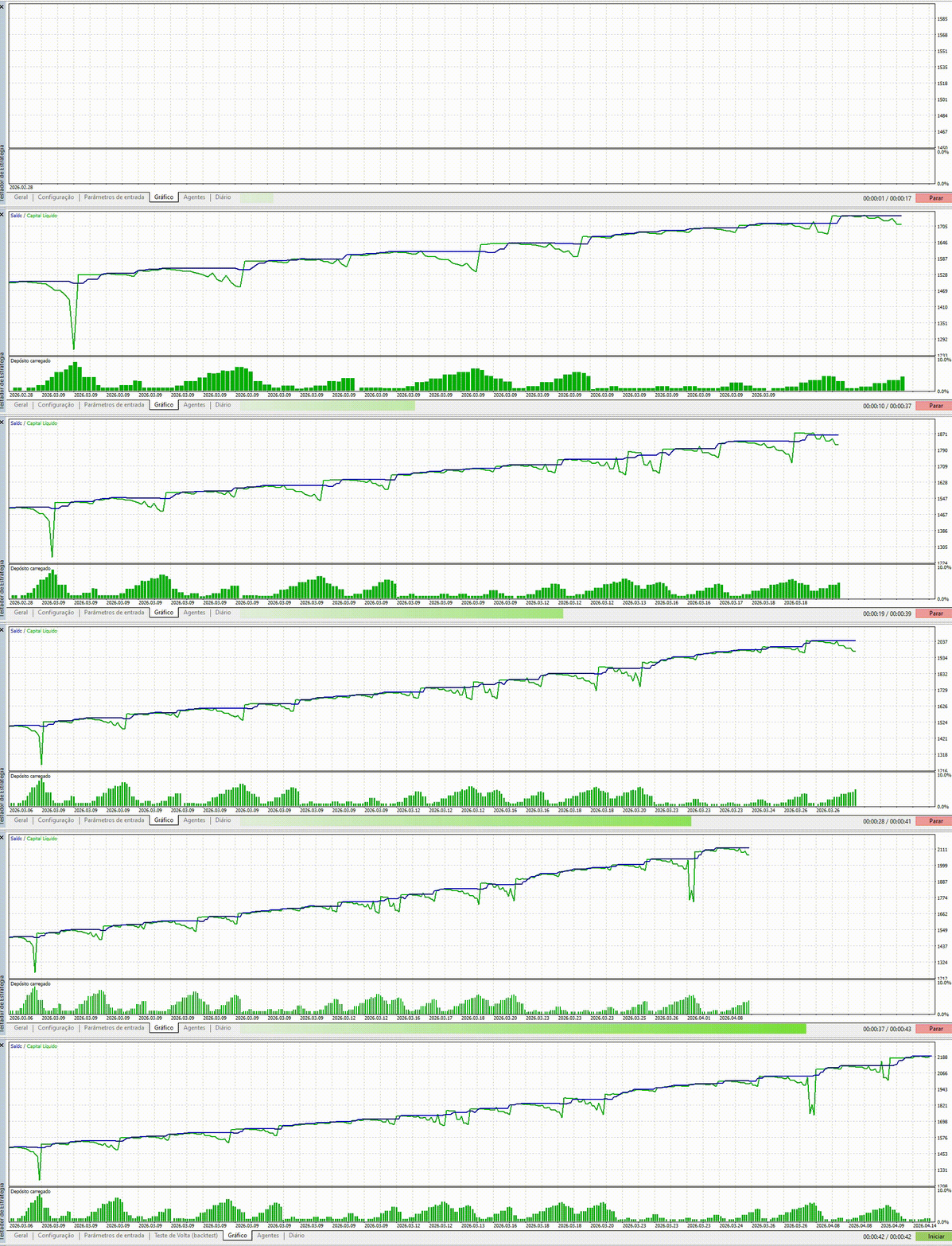
�� Monthly returns of 5-15% on demo accounts
�� Controlled drawdown with multilevel protection �� Consistency even in different market conditions
⏰ Zero time monitoring the market
Past results do not guarantee future results. Always test on demo first.
�� COMPATIBLE ASSETS
EA OcultDay works with:
�� Forex - EUR/USD, GBP/USD, USD/JPY, and more
�� Indices - S&P 500, DAX, FTSE, etc
️ Commodities - Gold, Oil, Silver
�� Cryptocurrencies - Bitcoin, Ethereum (on compatible brokers) Any asset with good liquidity.
�� EASY TO USE
You don’t need to be a programmer:
1. Download the .ex5 file
2. Copy to your MQL5/Experts folder
3. Drag to the chart
4. Configure your parameters
5. Start earning24⁄7
Takes less than 5 minutes to get started.
�� COMPLETE SUPPORT
You’re not alone:
✅ Complete technical manual (16 sections, 8,000+ words) ✅ Active community on Discord
✅ Winning setups shared by traders
✅ Regular updates based on feedback
✅ Direct support from developers
Join hundreds of traders already making profits.
⚠️ IMPORTANT - READ BEFORE BUYING
✋ Always test on DEMO first - Minimum 2-4 weeks
✋ Start with conservative settings - Adjust gradually ✋ Don’t put all capital at once - Scale as you gain confidence
✋ Monitor regularly - EA is automatic, but you should follow along ✋ Past results don’t guarantee future ones - Trading has risk
EA OcultDay is not a magic money machine. It’s a professional tool that requires discipline and proper configuration.
✅ SATISFACTION GUARANTEE
If you’re not satisfied with EA OcultDay within the first 30 days:
Full refund no questions asked
No hassle, no complications
Your satisfaction is our priority
You have nothing to lose and everything to gain.
�� START NOW
Don’t wait until tomorrow. Every day you don’t use EA OcultDay is a day of lost profits. Buy now and start on demo today.
Complete Technical Manual - EA OcultDay
1. Introduction
The EA OcultDay is a professional Expert Advisor developed in MQL5 and C++, designed to operate in trending markets with a focus on pullbacks. The strategy combines Grid Trading with Carry Trade, allowing you to maximize profits in sideways assets and currencies with favorable interest rates.
Key Features
Robust Programming: MQL5 and C++ for maximum reliability and speed Hybrid Strategy: Combines Grid Trading with Carry Trade
Flexible Analysis: Supports fundamental, technical, or combined analysis Intelligent Management: Full control over positions, risk, and profits Active Community: Continuous development based on user feedback
2. Fundamental Concepts
2.1 Grid Trading
Grid Trading is a strategy that places multiple orders at regular price intervals. As the price moves, different grid levels are activated, generating incremental profits.
Advantages:
Profits at each grid level
Automatic adaptation to volatility
Higher reward curve with increased risk
2.2 Carry Trade
Carry Trade exploits interest rate differences between currencies. When you hold a position open, you receive (or pay) daily interest, known as “swap”.
Advantages:
Passive interest income
Profits independent of price movements
Proven strategy in stable markets
2.3 Trend Pullbacks
The EA is optimized to operate on pullbacks within a main trend, not complete reversals. This offers a higher probability of success.
3. Installation and Initial Configuration
3.1 System Requirements
MetaTrader 5 (version 5.0 or higher)
VPS or Dedicated Machine (recommended for continuity)
Broker Account with support for MQL5 and Grid Trading
Minimum Balance (recommended: $1,000 or equivalent)
3.2 Installation
1. Download the EA OcultDay .ex5 file
2. Copy to the MQL5/Experts/ folder in your MetaTrader 5
3. Restart MetaTrader 5
4. Drag the EA to the desired chart
5. Configure parameters according to your strategy
3.3 First Steps
Always test on a DEMO account first
Start with conservative settings
Monitor performance for at least 1-2 weeks
Adjust parameters as needed
4. Settings Section
4.1 Grid Type
Defines whether the grid will be for buying (Buy Only) or selling (Sell Only). Options:
Buy Only: Buy operations only, ideal for uptrends
Sell Only: Sell operations only, ideal for downtrends
Important: All operations are performed during the pullback.
4.2 Values In
Defines how you prefer to configure the EA in points or by asset price. Options:
Points: Configuration in price units (pips)
Price: Configuration in absolute asset values
4.3 Robot ID
Allows you to choose a unique magic number for each EA instance.
Use: Enables running multiple EA instances on the same account with individual identification.
4.4 Trade Comments
Allows you to add custom comments to trades for better identification and analysis.
5. Fundamental Analysis (Open - Fundamental Analysis)
5.1 Concept
Fundamental analysis allows the grid to start only from a specific price, transforming the EA into a fundamental trading assistant.
Application: You can combine this analysis with technical analysis or use only fundamental.
5.2 Settings
Only trades below this price (buy): Buy trades can only be opened if the asset is at this price or below.
Example: DOE target for Crude Oil in 2025 = $55
If set to 0, can open at any price
Only trades above this price (sell): Sell trades can only be opened if the asset is above this target.
Example: Gold “ceiling” = $5,000
If set to 0, can open at any price
6. Technical Analysis (Open & Close)
6.1 Technical Indicators
The EA uses professional indicators to generate entry and exit signals.
Available Indicators:
EMA (Exponential Moving Average): Exponential moving averages Bollinger Bands: Volatility bands
ATR (Average True Range): Standard movement measurement
6.2 Requirement to Start the Trade
Defines technical requirements to start the grid:
Options:
1. Fundamental analysis only - No technical analysis, fundamental only 2. Signal only - Simple signals only, allows more trades in the grid
3. Signal with confirmation - Signal with trend strength loss confirmation, generates shorter grids
4. Signal with FULL confirmation - Requires high return confirmation, generates reduced number of trades but with greater precision
6.3 Technical Indicator Configuration
Short EMA Period
Definition: Number of periods for the short moving average
Use: Detects rapid price movements
Recommendation: Always less than Long EMA
Long EMA (Trend) Period
Definition: Number of periods for the long moving average
Use: Marks the main trend benchmark
Recommendation: Always greater than Short EMA
Main Timeframe
Definition: Chart time in which moving averages are calculated Default: Current chart timeframe
Flexibility: Can use different timeframe from current chart
7. Bollinger Bands Settings
7.1 Bollinger Bands Period
Defines the number of periods to calculate the Bollinger Band.
Function: Shows the standard distance from the average, helping to identify the end of a pullback in a trending market.
Recommendation: Should always be less than Long EMA and greater than Short EMA.
7.2 Main Timeframe
Defines the timeframe in which the Bollinger Band is calculated.
8. ATR Settings
8.1 ATR Period
Defines the number of periods in which ATR is calculated.
Function: Measures the standard movement of an asset. Used for both:
Grid trade spacing
Trailing Stop configuration
8.2 Main Timeframe
Defines the timeframe in which ATR is calculated.
9. Grid and Return Settings
9.1 Lots for Grid
Defines the number of lots for each grid trade.
Format: Comma-separated (e.g., 1.5,2,1.5,1,0.5,1 ) Example Sequence:
1st trade: 1.5 lots
2nd trade: 2 lots
3rd trade: 1.5 lots
4th trade: 1 lot
5th trade: 0.5 lots
6th trade: 1 lot
Important Rules:
No fixed rule for lots
Higher profit rate is generally associated with lot variation Difference between smallest and largest should not exceed 5x Total sum must be within account margin
9.2 Space Between Trades (Default ATR)
Defines the minimum price space between grid trades. Options:
In Points: Fixed value in pips
In Values Related to Asset Price: Based on ATR
Default: If left blank, uses ATR value
9.3 Days of Waiting Between Trades
Defines how many days to wait between grid trades.
Use: Prevents sharp price movements from activating multiple trades simultaneously.
9.4 Hours of Waiting Between Trades
Defines how many hours to wait between grid trades.
Note: These waiting fields (days and hours) are added together, and it’s ideal that at least some minutes pass between trades to prevent sharp price movements from disrupting your profit.
10. Carry Trade Settings
10.1 Minimum Swap (0 on swap)
Defines that swap must be greater than configured for a new trade to open. Use: Filters operations where swap is not favorable.
Example: If set to 0.5, only opens trades with positive swap greater than 0.5. Flexibility: Accepts negative values for operations where swap is unfavorable.
11. Trail Stop
11.1 Trail Stop Activated
Activates or deactivates Trail Stop.
Function: Automatic profit protection after reaching a gain level.
11.2 Space Between the TS (ATR default)
Defines the space between current price and stop loss.
Configuration: In points or value related to asset price (ATR).
11.3 Initial Value (above Average Price)
Defines the distance from average price at which Trail Stop will be activated.
Logic: If equal to zero, TS is activated as soon as current price exceeds average price plus TS spacing.
12. Targets
12.1 Target Equity (%)
Defines a profit target as a percentage above balance.
Function: If net capital exceeds by X%, the grid will be closed.
Example: If set to 10%, grid closes when balance increases 10%.
12.2 Total Profit Target
Defines the total profit target for the grid.
Function: Closes if grid reaches desired value.
12.3 Target Swap
Defines a profit target for accumulated interest.
Function: Closes if swap reaches desired value and sum of price differences is equal to or greater than 0.
Ideal for: “Pure” Carry Trade strategies.
13. Risk Management
13.1 Equity Stop ($)
Defines a loss limit relative to balance.
Function: Closes if net capital is X% less than balance.
Example: If set to 20%, grid closes when balance drops 20%.
13.2 Maximum Pullback ($)
Defines the maximum allowed drawdown.
Function: If grid falls this value or above, automatically closes entire grid at a loss.
Important: Only closes if grid is positive, meaning this option never closes at a loss as long as total value is profitable.
14. Best Practices and Recommendations
14.1 Initial Configuration
1. Start with conservative settings
Few grid levels (3-4)
Small and uniform lots
Aggressive targets
2. Test on Demo
Minimum 2-4 weeks
Different market conditions
Different assets
3. Monitor Constantly
Follow trades
Adjust as needed
Document results
14.2 Recommended Assets
Currencies: EUR/USD, GBP/USD, USD/JPY (with good swap) Commodities: Gold, Oil (during consolidation periods) Indices: Sideways assets with good liquidity
14.3 Recommended Timeframes
Short Term: 15 min, 30 min (more trades, faster)
Medium Term: 1H, 4H (balance)
Long Term: 1D (fewer trades, more consolidated)
14.4 Optimization Tips
1. Adjust ATR according to volatility
2. Use fundamental analysis to filter trades
3. Combine with technical analysis for greater precision 4. Monitor swap before trading
5. Test different lot combinations
15. Troubleshooting and FAQ
Q: The EA is not opening trades. What should I do? A: Check:
If fundamental analysis is allowing trades
If technical signals are being generated
If there is sufficient balance in the account
If broker allows Grid Trading
Q: Many trades are being opened simultaneously.
A: Increase values for:
Days/hours of waiting between trades
Space between trades (Space Between Trades)
Q: The EA is closing grids with small profits.
A: Adjust:
Target Equity to a higher value
Total Profit Target to a higher value
Increase number of grid levels
Q: Do I need to use VPS?
A: Recommended, because:
Ensures24⁄7 continuity
Prevents disconnections
Improves execution speed
16. Conclusion
EA OcultDay offers a complete and professional solution for Grid Trading with Carry Trade. With correct settings and a disciplined approach, it is possible to generate consistent returns in trending markets.
Next Steps:
1. Download the EA
2. Configure on Demo account
3. Test for 2-4 weeks
4. Adjust as needed
5. Migrate to live account cautiously
Support and Community: Join the group to share experiences, research, and discoveries with other traders.