Pivot Levels with Probabilities Telegram
- インディケータ
- バージョン: 3.0

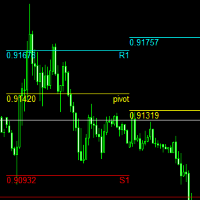
PivotPro Ultimate – Professional Pivot Levels with Probability Analysis & Telegram Alerts
🔥 KEY FEATURES
- 📈 Automatic Pivot Levels – Previous day's High, Low, and Pivot plotted on your chart
- 📊 Real-Time Probability Calculator – UP/DOWN/FLAT probabilities based on last 20 bars
- 📱 Telegram Integration – Instant alerts on level touches and probability changes
- 📅 Day Labels – Clear day-of-week markings (MON, TUE, WED...)
- 💾 Full History – All levels remain on chart for complete historical analysis
📊 PROBABILITY CALCULATOR
The indicator analyzes the last 20 bars to provide:
- 🟢 UP Probability – Chance of price moving higher
- 🔴 DOWN Probability – Chance of price moving lower
- ⚪ FLAT Probability – Chance of sideways movement
📱 TELEGRAM NOTIFICATIONS
- 🔴 TOUCH HIGH – Price approaches previous day's High
- 🟢 TOUCH LOW – Price approaches previous day's Low
- 🔵 TOUCH PIVOT – Price approaches Pivot level
- 📊 PROBABILITY CHANGE – Significant shift in market odds with BUY/SELL/WAIT recommendation
⚙️ INPUT PARAMETERS
| Parameter | Description | Default |
|---|---|---|
| LINE SETTINGS | ||
| PivotColor | Color of Pivot line | Blue |
| HighColor | Color of High line | Red |
| LowColor | Color of Low line | Green |
| LineWidth | Thickness of lines | 2 |
| MaxHistoryDays | Historical days to display | 500 |
| LABEL SETTINGS | ||
| ShowDayLabels | Show day-of-week labels | true |
| LabelColor | Color of day labels | White |
| PROBABILITY SETTINGS | ||
| ShowProbability | Enable probability calculation | true |
| ProbColor | Color of probability text | Yellow |
| TELEGRAM SETTINGS | ||
| UseTelegram | Enable Telegram notifications | false |
| BotToken | Your Telegram bot token | YOUR_BOT_TOKEN |
| ChatID | Your Telegram chat ID | YOUR_CHAT_ID |
| NotifyOnTouch | Alert on level touches | true |
| TouchDistance | Distance for touch alerts (pips) | 5 |
| NotifyOnProbability | Alert on probability changes | true |
| ProbChangeThreshold | Change threshold for alerts (%) | 15 |
📥 INSTALLATION
- Download the .ex5 file
- Copy to MetaTrader 4 → MQL4 → Indicators folder
- Restart MetaTrader or refresh Navigator
- Drag & drop onto any chart
📱 HOW TO SETUP TELEGRAM
- Create a bot with @BotFather on Telegram and copy the token
- Get your Chat ID from @userinfobot
- Enter both in indicator parameters
- Enable WebRequest in MT4: Tools → Options → Expert Advisors → Allow WebRequest for https://api.telegram.org
📊 RECOMMENDED TIMEFRAMES
- M15-M30 – For precise entries
- H1-H4 – For trend confirmation
- D1 – Levels are calculated from daily data
⚠️ DISCLAIMER
Trading involves substantial risk. Past performance does not guarantee future results. This indicator is a tool to assist analysis, not financial advice.