 MetaTrader 5
 エキスパート
 インディケータ
 ライブラリ
 ユーティリティ
 ウィジェット
 ルール
YouTubeにあるマーケットチュートリアルビデオをご覧ください
ロボットや指標を購入する
仮想ホスティングで
EAを実行
EAを実行
ロボットや指標を購入前にテストする
マーケットで収入を得る
販売のためにプロダクトをプレゼンテーションする方法
MetaTrader 5用取引ユーティリティ - 96
 以下はMetaTrader5での取引を簡素化する取引プログラムです。ユーティリティにカーソルを合わせると、その説明と目的が表示されます。

Cross-Market Confirmation Engine MT5 — Intermarket Divergence & Multi-Asset Confirmation Utility. Category: Utilities | Recommended Symbols: EURUSD, XAUUSD, US30, NDX100, GBPUSD | Recommended Timeframe: D1 / H1
Execution Role: Non-strategy Trading Utility (does not autonomously open directional strategy trades). Cross-Market Confirmation Engine calculates rolling Pearson correlation and Rate-of-Change (ROC) lead-lag divergences between the active symbol and a correlated benchmark asset. It flags

BasketLens - Basket Profit and Loss Manager for MT5
Grids, martingales, hedges, copied trades, several EAs on one account: the result that matters is the TOTAL of all the positions, not each single trade. BasketLens treats the selected positions as one basket and closes them all together when the basket reaches your profit target or your loss limit.
It is a utility Expert Advisor: it never opens trades. It manages the positions opened by you or by any other EA on the same account.
Choose the

Portfolio Correlation Risk Engine MT5 — Currency Exposure Decomposition & Portfolio Correlation Risk Utility. Category: Utilities | Recommended Symbols: EURUSD, GBPUSD, USDJPY, AUDUSD, XAUUSD | Recommended Timeframe: D1 / H1
Execution Role: Non-strategy Trading Utility (does not autonomously open directional strategy trades). Portfolio Correlation Risk Engine decomposes active positions into net base and quote currency lot exposures (USD, EUR, GBP, JPY, CHF, CAD, AUD, NZD) and calculates directi

Prop Challenge Navigator MT5 — Risk Pacing & Consistency Rule Enforcer for Prop Evaluations. Prop Challenge Navigator is a dedicated pacing utility for prop firm challenge accounts. It calculates your daily risk budget dynamically based on the remaining profit target and trading days left in the evaluation, while monitoring single-day profit caps to ensure compliance with prop firm consistency rules. Execution Role: Non-strategy Trading Utility (does not autonomously open directional strategy tr

Economic Surprise Tool MT5 — Economic Calendar Deviation & Surprise Z-Score Analysis for MT5. Economic Surprise Tool measures the magnitude of macroeconomic release deviations from consensus forecasts using empirical 24-month standard deviation Z-scores. It helps traders gauge fundamental momentum and avoid entering counter-trend positions during severe data surprises. Execution Role: Non-strategy Trading Utility (does not autonomously open directional strategy trades).
Recommended Symbols: EURU

CopyLens - Local Trade Copier for MT5
Copy every trade from one MetaTrader 5 account to one or more other accounts running on the same computer or VPS. One Expert Advisor, two modes: MASTER on the source account, SLAVE on each receiving account.
Tested live: in a 30-minute stress test the master made 91 operations (opens, partial closes, stop loss changes, closes on EURUSD, XAUUSD and US500) and the slave copied all 91, each in about 0.3 seconds.
What is copied - New positions, full closes a

SignalLens - Telegram Trade Notifier for MT5
Send your trades to Telegram as they happen: to your phone, to a private group or to a public channel for your followers. SignalLens runs inside MetaTrader: no server, no extra software, no monthly fee.
What it sends - New positions: symbol, direction, lots, entry, stop loss and take profit. - Closes with the result in money, pips and %. - Partial closes, stop loss and take profit changes. - Pending orders placed and deleted (optional). - A chart s

Regime-Adaptive Strategy Engine MT5 — Multi-Regime Trend, Pullback & Breakout Algorithmic Trading EA. Regime-Adaptive Strategy Engine is an algorithmic Expert Advisor that classifies the market into four distinct states (Strong Trend, Ranging Mean-Reversion, High-Volatility Breakout, or Low-Volatility Squeeze) using ADX, Bollinger Bands, Keltner Channels, Efficiency Ratio, and SMA 200. It automatically switches entry logic and manages trades with a 2.5x ATR hard stop loss, 3.0x ATR take profit,

Smart Breakout Scanner MT5 — Volatility Squeeze and Expansion Breakout Detection Utility. Smart Breakout Scanner monitors an 8-symbol watchlist for Bollinger Band inside Keltner Channel compression squeezes and directional breakouts outside outer bands with candle body-to-range confirmation (>=50%), providing one-click chart switching and MT5 Global Variable exports. Execution Role: Non-strategy Trading Utility (does not autonomously open directional strategy trades).
Recommended Symbols: BTCUSD

MTF Market Scanner MT5 — Multi-Timeframe Trend Alignment Matrix & Scanner Utility for MT5. MTF Market Scanner monitors EMA 20/50 structure and RSI(14) momentum across four weighted timeframes (D1 40%, H4 30%, H1 20%, M15 10%) across an 8-symbol watchlist. It computes a -100 to +100 MTAS confluence score, flags strong trend cascades, and includes one-click symbol navigation without placing live trades. Execution Role: Non-strategy Trading Utility (does not autonomously open directional strategy t
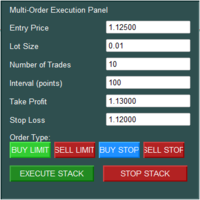
The Multi-Order Execution is an Expert Advisor for MetaTrader 5, designed to simplify the placement of multiple pending orders through a convenient on-chart control panel. The EA supports four pending order types: Buy Limit, Sell Limit, Buy Stop, and Sell Stop. Traders can configure the entry price, lot size, number of orders, price interval, take-profit (TP), and stop-loss (SL) directly from the chart. The EA automatically calculates each order's entry price based on the selected order type and

EVERY TRADE GETS AN EXPIRY DATE - AND THIS UTILITY ENFORCES IT Position Time Exit Manager is a trade-management utility for MetaTrader 5. It never opens a trade of its own. It watches the positions you choose and closes them, completely or by a percentage, the moment they have been open longer than you allow, before the Friday weekend gap, or at a fixed server time each day. See it working before you decide: load the utility in the MetaTrader 5 Strategy Tester with visual mode ticked. Inside the

Do you know your true mathematical trading edge, or are you just relying on a temporary run of luck?
A rising account balance can be deceptive. Oversized positions, favorable market regimes, or isolated winning streaks often mask deeply flawed strategies. The Statistical Edge Calculator removes all guesswork by auditing your terminal's closed trade history and calculating your true mathematical expectancy, win rates, and directional performance in seconds.
Zero manual data entry. Zero external

Risk Panel is a trade panel for MetaTrader 5 that sizes every trade by your risk and manages it from entry to exit. Drag the stop loss on the chart, and the lot size, money at risk and reward-to-risk update instantly. When the numbers look right, place the trade with one click. Buy Now | MT4 Version | Download Demo Version (Only for Demo Accounts) | User Guide It is made for manual traders who want the same risk on every trade, on forex, gold, indices and prop-firm accounts. It works with any br

Trade Simulator Panel turns the MetaTrader 5 Strategy Tester (visual mode) into a manual trading simulator. Move the chart bar by bar over years of history and practise your entries as if trading live, with real lot sizes calculated from risk and instant statistics.
Trade panel - BUY and SELL at market. - BUY LIMIT, SELL LIMIT, BUY STOP and SELL STOP (manual price or automatic, one stop distance away). - CLOSE, CLOSE HALF, BREAKEVEN and CANCEL ORDER. - Entry, stop and target lines that can be d

Trade Stats (Expert Advisor for MetaTrader 5) — Detailed Description 1. Overview Trade Stats is a non-trading analytics Expert Advisor for MetaTrader 5. It reads the account's closed-deal history, groups every trade by its Magic Number , and renders a compact live statistics table directly on the chart. Its purpose is to answer one question: which Expert Advisor on this account is actually making money, and how much each one costs to run? It places no orders, modifies nothing, and never touches

Professional on-chart risk management and automatic lot size calculator for MetaTrader.
Stop calculating lot sizes manually on external calculators while the market moves away from your entry price. Risk Controlled Volume integrates dynamic position sizing, visual interactive stop-loss lines, and one-click order execution directly onto your chart screen.
Execute orders with mathematical certainty that your defined risk tolerance will never be breached.
========================================

MSM Local Trade Copier copies trades from one MetaTrader 5 account (Master) to one or more MetaTrader 5 accounts (Slave) running on the same Windows computer or VPS. You decide the trades on the Master; the copier repeats them on the Slave with your own lot and risk settings. One file works in both roles. Set Mode = Master on the source terminal and Mode = Slave on the receiving terminal, and use the same Channel name on both. Trades are passed through a small local file, without DLL and without

MetaTrader 5 の裁量トレード用トレードマネージャー:リスクからのロット計算、確認クリック付きのワンクリック操作、建値ストップ(ブレイクイーブン)、トレーリングストップ、部分決済、1日の損失上限。 概要 PinPoint Trade Manager MT5 は、裁量でトレードする方のための取引パネルです。リスクとストップロスを決めると、パネルがロットサイズを計算し、予定の取引をチャート上にドラッグできるラインで表示します。約定後は、設定どおりにポジションを管理します。毎回の計算や繰り返しのクリックをパネルが引き受けるので、ご自身の判断に集中できます。 このパネルが自分で取引を始めることはありません。シグナルも戦略もありません。新しいポジションや待機注文は、すべてあなたの操作から始まります。 主な機能 リスクとストップロスまでの距離からロットサイズを計算(どの銘柄でも) チャート上の取引プラン:エントリー、ストップロス、テイクプロフィットのラインと、pips と金額をリアルタイム表示 管理操作はワンクリック。成行注文は意図した2回目のクリックが必要なため、誤クリック1回で取引が

Midas AI Trade Coach Review your closed MT5 trades with a statistical map and optional AI explanations. The utility reads account history and displays its findings on your chart. It never places, changes or closes orders, including in the Strategy Tester. Your History, Eight Views Explore results by UTC hour block, weekday, session, symbol, direction, holding time, trade size, and whether a trade followed a win or loss. Filter by look-back period, symbol and magic number, including manual trades

TradeSizer is a chart-based position sizing and manual order placement panel for MetaTrader 5. Set your intended risk, position your stop and target, review the calculated lot size, and send the order by clicking Place. Plan directly on the chart Choose Long/BUY or Short/Sell to create a setup. Drag the stop and target to the levels you want. TradeSizer updates the position size and estimated cash values as you adjust the plan. Use a 1R or 2R target lock, or choose Free to position the target ma
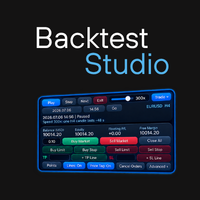
Backtet Studio
It is a training and manual back-testing tool. It does NOT send real orders to your broker.
Lets you go back to any date in a symbol's history and replay the market candle by candle (with simulated ticks inside each candle) while you practice manual trading on a virtual account.
HOW IT WORKS
1. Attach the EA to a chart of the real symbol (for example EURUSD).
2. Choose a start date and time with the built-in calendar and time picker and press Start Replay.
3. The EA build

さらに機能が必要ですか?アップグレード: JET Trade Assistant PRO — ドラッグできるラインでの部分決済、4段階の建値ストップ、8種類のトレーリングストップ、隠しストップ、仮想注文、プロップファームのルール、当日損益分岐ライン、統計。 Trade Panel and Risk Manager PRO は、チャート上から注文を出して管理するパネルです。ロット数は指定したリスクから自動計算されます。リスクをパーセントで入力して BUY または SELL をクリックするだけで、ストップロス、テイクプロフィット、ロット数が一度に決まります。エントリー、ストップ、ターゲットのラインをドラッグすれば、成行・指値・逆指値の注文種別もパネルが自動で選びます。 主な機能 リスクからのロット計算:残高または有効証拠金の%、または固定ロット。クリック前にロット数、リスク金額、リスクリワードを表示 指定リスクが最小ロットに満たない場合に最小ロットを使うオプション(少額口座向け) ワンクリックの BUY と SELL。ストップロスは ATR の倍数またはポイント、テイクプロフィットはリスク

VRD Quant は、MT5 口座の各 EA に必要な資金とロットサイズを、その EA 自身のドローダウン履歴から推定します。EA に資金を投入する前に、各 EA に何を割り当てるかを決めるために使います。 口座残高全体から各 EA の規模を決めても、それぞれが実際に何を必要としているかはほとんど分かりません。Quant は各 EA 自身の決済済み取引から、その EA が使った最小ロットを起点に、EA ごとの資金推定を出します。 できること 単一のドローダウン値だけで判断しない:EA の決済済み取引を 2,000 回ブートストラップ再標本化し、95 パーセンタイルのドローダウンを算出します。 推奨運用資金(p95 ドローダウン ÷ 20% の警告バンド)と固定ロット(観測された最小ロット)を提示します。 決済済み取引が 10 件以上あれば、各 EA の詳細カードに期待値と p95 ドローダウンを表示します。 再現性のある結果:各 EA の再標本化はマジックナンバーをシードにしているため、同じ履歴からは同じ結果が得られます。 読み取り専用:Quant には注文コードがなく、取引の新規発

VRD Guardian は、複数の EA を稼働させる MT5 口座で口座保護を最優先にします。各 EA に専用の運用資金とロット上限を設定すると、その EA の損失があらかじめ決めた段階に達したときに、Guardian が決めておいた対応を実行します。 複数の EA が 1 つの残高を共有していると、大きなドローダウンに陥った1 つの EA が口座全体に影響することがあります。Guardian は各 EA を、その EA に割り当てた資金を基準に評価します。そのため不調な EA はあなたが決めたルールで処理され、他の EA は稼働を続けます。 できること 各 EA(マジックナンバー)に専用の運用資金を割り当てます。損失は、その資金に対する確定損益と含み損益の合計で測ります。 3 段階で対応:20% で警告、26% でその EA の指値・逆指値注文を削除、32% で指値・逆指値注文を削除し、自動決済をオンにした場合のみその EA のポジションを決済します。他の EA は稼働を続けます。 EA ごとのロット使用量:その EA の最大ロットの 80% で警告、100% で Guardia

VRD Monitor は、複数の EA を稼働させる MT5 口座の資金計画と口座保護を 1 つのパネルにまとめます。各 EA に必要な資金をその EA 自身の履歴から推定し、それを運用資金として設定し、その資金に対する各 EA のドローダウンを制限します。 複数の EA が 1 つの口座を共有する場合、EA ごとに専用の資金額と専用の撤退ルールが必要です。Monitor はその両方を EA ごとに管理し、保護はその場の判断ではなく事前に決めておきます。 できること 口座の足を引っ張っている EA をひと目で発見:チャート上にマジックナンバーごとに 1 行(手動取引は専用の行)で、損益、ドローダウン、保有ポジション、ステータスを表示。 口座残高全体ではなく各 EA 自身の運用資金で評価するため、不調な戦略が早く見えます。 EA が警告(20%)、介入(26%)、放棄(32%)の各バンドを超えると、ターミナルに明確なアラートを 1 回表示。介入時はその EA の指値・逆指値注文を削除し、放棄時は自動決済をオンにしている場合のみ、その EA のポジションだけを決済します。 EA ごとのロ

Prop Firm Risk Guard PRO は口座全体を監視し、プロップファームのチャレンジやご自身のリスク計画の制限を守ります。制限に達すると、すべてのポジションを決済し、待機注文を削除し、次の取引日まで口座をノーポジションに保ちます。 機能 1日の損失上限。取引日開始時の残高(または残高と有効証拠金の大きい方)から計算し、含み損益も含めます。 最大ドローダウン:初期残高からの固定型、または最高残高・最高有効証拠金からのトレーリング型。 総利益目標と1日の利益目標:達成するとポジションを決済し、結果を確定します。 制限の設定割合(初期値 80%)に達すると、ポップアップ、サウンド、プッシュ通知で警告します。 口座がロック中は、手動でも他の EA でも、新しい取引はすぐに決済されます。 ステータス、残高と有効証拠金、各制限のバー、次の取引日までの時間を表示するパネル。 状態は口座ごとに保存されるため、ターミナルを再起動しても日の開始値、最高値、ロックが保持されます。 パラメーター 初期残高(0 = 初回起動時の残高)と、初期残高の % または口座通貨での制限値。 1日の損失上限、

RiskDeck は、MetaTrader 5用のトレードマネージャー兼リスクマネージャーです。リスクとストップ(損切り)を設定してボタンを一度押すと、ロットを計算し、トレードを管理し、あなたが設定した日次・週次・月次の損失上限に照らしてチェックします。ロットには入力した手数料が反映されます。その後、ストップを建値(ブレークイーブン)へ移動し、部分決済やトレーリングを行えます。その間も損失上限は、スマートフォンや別のExpert Advisor(EA)から建てたポジションを含め、すべてのポジションを集計します。 クイックスタート · Strategy Tester(ストラテジーテスター)での試し方 プランから注文まで、ボタン一つで リスクは、パーセント、口座通貨での金額、または固定ロットで指定します。ロットはリスクとストップから算出されます。 ボタンには、押す前にストップまでのリスクが表示されます:CONFIRM BUY · $100.00(入力した手数料を含む)。スワップとスリッページは含まれず、別途発生します。 ストップとターゲットのラインは、チャート上でドラッグするか数値で入力し

Trade Panel With Drawdown Monitor and Protector is a risk-management utility that watches your account drawdown in real time and closes all trades automatically when a limit you choose is reached. It also gives you a clean on-chart trading panel.
This is a protection tool, not a signal robot. It does not decide when to enter the market. It protects the account, whether you trade manually, with Expert Advisors, or both.
WHAT YOU SEE ON THE CHART - Daily Drawdown: current % and the maximum % re

Prop Firm Daily Loss Protector Pro is an MT5 equity protector for prop firm challenges and funded accounts. When your daily loss limit or maximum drawdown limit is breached, it closes all open positions, deletes pending orders and locks trading, so one bad moment does not break your account rules. It does not open trades. Its only job is to protect the account from breaking the rules. TRY IT FREE FIRST Prop Firm Daily Loss Monitor ( https://www.mql5.com/en/market/product/204831 ) is the free, mo

FLOATING PROFIT IS NOT YOURS UNTIL IT IS LOCKED - THIS UTILITY LOCKS IT Equity Gain Lock Manager is a basket-protection utility for MetaTrader 5. It never opens a trade. It adds up the floating profit of the positions you choose, and once that basket has earned your activation amount it guarantees a minimum profit, raises that floor as the profit grows, and closes the whole basket the moment profit falls back to the floor. Try it free before you buy: run the free demo in the MetaTrader 5 Strateg

You drive, GearStick shifts the gears.
GearStick is a trade panel for MetaTrader 5. It doesn't try to predict the market. You choose the direction, and GearStick handles the routine work: it adds positions on pullback candles, manages take profit and stop loss, and closes the basket together. Every action is one click away, and you can take full manual control at any moment.
It works on any symbol your broker offers: forex, gold, indices and crypto.
HOW IT WORKS
1. Pick a direction. Press

Trade panel, trade manager and equity guard for MetaTrader 5, built for Gold (XAUUSD).
You pick the entry. The panel works out the lot size from your risk, sends the order with a stop loss and take profit, manages the trade, and blocks new trades when your daily loss or drawdown limit is hit. It never opens a trade on its own.
WHY USE IT - No more lot-size maths: type your risk %, see the lot and the planned loss before you click - Every order goes out with a stop loss and a take profit - Bre

Applies a separate R-based exit plan to each position by its magic number: break-even, two partial exits, ATR or R-step trailing, time stop and an optional protective stop. It does not open trades. Magic Profile Exit Manager manages the exits of positions that are already open on your account. You can open them by hand, through another Expert Advisor, or with a trade panel. The utility looks at each position's magic number and assigns it to one of three exit profiles. Each profile has its own pl

SMART AI TRADING PANEL User Manual — MetaTrader 5 (MT5) Developed by RobotTradingCerdas
Website: https://robottradingcerdas.com
Copyright 2026 Faisal Sagala 1. Introduction Smart AI Trading Panel is a manual trading assistant for MetaTrader 5. It provides a convenient on-chart interface for opening trades, placing pending orders, managing Stop Loss and Take Profit levels, monitoring account information, and closing selected positions. The panel includes the following features: One-click Buy

A prop firm risk manager for MetaTrader 5. Account Rule Keeper enforces a daily loss limit and a maximum drawdown on the whole account, the kind of rules evaluation and funded accounts use, and an optional profit target. When a limit is reached, it closes all positions, deletes every pending order and keeps the account flat until the lock ends, whether the trades came from you or from another Expert Advisor. It works as an account protector and equity protector next to your own trading; it does

GTM Trade Manager v3 is a manual trade panel for MetaTrader 5. You decide when to buy and sell. The panel opens the trades with your settings, then looks after every one of them: partial closes at TP1 and TP2, break-even, trailing, and a clean chart that shows exactly where each trade stands. It also sees every open trade on the account , including trades you open from your phone, another PC or another EA. All your closed trades go into a history with replay, a data analyzer and a journal. This

Rhino Dashboard Trade Panel は、裁量トレーダーのために作られた MetaTrader 5 用のトレードパネル兼リスク管理ツールです。トップバーと1つのパネルが注文ダイアログの代わりになります。 ポジションサイズ計算機がストップを取引量に変換し 、各注文は決済プランを設定した状態で送信され、日次損失上限と週次・月次のルールが口座全体を監視します。 パネルが取引するのは、あなたがクリックしたときだけです。 設定した上限に達すると、ルールが新規取引を止めたりポジションを決済したりできます。 MetaTrader 4 版: Rhino Dashboard Trade Panel MT4
ユーザーマニュアル: Rhino Dashboard Trade Panel user manual
デモ版のダウンロード: 7-Days Trial version
トップバー:口座、価格、損益 トップバーはチャートの上部にあり、口座の状態をひと目で表示します。 口座
製品名とバージョン、 DEMO 、 LIVE 、 TESTER のバッジ、ヘッジングかネッティングか、そし

Like the logic of this tool? Explore the full ecosystem of professional indicators and utilities, built by a trader for traders: All author's products in MQL5 Market: https://www.mql5.com/en/users/musa1994/seller Trading philosophy and details: https://developer-mql4-mql5.netlify.app/ SLTPManager is a professional automatic Stop Loss and Take Profit manager with an interactive panel for MetaTrader 5, which instantly sets protection and profit-taking levels for every new trade. You will

ZigZag Confirmation EA – Smart Swing Trading with Risk Management Overview ZigZag Confirmation EA is an automated trading system for MetaTrader 5 designed to identify potential market swing points using the ZigZag indicator and trade confirmed reversal setups. The EA combines swing-point analysis, configurable entry confirmation, stop-loss protection, trailing stops, daily profit and loss limits, and customizable trading-time filters to help traders implement a structured trading approach. It is

Capital SL Defender Pro is a position manager and profit protection Expert Advisor for MetaTrader 5. It does not look for trades. You (or another EA) open the trades, and Capital SL Defender Pro manages them: it sets the stop loss and take profit the moment a trade opens, moves the stop to break-even once the trade is a quarter of the way to its target, can protect small wins from turning into losses, closes trades only at limits you switch on, and shows everything on a black and orange panel o

TRADE GESTOR v4.22: Panel de gestión visual y cálculo automático de riesgos Olvídese de los cálculos manuales de lotes y los errores de ejecución durante periodos de alta volatilidad. Trade Manager v4.22 es un panel de negociación visual de nivel profesional diseñado para ejecutar y gestionar operaciones directamente desde el gráfico mediante un sistema intuitivo de arrastrar y soltar. Esta herramienta automatiza por completo los cálculos de gestión de riesgos y asume el control técnico de sus

Trailing Peak Guard closes a position the moment its floating profit turns against you — instead of waiting on a fixed Take Profit that may never be reached, or giving back a winning trade while you wait for a textbook exit. It tracks the peak floating profit each position (or basket) reaches, and closes once profit retraces a set amount from that peak. It never opens a trade — it only protects the ones you (or your EA) already have open. Why per-position, not account-wide Most "protect your pro

Same PC Trade Copier copies trades between MetaTrader 5 terminals running on the same computer or VPS. It is one Expert Advisor with a Role input: the source account runs it with Role = Master , and every receiving terminal runs it with Role = Slave . The copies talk through a small file in the terminals' shared Common\Files folder: no internet service, no DLL, no web requests. Setup in 5 steps Install both terminals on the same computer (or VPS) and log each in to its account. Master: in the so

プロップ口座は、会社のダッシュボード上の一本のラインで失われます。Prop Limit Sentinel は、日次損失と最大損失をあなたのプロップ会社と同じ方法で計算し、有効証拠金がそのラインに達する前に動作します。 問題 日の数え方は会社ごとに異なります。FTMO の1日はプラハの午前0時に始まります。ブローカーのサーバーでは、1年の大半は 01:00 ですが、欧州と米国が別々の日に時計を切り替える約3週間は 02:00 になります。サーバー時刻を固定で設定したガードは、その期間に日を誤って数えます。また、ストップのないポジションには損失の上限がありません。 できること 会社自身の基準で日次損失と最大損失を計算します(固定型またはトレーリング型)。プリセット:FTMO 2-Step と 1-Step、FundedNext Stellar 2-Step と 1-Step、The5ers High Stakes、Custom rules。 会社のタイムゾーン(夏時間を含む)と実測したサーバーの時差から会社の1日の開始時刻を求め、パネルに表示します。 取引が約定する前に最悪のケースを確認し

Overview
Slippage Execution Monitor is a utility panel designed for traders who require precise transparency regarding order execution quality. While traditional post-analysis tools rely on closed trading history where the initial click quote has already been lost, Slippage Execution Monitor captures the exact Bid/Ask prices locally at the very instant you send the order and benchmarks it against the broker fill price.
This allows you to accurately measure latency slippage, liquidity gaps, an

A manual-trading panel that sizes the orders you prepare in it from your risk, using MetaTrader's profit calculation for the symbol and an estimated commission learned from your trades or entered by you, and shows the whole order before anything is sent. No signals, no automatic trading. What Levelstead does Levelstead is a panel for traders who place their own trades. It does three things on one chart: 1. It describes the market. Trend, ADX and volatility on M5, M15, H1, H4 and D1 from closed b

Private Trade Alerts to Telegram sends the events of your own MetaTrader 5 account to your own Telegram chat, through your own Telegram bot: positions opened and closed, partial closes, SL and TP changes, pending orders, a daily summary and optional warnings. It only reports what happened on the account. It never opens, changes or closes a trade, and it gives no signals or advice. Setup in 5 steps Create your bot. In Telegram, open the official BotFather chat, send the newbot command and follow

News Blackout for MT5 reads the economic calendar that is built into MetaTrader 5 and keeps a blackout window around the news you choose. During a blackout it can delete pending orders, close positions or move their stop loss to break even, and it sets a terminal global variable that your other Expert Advisors can read to skip new trades. A panel shows the countdown to the next blackout and the next events. It never opens trades and gives no signals. It is useful when your own rules, or your acc

TradeHam Manager is a trade panel for manual traders. You decide when and where to trade. The panel takes care of the lot size, the order and the clean-up. It does not open trades on its own. It has no entry logic and does not promise any profit. Main features Risk-based lot size. Set the risk as a percent of balance, a fixed amount of money or a fixed lot. Drag the stop-loss line on the chart and the lot is recalculated. One-click orders. BUY / SELL buttons place the order with stop loss and ta

Copy trades between MT4 and MT5 terminals on one computer. CopyHam Inside Sender is the master side of a trade copier. Attach it to the account you want to copy from. It shows a Receiver code (CT-XXXX-XXXX) on its panel. Paste that code into CopyHam Inside Receiver on the other terminals, and they follow every trade of this account. The Sender and the Receivers exchange data through the common data folder of MetaTrader on the same computer. Nothing is sent over the internet, so there is no URL t

Follow a master account from another terminal on the same computer. CopyHam Inside Receiver is the follower side of a trade copier. Paste the Receiver code shown on CopyHam Inside Sender (CT-XXXX-XXXX) into its inputs, and this account opens, modifies and closes the same trades as the master. The data is exchanged through the common data folder of MetaTrader on the same computer. Nothing is sent over the internet. The master may be MT4 or MT5 and may be with a different broker. What is copied Ma

次のローソク足を待っていますか?その時間を使って、MetaTrader 5 のチャート上でそのまま遊びましょう。
Trading Games は、ローソク足をテーマにした15本のミニゲームを、チャート上で自由にドラッグできるウィンドウにまとめました。時間つぶしになるだけでなく、Quiz、Memory、Pattern Reflex のゲームで、ローソク足パターンを少しずつ覚えられます。このEAは売買注文の発注・決済を行いません。
ゲーム
1 · Flappy Candles ワンタップでローソク足をよけます。Bull、Bear、Auto から選んで、3つの難易度(Easy、Medium、Hard)で遊べます。スコアはpipsです。
2 · Candle Match ローソク足を入れ替えて、同じ種類を3つ以上そろえます。コンボをつなげてスコアを伸ばしましょう。
3 · Pattern Quiz ローソク足のパターンを見て、正しい名前を選びます。パターン認識のトレーニングに最適です。
4 · Candle Memory ローソク足とパターンが描かれた9枚のカードを覚え、それぞれ

Analyzator Optim は、最適化結果で動作するユーティリティです。 彼女は最大5年間の最適化の深さで膨大な数のデータ配列を分析し、年ごとに別々にそれを行います。 データ分析が完了すると、時間の経過とともにより安定した結果をもたらし、注意を払う価値のある上位5つの上位10または上位20の最適化オプションが表示されます。
ユーティリティの使用方法については、手順を参照してください。 Instructions on how to use. Version MT4
重要! ストラテジーテスターのユーティリティのデモ版は、非常に明白な理由でデータ分析を実行しません。
Analyzator Optimが役立つキーポイント: 品質, 数量, 機動性。
1. 質。 目標は、1年目だけでなく、他のすべての年にも良い結果を示す最適化結果を見つけることです。 (言い換えれば、最適でより安定した結果を選択する)。 このアプローチを使用すると、将来的にも安定した結果を示す可能性が高いオプションを見つけることができます。
ある年の結果が他の年に影響を与えないようにするには、最適化を毎年他の

マニュアル: 日本語マニュアル KZ Chart Synchronizer MT5 は、異なる時間足を確認するときに、同じ同期グループのチャートの表示位置を揃えるツールです。参加しているどのチャートからでも操作でき、描画オブジェクトの共有や、あとで見返すための表示範囲のブックマークも行えます。 インジケーターとして動作するチャート用ユーティリティです。注文の発注や売買シグナルの提供は行いません。 主な機能 チャート操作の同期: 同じ同期グループのチャート間で、表示位置と横方向ズームを揃えます。 独立した同期グループ: チャートを別々の作業用グループに分け、色で所属を識別できます。 表示範囲矩形: 同一銘柄名の上位足チャート上に、隣接下位足チャートの表示時刻・価格範囲を示します。 描画オブジェクトの同期: 対応するライン、フィボナッチ、チャネル、矢印、テキストを、同一銘柄名の伝播対象チャート間で共有します。 オブジェクト管理: 描画オブジェクトの一覧表示、位置への移動、同期化・同期解除、一括操作を行えます。 ブックマーク: チャートの表示範囲を記録し、説明を付けて、保存した位置へ戻れます

Auger Panel
Manual Trading, Risk Management and Position Management for MetaTrader 5
Auger Panel is a manual trading and position management utility designed to make trading from MetaTrader 5 charts more organized and convenient.
It combines order preparation, risk calculations, trade management, chart analysis and customizable visual controls within a single interface.
Traders can open positions manually, review order parameters before execution, manage existing positions and optionally ma

Discipline you don't have to hold by willpower. Account Shield controls the risks on your account — per trade, per day, in total, drawdown, stops, overtrading, trading after a loss — and helps stop you before a bad moment becomes a lost account. Own account or prop firm (15 firm presets included). Never opens trades by itself. Why Most accounts are not lost to bad analysis. They are lost to a moment: the daily loss counted on equity, the stop set a minute late, the fourth trade after two losses,

Break Pullback Utilitiesの実際の動作をご体験ください。 YouTube での毎日のライブトレーディング配信にぜひご参加ください ! MetaTrader 5 向け 7 つの統合トレーディングツール
BreakPullback Utilities は、相場環境の分析、価格動向の監視、取引機会の発見、そして取引執行の管理を、ひとつの統合ダッシュボードから行えるオールインワンのトレーディングツールキットです。
1. Overview — 口座&マーケットダッシュボード 重要な口座指標と相場環境を、ひとつの集約されたインターフェースで確認できます。 主な機能: 口座モニタリング:開始残高、有効証拠金(エクイティ)、現在の残高、含み損益を追跡します。 日次パフォーマンス:日次の損益を金額とパーセンテージの両方で確認できます。 最悪 / 最良ケース分析:ストップロスとテイクプロフィットのシナリオに基づく口座の予測結果を確認できます。 相場環境:スプレッド、ADR5、日次の価格レンジ、市場セッションの状況を監視します。 セッションクロック:ロンドン時間を表示し、シドニ

Nexus Trade Terminal is a utility Expert Advisor that combines market context and manual execution on one panel. On every closed bar it updates three readings and offers buttons to send orders. Panel execution is disabled until you allow it in the inputs. How it works Regime: Hurst exponent and fractal dimension over the lookback window, plus momentum and volatility, classify the market as trend, mean reversion, chaotic or range/accumulation, with a heuristic confidence value. Volume and gap mon

Aegis Order and Risk Manager is a utility Expert Advisor for traders who open positions themselves. A two-tab panel provides one-click buy and sell orders, and the EA manages the positions of the chart symbol with a fractal trailing stop, an optional basket profit target and an optional rescue hedge. How it works Trade tab: set Risk % and volume with the +/- buttons, then click BUY or SELL. With panel risk sizing on (default), the volume is calculated from Risk % of the balance over the default

OCO Panel PRO:チャート右側に固定される注文パネルで、OCO戦略を保存できます。エントリーすると、選択した戦略の分割決済(利確と損切り)をパネルが自動で発注します。あらゆる銘柄・あらゆる口座タイプ(ネッティング/ヘッジング)で動作します。 主な機能 ワンクリックで売買:指値、成行、Bid、Ask。価格、数量、数量クイックボタン付き。 保存できるOCO戦略:1戦略につき最大7つの分割決済(数量の%、利確、損切り)をティックまたは金額で設定。 自動ブレークイーブン(発動とオフセット)とトレーリングストップ(発動、距離、ステップ)。 チャートトレード:Shift+クリックで指値注文、Ctrl+クリックで逆指値注文(オフセット調整可能なストップリミット)。 チャート上でドラッグできるストップライン。MetaTraderのSLラインをドラッグすると戦略のストップも移動します。 決済、ドテン、注文取消、「注文取消+決済」。 含み損益、当日損益、合計損益を金額または%で表示し、平均価格も表示。 当日の損益分岐点:決済済みの取引と保有ポジションを含め、当日の損益がゼロになる価格にラインを表

SMART AI TRADING PANEL - WIDE PANEL User Manual — MetaTrader 5 (MT5) Developed by RobotTradingCerdas
Website: https://robottradingcerdas.com
Copyright 2026 Faisal Sagala 1. Introduction Smart AI Trading Panel Wide is a manual trading assistant for MetaTrader 5. It provides a convenient on-chart interface for opening trades, placing pending orders, managing Stop Loss and Take Profit levels, monitoring account information, and closing selected positions. The panel includes the following featu

QuantView Analytics Pro
A dashboard that analyses performance across several strategies in MetaTrader 5. It tracks every EA and magic number in your terminal and shows results by strategy and by trading session (Asia, London, New York, Late), equity and drawdown curves, risk ratios, correlation between strategies and exportable reports. It is read-only and never places, changes or closes a trade. Overview When you run several Expert Advisors, or several copies of the same EA with different pre

JET Trade Assistant PRO は、MetaTrader 5 用の本格的なトレードパネル兼トレードマネージャーです。リスクを選び、チャート上にトレードを描き、ワンクリックで発注 — パネルがロット数を計算し、最後の決済までトレードを管理します。 バージョン 3.00 の新機能 Reverse(ドテン):ボタン1つ(または Shift + V)でシンボルの保有側を決済し、反対側を新規建て — 同じロット数またはリスクから算出、SL/TP は反転、決済プランも適用。2回目のクリックで確定。 日次利益目標:日初残高の % または口座通貨での金額。達成すると翌日まで新規エントリーをブロックし、オプションでポジション決済と待機注文の削除も可能。 保有ポジションの建値ライン(BE OPEN):シンボルの全保有ポジション合計がコスト込みでゼロになる価格。ワンクリックの "SL at open BE" 付き。 注文コメント JTA#<number> <origin> <detail>:各トレードに番号が付き、TRADES リストとチャート上のタグに表示。 最初の決済までは R がストッ

**Title:** Semi-Auto Execution Panel Assistant — One-Click Trading & Risk Management for MT5 **Short Description:** Streamline your manual trading with instant one-click execution, automatic lot sizing based on risk, and built-in stop-loss/take-profit management. Execute faster and eliminate costly entry errors across any symbol and timeframe. **Full Description:** The Semi-Auto Execution Panel Assistant is an intuitive MT5 overlay designed for traders who value speed, precision, and strict risk

ZEN COMMAND — MT5用 裁量トレード管理・リスクコントロールパネル
注文から決済まで、ひとつのパネルで。
スプレッドを考慮した価格管理。分割エントリーの合計リスク管理。ポジション1本ごとの部分決済。
ZEN COMMANDは、裁量トレーダーのためのチャート操作型トレード管理ツールです。エントリー位置の検討、ロット計算、損切り・利確ラインの管理、保有ポジションの決済操作をひとつのパネルにまとめます。売買の判断はトレーダー自身が行います。
1|エントリー前にリスクとリワードを確認
チャート上でエントリー・損切り・利確ラインを設定すると、想定損失・想定利益・リスクリワードをpipsと口座通貨で表示します。エントリー前の試算にはスプレッドと手数料を反映し、将来のスワップは含みません。
掲載するMT5テスター画面では、損切り時の想定額−32.94ドル、利確時+115.56ドル、RR 1:3.51を表示しています。これは画面上の計算例であり、取引成果を保証するものではありません。
2|分割エントリーでも合計リスクを管理
「合計リスク/1回ごとのリスク」を切り替え、分割

Menedjer AI 1.07v. A trading robot for gold on the MetaTrader 5 platform What it is Menedjer AI is a program that trades gold on the MetaTrader 5 platform without your constant attention. It finds the right moments to enter the market, calculates the size of each trade, and manages the trade until it closes. The main asset is gold. You can also choose silver and the euro against the US dollar. How to start You enter the amount of your deposit, choose an asset, and press the "START" button. The

GoldSniper هو نظام مضاربة دقيق مصمم خصيصًا لزوج الذهب XAUUSD. Engineered for traders who demand consistency, transparency, and capital protection.
WHY GOLDSNIPER?
Passed all MT5 Strategy Tester examinations → 0 execution errors | 0 margin failures | 0 modification errors
Strict 1:1 Risk-to-Reward on EVERY trade → SL distance = TP distance. Always. No exceptions.
EMA 20 Trend Filter → Only enters trades ali

Riskly Pro is a risk and trade management utility for manual traders. It combines account protection, position management and scale-in entries in one Expert Advisor.
Trading panel - On-chart BUY and SELL buttons. The lot is calculated from the risk you set (percent of the account) and the stop loss distance. - Automatic stop loss and take profit on every position, including positions opened from the phone or another terminal.
Account protection - Maximum daily loss, maximum number of trades p

Account guard that closes positions and blocks new ones for the rest of the day once your daily loss or daily gain limit is reached. Most accounts are not lost on one bad trade but on the trades taken after it. MetaTrader lets you set a stop loss per position, but it has no hard limit for the whole day, so one emotional afternoon or one misbehaving Expert Advisor can undo weeks of work. A rule you keep in your head is easy to break when you are under pressure. Watch Risk Gate turns the daily lim
MetaTraderマーケットは自動売買ロボットとテクニカル指標を販売するための最もいい場所です。
魅力的なデザインと説明を備えたMetaTraderプラットフォーム用アプリを開発するだけでいいのです。マーケットでプロダクトをパブリッシュして何百万ものMetaTraderユーザーに提供する方法をご覧ください。

取引の機会を逃しています。
- 無料取引アプリ
- 8千を超えるシグナルをコピー
- 金融ニュースで金融マーケットを探索