 MetaTrader 5
 エキスパート
 インディケータ
 ライブラリ
 ユーティリティ
 ウィジェット
 ルール
YouTubeにあるマーケットチュートリアルビデオをご覧ください
ロボットや指標を購入する
仮想ホスティングで
EAを実行
EAを実行
ロボットや指標を購入前にテストする
マーケットで収入を得る
販売のためにプロダクトをプレゼンテーションする方法
MetaTrader 5用取引ユーティリティ - 99
 以下はMetaTrader5での取引を簡素化する取引プログラムです。ユーティリティにカーソルを合わせると、その説明と目的が表示されます。

Watching several charts for a handful of price levels is a poor use of attention. This tool takes a list of levels typed into one input and alerts when price reaches any of them, on the current symbol or across a list. Watches a list of price levels, on one symbol or several, and alerts on approach, touch and cross, each firing once per level. Levels come from one text input such as '1.0850;EURUSD 1.0900', so the same alert list moves between charts by copy-paste. Runs on a single chart; it does

Evaluation accounts are scored on rules, not on feelings, and the rules are unforgiving in one direction: a profit target is a goal, but a daily loss limit and a maximum drawdown are hard stops. This panel tracks both against the challenge limits and warns before either is breached. Tracks profit-target progress, worst daily loss and worst total loss against the limits an evaluation is scored on, as three progress bars. Reads equity extremes from the account rather than price, and reports headro

Run it free first: open Margin Level Relief Guard in the Strategy Tester with visual mode on. Its demo trades push the margin level under the action level on purpose, and you can watch each planned slice appear on the panel, then the slice itself, then the level climbing back. THE BROKER'S STOP-OUT DOES NOT ASK WHICH POSITION YOU WOULD GIVE UP. THIS GUARD DOES. Margin Level Relief Guard is a utility Expert Advisor for MetaTrader 5. It places no entries of its own on a real account. It reads your

EA performance tracker for MT5: trading statistics and profit per Expert Advisor, magic number, symbol and strategy, from your account history. EA Performance Ledger shows what every Expert Advisor on your account really earns. MetaTrader shows one balance for the whole account; when several EAs, manual trades and copied signals share it, you cannot see which one carries the account and which one drains it. The Ledger reads the account history, rebuilds every closed position and splits the resul

Trade copier for MT5: copy trades between MT5 accounts on the same PC or VPS, from one master to several receivers. Local Trade Copier Pro copies trades between MetaTrader 5 terminals running on the same Windows PC or VPS . One EA, two modes: run it as Master on the account that trades and as Receiver on every account that should follow. Positions, pending orders, SL/TP changes, partial closes and closes are copied within a few hundred milliseconds including the broker's execution (median 333 ms

Local trade copier MT5 to MT5 on the same PC or VPS: copies opens, SL/TP, partial closes and closes between accounts. Lot multiplier, balance ratio, symbol mapping. The same file is used on both sides: choose Master on the source account and Slave on each receiving account, with the same channel name. WHAT IS COPIED New positions (market execution) Stop loss and take profit, including later changes Partial closes (proportional to the copied lot) Closes LOT SIZE Multiplier: master lot x value Fix

MT5 to Telegram signal sender: posts your trades, stop-loss and take-profit changes, closes with results and chart screenshots to your Telegram channels automatically. Turn your MT5 account into a signal channel. TradeCast posts every trade action of your account to up to three Telegram channels, groups or private chats: new trades, pending orders, stop-loss and take-profit changes, breakeven, partial and full closes with the result in money, pips and R , a chart screenshot, and daily, weekly an

Seconds chart, Renko chart, range bar and tick chart generator for MT5: real custom symbols built from your broker's ticks, usable with indicators, EAs and the Strategy Tester. Custom Charts Pro builds seconds charts (S1 … S3600, any value), Renko , Range bars and Tick charts as real MetaTrader 5 custom symbols, from your broker's real ticks . It fills the history first, then keeps every chart updated live, for as many symbols and chart types as you like, from one control panel. The generated ch

️ Never Fail Your Prop Firm Challenge Again! Most traders don't fail prop firms because of a bad entry strategy—they fail because of poor risk management, emotional over-trading, and breaking strict drawdown limits. Prop Firm Shield Pro is your ultimate automated risk management partner designed to protect your capital and keep you safe within the rules. Key Features Dynamic Daily Loss Guard: Automatically tracks your daily drawdown based on server time (00: 00 reset), supporting both B

Monte Carlo simulation and walk-forward analysis for MT5 Expert Advisors: test whether a backtest is robust or overfitted. EA Robustness Lab tells you whether an Expert Advisor's results are robust or overfitted. A good backtest is not proof: it can come from a lucky order of trades, a few outsized wins, costs that were too optimistic, parameters fitted to the past, or a market regime that is gone. The Lab takes the closed trades of a strategy, puts them through Monte Carlo, walk-forward, stabil

Bar replay and trading simulator for MT5: replay any chart from a past date and practise manual trading and manual backtesting on a virtual account. Bar Replay Simulator turns any MetaTrader 5 chart into a trading practice room. Pick a symbol and a date in the past, press Start , and the market is replayed bar by bar or tick by tick while you trade on a virtual account : market and pending orders, stop loss and take profit lines you can drag, partial close, break-even, statistics in R, a trade j

Hide your stop loss and take profit from the broker. Hidden SL TP keeps your real levels on your chart only, and closes the trade itself when the price reaches them. Trade as usual: set SL and TP in the Trade tab or on the chart, the EA hides them at once. Many traders do not want the broker, or other traders, to see where their stops and targets are. With hidden levels, the broker sees no take profit and only a backup stop loss, far away. HOW IT WORKS Your SL / TP become hidden: set them as alw

Trend Trail Panel shows which way four timeframes are leaning, then manages your exit: breakeven at a set profit and a trailing stop after that. You place the trade from the same panel. It is a tool for manual traders: you decide every entry, and the panel never opens a trade on its own. What it does Trend strip: the EMA direction on four timeframes (default M5, M15, M30, H1), from closed bars only, so it does not flicker. The same EMAs are drawn on the chart, green where they rise and red where

This indicator significantly simplifies manual chart marking when trading using the Wolfe Wave strategy. First, click the start button. A chart appears with points marked 1-2-3-4-5. The user manually places points 2-3-4 on the chart, according to the strategy conditions. Then the magic happens: The indicator finds point 1. Calculates and displays the following levels on the chart: * Trade entry level * Stop loss level * Take profit closing level

KF Multi-Timeframe Trend Dashboard — Professional 20-Timeframe Trend Cockpit & Consensus Indicator for MT5
Never trade against higher timeframe consensus again. KF Multi-Timeframe Trend Dashboard is a comprehensive, institutional-grade on-chart cockpit inspired by world-class trading terminals. Featuring an authentic 20-timeframe matrix grid and a sovereign 5-evidence voting engine (EMA 50, MACD, ADX/DMI, Ichimoku Kinko Hyo, and Parabolic SAR), it eliminates chart-switching fatigue and provide

MPGoldScalp GOLD SCALPING — PROFESSIONAL ANALYSIS SYSTEM 金は混沌を許しません。体系的に分析してください。 ほとんどのインジケーターは市場の全体像の一部しか示しません。MPGoldScalp は構造、モメンタム、トレンド、 需要/供給ゾーン、主要レベルを 1 つの分析ツールに統合し、GOLD / XAUUSD のスキャルピングに使用します。これは BUY / SELL の矢印インジケーターではありません。オプションの取引モジュールは既定で無効です。 3 つの時間軸、1 つのシステム M15 — 構造とメインゾーン M5 — モメンタムとエントリー候補 M30 — 上位時間軸の状況と確認 収録内容 需要ゾーンと供給ゾーンの自動検出 TREND と COUNTER のシナリオ Entry / SL / TP1 / TP2 の計算 H1 主要レベル、ピボット、複数日の極値 ニュースフィルター(USD / XAU) シナリオロック:シグナルがちらつきません 方向、強さ、レベルを表示するパネル オプションの取引モジュール 万能なインジケー

MetaTrader 5 has no timeframe below one minute. MelloSecondsChart builds 1, 2, 3, 4, 5, 6, 10, 12, 15, 20 or 30 second bars from the real ticks of your chart symbol and stores them in a custom symbol, such as XAUUSD_S10. Open its M1 chart and every bar is one seconds bar, so you can use any indicator, EA or drawing on it. It never trades. How it works Attach it to the chart of the symbol you want and choose the seconds per bar It builds history from recent ticks (up to 7 days) and keeps adding n

This is very useful trade manager by IAT Tools. It has multiple features which are required by traders in trading. It's some important features are:
1. Lightweight EA. 2. Four themes. 3. Trade execution from main panel and from PnL. 4. Smart risk management. 5. Split order into multiple sub trades. 6. Setting of TPs at different RR with one click. 7. Show breakeven. 8. Apply breakeven with single click. 9. Multiple options to close trades. 10. Auto breakeven and trailing stop loss.. 11. Saving

Run it free first: load Negative Swap Rollover Guard in the Strategy Tester with visual mode on. Its demo positions are held into the rollover on purpose, so you can watch the countdown run down, the check fire ten minutes before midnight, and the next morning's line that puts the estimated swap next to the swap the tester really booked. SWAP IS THE COST YOU NEVER SEE COMING. THIS GUARD LOOKS AT IT BEFORE THE BROKER DOES. Negative Swap Rollover Guard is a utility Expert Advisor for MetaTrader 5.

Size it. Place it. Manage it. Your trade ticket, built around risk. Risk Ticket Panel turns your MetaTrader 5 chart into a professional trade ticket. Drag three lines, read the lot size, press one button. No calculator, no spreadsheet, no guessing. HOW IT WORKS 1. Set the risk you accept per trade (percent of balance or a fixed amount). 2. Drag the Entry, Stop Loss and Take Profit lines on the chart. 3. The panel instantly calculates the lot size so that the loss at your stop equals the risk you

SG Copier Guide
MT4 version --------------------------------------------------------------------------------------------------------------------------------------- SG Copier Plus copies trades between MT4 and MT5 in any combination: MT4 to MT4, MT4 to MT5, MT5 to MT4, and MT5 to MT5.
• Copy trade openings, stop loss and take profit changes, and trade closures. • Connect multiple Master accounts to a Receiver. • Choose fixed lot, balance-based, equity-based, multiplier,
same-as-Master, or ris

Try it free before anything else: run Stale Trade Expiry Guard in the Strategy Tester with visual mode on. It opens small demo positions there on purpose and leaves them alone, so you can watch each one age on the panel, see its countdown reach zero, and see what the guard does next. A TRADE WITHOUT A DEADLINE IS A TRADE NOBODY IS MANAGING. THIS GUARD GIVES EVERY POSITION ONE. Stale Trade Expiry Guard is a utility Expert Advisor for MetaTrader 5. It never places entries of its own on a real acco

The advisor searches for open positions and pending orders with the specified magic number and opens another order with the magic number specified by the user. You can specify the same magic number so that the main robot will accept it as its own and execute it, in the same direction and at the same price (market or pending). Duplicate volume: fixed or x-multiple of the volume of the found order. The duplicate is automatically closed when the main order closes.
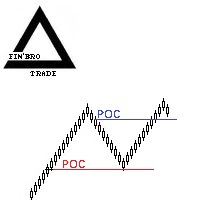
The indicator displays the POC (Point of Control) at the extremes of a swing zigzag. Algorithm: 1. A zigzag is plotted: swing extremes (fractal pivots) with a depth of N bars to the left and right of the extreme. 2. For each extreme, a volume profile is plotted over a window of N candlesticks (the window is centered on the extreme bar). 3. The POC is the level with the highest volume in this window; it is plotted on the chart as a horizontal line.
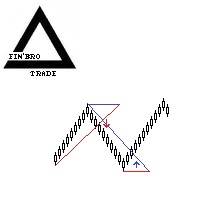
A swing pattern indicator based on fractals. At each confirmed swing extreme (fractal), a horizontal level lasting N candles is drawn. A trend line is drawn from the previous fractal to the right edge of the level. Arrow signals: when a candle crosses the trend line and closes beyond it, an arrow is displayed pointing in the direction of the trade. A stop loss is placed beyond the extreme.

Full description (for the Description field): FX TRADE PANEL PRO — Version 2 Update: compact panel mode and corrected calculation of common Take Profit (TP) for Buy and Sell positions. Product description FX TRADE PANEL PRO is a powerful and user-friendly trading control panel for MetaTrader 5. In version 2 we made the interface more compact and fixed an important bug in the common Take Profit calculation so your automation behaves more accurately and reliably. Key features Two panel display mod

APSC Trade Manager Pro チャート上から、シンプルでわかりやすく取引を管理できます。 APSC Trade Manager Pro は、MetaTrader 5 向けのツールです。取引ロット数の計算、リスクの管理、ポジションの管理をすばやく簡単に行えます。 リスクにさらす金額を設定し、チャート上にエントリー、Stop Loss、Take Profit のラインを配置するだけです。APSC が推奨ロット数を自動計算し、想定される利益と損失を表示します。 マウスでラインをドラッグすると数値が更新されるため、手作業で計算する必要はありません。 主な機能 ロット数の自動計算 リスクの設定: 口座残高と1取引あたりのリスク割合を入力します。 自動計算: Stop Loss までの距離に応じた推奨ロット数を計算します。 リアルタイム更新: 価格や取引レベルが変わると数値を再計算します。 リスクと利益: 想定損失と想定利益を口座通貨で確認できます。 リスクリワード比(RR): Stop Loss までの距離に応じて Take Profit を調整できます。 5つの取引モード Ma

Trade Autopilot は、PCやスマートフォンから手動で入ったトレードを管理します。ストップロスがなければ設定し、ブレイクイーブンに移動し、ポジションの一部を決済して、残りをトレーリングします。すべてを R(初期リスク)と ATR で測るため、同じ設定がゴールド、指数、FXで使えます。 発売記念価格:30 USD、通常価格 60 USD から 50% オフ。 エントリーのタイミングはあなたが決めます。そこから先は Trade Autopilot がトレードを引き受けます。新規トレードは行わず、シグナルも出しません。1つのチャートに設定するだけで、口座内のすべての銘柄のトレードを管理します。 すべてのトレードに4つのステップ Stop loss (ストップロス):ストップロスなしでトレードを開いた場合、エントリーから 2 ATR の位置に設定します。この距離が 1R になります。 Breakeven (ブレイクイーブン):+1R でストップロスをエントリー価格にスプレッドとわずかな余裕を加えた位置へ移動します。 Partial (部分決済):+1.5R でポジションの 50%

QuantBench は、チャートの銘柄と時間足で売買戦略を構築する MetaTrader 5 用のエキスパートアドバイザーです。過去のローソク足で戦略をテストします。構築に使う部分(in-sample)と、構築時に戦略が見ていない部分(out-of-sample)です。あなたのフィルターを通過した戦略を一覧に保存し、どの戦略で取引するかはあなたが選びます。
チャート上では、エキスパートは自分で戦略を探索したり選んだりしません。探索を始めるのも、戦略を選ぶのも、実注文を送るかどうかを決めるのも、あなたです。 **発売記念プロモーション:早期購入価格**
- 最初の10本:$99(現在の発売価格) - 次の10本:$119 - 最終目標価格:$399
10本売れるごとに価格が上がります。今後のすべてのアップデートと戦略パックは、購入済みの方に無料で提供されます。
**使い方**
1. 「生成」ページでフィルターを設定し、「探索開始」をクリックします。 2. 「戦略一覧」ページで見つかった戦略を確認します。各戦略にはスコアと小さなチャートがあります。戦略をテストしてから、「有

プロップファームの口座が失格になる主な原因は、相場分析の失敗ではなく、リスク管理ルールへの違反です。 一日の大きな損失、放置された予約注文、重要ニュース時の急激な価格変動によって、警告なしにチャレンジが終了することがあります。 PropGuard は、取引と並行して動作するリスク管理ツールです。プロップファームのルールに従って口座を監視し、損失上限に達する前に対応します。 なぜ事前に対応するのか? 初期設定の安全バッファは90%です。日次損失上限または最大損失上限の90%に達すると、PropGuardはポジションの決済、予約注文の削除、取引のロックを試みます。 ただし、スリッページ、価格ギャップ、約定遅延により、ルール違反を完全に防げる保証はありません。 管理するルール 日次損失上限:当日の基準残高または有効証拠金に対する割合。 最大損失上限:3つの計算モード。 Static:初期残高に基づく固定下限。 Trail Equity:有効証拠金の最高値に追従する下限。 Trail Day:最も高い日初残高に追従する下限。 プロップファームの時刻に基づく日次リセット。ブローカーのサーバー時刻

Tidewall Timing finds the market regime in which a trading bot performs best, then monitors the market live and tells you when to switch the bot on.
Every trading bot has market conditions that suit it and others that do not. Tidewall Timing measures this from the bot's own trade history and tells you, in real time, when the current market looks like the conditions in which the bot has historically performed better.
HOW IT WORKS 1. Analyze. Load the bot's trades from a Strategy Tester report (

Profit Storm Replay Profit Storm Replay は MetaTrader 5 用のチャートリプレイとトレード練習のユーティリティです。ブローカーの任意の銘柄を過去の日付まで戻し、価格の履歴をローソク足1本ずつ、または選んだ速度で再生して表示します。リプレイチャート上で仮想注文を使ってエントリー、決済、ポジション管理を練習し、結果をその場で確認できます。すべての取引はシミュレーションで、ブローカーには何も送信されません。 使い方 1. 練習したい銘柄の通常チャートに Profit Storm Replay を適用します。 2. SYMBOL_RPL という名前のリプレイチャートが開き、パネルが自動で起動し、チャートは開始日で止まります。それ以降のローソク足は表示するまで隠れたままです。 3. 1分ずつ、または1本の完成したローソク足ずつ進めるか、Play を押します。時間足の切り替えや MetaTrader 5 の標準描画ツールは通常どおり使えます。 機能 - 1分足の履歴によるバーリプレイ、またはデータがある場合はブローカーの実ティックによ

Gardien closes every position and locks the account when your daily or max loss reaches 90 % of your prop firm's limit. The loss is measured on equity, open trades included, and the day starts at your firm's own reset hour, not at the server's midnight. Most challenges are not lost by a bad strategy. They are lost by one bad day: a trade without a stop, a revenge trade, an Expert Advisor that keeps opening positions after a losing streak. Gardien watches your whole account and steps in before a

APEX Signal Copier Copy supported Telegram text signals to MetaTrader 5 with recognition rules you control. Common signal formats work out of the box. When a channel uses different instructions or labels, add a rule and check the result in Live Preview before using it for copying. Sign in with your own Telegram account and select channels you can access. Channel administrators do not need to invite a bot. A separate Windows connector is required and must run alongside MetaTrader 5. Recognition t

MT5 to Telegram trade notifier and signal sender: posts opens, SL/TP changes, partial closes and closes with pips and profit, chart screenshots and a daily report. Attach it to ONE chart. It reports the whole account: manual trades and every EA, or only the magic numbers and symbols you choose. WHAT IS SENT New positions: direction, symbol, entry price, SL, TP, lot SL/TP changes (break-even, trailing, manual edits) Partial closes: closed and remaining volume, pips and profit Closes: exit price,

News filter for MT5 using the built-in economic calendar: closes positions before high-impact news (NFP, CPI, FOMC) and blocks new trades during the news window. Works with any EA. Many prop firms do not allow trading a few minutes before and after high-impact news, and a single release can wipe out a day of profits. NewsGuard handles this mechanically, for manual trading and for every EA on the account, including EAs that have no news filter. HOW IT WORKS Warning: a popup / push notification be

Trade panel and lot size calculator for MT5: lot from your risk %, SL/TP by pips or chart lines, one click buy/sell, pending orders, close all, break-even and partial close. PLACE TRADES Risk % of balance or equity Stop in pips (points for gold, indices and other non-forex symbols), take profit by R:R Line mode: drag the SL and TP lines on the chart; TP follows your R:R until you drag it Pending mode: drag the entry line; buy/sell limit or stop is chosen automatically The valid side is highlight

**MQL PRO TRADER — execution panel, position manager and built-in performance analytics.**
A trading toolkit for MetaTrader 5: an on-chart order panel, a position manager with partial targets, a rule engine you write yourself, and a performance report built from your own account history. You decide the rules; the robot executes them.
**IT RUNS ENTIRELY INSIDE YOUR TERMINAL**
No DLL. No web requests. No API key. Nothing about your account, your trades or your results leaves your computer. Eve

Telegram Reporter Pro は、 MetaTrader 5(MT5)のトレーダー、 ポートフォリオマネージャー、 シグナルプロバイダー向けに開発された、 高度で自動化された口座追跡およびテレメトリーEAです。 一日の開始時の有効証拠金(Equity)を自動的に計算し、 リアルタイムの口座パフォーマンスを監視して、 美しくフォーマットされたレポートをTelegramグループやプライベートチャンネルに直接配信します。 Telegram Reporter Proが選ばれる理由(主なメリット) 絶対的な透明性とコントロール: 一日中画面に張り付くことなく、 24時間365日いつでもトレード成果をしっかり把握できます。 個人口座の管理や投資家からの信頼構築に最適です。 投資家の信頼向上: シグナル配信、 コピートレードネットワークの運営、 プロップファーム口座の運用を行っている場合、 自動検証された日次/週次の利益更新をTelegramチャンネルに直接送信することで、 即座に高い信頼性とプロフェッショナリズムを確立できます。 ストレスフリーな完全自動化: スケジュール(朝

Mello Trade Copier copies trades between MetaTrader 5 terminals on the same computer or VPS. Attach it in Master mode on the source account and in Receiver mode on each destination account, using the same channel name. It needs no DLL, no server and no internet service of its own. What it copies New trades, with stop loss and take profit Stop and target changes Partial closes, in proportion Closes Pending orders are not copied while they wait. They are copied when they fill and become trades. Wh

Mello Trade Dashboard shows the results of your own trading account on the chart, read directly from the account history. It answers simple questions: how did today, this week and this month go, which symbols and which Expert Advisors make or lose money, at what hours, and how deep was the drawdown. It opens no trades, needs no DLL and sends nothing outside the terminal. Summary page Net result and gain in percent for today, this week, this month and the period you choose Closed trades, win rate

Smart Trade Pad Pro — Visual Risk Manager, Draggable Scale-In Cockpit & 1- Click Lot Sizer ** Stop guessing lot sizes. Eliminate human math errors. Never breach a Prop-Firm drawdown rule again.** Have you ever lost a funded Prop-Firm evaluation because of a hasty lot size calculation error? Have you ever missed a high-probability breakout on Gold (XAUUSD) or Bitcoin (BTCUSD) because you were busy typing numbers into an external web calculator? Have you ever wanted to scale into an order bl

️ News Shield Pro — Universal Prop-Firm News Guardian & 24/7 Account Emergency Controller ** The #1 reason Prop-Firm traders fail funded challenges isn't poor analysis—it's high-impact news spikes.** Are you trading on a **Prop Firm account (FTMO, The 5 ers, FundedNext, Funding Pips)** where violating the "No News Trading" rule instantly disqualifies your account? Are you exhausted from manually checking economic calendar websites while managing active trades? Have you ever had a winning p

Telegram Copier MT5 Range Grid Telegram Signal Copier with Russian Language Support, Range Grid Execution and Custom SL/TP Management Telegram Copier MT5 Range Grid is an Expert Advisor designed to execute supported Telegram trading signals in MetaTrader 5 through a companion Windows application. The system supports English trading signals and configurable Russian-language signal recognition. It also provides range-based order execution, adjustable grid spacing, flexible lot distribution and ind

News filter for MT5: closes or protects trades and pauses Expert Advisors around high-impact news from the built-in economic calendar. News Window Guardian keeps every Expert Advisor and every manual trade on your account out of trouble around high-impact economic news. Attach it to one chart: it reads the economic calendar built into MetaTrader 5, finds the releases you care about and, inside each protection window, closes or flattens positions, deletes pending orders, moves stops to break-even

Spider Gold Protector 資金を守り、利益を確保し、より安心して取引。 取引を開始するのはあなた。保護するのはSpider。 Spider Gold Protectorは、MetaTrader 5のゴールド(XAUUSD)取引向けに開発された、インテリジェントな取引保護ツールです。 買い(BUY)または売り(SELL)のポジションを開くと、Spiderが自動的に保護設定を管理し、損失の抑制と利益の保護をサポートします。 Spiderの仕組み 1. 自動ストップロス — 資金を保護 ポジションを開くと、Spiderは口座残高と設定されたリスク条件に基づいて、自動的にストップロスを設定します。 2. 建値保護 — リスクを軽減 ゴールド価格が有利な方向に一定の距離だけ動くと、Spiderはストップロスをエントリー価格まで自動的に移動します。 これにより、利益が出ている取引が損失に転じるリスクを軽減します。 3. スマートトレーリングストップ — 利益を確保 価格がさらに有利な方向へ動くと、Spiderはストップロスを自動的に調整し、利益を段階的に確保します。 ゴールドの値

AutoSLTP – Automated Stop Loss & Take Profit Manager for MetaTrader 5 Short Description: Take full control of your risk management with AutoSLTP , an essential MetaTrader 5 utility that automatically attaches Stop Loss and Take Profit levels to all newly opened positions and pending orders. Designed for all instruments (Forex, Indices, Crypto, Commodities). Full Description: Managing risk manually can lead to costly delays and mistakes. AutoSLTP is a lightweight, ultra-fast trade assistant built

Spider Silver Protector 資金を守り、利益を確保し、より安心して取引。 取引を開始するのはあなた。保護するのはSpider。 Spider Silver Protectorは、MetaTrader 5のシルバー(XAGUSD)取引向けに開発された、インテリジェントな取引保護ツールです。 買い(BUY)または売り(SELL)のポジションを開くと、Spiderが自動的に保護設定を管理し、損失の抑制と利益の保護をサポートします。 Spiderの仕組み 1. 自動ストップロス — 資金を保護 ポジションを開くと、Spiderは口座残高と設定されたリスク条件に基づいて、自動的にストップロスを設定します。 2. 建値保護 — リスクを軽減 シルバー価格が有利な方向に一定の距離だけ動くと、Spiderはストップロスをエントリー価格まで自動的に移動します。 これにより、利益が出ている取引が損失に転じるリスクを軽減します。 3. スマートトレーリングストップ — 利益を確保 価格がさらに有利な方向へ動くと、Spiderはストップロスを自動的に調整し、利益を段階的に確保します。 シル

Brick Lab builds Renko, Range and Seconds charts from real ticks and shows what spread and commission cost you on every brick, session by session. It helps you choose a brick size your broker can afford.
What you get
- Renko, Range and Seconds charts built from real ticks inside the EA, not from M1 bars. No external generator. - The cost of one brick after spread and commission, for each trading session, with a warning when a session gets too expensive. - A suggested brick size based on normal

Trading statistics report as a shareable image for MT5: return, profit, win rate, profit factor, drawdown, pips and equity curve. One-click PNG, Telegram, daily/weekly/monthly. WHAT THE CARD SHOWS Return in % of the starting balance, net profit and pips Trades, win rate, profit factor, maximum drawdown, won / lost Average win and loss, best and worst trade Growth curve of the closed trades Your title (name or @account), the period, and a REAL / DEMO badge PERIODS Today, this week, this month, th

CalmFx Trading Panel is an on-chart panel for manual trading in MetaTrader 5. It places market and pending orders in one click, manages open positions with a trailing stop and a hedge button, and shows sessions, multi-timeframe trend, RSI alerts and the economic calendar on the same chart. The panel works on any symbol. Distance settings such as take profit, trailing stop and pending order offsets are scaled automatically to each market's average daily range, so the same settings behave consiste

Spider Bitcoin Protector 資金を守り、利益を確保し、より安心して取引。 取引を開始するのはあなた。保護するのはSpider。 Spider Bitcoin Protectorは、MetaTrader 5のビットコイン(BTCUSD)取引向けに開発された、インテリジェントな取引保護ツールです。 買い(BUY)または売り(SELL)のポジションを開くと、Spiderが自動的に保護設定を管理し、損失の抑制と利益の保護をサポートします。 Spiderの仕組み 1. 自動ストップロス — 資金を保護 ポジションを開くと、Spiderは口座残高と設定されたリスク条件に基づいて、自動的にストップロスを設定します。 2. 建値保護 — リスクを軽減 ビットコイン価格が有利な方向に一定の距離だけ動くと、Spiderはストップロスをエントリー価格まで自動的に移動します。 これにより、利益が出ている取引が損失に転じるリスクを軽減します。 3. スマートトレーリングストップ — 利益を確保 価格がさらに有利な方向へ動くと、Spiderはストップロスを自動的に調整し、利益を段階的に確保し

口座の各 EA が本当はいくら稼いでいるかが分かります。Halberd Portfolio Monitor は口座の取引履歴をマジック番号ごとに分け、戦略ごとに取引数、勝率、プロフィットファクター、純損益、ドローダウン、保有ポジションと健康状態を表示します。読み取り専用で、取引は一切しません。 1つの口座で複数の EA を動かすと、MetaTrader に表示される残高は全部の合計だけです。静かに負け続けている戦略が、勝っている戦略の陰に隠れてしまうことがあります。Halberd Portfolio Monitor は口座の履歴を読み、EA ごとに1行ずつ並べます。どの EA が口座を支えていて、どの EA が崩れ始めているかが分かります。 このプログラムは注文の発注・変更・決済を行いません。ご自分の口座の履歴と保有ポジションを読むだけです。データがターミナルの外に出ることはありません。 戦略ごとに表示するもの 取引数、勝率、プロフィットファクター。 純損益、最大ドローダウン、その戦略の最高値からの現在のドローダウン(決済済みの取引、口座通貨)。 直近の期間(既定は30日)の損益。 保

One question: after an economic release, did the first move hold or fade?
AfterRelease takes the most recent high-impact releases on your broker's calendar and prices and shows how many times the first move held and how many times it faded a few bars later, always with the number of cases.
- TODAY'S CASE: one button loads today's release that already has an actual value, and the market it moves. - Choose the market and timeframe in the inputs; the panel always says which market it analysed. -

Risk and Lot Size Calculator は、「損切りになったら失う金額」が決めた額になるロット数を計算する MT5 用インジケーターです。チャート上の3本の線(エントリー・損切り・利確)をドラッグすると、ロット数、リスク額、利確時の利益、リスクリワード、必要証拠金(概算)をパネルに表示します。プロップ口座(資金提供型口座)の損失の余裕も、必要なら表示できます。 裁量で取引する方が、注文の前に損切り幅からロット数を決めるための道具です。計算と表示だけの道具で、注文・変更・決済は一切しません。表示は計算の目安であり、実際の約定・損益・証拠金はご利用の業者の条件で決まります。
機能 ・エントリー(点線)、損切り、利確の3本の水平線。線にマウスを乗せてドラッグします。損切りがエントリーより下なら買い、上なら売りとして計算します。エントリーの線を現在値に追従させることもできます(「現在値に追従」ボタン) ・パネル:ロット数(大きく)と売買の方向、リスク額(基準に対する%)と目標額、損切り幅(FX は pips、それ以外は価格差とポイント)とスプレッド込みの幅、利確幅、リスク

How old is the last swing high and swing low that has not been broken yet - and what happened to past swings of the same age?
ExtremeAge shows both live swings on one panel: price, time and age in bars. Below them it lists past swings from your broker's history that reached a similar age, and how many of them stayed intact or were broken soon after, always with the number of cases.
- Pick any market from the panel: forex, metals, indices, energies, crypto, stocks. Broker symbol names with suff

MTF Sync Object & Charts PRO Draw Once. Sync Everywhere. MTF Sync Object & Charts PRO is a professional multi-timeframe synchronization utility designed for MetaTrader 5 traders who work with multiple charts and timeframes simultaneously. The tool automatically synchronizes crosshairs, chart navigation, scrolling movements and drawing objects across multiple chart windows in real time, allowing traders to maintain a consistent analysis environment without repetitive manual adjustments. Whether

Centucode Trade Copier MT5 Centucode Trade Copier MT5 is a trade-copying utility designed to synchronize trading activity between MetaTrader 5 terminals running on the same Windows computer or VPS. The copier supports Supplier and Receiver operating modes, allowing one trading account to broadcast transactions to several receiving accounts. Multiple suppliers can also be followed by a hedging receiver using separately configured EA instances. Main features Market BUY and SELL position copying. P

Visual Risk Manager Panel は、リスクを最優先に考える MetaTrader 5 用のトレードパネルです。1 回の取引で許容する損失を口座のパーセントまたは金額で決めると、パネルがロットサイズを計算し、取引をチャートに描画して管理します。 主な機能 リスクを % または金額で指定。 ロットはリスクとストップロスまでの距離から自動計算されます。固定ロットモードもあり、その場合は損失がリスクと等しくなる位置にストップロスが置かれます。 テイクプロフィットは %、金額、R (リスクの倍数)で指定できます。 視覚的でインタラクティブ。 エントリー、ストップロス、テイクプロフィットのラインはワンクリックでドラッグできます。各ラインのタグに価格、金額、パーセント、ポイント、リスクリワード比が表示されます。 成行注文と指値・逆指値注文。 ボタンには送信される注文が正確に表示されます:BUY、SELL、BUY LIMIT、SELL STOP など。 ブレークイーブンとトレーリングストップ。 しきい値は R またはポイントで設定します。 一括決済。 合計利益または合計損失が指定し

Mirror Trade Copier は、ある MetaTrader 5 口座のポジションを、同じパソコンまたは VPS 上で動作している別の口座(複数可)にコピーします。コピー元の口座では Master、受信側の各口座では Slave として、同じチャンネル名で起動します。 主な機能 新規ポジション、ストップロスとテイクプロフィットの変更、一部決済、決済を 1 秒間に数回コピーします。 Slave 側のロット: 残高比例、Master のロット×係数、または固定ロット。 銘柄名の変換: サフィックスの削除、プレフィックスやサフィックスの追加に対応し、銘柄名が異なるブローカー間でも使えます。 リバースモード: 買いを売りに変換し、ストップロスとテイクプロフィットを入れ替えます。 安全設計: Master の配信が止まった場合、Slave 側では何も変更しません。Slave 起動時にすでに保有していたポジションは、コピーを指定しない限り無視されます。 1 つの Master から任意の数の Slave へコピーできます。複数のチャンネルを同時に使えます。 入力パラメータ モード(Mas

News Guard は経済カレンダーをチャート上に表示します。取引している通貨の今後の指標発表、重要度、カウントダウン、発表前のアラートを確認できます。さらに、重要度の高い指標の前後で口座を保護することもできます。 主な機能 ニュースパネル: チャート銘柄の通貨、または任意の通貨リストについて、日時・通貨・重要度・タイトル・カウントダウンを表示します。 垂直線: 各発表時刻をチャート上に重要度別の色で表示します。 アラート: 発表の指定分前にポップアップとプッシュ通知でお知らせします。 保護ウィンドウ: 重要度の高い指標について、発表直前にその銘柄または口座全体のポジションを決済し、待機注文を削除できます(任意)。 他の EA 向けシグナル: ニュースウィンドウ中はターミナルのグローバル変数 NewsGuard_銘柄名 が 1 になります。 MetaTrader 5 内蔵のカレンダーを使用します。Web リクエストや外部ファイルは不要です。 入力パラメータ 通貨(空欄 = 銘柄の通貨)、最低重要度、先読み時間、表示行数、垂直線、パソコン時間またはサーバー時間、パネル位置、アラートの分

STOPS DUPLICATE TRADES FROM COPIER GLITCHES, EA DOUBLE-SENDS AND RECONNECT RESENDS BEFORE THEY DOUBLE YOUR RISK. Built for traders who run copiers, signal services or Expert Advisors. One job: one trade stays one trade. Mechanism: positions with the same symbol and direction, opened seconds apart with near-identical volume and price, are grouped into a cluster; the first one is kept, the newer copies are handled your way. Try it free first: run Duplicate Trade Shield in the Strategy Tester with

RM Trade Manager は裁量トレーダーのための取引管理パネルです。リスクに基づくエントリー、分割注文、トレーリングストップ、リスクプランを、ライブチャート上で扱えます。 いつ取引するかを決めるのはあなたです。RM Trade Manager は計算と定型作業を引き受けます。ストップロスとリスクからロット数を計算し、それぞれ独自のテイクプロフィットを持つ分割注文を送信し、ストップを動かし、1日の損失上限を守り、重要指標の発表から距離を置けるようにします。 トレーダーが使う理由 すべての取引でリスクが正確 :リスクは残高の % または金額で指定し、ロット数は SL までの距離から手数料込みで算出されます。 分割決済がシンプル :1クリックで複数の注文を送信し、それぞれに独自の TP を設定します。 プロップファーム口座のルール :口座全体の1日の損失上限と利益目標、最大保有ポジション数、ニュースフィルター。 画面に張り付く作業を削減 :6種類のトレーリングストップ、建値決済(ブレークイーブン)、部分決済をひとつのパネルから操作できます。 新規注文(New Order) 成行の

Spread, slippage and commission analyzer for MT5: an execution quality report per EA and per symbol, plus a spread log by hour. Execution Cost Analyzer shows what your trades really cost and how your account executes them. Attach it to any chart: it reads the deal history of the account and breaks every closed trade into spread, slippage, commission and swap. It then shows, per EA and per symbol, how much of the edge went to costs. While it runs it also records the spread of your symbols every s

Send alerts from ANY indicator, ANY Expert Advisor and your own price lines to Telegram, Discord, your phone and email, with a chart screenshot. No coding. MetaTrader can beep and pop up a box. It cannot send an indicator's arrow to your Telegram group, post your EA's trades to a Discord channel, or tell you on your phone that price touched the line you drew. DuoFX Alert Relay Pro does all of that from one Expert Advisor on one chart, for every chart in the terminal. It is an alert tool and noth

STOPS THE WEEKEND GAP FROM JUMPING STRAIGHT OVER YOUR STOP LOSS: PROTECTS OPEN POSITIONS MINUTES BEFORE THE FRIDAY CLOSE. Built for traders who hold positions into Friday evening, by hand or with an Expert Advisor or copier. One promise: no position goes into the weekend unguarded by accident. Mechanism: it reads each symbol's own last trading session of the week from your broker, warns you first, and a set number of minutes before that close adds a protective stop, closes a part, or closes the

Take full control of your manual and automated trades with the Multi-Mode Trailing & Risk Assistant , an advanced risk management and trade-enhancing Expert Advisor built specifically for MetaTrader 5 (MT5). Designed for high-volatility instruments like Gold (XAUUSD) as well as major forex pairs, this tool ensures your profits are locked in and your risk is professionally managed. Key Features: Auto SL & TP (1:3 Risk-to-Reward): Automatically attaches a default Stop Loss and calculates a 1: 3 Ta

Most news filters ask you to maintain a list of events, and a list goes stale the week you stop updating it. MetaTrader 5 already ships the economic calendar, so this guard reads it directly and blocks new orders inside a window around high-impact releases. Reads the terminal's own economic calendar for the currencies on the chart, marks each high-impact window forward on the chart, withdraws pending orders while a window is open, and can optionally protect or close open positions. Uses the nati

Your backtest is scored on the price you asked for. Your account is scored on the price your broker gave you, and the difference is paid on every single trade. The platform does not report that difference anywhere, which is why almost nobody measures it. This utility catches each deal as it is added to the account, compares the fill with the price that was actually requested, and turns the gap into points and into money - split by symbol, by direction and by hour of the server day. Catches every

The State Trading Panel is a risk management, trade execution and discipline utility for MetaTrader 5. You know your trading rules. The difficult part is following them when a trade goes against you. Moving a stop loss to avoid taking a loss. Entering another trade to recover the last one. Taking a setup that doesn't meet your plan. The State helps you control these decisions with a mandatory pre-trade checklist, automated stop-loss protection, entry restrictions, trading cooldowns and market fi
MetaTraderマーケットは、履歴データを使ったテストと最適化のための無料のデモ自動売買ロボットをダウンロードできる唯一のストアです。
アプリ概要と他のカスタマーからのレビューをご覧になり、ターミナルにダウンロードし、購入する前に自動売買ロボットをテストしてください。完全に無料でアプリをテストできるのはMetaTraderマーケットだけです。

取引の機会を逃しています。
- 無料取引アプリ
- 8千を超えるシグナルをコピー
- 金融ニュースで金融マーケットを探索