 MetaTrader 5
 エキスパート
 インディケータ
 ライブラリ
ライブラリ
 ユーティリティ
 ウィジェット
 ルール
ルール
YouTubeにあるマーケットチュートリアルビデオをご覧ください
ロボットや指標を購入する
仮想ホスティングで
EAを実行
EAを実行
ロボットや指標を購入前にテストする
マーケットで収入を得る
販売のためにプロダクトをプレゼンテーションする方法
MetaTrader 4のための新しいエキスパートアドバイザーとインディケータ - 231
 自動売買ロボットは市場取引を自動的に実行しますが、インジケータを使用すると、相場をより適切に分析し、価格行動を予測できます。
これらのアプリケーションを使用すると、より多くの機会を獲得しながら、より多くの情報に基づいた方法でMetaTrader4で取引を実行できるようになります。
自動売買ロボットは市場取引を自動的に実行しますが、インジケータを使用すると、相場をより適切に分析し、価格行動を予測できます。
これらのアプリケーションを使用すると、より多くの機会を獲得しながら、より多くの情報に基づいた方法でMetaTrader4で取引を実行できるようになります。 
Keltner Channels are volatility-based bands that are placed on either side of an asset's price and can aid in determining the direction of a trend. The exponential moving average (EMA) of a Keltner Channel is typically 20 periods, although this can be adjusted if desired.( Default is 50 here..)
In the Classic Keltner Channels The upper and lower bands are typically set two times the average true range (ATR) above and below the EMA, although the multiplier can also be adjusted based on personal p
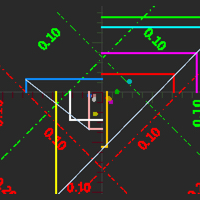
Best Currency Flow Indicator This indicator breaks down all 28 forex currency pairs and calculates the strength of individual currencies , therefore it visual the money flow in/out of a currency. This indicator is very powerful because it reveals the true movements of the market, true supply and demand zone. It is highly recommended to analyze charts knowing the performance of individual currencies or the countries economies . The indicator will reveal the country's economic performance

You can get a Bonus: Get my Bolide EA for free, after rating the Huracan Hedger
Huracan Hedger EA is a fully automated Expert Advisor for smart Hedging/Grid Trading. This System is designed very simple and it´s very easy to understand the EA, even for beginners . The EA is focused on the AUDNZD Market- But can be Optimized for every Currency Pair, Index, Stock etc. It is a system designed to restore unprofitable positions, with the integrated Martingale function , if the trade does not
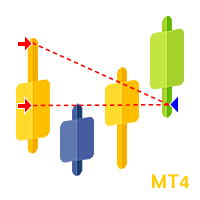
Trade History Plotter is used to draw trades historical position. It's really useful for analyzing previous trades. It can be from manual trade or expert advisor. This trade history plotter is showing open arrow, lines and closing triangle just like a backtest trade history, everything is exactly the same. It can also plot current running trade history Parameters: Plot history Plot running trades Filter by magic number Filter by trade comment Show trade levels Show chart period separator Customi

The Tachikomas Metatrader 4 Forex Robot is an algorithmic expert advisor that opens, exits and manages positions based on the MA cross overs. The logic that is used to define trade entries on TheTachikomas EA is to buy and sell when the condition above are met. All timeframes will work on The Tachikomas expert advisor but our preference falls on the 1- Hour chart. NOTE: The default settings in the EA should be left as is besides - Aggressive Trade settings Set Aggressive to true w
預金の加速。
EAには7つの設定があります:
1.コメント(注文に対するコメント)
2. ロット(ロットは設定でのみ手動で変更されます)
3. 通貨での目標(顧問がポジションを閉じて取引しない預金通貨での目標)
4. Magik(注文番号)
5. RSi(潜在的なエントリポイントを決定するためのRSi期間)
6. RSi出力(出口ポイントを決定するRSi期間)
7. エントリ価格への追加(潜在的なエントリのレベルからのポイントでインデント。 設定フィルタ偽テイクアウト)
フラットでは、70と30のレベルを超えたRSIの出口は、トレンドでは、逆に、新しい動きの出現を差し迫った逆転を示しています。
フラットで群衆に立ち向かうと、他の参加者のストップロスに大きな動きを捉える機会がありますが、写真が壊れた瞬間に入る必要があります。 これはまさにアドバイザが作成されたものです。 彼は70または30のレベルを超えたエントリを見て、故障時に指値注文をすることによって動きの継続を待ち始める。 ポジションを終了するには、急激なプルバックの場合に利益を維持するために、より短い期間

Description:
An automatic advisor designed to work on the Forex market. The Expert Advisor belongs to the scalping category. It is based on an adaptive system and does not need indicator settings and optimization. It works on the candlestick opening prices. The optimal pair for the EA is EURUSD , M1 . Stop Loss and Take Profit are always used to protect the deposit in unexpected situations. You only need to set up a money management that is acceptable for you, as well as specify the GMT time o

ArtLine is a scalping fully automatic trading robot. It uses several digital indicators and its own filters to find suitable market conditions.
For currency pairs with the Swiss franc, the most positive trading results. Recommended trading pair EURCHF M1 The EA works on the candlestick opening prices, this provides a reliable test on historical data and stable operation in real conditions.
You only need to set up an acceptable money management for you, as well as specify the GMT time

こんにちは、親愛なる友人
外国為替市場で取引するためのロボット"Ai Bot"は、一定期間、価格が以前の高値よりも高くなったときに買い取引を開きます。 したがって、価格が以前の安値よりも低くなったときに売りを開きます。
すべてのシンプルさにもかかわらず、ロボットは異なる設定で長い間利益を上げることができるように構成されています。
"エアボット"ロボットは、グリッドを使用せず、ヘッジし、市場が一方向または他の方向に行くときにうまく機能します。 もとのフラットでの成果としてのスクリーンショット. ない永久の開取引は、支払い、仲介業者のためのスワップ. また、何らかのニュースやその他の理由で無効にしたい場合は、それを疑う場合に便利です。
これは、最後の3年と3ヶ月のために調査されている、一定のロットで取引を開くとき、ロボットは顕著な結果を示しました。
"エアボット"ロボットのニュアンス": 1. ストップロスを設定することは可能ですが、市場が変化したときにロボットが特定のパラメータに従って閉じるようにプログラムされているため、私; 2. 負けた貿易の場合には、第二の貿易は1
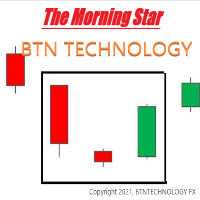
モーニングスター この指標はモーニングスター(明けの明星)に基づいています。 いつBUY(買い)ポジションを取るべきかを簡単に見つけることができます。また、パラメータ設定を調整することもできます。 *モーニングスター(明けの明星)とは- https://btntechfx.com/?product=301 使い方 青い上向き矢印-値上がりすると思われます(買いポジションを持ちましょう)。 このインジケーターは、 M15 または H1 インジケーターを使用する場合に使用できます。 (他の時間帯でこのインジケーターを使用することはお勧めしません。) *ストラテジーテスターではなく、ライブチャートを使用すると、インジケーターが表示されます。 パラメータ設定(カスタマイズ可能) AVGRANGE_VAL(平均範囲の値を調整できます。) このインジケーターに、さらに追加したい機能などがございましたら、お気軽にお問い合わせください。 ホームページ: btntechfx.com Eメール:support@btntechfx.com

This is a trading robot to work on EURUSD , with the H1 timeframe. It exploit a statistical advantage with Bollinger Bands and Parabolic SAR that is complemented by a reversion system to the short-term mean, profitable since 2012. Backtest now! Special OFFER for this week Discount price - $ 49. Next price $ 149. BUY NOW!!! Would you like a system that works on real accounts? Use the strength of the God Apollo. TC Apollon EA works with the Bollinger Bands and Parabolic SAR indicators, a
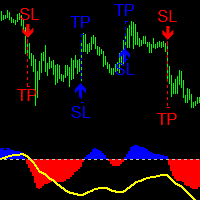
Description
The Quantum Awesome Oscillator indicator is based on the standard Bill Williams Awesome Oscillator (AO) indicator. It has two parts. The lower part is a colored histogram of the oscillator (divided into two sides - above zero and below zero and, accordingly, colored in two colors - blue for buying and red for selling) and a trend curve line (shows the direction of the global trend). The upper part - arrows showing market entry points, as well as dashed lines showing Stop-Loss and Ta
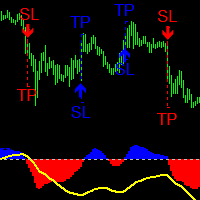
Description
The Quantum Awesome Oscillator Pro indicator is based on the standard Bill Williams Awesome Oscillator (AO) indicator. It has two parts. The lower part is a colored histogram of the oscillator (divided into two sides - above zero and below zero and, accordingly, colored in two colors - blue for buying and red for selling) and a trend curve line (shows the direction of the global trend). The upper part - arrows showing market entry points, as well as dashed lines showing Stop-Loss an
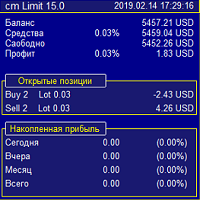
Strategy:
A grid Expert Advisor that collects profit in any direction of price movement! We catch the initial price movement with stop orders. The exact guidance of the order is carried out by a trawl (pulling it up behind the price). Next, a grid of limit orders is placed at a specified distance (Step) from each other. Moreover, the distance is dynamic and can adjust to the market. The lot is set as a fixed or as a percentage (RiskPercent) of available funds. The essence of the strategy is t

The MaxMinTrend indicator displays the highs and lows of the price on the chart. This indicator was created to simplify the determination of trend directions, as well as to support open positions, by transferring Stoploss to the current highs and lows of the price, thereby making a large profit. This indicator is not redrawn.
Input parameters:
BarsCount - 1000 - Number of bars to draw the indicator
maxmin - true - Enabled display of Highs and Lows
line - true - Enabled display of the connec
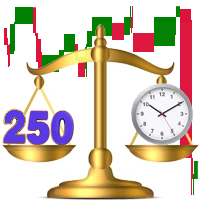
The indicator displays a stock chart of a non-standard type, in which the price and time have the same value.
The usual chart of Japanese candlesticks does not take into account all the information that the time analysis can give. Renko charts do not use all the information that price can give in relation to time. The "Chart Price and Time" indicator takes into account price and time equally and shows the predominance of price or time.
Taking into account price and time equally gives an idea
Attention!!! Do not try to test the EA in the Tester - it is simply impossible, because the EA opens positions on different 28 instruments. The tester is able to test only one pair.
The EA uses 4 strategies, each strategy uses joint work on several currencies at the same time.
The EA uses 4 stages of control and order tracking for a step-by-step profit capture. Trading is carried out in a pair for several currencies at the same time, trading is also carried out in a group of several strate

Indicator shows buy/sell arrows depending on volatility factor. Indicator does not repaint! It works on any pair and any timeframe. It is well tested through strategy builders and shows quite interesting results as a good filter indicator and as independent signaler as well (check the screenshots). It is possible to search for a lot of interesting parameters for profitable trading, some of which are shown on the screenshots. There are next inputs in indicator settings: N-volatility period; Level

We Trade Live Trend Max 500-1000 Pips Our team of engineers have programmed a great tool which we have used to success and will aid you in making better decisions when placing a trade, it is better than anything available on the market at the moment! try & Test Against other products and see for yourself how amazing this is. Our Main Objective is to help you as traders discover how you can take a simple trading setup and make consistent profits. We provide the fundamentals needed to trade the ma
FREE

Attention. The sale of this advisor will be available only during today. Live monitoring of the Wild Side https://www.mql5.com/ru/signals/962021 To correctly determine the trading time, you need to specify the broker's winter GMT time. you can read how to do this in my post: https://www.mql5.com/ru/blogs/post/743531
Wild Side is a fully automatic expert Advisor for trading on the night Forex market. It does not use martingale, grid, or other "toxic" methods. Each trade is accompanied by a st

PeakMaster PRO EA is an intelligent fully automated robot, uses the Moment change, and a mathematical algorithm that compares the MA level and places buy or sell orders accordingly. Each order has a Stop Loss and a Profit. PeakMaster PRO is designed so that with a spread greater than the set maximum - does not place orders to buy or sell. This makes it safer in the presence of too high volatility. To test PeakMaster PRO, be sure to use the MT4 Demo account data (every tick) 1min. A smaller sprea

AZ forex LTD EA ls result from 8 years of experience forex trading
Forex ea robot,
Hello,
Are you in need of profitable forex ea robot?
OR
You have no time to trade?
You are now in the right place because your satisfaction is guarantee. AM promising and guarantee that you won’t loss with my bot
I am equipped with all the necessary skills required to build and maintain a Profitable FOREX EA ROBOT to make automatic trades in the Forex ea robot market [with EUR-USD,GBP-JPY Pairs, e
We Trade Live Trend Levels This indicator is a fantastic addition to the We Trade Live Trend Max this helps filter out noise and helps with better entries into a trade this add on is a must have and we use it all the time along side We Trade Live Trend Max this is a fantastic tool to help with entering a trade and exiting a trade, This indicator Calculates Volume strength indicating levels of support and resistance for a trade, measures momentum in a market making buying or selling into the
FREE

We Trade Live Trend Candle Stick can help identify potential trend in the market when trading, spot market trends and predict future prices. We Trade Live Trend Candle Stick has a smoother look, as it is essentially taking an average of the movement. candles will stay RED during a downtrend and Green during an uptrend . We believe It's useful for making candlestick charts more readable and trends easier to analyse. As a breakout trader you are looking for trades that are ‘breaking out’ of
FREE

We Trade Live Trend Entry & Exit is another fantastic addition to the the We trade Live trend Indicator collection This Indicator works fantastically well with our other Indicators. This Indicator is primarily used to enter a trade & Exit a Trade , and to alert you when you could possibly take a short or long on a current trend , it provides alerts on when there is a change in direction on the trend you are trading but please make sure you take into account all variables, before entering a trade
FREE
As a trader you are looking for to enter trades at the perfect time. This indicator takes advantage of any price action and indicates when a certain level has been made and a potential break out is going to be made. THIS IS BEST USED ON THE 1DAY CHART WITH WE TREND LIVE MAX Check LTF (Check Long time frame) feature added to 5mins , 15mins, 30mins 1hr & 4Hr chart which will check the trend on all frames times in particular the 4hr trend. so if a alert is received to buy or sell and the trend is
FREE
Being flat is a position taken by a trader in Forex trading when s/he is unsure about the direction of currencies trading in the market. If you had no positions in the U.S. dollar or your long and short positions canceled each other out, you would be flat or have a flat book
A flat market is one where there is little price movement; the market typically trades within a tight range, rather than forming a clear up or down trend. This indicator shows potential flat
FREE

Expert description
The Expert Advisor's trading system is based on entry and exit at a certain deviation of the asset price from the moving average value. The Expert Advisor has a number of parameters, by manipulating which you can implement different trading systems and also get different results when trading on different assets, keep this in mind when setting up an Expert Advisor and do not use standard settings on all instruments and time frames.
Recommendations for use
The EA working time
FREE
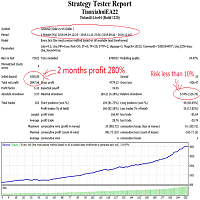
This is a trend type short-term foreign exchange EA intelligent trading system. It only makes one order at a time and has a fixed stop loss. It will not adopt the high-risk loss strategy of constantly increasing positions, nor will it carry on without stop loss. This EA mainly deals in EURUSD currency pairs. It is loaded into a one hour cycle. After 20 years of historical testing, the capital curve is stable. This EA can adapt to any market, and has no requirements for the trading environment an
The Better Volume indictator improves the comprehension on volume by coloring the classical histogram bars . The colors point out differents nature of volume . Further through two buttons and without change the main chart it is possibile to change the time frames and navigate among three symbols . The alerts will work accordingly. For each symbol can be choosed the LookBack and Ma periods . The possibility to show/hide the indicator allows you to focus on the price .
The subwindow can be hide

Trend line Trader Ultimate EA
A "Professional Trading Panel" that every experienced and beginner manual trader needs it.
"Trend Line Trader Ultimate EA" makes it easy to never miss an opportunity of a good point to open positions. Demo version doesn't work due to programmatic limitations. Please watch videos and images for more information.
Key Features of Trend line Trader Ultimate EA:
Fully graphical interface. Extremely precise and reliable. Risk Manager , Lot calculator , Trailing Stop . Mu
For metatrader 4 - MT4 version
There are 2 oscillator plots - fast & slow. Fast plot shows the price location with in the medium term channel, while slow plot shows the location of short term midline of cycle channel with respect to medium term channel.
Usage of this is similar to %b oscillator. The slow plot can be considered as the signal line. This makes use of the default 10/30 values of Hurst Cycle Channel, but may need tuning for your instrument.
This indicator can also be used to spot
This EA has been developed, tested and traded live on GBPJPY H1 TF. Everything is ready for immediate use on real account. Very SIMPLE STRATEGY with only FEW PARAMETERS. Strategy is based on CLOSE WEEKLY BREAKOUT . It enters if volatility raise after some time of consolidation . It uses STOP pending orders with ATR STOP LOSS and TAKE PROFIT. EA has been backtested on more than 18-year long tick data with 99% quality of modeling and verified on 30-year long M1 data. Everything is alread

Bitcoin Smart Buyer expert is a 100 % automated system that only opens buy positions in Bitcoin, it is the result of more than 7 years of experience in the financial markets.
This expert is designed for people with or without trading experience. With its higher profit ratio, this expert is the best solution for losing money and start making real money in financial markets.
- Why choosing this expert ? Bitcoin Smart Buyer : * Trade only on Up trend and open only buy positions. * Choose the bes

Free use for 3 months without any restrictions July 7, 2021 will be restore the original price of 199$
This is a fully automatic Quantitative Trading Advisor (QTA )
What you need to do is to optimize the parameters, then select the appropriate parameters and let it run. No one strategy is a one-size-fits-all solution. Now we have given you the best and most advanced tools , but you need to learn how to use them. This QTA can help you find out the characteristics of the parameters that get sev

EA Trade ATR Plus is a fully automated trending advisor It is based on an advanced trading algorithm that has been extensively tested for many years Dignity Capital management system; Low drawdown Each order is protected by a stop loss Doesn't use martingale, grid, arbitrage Requirements Platform: MT4; Minimum deposit: $ 100; Currency pair EUR / USD VPS hosting recommended. Input parameters LOT - Lot size (if k = 0) atr - value of the ATR indicator slatr - Stop Loss value (size from ATR value)
An indicator to draw a graph of account current and historical state such as Balance, Equity, Margin, Free Margin, Margin Level, Drawdown, Account Profit, Deposit and Withdrawals.
Indicator Inputs : Draw Balance Graph Draw Equity Graph Draw Margin Graph Draw Free Margin Graph Draw Margin Level Graph Draw Drawdown Graph Draw Account Profit Graph Connect Gaps by Lines Sign of DDs on Profit Sign of DDs on Loss
Tips : The Indicator will draw historical balance graphs and deposit/withdraw arrows b

Crystal Sword EA being a fully automated adviser, it requires minimum efforts from users. This is a perfect fit for beginners who are just getting a hang of it. Most of the inner parameters have been pre-set and optimized in advance to save you from fiddly customization . What makes a real difference is that Crystal Sword will easily meet the needs of both experienced traders and newcomers. Its risk management strategies can be attuned to your taste. Just set the desired risk level and you ar

WHAT IS NEXT MOVE? SIMPLE ANSWER IS, THIS PROGRAM IS BASED ON PRICE ACTION THEREFORE FINDING NEXT MOVE IS EASY TO IDENTIFY THIS PROGRAM IS USING STANDARD CALCULATIONS FOR SUPPORT RESISTANCE IN SHAPE OF 2 WAYS TREND LINES SELECT HORIZONTAL LINES TREND LINES WILL GUIDE TRADERS TO TRADE IN RANGE WITH PIVOT LEVEL ALSO HORIZONTAL LINES GUIDE YOU ABOUT SUPPORT RESISTANCE OF DIFFERENT TIMEFRAMES FOR EXAMPLE: IF TRADER INTERESTED TO TRADE IN 15 MINUTES TIME FRAME, THEN HE CAN SELECT 15 MINUTES IN PR
FREE

Kusama is an automated trading system that uses and candlestick patterns in combination with Standard Deviation calculations to open and close trades. This Expert Advisor is designed specifically for the USDJPY H1 Foreign Exchange(FX) market to open, monitor, modify and adjust orders automatically.
Entry signals utilize Shooting Star Candlestick patterns and Hammer Candlestick patterns . Long Exit Signals work on the Bearish Engulfing Candlestick patterns in combination with Standard Deviati
FREE

The Alpha Trend Experience the cutting-edge in trend analysis. The Alpha Trend doesn't just identify trends—it filters out the noise, focusing only on the primary movements of price. Whether you're a Binary Option pro or a scalping enthusiast in the Forex world, this tool is tailored for you. Here's the secret: The initial thrust of a major trend often sets its enduring direction, irrespective of the minor fluctuations within. With Alpha Trend, you can decode this momentum, pinpointing the most
The price fluctuates. Just like planets oscillating in a star system. The wavelength of the oscillations depends on gravity in the center and other factors in the system.
You can benefit from these oscillations with this expert advisor in the market.
It is an expert advisor suitable for beginners with simple usage inputs. Stoploss Calculation Level: Stoploss Begins after breakeven in points
Stoploss Movement Step: Step points after stoploss works.
Minimum Start Level in Points: Minimum strat lev

I am glad to welcome you on the page of my product Step By Step EA is a new generation Expert Advisor applying a well-established trend-following trading. The product is good both for scalping, as well as medium- and long-term trading. Step By Step always sets take profit and stop loss to its deals. Step By Step trades on all symbols and timeframes. It features multi-currency trading. The indicator searches for suitable market entry points on an already formed trend.
Benefits Automatic mar

Valorant EA is a multi-functional expert advisor for the MetaTrader 4 terminals. The algorithm of the expert advisor allows you to trade both with the trend and against the trend. Trading against the trend is conducted in order to close unprofitable positions with a profit. The advisor has a large number of settings that allow you to conduct conservative, aggressive or scalping trading of financial instruments. EA contains self-adaptive market algorithms with reinforcement learning element

This is Command Prompt(CP) for MT4. By using this,you can access info that only brokers and programmers can access. For example,do you know your freeze level,margin mode,or how much memory used by MT4? Knowing these info,you can improve your trading.
How to Use Type following commands into command prompt box(Shown in photos.) and press Enter. For example,if you want to know maximum permitted amount of a lot,then type "maxlot". By typing "info",CP will show all commands available. By typing "hel
Telegram Channel & Group :https://t.me/joinchat/sdHZOjGc9V0xYjQ0
V.I.P Group Access: Send Payment Proof to our Inbox https://easypippin.com/ The Easypippin collector indicator gives u a indication of direction,based on several settings all put together to make it Easy to detect where the market possible is going to. The indicator gives u a X inthebox and a X , if u see them painting together the possible direction is strong. The indicator also can be used as a support and resistence zone.
Sc
Simply the " Wilder Exponential Moving Average " An exponential moving average with a somewhat different formula. It is one of the most common and widely used moving averages on various trading platforms. It can be used on all symbols, from forex to indices, it has a single parameter with a default value of 10 It can also be used within expert advisor, I hope it will be useful.
Welcome to the Crypto EA (currently only tested on Bitcoin) But keep in mind if you use a smaller frame you will get more signals. And also consider the profit when there was a signal but the market is trading sideways. Maybe better to go for small profit, set it on higher time frames then you can use it for more pairs at the same time. =========================================== => works on all Time Frames. =>On the lower Frames there are too many small trades but its up to yourself. =>You can

Utility Description This is a useful utility that can help traders to Stay in touch with their Accounts and hear about account critical conditions. With this utility, traders will receive notifications of broker server connectivity status. Different forms of notifications are supported such as Android or IOS phone notifications, Email messages or Popup Alerts. Also any changes on positions can be sent as a notification based on user settings. All above features can be customized using the EA inp

Introducing Fx Kenji , the ultimate Expert Advisor for serious traders! Powered by a highly sophisticated breakout strategy , Fx Kenji is expertly crafted to dominate the USDCAD, EURGBP and EURUSD symbol. GBPUSD is also an excellent choice! Proven through rigorous backtesting from 2010 to 2024 with an impressive 99.90% modeling quality , Fx Kenji demonstrates the outstanding potential of its strategy. Trading Recommendations Minimum balance: $1,000 Minimum leverage: 1:500 Account type: ECN

****** Easy to understand, correct Trade direction indicator, quick and easy to visualize******* BING Proper Path Indicator(BPP) will show BUY/SELL signals on-screen in an easy-to-understand 'Traffic Light' format. Provides a final 'reassurance' and 'peace of mind' for taking an educated, high probability, low-risk, trade decision. In the same way, you use a rearview mirror for instantaneous information while taking a driving decision, the same way BING Proper Path Indicator(BPP) will help you

Auto trade V20 is a trading tool like Robot or Expert Advisor that is used for automatic trading, this type is Martingale EA, the recommended broker is FBS, EU Pair, default setting. If you want to find the best setting, please look for it by backtesting it, so that you find the best setting and help your trading become more profitable, please try this tool to help you trade. minimum deposit 200 $ cen lot 0.01, pipstep in points.
For more info join to http://discord.io/reitakfx where you can get info how to set, how to trade or for your questions -------------------------------- If you want this panel and all my other products for FREE , create account here http://bit.ly/reitakfxroboforex and then write me and I will send you all my actual and future product for FREE + VIP on my DISCORD --------------------------------------
Set in panel what margin will use to trade. When you ready to trade, just click to buy or sel
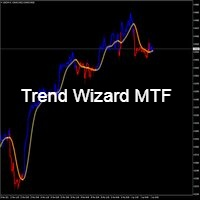
Trend Wizard MTF - trend indicator Input signals without repainting. Nice play on different characters. Easy to set up, simple tool. trend indicator based on the principle of joint analysis (3 indicators). The indicator forms arrows (red and white).
If a signal appears and is confirmed at the close of the signal candle. Error-free opening of transactions The indicator finds the ideal signals to enter a trade (buy or sell), which increases the likelihood of success.
SALE. 1) Red line color -
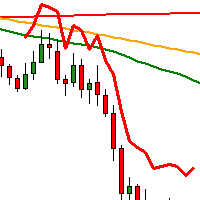
This Indicator is using 3MA's with different periods.
A Buy Signal occurs when Green on the top, yellow in the middle, red at the bottom.
A Sell Signal occurs when Red on the top, yellow in the middle, green at the bottom.
When there is buy signal the indicator draws a blue line below price. When there is sell signal the indicator draws a red line above price.
In the comments section you may find a template file with the 3 MAs.
You can use this strategy alone or compined with anoth

CogniTrade is a time-tested profitable trend following EA. The key to its success is given by the fact that it detects short-term trend and open position in the direction of the prevailing trend. It further maximizes the profit potential by opening trade during a pull back i.e. buying weakness in an uptrend and selling strength in a downtrend. Check Live Result Here -> https://www.mql5.com/en/signals/821852 Recommended Setup Minimum Balance: $1000 Currency Pair: EUR/USD Time Frame: H1 Initial

The Expert Advisor tool has been developed for XAUUSD (GOLD), based on SUPPORT/RESISTANCE level . All trading positions contain a DYNAMIC TAKE-PROFIT and DYNAMIC STOP_LOSS. . The signal: https://www.mql5.com/en/signals/997939?source=Site+Signals+My
There is no need to set up parameters - all settings are already optimized and fine-tuned. Features Each deal is protected by Dynamic Take-profit and Dynamic Stop-loss. A fixed lot are used. No martingale, no grid. All settings optimized. Long-term

"Phoenix Gold is a great choice for hands-off investors who plan to do a long-term investment in gold"
#Non-Martingale #Always SL #Robust #Adaptive #Fully Automated #AI #XAUUSD Phoenix Gold is a non-martingale expert adviser generated from our AI-driven pipeline which learns diversified trading strategies from 10-years historical data of the gold market.
Phoenix Gold project aims to provide a robust adaptive trading system that can harmonize with the dynamic of the market.
We value risk manage

do not download this indicator from here unless you want to donate me , because if you did you will get a demo version ..
this indicator will help you analyse the market based on waves strategy.. to understand it more get the tutorials from my channel on telegram and wait for more new strategies ..
its working on nasdaq dow and dax , but thos one just for nasdaq ..
to get the demo version or buy the real one / join my telegram channel
t.me/forexEaTrade
don not use this indicator without

2つのオシレーターを組み合わせたもの。 1 つ目はエントリーポイントを表示し、2 つ目は現在のトレンドを表示します。このインジケーターは、すべての高速オシレーター信号または現在のトレンドの方向のみの信号の 2 つのモードで、オシレーター信号を矢印で表示できます。マルチタイムフレームパネルと 3 種類のシグナル通知があります。 利点: デイトレードやスキャルピング取引に適しています トレンドフィルタリング シンプルかつ高感度なセットアップ マルチタイムフレームパネル アドバイザーへの統合に適しています。 あらゆるシンボルとあらゆるタイムフレームに対応 3種類の通知 MT5 version -> HERE / Problem solving -> HERE 指標戦略 このインジケーターは 2 つの異なるオシレーターで構成されます。 遅いトレンド ライン (太い) - インジケーターの高レベルが上から下に交差する場合、それは下降トレンドのインジケーターであり、下側の水平レベル (インジケーターの低レベル) が下から上に交差する場合、それは下降トレンドのインジケーターです。上昇傾向。さら

What is crypto trading? A cryptocurrency is a digital (virtual) financial currency, where security of making transactions is provided by using cryptography methods. The concept of the very first digital currency, Bitcoin, was introduced by Satoshi Nakamoto in 2008. Since the moment cryptocurrencies appeared, they have been growing in popularity quickly and at present may be considered as some of the most highly-demanded trading instruments. There are more than 1,500 cryptocurrencies in the worl

Extended version of the indicator of the same name. Optimized work order. Added settings to the indicator menu for finding accurate signals. There are separate settings for Buy and Sell.
Scalper indicator designed for accurate entry into trade transactions. Designed for intraday and medium-term trading on any instrument. The indicator does not redraw and does not lag. There is the possibility of visual and sound notification of the appearance of a signal to enter. The indicator also sends sign

序章
Meta Trader4のエキスパートランダマイザー-純粋なランダム性に基づくトレーディングロボット。指標はなく、まったくありません。純粋なランダム性のみが、買いまたは売りのいずれかの取引を開始します。だから、あなた自身に尋ねてください-それはあなたの幸運な日ですか?あなたは本当に知ることはできません。それは、黒か赤のどちらかに賭けをするカジノに足を踏み入れるようなものです。あなたは非常に幸運で、いくつかの本当に良い利益を上げることができます。緩んでも泣かないでください、警告されています!
Randomizerは、取引操作でいかなる種類の危険な取引手法も使用しません。注文は常に入力で定義されたストップロスで事前設定され、利益を取り、使用された場合でも損益分岐点になります。幸運を願っています!
方法?
預金と口座 外国為替はテストされました、私が知らない他のもの。任意の時間枠とレバレッジ 素晴らしい結果を期待してバックテストを行うと、ランダムであるため役に立たないので、時間を無駄にしないでください。
Randomizerはどのように機能しますか?
現在のオープンポジシ

Forex Vampireは、MT4プラットフォームとEUR / USD、GBPUSD、USDCAD通貨ペア向けに設計および最適化されたプロの自動取引システムです。
このシステムは端末上で独立して動作します。ロボットの実行中にコンピューターの電源をオンにする必要があるため、コンピューターまたはVPSで実行できます。
ロボットは24時間市場を分析しているため、人間よりも効果的です。
更新と最適化は継続的に行われ、購入者が利用できるようになります。
ロボットはさらに開発され、将来さらに良い取引効果を達成するのに役立ちます。
危険な戦略を使用しないでください。本当のストップロスとテイクプロフィットのみ。
あなたがあなたのインターネット接続または電気を失ったとしても、あなたの注文は保護されたストップロスです。
ロボット外国為替ヴァンパイアの動作原理。
ロボットが取引を行うことはめったにありませんが、品質は良いので、しばらくお待ちください。ロボットを起動して、数か月以内に結果を確認してください。 ロボットの動作は、ロボットが最適に動作するために、端末のEUR / USD、GB

No Nonsense Forex メソッドのための完全なトレードパネルです。このパネルには、あなた自身のNNFXアルゴリズムを実行するために必要なほとんどすべてのものが集約されており、あなたがより速く、より簡単にトレードできるようになっています。3つの部分で構成されています。 シンボルパネル
シンボル名を押すと、チャート内の任意のシンボルに素早く切り替えることができます。 パネルには、現在開いている取引、それらの取引と他のシンボルとの相関関係(ストップロスがブレークイーブンまたはプラスの場合を除く)、今後のニュース(次の日のローソク足、ローソク足の終値で取引する場合)などの追加情報を表示できます。 ニュースはForex Factoryからインポートされ、デフォルトのフィルタリングされたニュースはVPがNo Nonsense Forexで推奨しているものとなっています。ニュースを変更したい場合は、あなたの完全なカスタムニュース(大文字と小文字を区別します)を含むニュースが表示されることを考慮してください。 タイムゾーンはEET/EEST(メタトレーダーと同じ)で、表示されるニュースは

このインジケーターは、ゴールデンクロス、デッドクロス、MACDに基づく太い青と赤のLINEのトレンドを示します。 パラメータ設定で自由に数値を調整できます(MA期間、MACD値)。 したがって、このインディケータ を取引通貨の種類や期間などに合わせてカスタマイズできます。このインディケータのデフォルトは、 USD / JPY M30 または H1 取引に適しています。 このインディケーターのデフォルトはUSDJPYに設定されています。 したがって、このインディケーターを他の通貨ペアまたは時間枠で使用する場合は、0.00037に変更してください。 使い方 青い線:上昇、購入 赤い線:下降、売り パラメータ(カスタマイズ可能) MAPeriod1(短期) MAPeriod2(長期) MACDBUY_Value(MACDは値を上回っています。) MACDSELL_Value(MACDは値を下回っています。) Audible_Alerts = trueまたはfalse
無料デモをダウンロードして、製品をチェックしてください! このインディケータに機能がさらに必要な場合は、お気軽にお問
Demo version of the advisor Correlation Hunter
The full version can be found at the link https://www.mql5.com/ru/market/product/64481
The Expert Advisor appeared thanks to many years of analysis of the movement of correlated currency pairs in the Forex market.
The full version does not use any blocks
You can test the Expert Advisor on a demo account for an unlimited time. Nobody limits you in time. The main task is to choose the most optimal settings for working with your broker
You can s


This is a trading robot to work mainly on the EURUSD pair, with H1 timeframe . It uses a robust strategy that combines the strength of the Bears Power, Force Index and Envelopes indicators through a scalping system that will give you excellent results. Backtest now! Special OFFER for this week Discount price - $ 49. Next price $ 149. BUY NOW!!! Are you tired of trading systems that work only in backtesting? Would you like an EA that works well on live accounts? Collect fortunes with t

FxBears Powers – Institutional Entry Levels with Precision Stop Chasing the Market. Trade the Levels That Matter. FxBears Powers is a professional trading indicator designed to identify high-probability reversal zones before price reaches them. Instead of reacting after the move has already started, FxBears Powers helps you prepare for the market by providing precise Buy Limit and Sell Limit levels based on advanced market structure analysis. The algorithm combines multiple layers of price behav
MetaTraderマーケットは、他に類のない自動売買ロボットやテクニカル指標の販売場所です。
MQL5.community ユーザーメモを読んで、取引シグナルのコピー、フリーランサーによるカスタムアプリの開発、支払いシステムを経由した自動支払い、MQL5Cloud Networkなど、当社がトレーダーに対して提供するユニークなサービスについて詳しくご覧ください。

取引の機会を逃しています。
- 無料取引アプリ
- 8千を超えるシグナルをコピー
- 金融ニュースで金融マーケットを探索