
Master Stochastic
- Experts
-
Genesis Hafalla
 Fueled by coffee and optimism, even on 1 % battery—ambitiously steering through questionable choices as a part-time realist and full-time daydreamer.
 - Versione: 267.200
- Aggiornato: 20 luglio 2026
- Attivazioni: 20
How it works
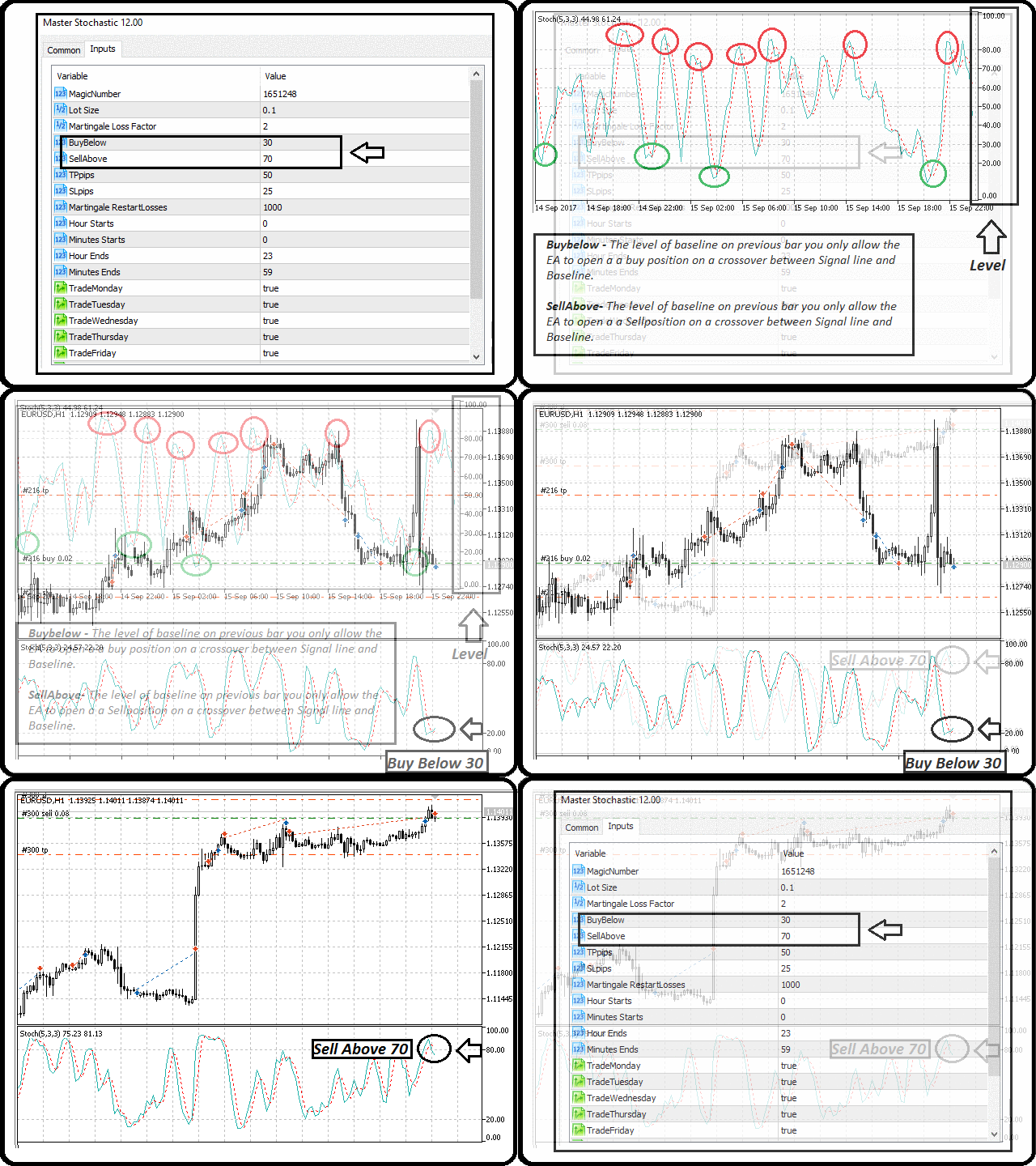
This EA trades Stochastic signal line and base line crossovers. It opens a Buy position when the signal line crosses below the base line under the level set in the BuyBelow parameter, and a Sell position when the signal line crosses above the base line over the level set in the SellAbove parameter. Only one trade is allowed at a time on the symbol the EA is attached to.
The EA works on any timeframe and any pair. The Stochastic oscillator uses data from the timeframe of the chart it is attached to.
Trades are closed by Take Profit, Stop Loss, Trailing Stop, or Close on Reverse Crossover.
Money management uses martingale. To deactivate martingale, set the Martingale Loss Factor to 1.
Parameters
General
- MagicNumber - identifying (magic) number of the orders opened by this EA.
Lot and Risk Management
- Lot Size - initial starting lot of the martingale sequence.
- Martingale Loss Factor - lot multiplier applied when the last trade is a loss.
- Maximum Lot Size - if the calculated martingale lot exceeds this value, it is adjusted to this input.
- Martingale Restart Losses - number of consecutive losses after which the lot size resets.
- SL Pips - Stop Loss distance relative to the opening price.
- TP Pips - Take Profit distance relative to the opening price.
- Close on Reverse Crossover - close the open trade on a reverse crossover.
- Max Spread Pips - maximum Ask/Bid distance at which the EA is allowed to open a trade.
- Max Slippage Pips - maximum slippage allowed when executing an order.
Trailing Stop
- Use Trailing Stop - if true, the trailing stop is activated.
- Trail Stop - distance of the stop loss from the current price.
- Trail Step - distance the stop loss moves per step, in pips.
- Trail Above Breakeven - if true, trailing only occurs when the calculated stop loss is above breakeven; if false, it can also trail below breakeven.
ATR Stops (auto-scale per symbol)
- Use ATR Stops Instead of Fixed Pips - if true, the Stop Loss, Take Profit and Trailing Stop are calculated from the ATR of the symbol instead of the fixed pip values above. This lets one set of settings work on any symbol. Recommended and enabled by default.
- ATR Period - period of the ATR indicator used to measure volatility.
- ATR x for Stop Loss - the Stop Loss equals this value multiplied by the ATR. Set to 0 for no Stop Loss.
- ATR x for Take Profit - the Take Profit equals this value multiplied by the ATR. Set to 0 for no Take Profit.
- ATR x for Trailing Stop - the trailing distance equals this value multiplied by the ATR.
- ATR x for Trailing Step - the trailing step equals this value multiplied by the ATR.
Stochastic Filter Settings
- Reverse Logic - if true, reverses the opening and closing conditions of order types.
- %K - %K value.
- %D - %D value.
- Slowing - slowing value.
- Stoch Method - Moving Average method, any of the enumeration values.
- Applied Price - Low/High or Close/Close.
- Indicator Bar Value - choose between the current bar value and the closed bar value for detecting the crossover.
- BuyBelowLevel - base line level on the previous bar below which the EA is allowed to open a Buy position on a crossover.
- SellAboveLevel - base line level on the previous bar above which the EA is allowed to open a Sell position on a crossover.
Time and Day Filter (for opening trades only)
- Daily Start Time - time the EA starts opening trades.
- Daily Stop Time - time the EA stops opening trades.
- Trade Sunday to Trade Saturday - allow or disallow the EA to open trades on each day of the week.
Dashboard and Logging
- Show On-Chart Dashboard - shows the status panel on the chart. Set to false to hide it.




































Good EA that is easy to use and profitable. Thank you Genesis for improving the trail stop. I don't use it on currencies but rather commodities and indexes. Any half decent trader can make money with this EA.