SmartTradePanel pro
- Experts
- Versione: 2.0
- Attivazioni: 20

SmartTradePanel pro— manual trading and position management
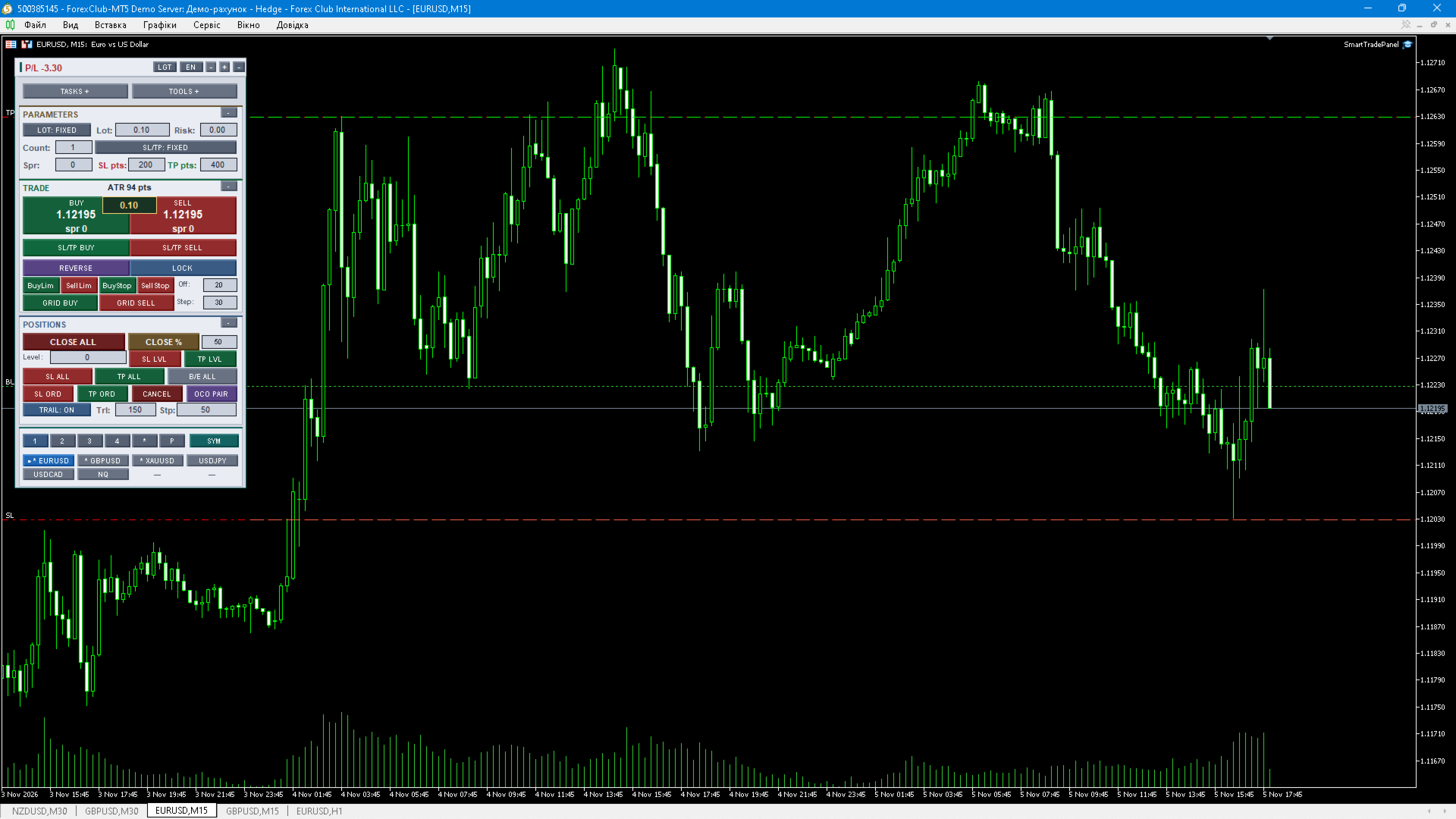
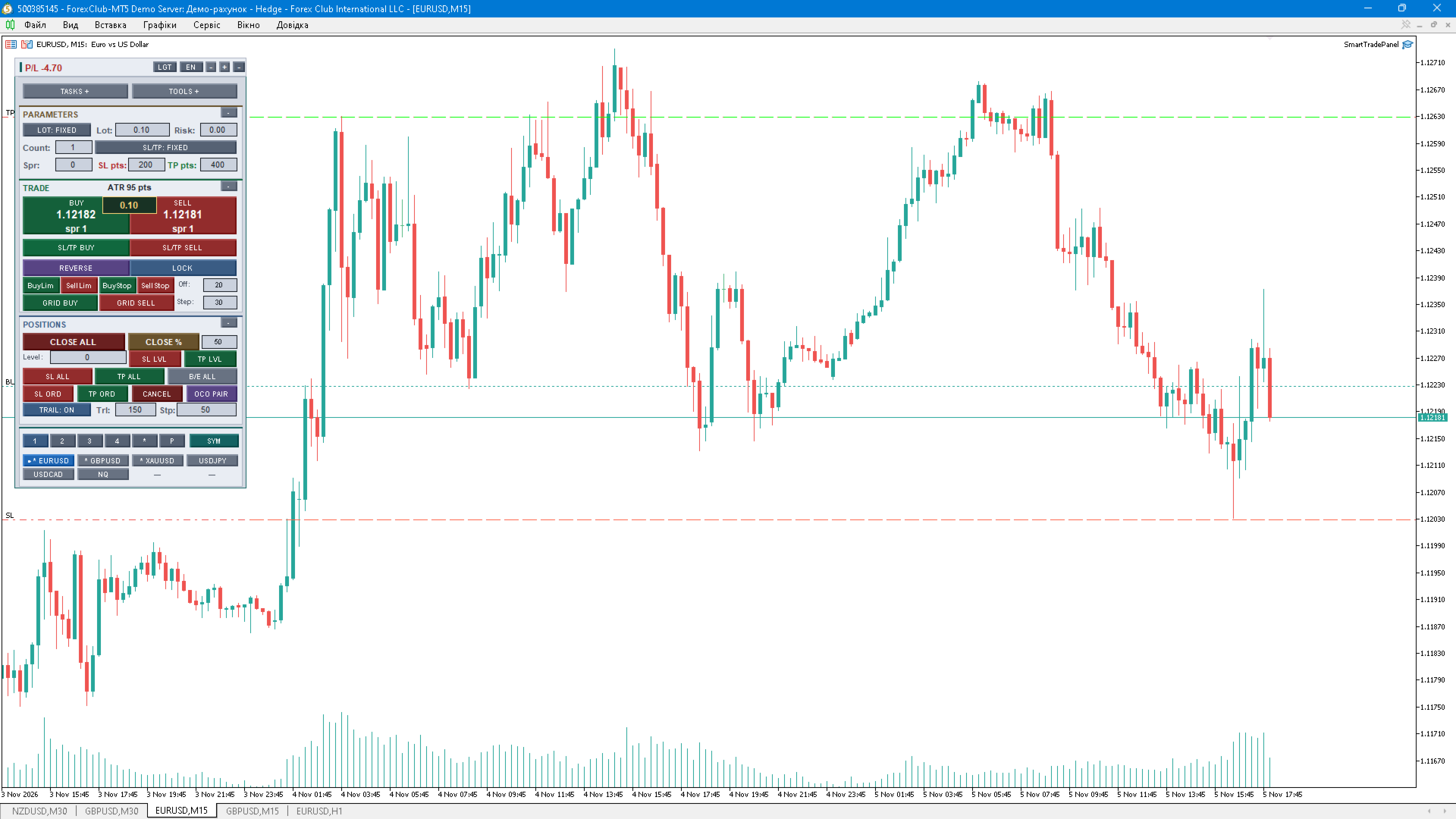
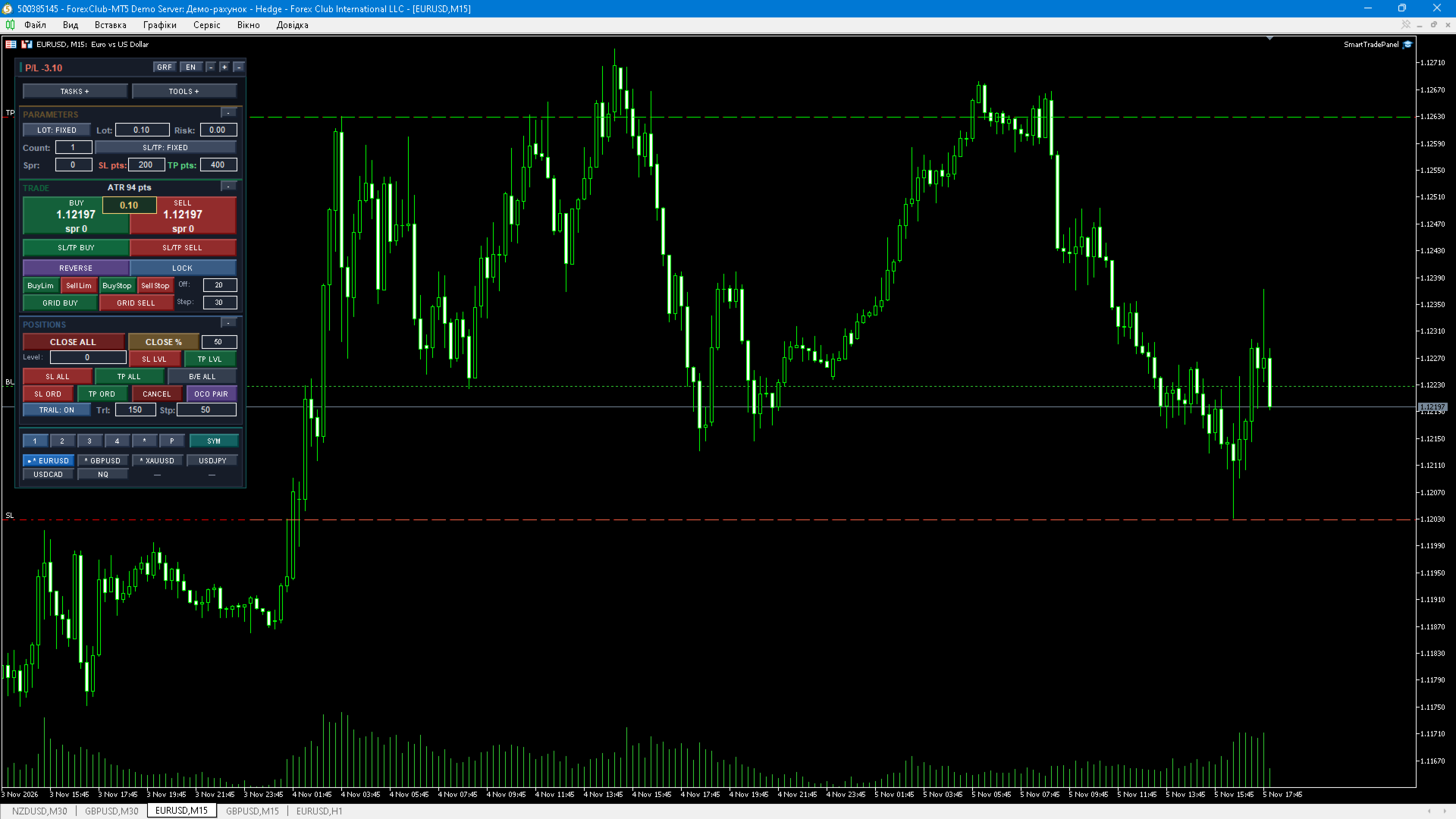
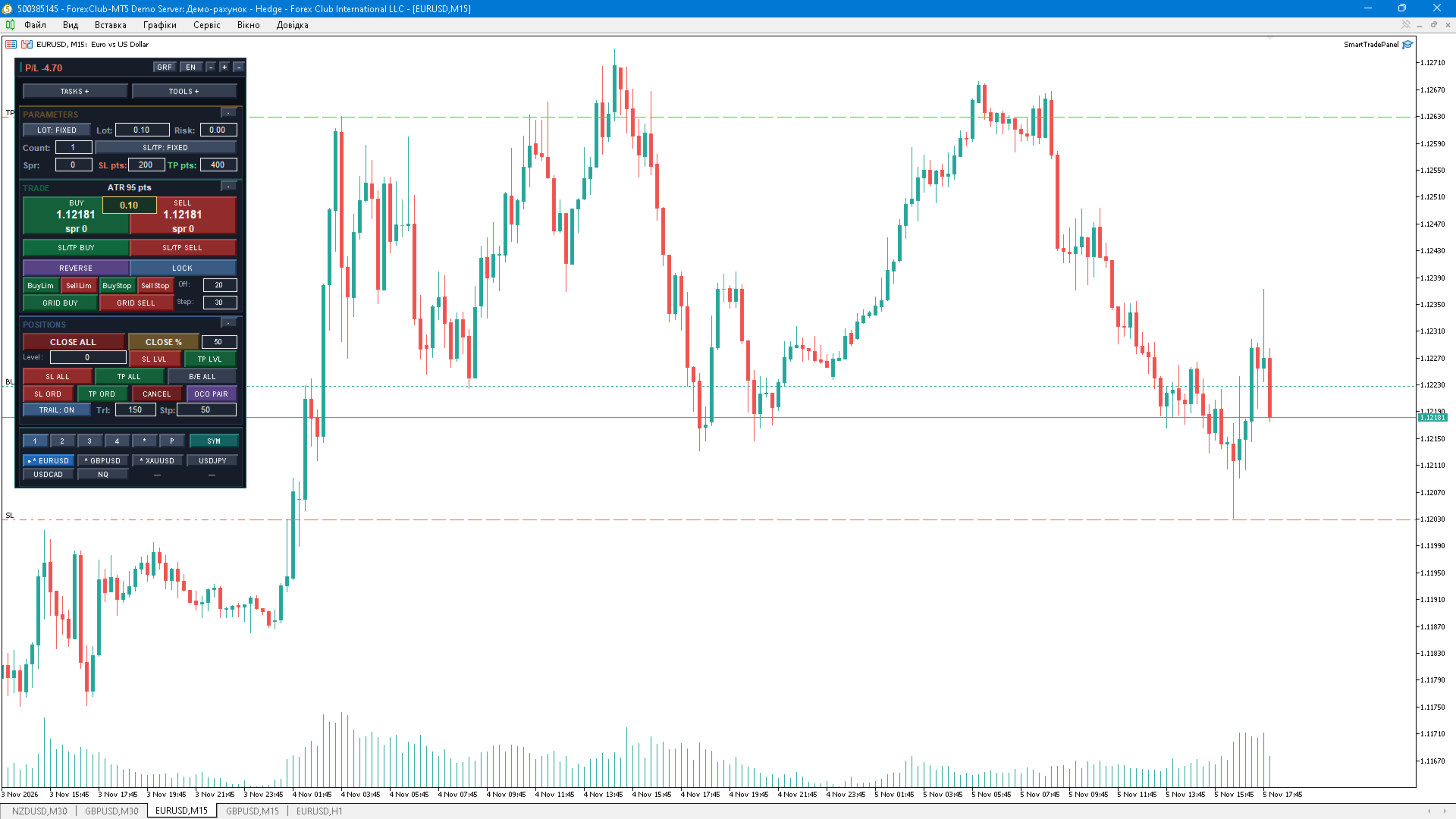
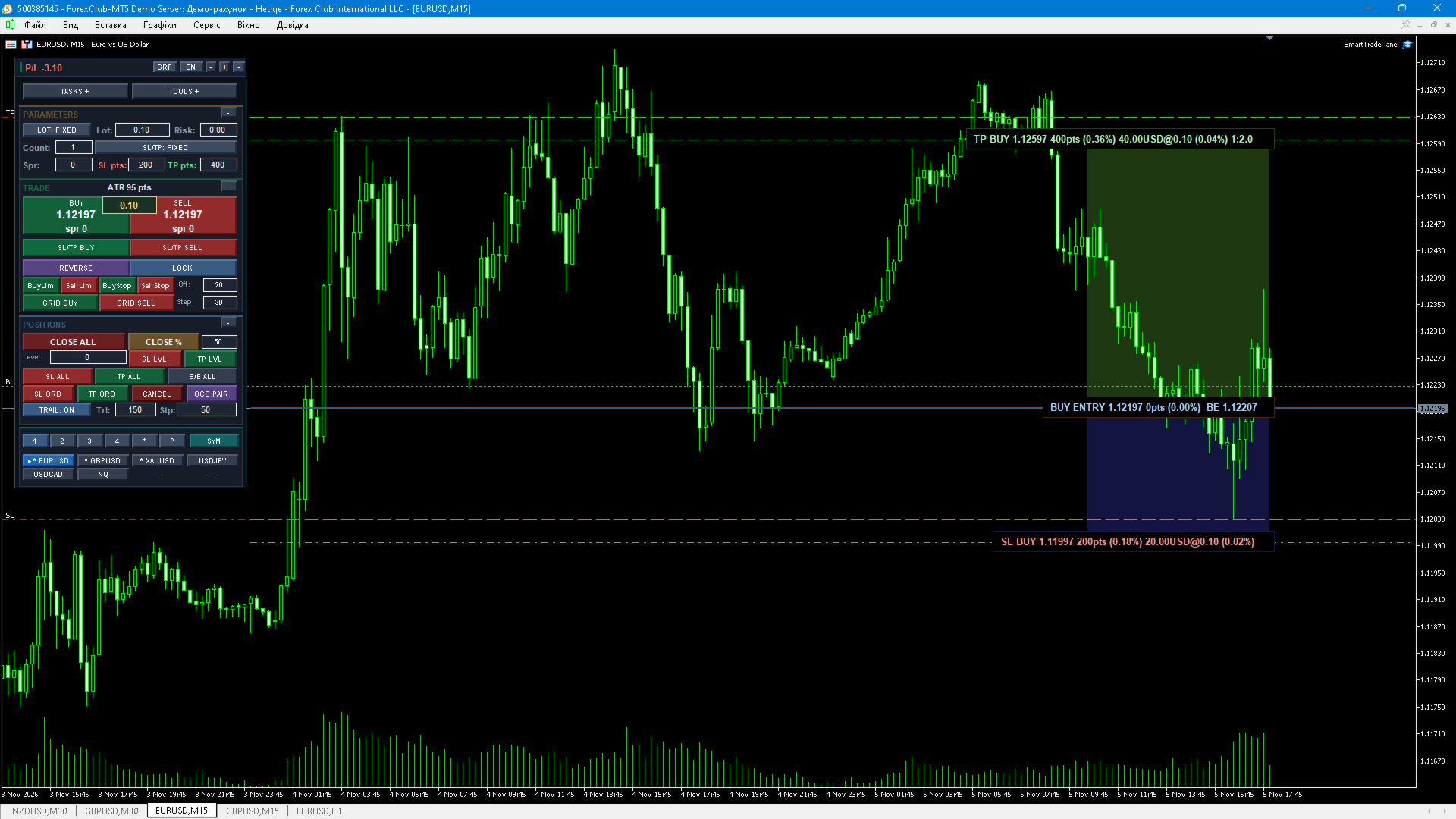
SmartTradePanel pro is a professional control panel for traders who make their own decisions but want fast, precise and fully manual order management directly from the chart. The panel contains no trading strategy: it never opens a position on its own signal, it executes only your clicks. Volume, direction, stop levels and timing are always under your control.
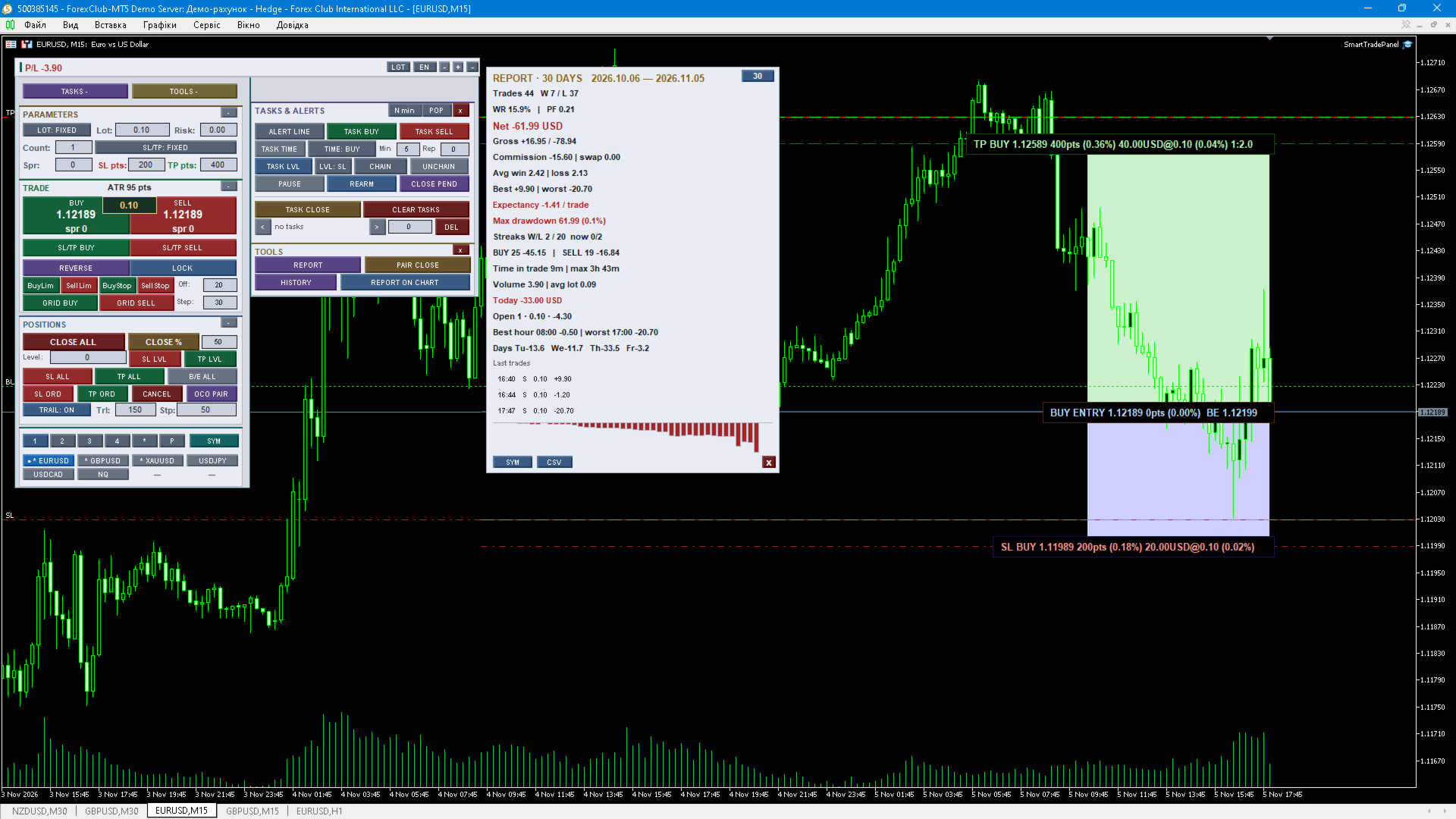
One compact window next to the chart replaces a dozen dialogs: market and pending orders, series of several orders, order grids, OCO pairs, SL/TP for all positions, partial closing, break-even, seven trailing types, virtual (broker-invisible) stops, time-scheduled tasks, price-line alerts, a risk manager with daily/weekly/monthly limits, a symbol navigator and a full performance report with an equity curve.
Trading
BUY / SELL market orders with the volume taken from the panel (fixed lot or % of balance risk).
The BUY/SELL buttons show the actual execution price and the current spread in points; the spread turns amber when it exceeds your limit.
Series of N orders in one click (Count field).
Pending orders: Buy Limit, Sell Limit, Buy Stop, Sell Stop; the distance from the market is set in points, with an optional lifetime (GTC or N minutes).
Pending grids: GRID BUY / GRID SELL with configurable step and number of orders.
OCO pair: two opposite pending orders — when one triggers, the other is deleted automatically; the pair is restored after a terminal restart.
Stop Loss and Take Profit from fixed points, an ATR multiplier or a risk/reward ratio; the panel warns you when ATR or RR overrides the points you typed.
Optional virtual SL/TP: levels are stored inside the panel and the position is closed by the EA when touched — no stop order is visible to the broker.
Broker-side validation: minimum stop distance, freeze level, volume step, minimum and maximum volume are checked and normalized automatically.
Position management
CLOSE ALL and CLOSE % (close a chosen percentage of every position), with a group filter: all / Buy only / Sell only.
REVERSE — close the position and reopen the opposite side with the same volume.
LOCK — hedge the current net position with an opposite order of equal volume.
SL ALL / TP ALL — set the stop and the target of every position from the panel fields in one call.
SL LVL / TP LVL — set a single price level as stop or target for all positions.
SL ORD / TP ORD — set stop levels for all pending orders.
B/E ALL — move all positions to break-even.
CANCEL — delete pending orders of the selected group.
PAIR CLOSE — close the current worst and best position as one basket.
Basket close: close everything when the total result reaches a profit or loss value in account currency, optionally deleting pending orders as well.
Automatic grid cleanup: pending grid orders are removed when no positions remain.
Trailing, break-even and levels
Automatic break-even with a configurable profit offset.
Two additional partial-close levels (% of the current volume) triggered at a given profit in points, each optionally followed by a stop move.
A second break-even level with locked profit.
Pending order trailing: keeps a pending order at a fixed distance from the market.
Seven trailing types: fixed points, ATR, 25% of the TP distance, previous bar high/low, lock 50% of accumulated profit, Parabolic SAR, moving average (EMA).
Trailing and break-even modify a stop only when the new level is valid and improves protection — no per-tick modification spam.
Risk manager
Risk-based lot: volume is calculated from the risk percentage and the stop distance, synchronised with the lot field.
Daily, weekly and monthly loss and profit limits.
Action on limit: alert only, close all, lock positions, or (optionally) close the terminal.
Maximum number of entries per day.
Maximum simultaneous positions per symbol and maximum total volume in lots.
Maximum spread filter for new orders.
Optional counting across the whole account instead of the current symbol only.
The same limits are used both for notifications and for blocking new entries.
Tasks, alert lines and chains
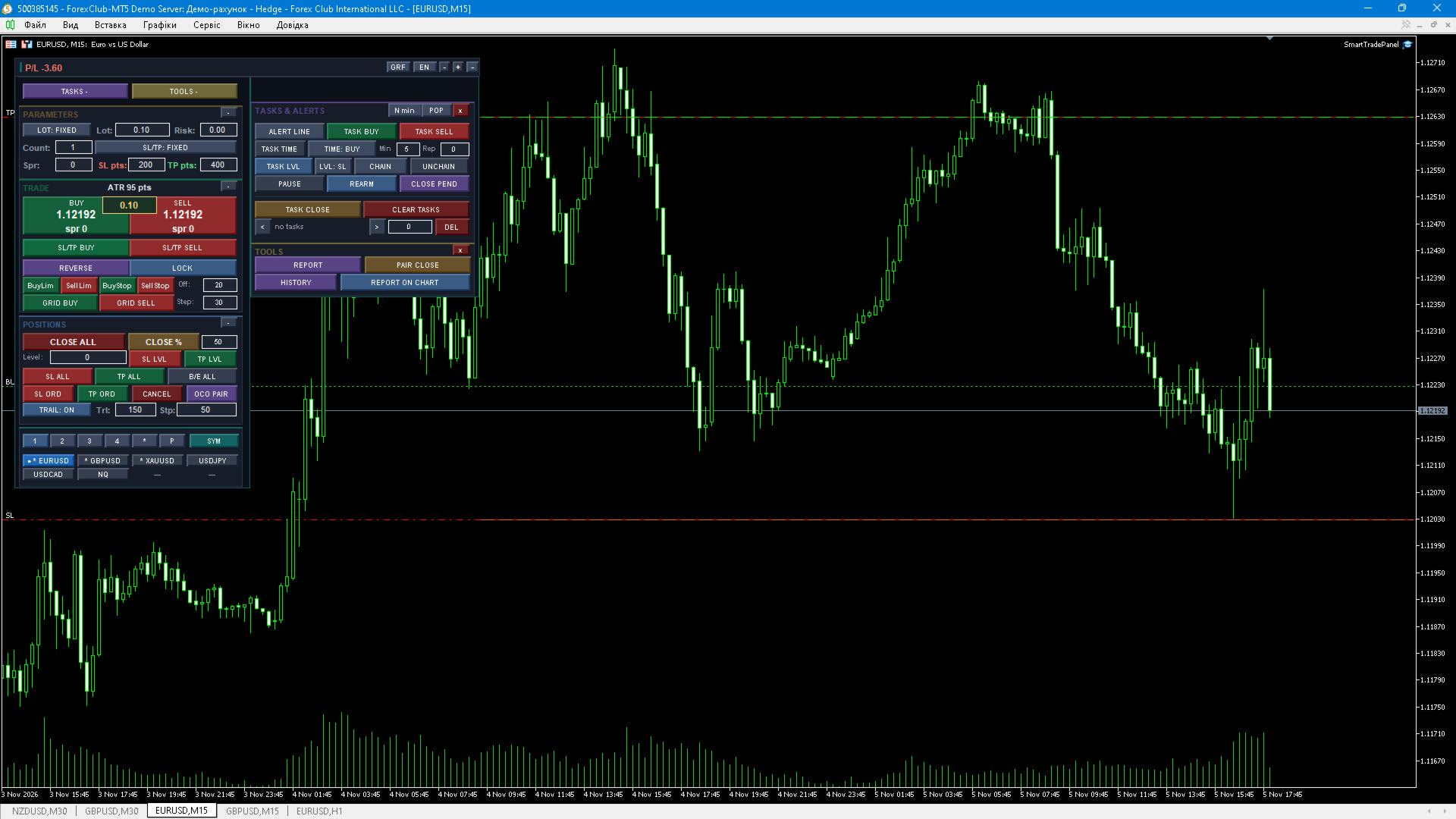
ALERT LINE — a horizontal line with a price-crossing trigger.
Task actions: open BUY, open SELL, close everything, delete pending orders, apply SL/TP/break-even to the group at the line level.
Tasks by time: BUY, SELL, close all, Buy Limit, Sell Limit, partial close, delete orders — after N minutes or at a fixed HH:MM, with repetition and overdue protection.
Task chains: a newer task waits for an older one to trigger (A → B), controlled by CHAIN / UNCHAIN.
PAUSE for all tasks; REARM resets the trigger and hit counter of the selected task.
Task list with selection, a level field and one-click delete; tasks are saved per symbol and magic number.
Alert channels: sound, popup, push notification and e-mail (push and e-mail require the terminal's own settings).
Symbols and navigation
Four editable symbol lists plus a favourites tab and an open-positions tab.
Click a symbol to switch the chart, Ctrl+click to toggle a favourite, Shift+click to remove it from the list.
Add symbols by typing; the current chart symbol is highlighted with a marker.
A dedicated SYM page shows the full list in a 4-column grid.
Lists are saved to file and restored on the next launch.
Visual planning on the chart
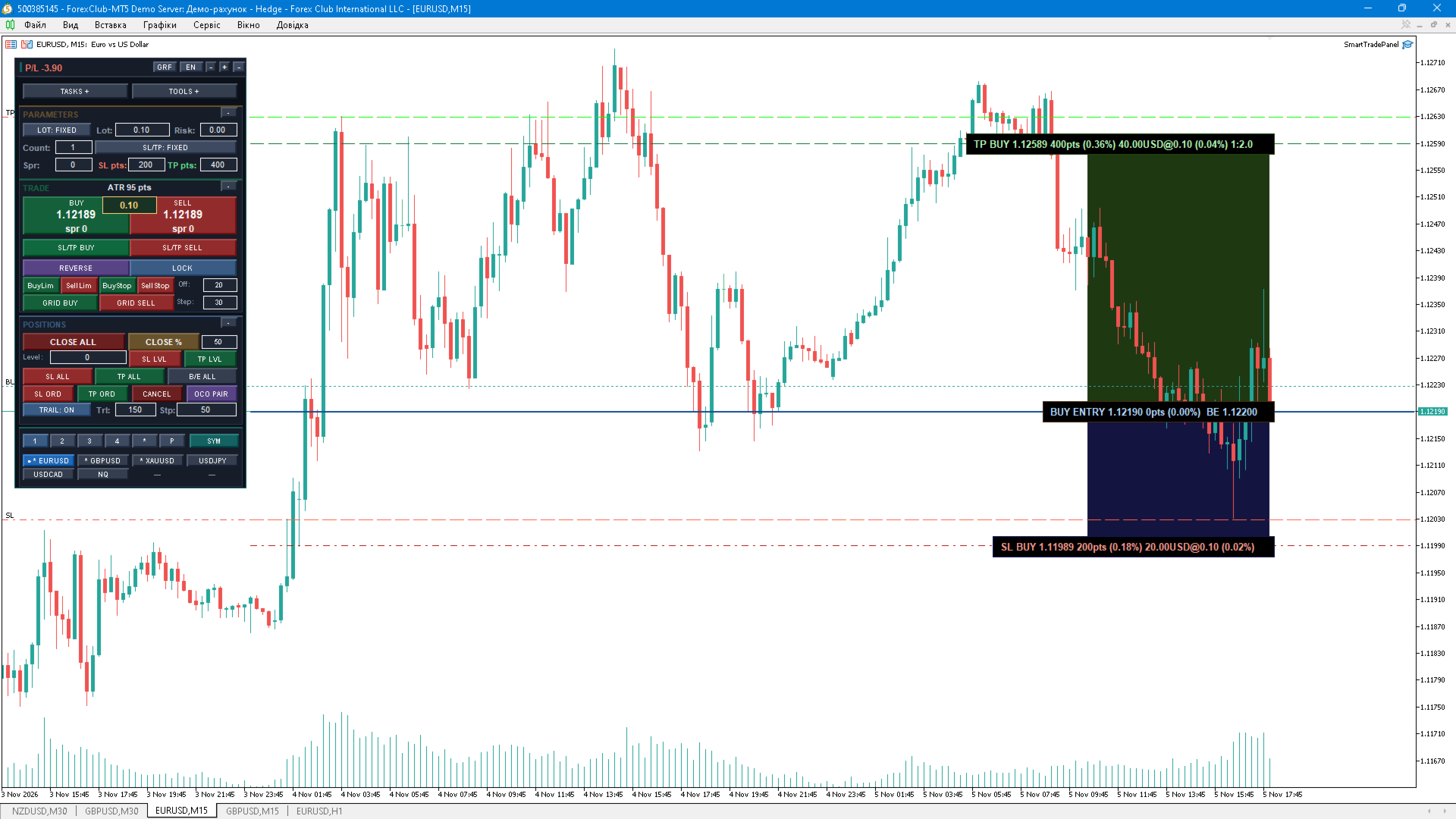
SL/TP BUY and SL/TP SELL buttons place the entry line together with the SL and TP lines, using the distances from the panel.
All three lines are draggable; the entry line can follow the market price.
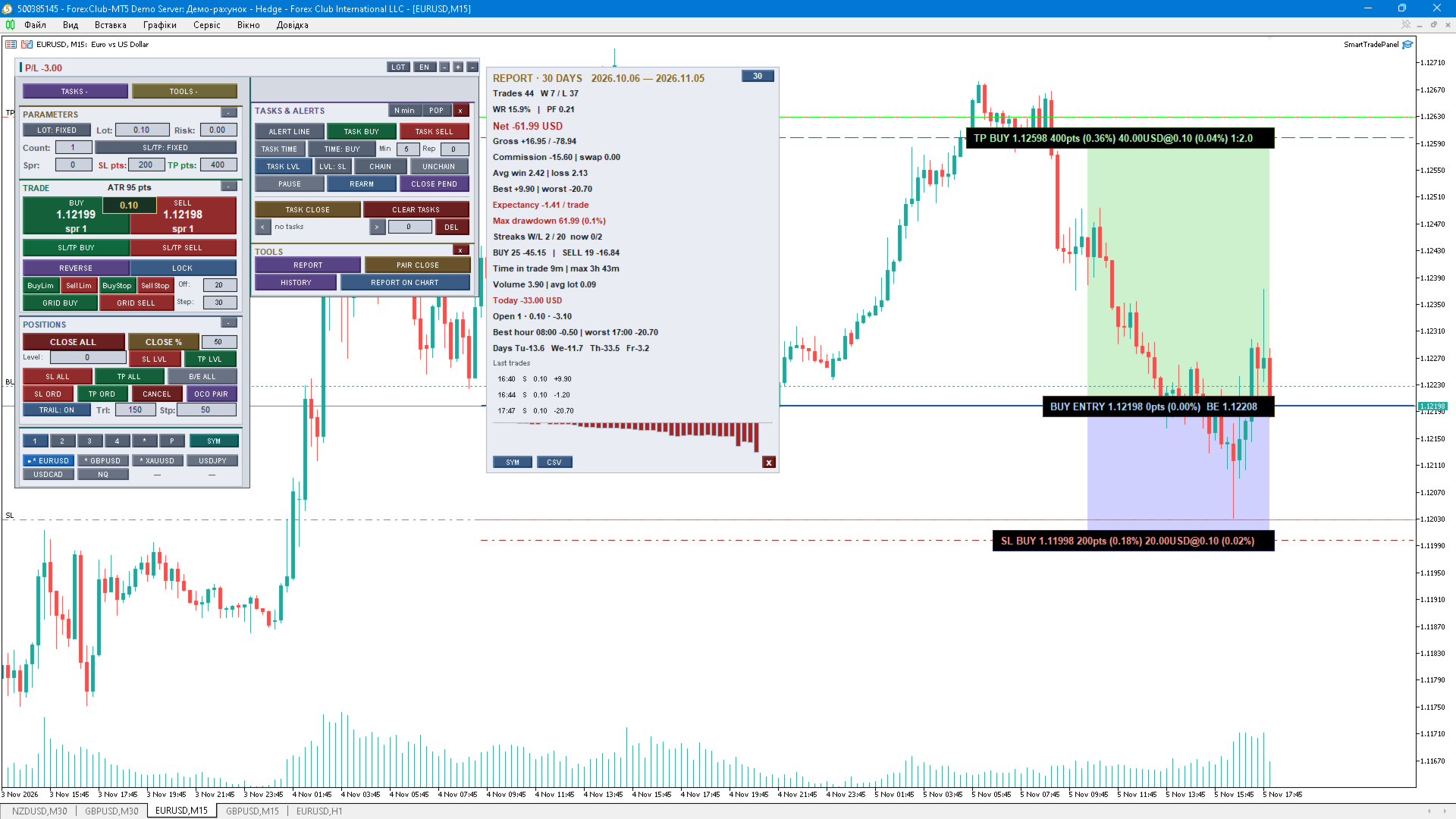
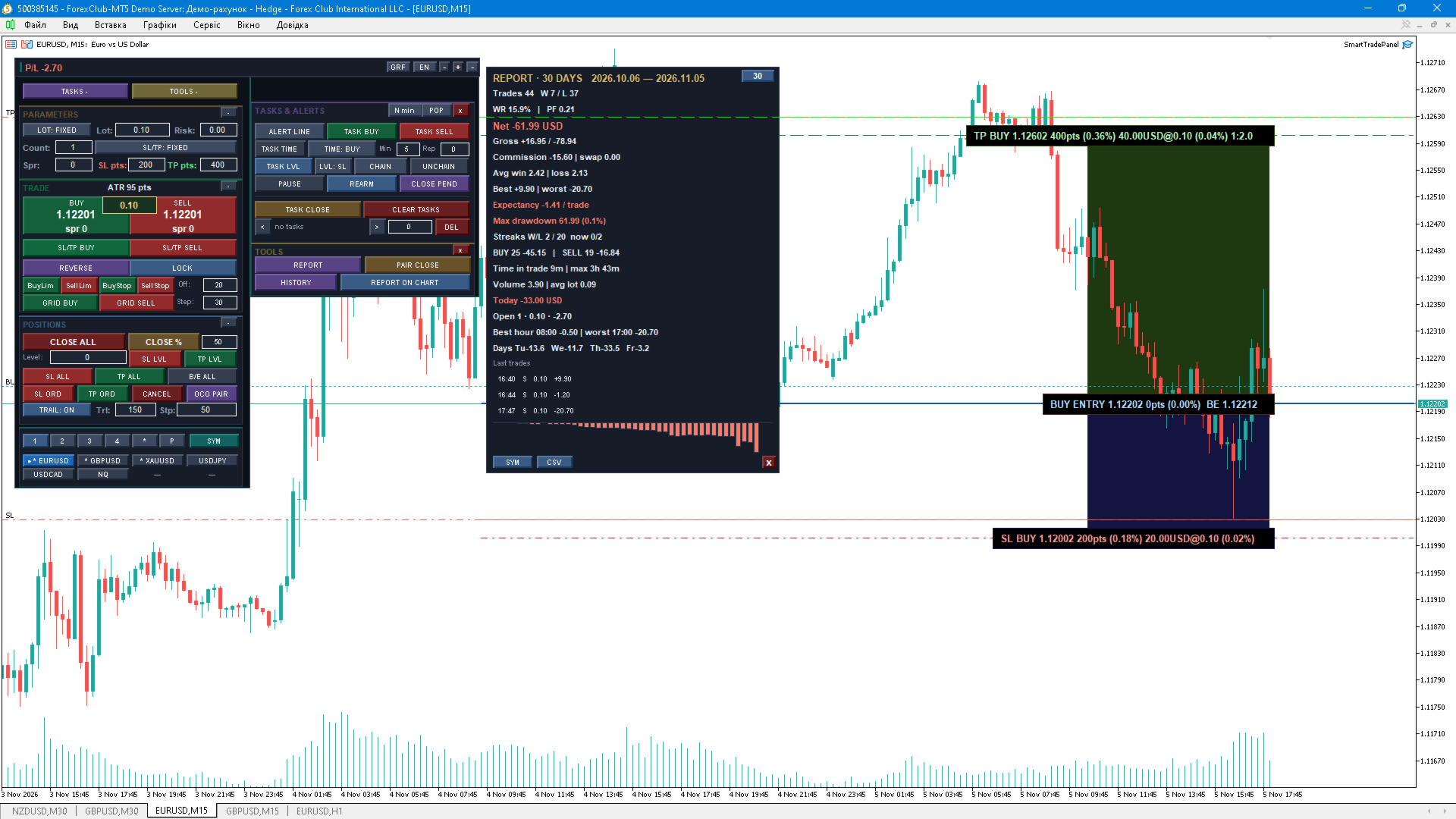
Risk and profit zones are shaded between the entry, stop and target levels.
Each line carries a tag with its price, distance in points, money value and the calculated risk.
Levels can be transferred to positions or pending orders from the lines; the lines survive a panel rebuild and a terminal restart.
Reports and analytics
HISTORY — draws recent closed trades on the chart as markers with connecting segments (depth and number of trades are configurable).
On-chart report card (RPT CHART) with a period switch: 24 hours / 7 days / 30 days / 12 months.
Scope switch: current symbol only or the whole account.
Metrics: number of trades, wins and losses, win rate, profit factor, net and gross result including swap and commission, average win and average loss, best and worst trade, expectancy per trade, maximum drawdown in money and percent, win/loss streaks, BUY vs SELL breakdown, average and maximum time in a trade, total volume and average lot.
Distribution by hour of the day and by weekday, with the best and worst hour.
Today's result, open positions summary and a comparison with the previous period of the same length.
The last three closed trades.
An equity mini-curve of the cumulative result inside the card.
Report to the Experts journal (REPORT) and CSV export of the report.
Interface
Four colour themes: dark, light, grey and graphite.
Three interface languages: English, Ukrainian, Russian.
Adjustable panel scale from 80% to 160% using the + / − buttons.
Every block can be collapsed; the whole panel can be collapsed to its header.
Tooltips on every control; the panel state, collapsed blocks and scale are restored after a restart.
Works on any symbol and timeframe; all state is stored in separate files per symbol and magic number, so several charts never overwrite each other's data.
Settings
About 80 input parameters in 15 groups: General (magic number, deviation, own-positions-only mode, push and e-mail alerts, scale, language, theme, ASCII icons), volume and SL/TP, grid and pending orders, trailing and break-even, risk manager, exposure limits, pending trailing, partial-close and break-even levels, basket total result, trailing type, weekly and monthly limits and actions, timed action, groups and time tasks, symbol lists, history and chart options.
Quick start
Attach the panel to any chart and enable Algo Trading.
Set the lot, SL and TP in points (or risk % and ATR), the spread limit and the pending order distance.
Trade with the BUY / SELL and pending buttons, then manage the positions from the same panel.
Important
This is a manual trading tool, not a trading strategy. It does not generate trade signals and it does not promise any profit.
Stop Loss and Take Profit are enabled by default; the risk of loss always exists and past results never guarantee future performance.
The panel must stay running (terminal open, Algo Trading enabled) if you use virtual stops, tasks or trailing — these features work inside the EA.
Virtual stops are not sent to the broker; they cannot be executed while the terminal is closed.
The LOCK function requires a hedging account.
Test on a demo account first and check your broker's stop and freeze levels.