Rollover Swap Shield
- Utilità
-
AL MOOSAWI ABDULLAH JAFFER BAQER
 To trade successfully we need to go through the proven path that others had gone and reached!
Here are 17 quotes from such successful investors:
1- Limit your size in any position so that fear does not become the prevailing instinct guiding your judgment.
Joe Vidich - Versione: 1.0
- Attivazioni: 5
See it work before you trust it: load Rollover Swap Shield into the Strategy Tester, switch on visual mode and watch a demo position with a negative swap open about an hour before the action time, then see it closed a few minutes before the rollover, with the estimated swap that was avoided printed in the journal.
THE SWAP YOU NEVER SEE IS STILL A COST.
Rollover Swap Shield is a utility Expert Advisor for MetaTrader 5. It does not search for entries and it does not open trades for you. It watches every position in scope, estimates what the next broker rollover will charge each of them, and a few minutes before that rollover it acts on the positions whose negative swap is worth avoiding: the position is closed, partly closed or only reported. Triple-swap night is read from the symbol specification of your broker and multiplied automatically, so the most expensive night of the week is never a surprise.
At a glance
• A live estimate of tonight's swap for every position and for the whole scope, with a countdown to the rollover.
• Works with every swap mode MetaTrader 5 uses: points, money in the symbol, margin or deposit currency, and interest percent.
• Triple-swap weekday detected per symbol, estimate multiplied by three on that night.
• Two thresholds: a fixed amount in account currency and a percent of equity. Either one marks a swap as costly.
• Actions: close the position, close a chosen percent of it, or alert only.
• Keep rules: only losing positions, only on the triple night, and the cover rule that keeps a position whose floating gain is many times larger than the charge.
• Early warning a chosen number of minutes before the action, so you can decide yourself first.
• SKIP TONIGHT button: keep everything through the next rollover only, the shield returns automatically the day after.
• Daily counters and a running total of swap avoided today.
• Chart symbol only or every symbol of the account, with any magic, one magic number or manual trades only.
• Not a grid, no martingale, no averaging, no DLLs, no web requests, no extra files.
QUICK START
Attach it to any chart, for example EURUSD H1, and make sure Algo Trading is on. Check the time of the daily rollover of your broker in server time; most brokers roll at 00:00, some at 23:59 or at another hour, and you enter it in InpRollHour and InpRollMinute. Keep the other defaults: action 10 minutes before the rollover, a warning 30 minutes earlier, a position is costly when tonight's charge is at least 1.00 in your account currency, and the action is a full close. The panel immediately shows tonight's estimated swap bill, the time of the next rollover, the action time and the triple-swap weekday of the chart symbol.
Why rollover protection matters
Swap is easy to forget because it never appears as a trade. It is booked silently at the rollover, night after night, and on many symbols one side is expensive: an index, a metal or an exotic pair can cost more in one week of holding than the spread of the trade. On the triple-swap night the charge is multiplied by three, and a position that was opened only for a short intraday idea and simply forgotten pays it in full. Many traders only discover the total at the end of the month in the account statement. Rollover Swap Shield moves that decision to the right moment: just before the charge, with the exact number in front of you.
What is new and different here
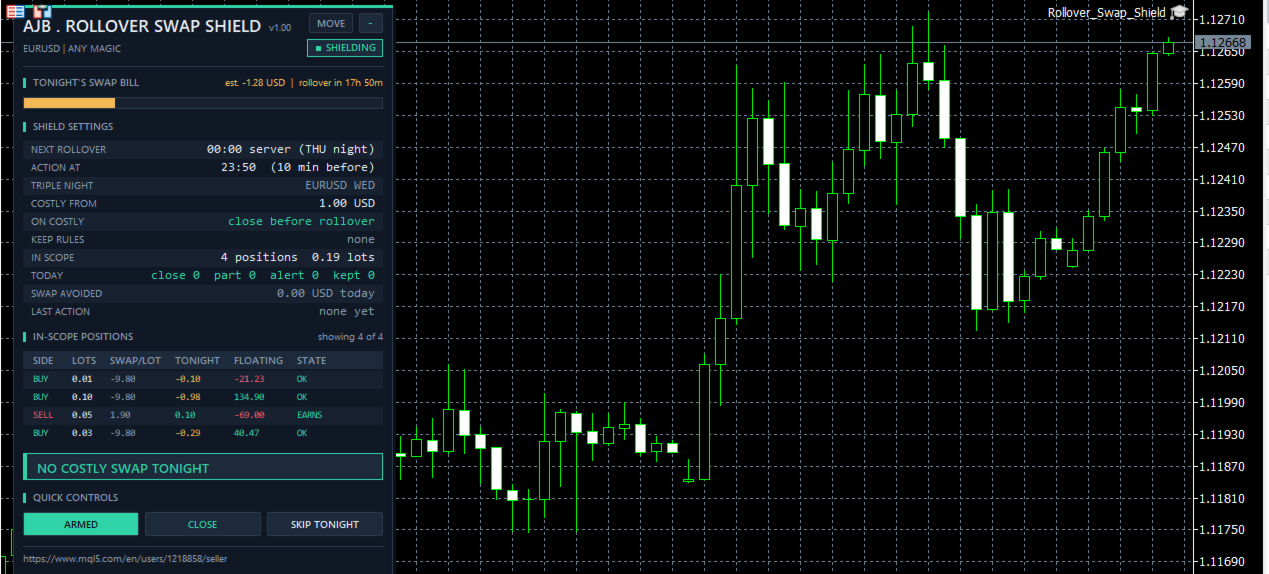
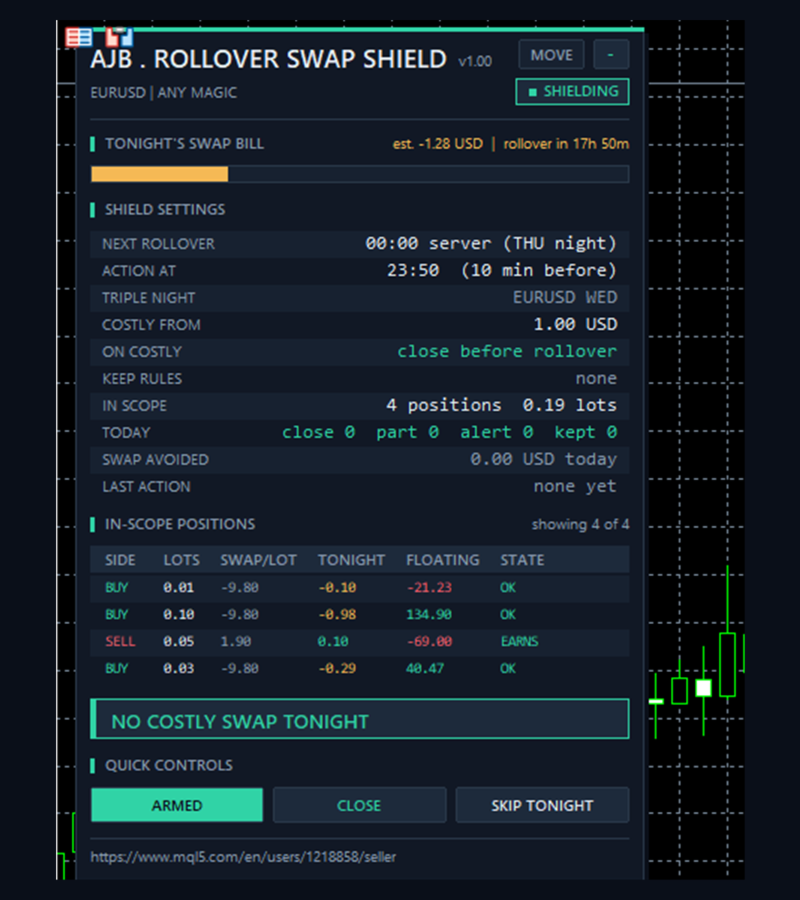
Tonight's swap bill. Instead of showing swap already paid, the panel shows the swap that is about to be paid, per position and in total, together with a countdown to the rollover and a day progress bar. You see the cost before it happens, not after.
Triple-night awareness. Every symbol has its own triple-swap weekday, usually Wednesday for currencies but often different for indices, metals and crypto. The utility reads it for each symbol from the broker, marks the estimate with x3 in the table and multiplies the charge, so thresholds work correctly on the expensive night too.
Cover rule. Closing a strong winning trade only to save a small swap is rarely smart. With InpCoverMultiple you keep any position whose floating gain is at least that many times larger than tonight's charge; it is marked COVERED and counted as kept.
Skip tonight. Sometimes you want to hold through one specific rollover, for example before a planned release. One click on SKIP TONIGHT keeps every position through the next rollover only. You do not need to remember to switch the shield back on: it is active again for the following rollover automatically.
How one rollover is handled
1. Clock. The next rollover moment is calculated from the server time and your rollover hour and minute. Rollovers that charge for a Saturday or Sunday are ignored when InpSkipWeekend is on.
2. Estimate. For every position in scope the swap of the next rollover is estimated from the swap mode and swap rate of its symbol, the side and the volume, multiplied by three on the triple night.
3. Early warning. InpWarnMinutes before the action time one alert lists how many positions are costly and the total estimated charge.
4. Decision. At the action time each position is checked: is the charge negative and above a threshold, do the keep rules apply.
5. Action. A costly position is closed, partly closed or reported. Each position is handled once per rollover; a position opened inside the action window is checked as soon as it appears.
6. Record. The action is counted in TODAY, the avoided charge is added to SWAP AVOIDED, shown as LAST ACTION, printed in the journal and, if enabled, sent as a pop-up or push notification.
Inputs, every one explained
ROLLOVER TIME (broker server time)
InpRollHour = 0. The hour of the daily rollover of your broker, in server time, 0 to 23. Most brokers roll over at 0. If unsure, look at the time of the swap entries in your account history.
InpRollMinute = 0. The minute of the rollover, 0 to 59. Together with the hour it gives the exact rollover moment shown in the panel.
InpLeadMinutes = 10. How many minutes before the rollover the action is taken. A few minutes give the order time to fill while the market is still liquid; spreads often widen right at the rollover, so avoid values that are too small.
InpSkipWeekend = true. No action for rollovers that charge for a Saturday or a Sunday. Keep it on for normal forex brokers; switch it off for symbols that also charge swap on weekend days.
WHEN IS A SWAP WORTH AVOIDING (0 = rule off)
InpMinCharge = 1.0. A position is costly when tonight's estimated charge is at least this amount in your account currency. Raise it on larger accounts so small charges are ignored. 0 switches the rule off.
InpMinChargePct = 0.0. A position is also costly when tonight's charge is at least this percent of equity. Useful when one setting should fit accounts of different sizes. 0 switches the rule off. With both rules off, every negative swap is treated as costly.
InpTripleOnly = false. When on, the shield acts only on the triple-swap night of each symbol and keeps positions on normal nights.
InpCoverMultiple = 0.0. Keep a position whose floating gain is at least this many times tonight's charge. With 10, a position that is 25.00 in gain keeps a charge of 2.50 or less. 0 switches the rule off.
ACTION - WHAT HAPPENS BEFORE THE ROLLOVER
InpAction = Close. Close closes the whole costly position. Partial closes the percent below and keeps the rest. Alert only changes nothing and sends an alert.
InpClosePercent = 50.0. The percent of the volume closed by the partial action, 1 to 100. The volume is rounded down to the volume step; if the rest would be below the minimum volume, the whole position is closed.
InpLosersOnly = false. When on, only positions that are currently in a loss are acted on; positions in gain are kept.
FILTER - WHICH POSITIONS ARE IN SCOPE
InpSymbolScope = Chart symbol only. Choose the chart symbol only, or every symbol of the account. With all symbols, one chart protects the whole account, each symbol with its own swap rates and triple night.
InpMagicFilter = Any magic. Any magic checks manual and Expert Advisor positions, Only the magic number checks one Expert Advisor, Only manual trades checks positions with magic 0.
InpMagic = 0. The magic number used when the filter is set to Only the magic number.
ALERTS
InpAlertPopup = true. Show a pop-up alert in the terminal for every action and for the early warning.
InpAlertPush = false. Send a push notification to the MetaTrader app on your phone. Push notifications must be enabled in the terminal options.
InpWarnMinutes = 30. The early warning is sent this many minutes before the action time, with the number of costly positions and the total estimated charge. 0 switches the warning off.
PANEL
ShowPanel = true. Show or hide the panel. The shield keeps working with the panel hidden.
PanelX = 12 and PanelY = 15. Panel offset from the top left corner of the chart. The MOVE button lets you drag the panel anywhere.
PanelFontSize = 9. The base font size. The panel shrinks the font automatically when the chart is too small, so it always fits the screen.
MaxTableRows = 6. How many positions are listed in the in-scope table. The rest is counted below the table.
STRATEGY TESTER DEMO
InpTesterDemo = true. Only in the Strategy Tester: about one hour before the action time, a demo position is opened on the side of the chart symbol that pays swap, large enough to be costly and never more than 30 percent of the free margin, so the pre-rollover close can be watched. If it stays open, it is closed after six hours. This never happens on a live or demo account chart.
The panel
TONIGHT'S SWAP BILL shows the estimated total swap of all positions in scope for the next rollover and the time left until it, with a bar that fills as the rollover gets closer. SHIELD SETTINGS lists the next rollover and the weekday it charges for, the action time, the triple-swap weekday of the chart symbol, the costly threshold, the action, the keep rules, the positions and lots in scope, today's counters for close, partial, alert and kept, the swap avoided today and the last action. IN-SCOPE POSITIONS lists side, lots, swap rate, tonight's estimate, floating result and state: OK, EARNS, AVOID, COVERED, KEEP or DONE. The banner tells you in one line whether a costly swap is due. QUICK CONTROLS: ARMED or PAUSED switches the shield on and off, the action button switches to ALERT ONLY and back, SKIP TONIGHT keeps everything through the next rollover only. The minus button folds the panel to its header.
How to use it well
Find the exact rollover time of your broker first; it is the only setting that must be right. Start with alert only for a few days and compare the estimate in the panel with the swap entries in your history, then switch to close or partial. Use the cover rule for swing trades you want to hold, and InpLosersOnly if you prefer to pay swap only on trades that work. For an account that holds several instruments, run one copy with all symbols. Keep the terminal running at the rollover time, for example on a VPS, because a utility can only act while it is running.
Good to know
The estimate uses the swap rates published by the broker in the symbol specification. Brokers can change rates, and some add markups or use their own calculation, so treat the number as a close estimate, not as a statement. The utility only touches positions that match the symbol scope and magic filter you choose. It never opens trades outside the Strategy Tester, never moves stops or targets, never touches pending orders and never reopens a closed position. If the broker rejects a close, the failure is counted in red and written to the journal.
Try it in the Strategy Tester
Open the Strategy Tester, choose Rollover Swap Shield, a symbol with a clearly negative swap on one side and visual mode, and press Start. You will see the demo position appear, the swap bill turn red as the action time comes closer, and the position closed before the rollover, with the avoided charge in the journal. Change the thresholds, the partial percent or the cover rule and watch how the decision changes.
If Rollover Swap Shield saves you swap the way you expect, an honest review on the product page helps other traders decide, and tells me what to improve next.