Visual Strategy Terminal
- Indicatori
- Versione: 1.10
- Attivazioni: 5

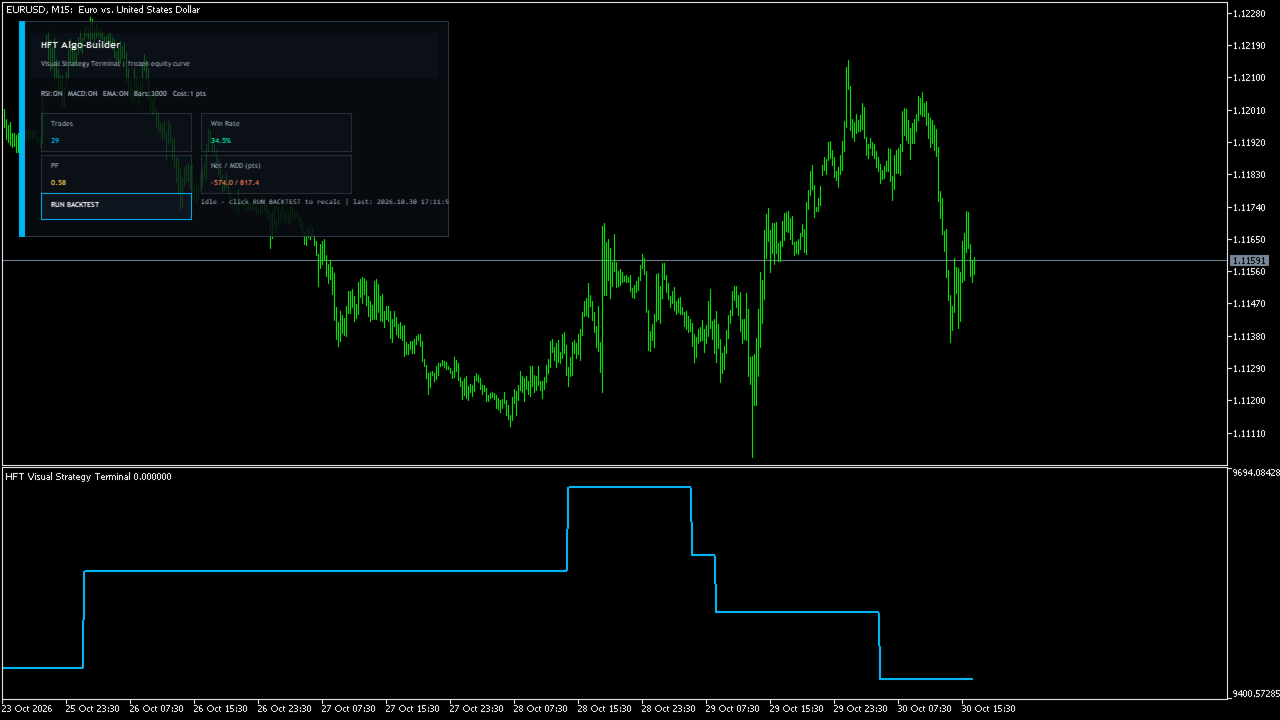
Visual Strategy Terminal is an indicator that runs a quick virtual backtest of a simple rule set on the chart's history and draws the resulting equity curve in a separate window. A panel shows the number of trades, win rate, profit factor, net result and maximum drawdown. It is a tool for exploring filter combinations quickly; it does not place orders.
How it works
On each closed bar of the tested range, up to three filters vote:
- RSI: below 35 votes long, above 65 votes short
- MACD (12/26 with a 9-value signal average): histogram above or below zero
- EMA trend: close above or below the EMA
A virtual trade is taken only when all enabled filters agree and no other virtual trade is open. Entry is the open of the next bar; stop and target are placed at ATR multiples from the entry. Following bars are checked for the stop first and then the target; if neither is touched within 20 bars, the trade is closed at that bar's close. A trade still open at the end of the history is not counted. Each result is measured in points, reduced by the cost per trade, and booked on the bar where the trade exits.
Main features
- Enable or disable each filter individually
- ATR-based virtual stop and target
- Cost per trade in points, or the symbol's current spread by default
- Equity curve in points and a canvas panel with key statistics
- Runs when the indicator loads and when you click the RUN BACKTEST button, not on every tick
Inputs
- Use RSI / MACD / EMA filter, RSI period, EMA period, ATR period
- Stop and target in ATR multiples
- Number of bars to test (100 to 20000)
- Starting value of the curve (points)
- Cost per trade in points (-1 = current spread)
- Panel refresh interval
Notes and limitations
- This is a simplified simulation: results are in points, not account currency, with a fixed cost per trade and no swap or slippage modeling.
- When stop and target are both reached in the same bar, the stop is counted (conservative).
- To test other settings, change the inputs; the button re-runs the calculation with the current inputs and data.
- Historical results do not predict future performance. Use the MetaTrader Strategy Tester for full validation.
Recommended use
Any symbol and timeframe with enough history (at least a few hundred bars). Useful for a first look at how these filters behaved on a symbol before deeper testing.