Masterkeys
- Experts
- Versione: 1.0
- Attivazioni: 5

Masterkeys Hybrid EA - six signal engines, one disciplined basket manager, and a full control panel on your chart.
Important: this EA uses grid / martingale position layering. It can recover quickly, but it can also lose heavily in a strong one-way market. Start with the minimum lot, and test on a demo account first. Past results do not guarantee future results.
Why traders choose Masterkeys
- Six independent signal engines . Run one, or several together, each with its own magic number, lot size and risk settings.
- Basket management. Every signal closes its whole basket at a money target, with an optional basket profit trail that locks in gains as the basket grows.
- Global basket target. Close all signals together when their combined profit reaches your target.
- Built-in protection. Daily loss limit, daily profit target, trading days and hours, Friday window, and a high-impact news filter.
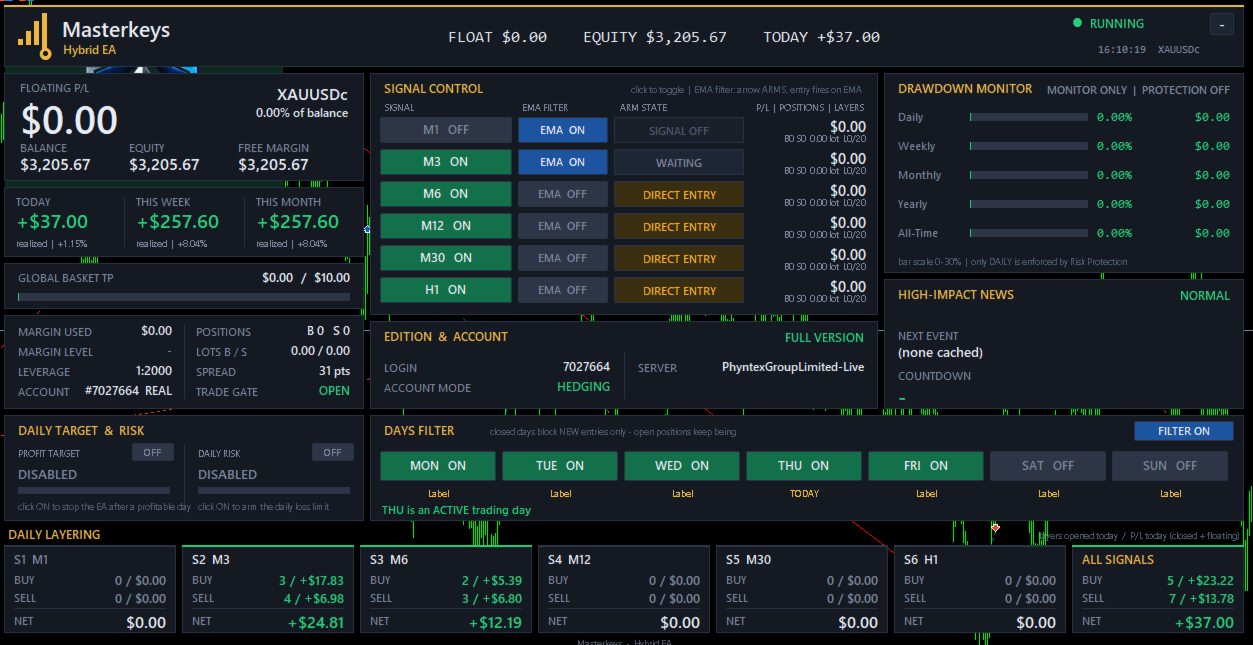
- Everything on one dashboard. Switch signals and filters on or off with a click, without reopening the settings.
How it works
Each engine builds a smoothed trend line with volatility bands. When price pushes through a band, the engine generates a buy or sell signal. With the optional EMA filter enabled, the signal only arms the trade, and entry fires when price crosses the EMA in that direction, which cuts early entries.
If the market moves against an open trade, the EA can add layers, either on each new same-direction signal or at a fixed price step. Lot size per layer is set by mode: Multiplicative with a maximum layer count you control. Break-even and trailing stop manage every position, and the basket closes as one when it reaches its target.
Control panel
- Live floating P/L, balance, equity, margin and free margin.
- Today / week / month results.
- Per-signal ON/OFF, EMA filter ON/OFF and arm status (WAITING, ARMED BUY, ARMED SELL).
- Layers opened today per signal.
- Drawdown monitor (daily, weekly, monthly, yearly, all-time).
- Days filter, daily target and daily risk switches.
Quick start
- Attach the EA to one chart per symbol, on a hedging account.
- Set the lot size for the signal you want to use. By default only Signal 2 is on.
- Choose your max layers, basket target and trading hours. Use the dashboard to switch signals on or off.
Requirements
- Hedging account (required).
- Recommended symbols: [GOLD/XAUUSD]. Recommended minimum balance: [3000].
- A VPS is recommended for continuous operation.
- The news filter covers USD NFP and FOMC events and works on a live chart only, because the Strategy Tester has no economic calendar.
- The free demo runs in the Strategy Tester on historical data.
Parameters
- Trade Settings: slippage, stop loss (0 = off), reverse on opposite signal (or hedge both sides), magic number (0 = automatic).
- Break Even and Trailing: enable, trigger, offset, trail start, trail step.
- Dual Session: two session profiles, each with its own start and stop hour, minimum distance and step.
- Basket Take Profit: money target, basket trailing start and stop.
- Global Basket Take Profit: combined target across all signals.
- Risk Protection: maximum daily loss in percent of the day's starting balance.
- Daily Profit Target: close all and pause until the next server day.
- Time and Day Filter: trading days, Friday window.
- News Filter: keywords, minutes before and after, spread multiplier.
- Signal 1-6: timeframe, lot size, break-even trigger, trail start, take profit, multiplier, max layers, basket targets, EMA filter and EMA period.
- Dashboard: show or hide, position, width, hide individual signals.
Risk warning
Trading leveraged products carries a high level of risk and may not be suitable for everyone. Grid and martingale strategies can lead to large drawdowns and account loss. Only trade with money you can afford to lose. This product does not guarantee profit.