GTM Bot Maker No Code EA Builder
- Experts
- Versione: 3.40
- Attivazioni: 10

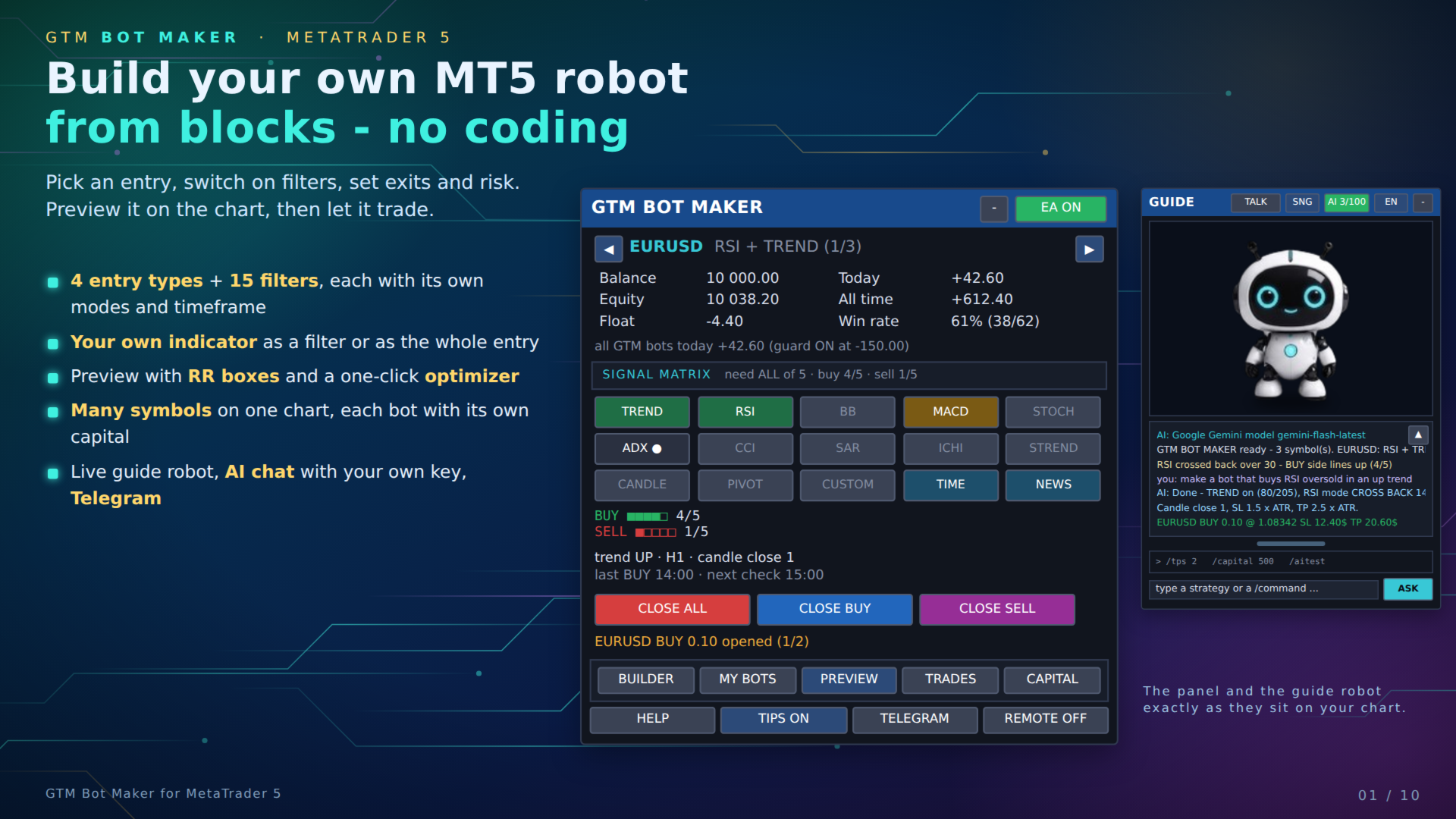
| GTM Bot Maker builds an Expert Advisor from ready blocks, right on the chart. Choose an entry, switch on filters, set the exits and the risk, preview the result on past candles - then switch the EA on. No MQL5, no code editor, no compiling. Everything is changed live from the panel, by /commands, or by describing the idea to an AI with your own key. |
━━━━━━━━━━━━━━━━━━━━━━━━━━━━━━
■ HOW IT WORKS - THREE STEPS
- 1. Build - open BUILDER. Pick one of 4 entry types, switch on any of 15 filters (or your own indicator), set exits and risk. Or start from one of 8 templates.
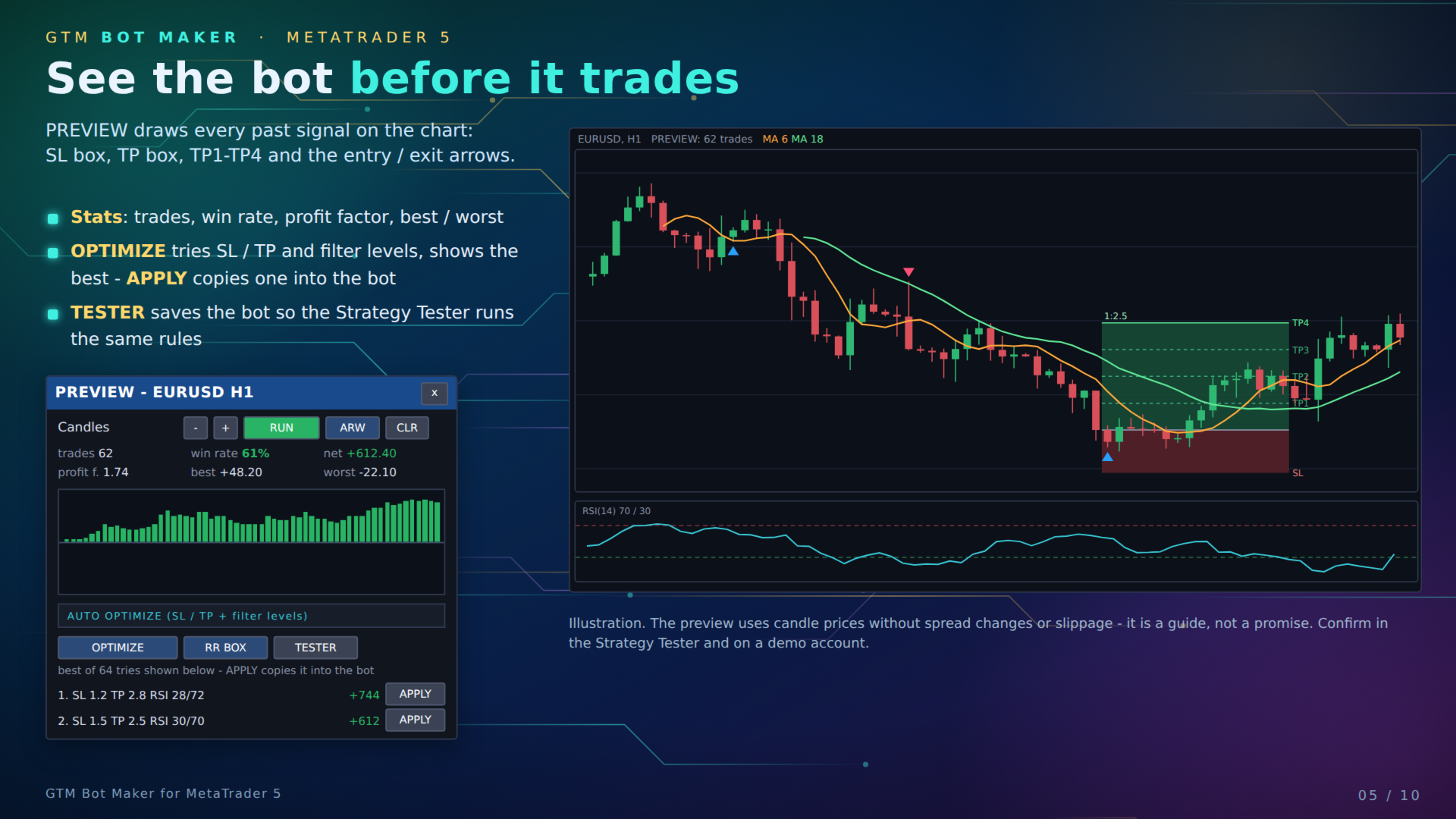
- 2. Check - press PREVIEW. Every past signal is drawn on the chart with an SL box, a TP box, TP1-TP4 and entry / exit arrows, plus trades, win rate, profit factor, best and worst trade. OPTIMIZE tries SL / TP and filter levels and lists the best; APPLY copies one into the bot.
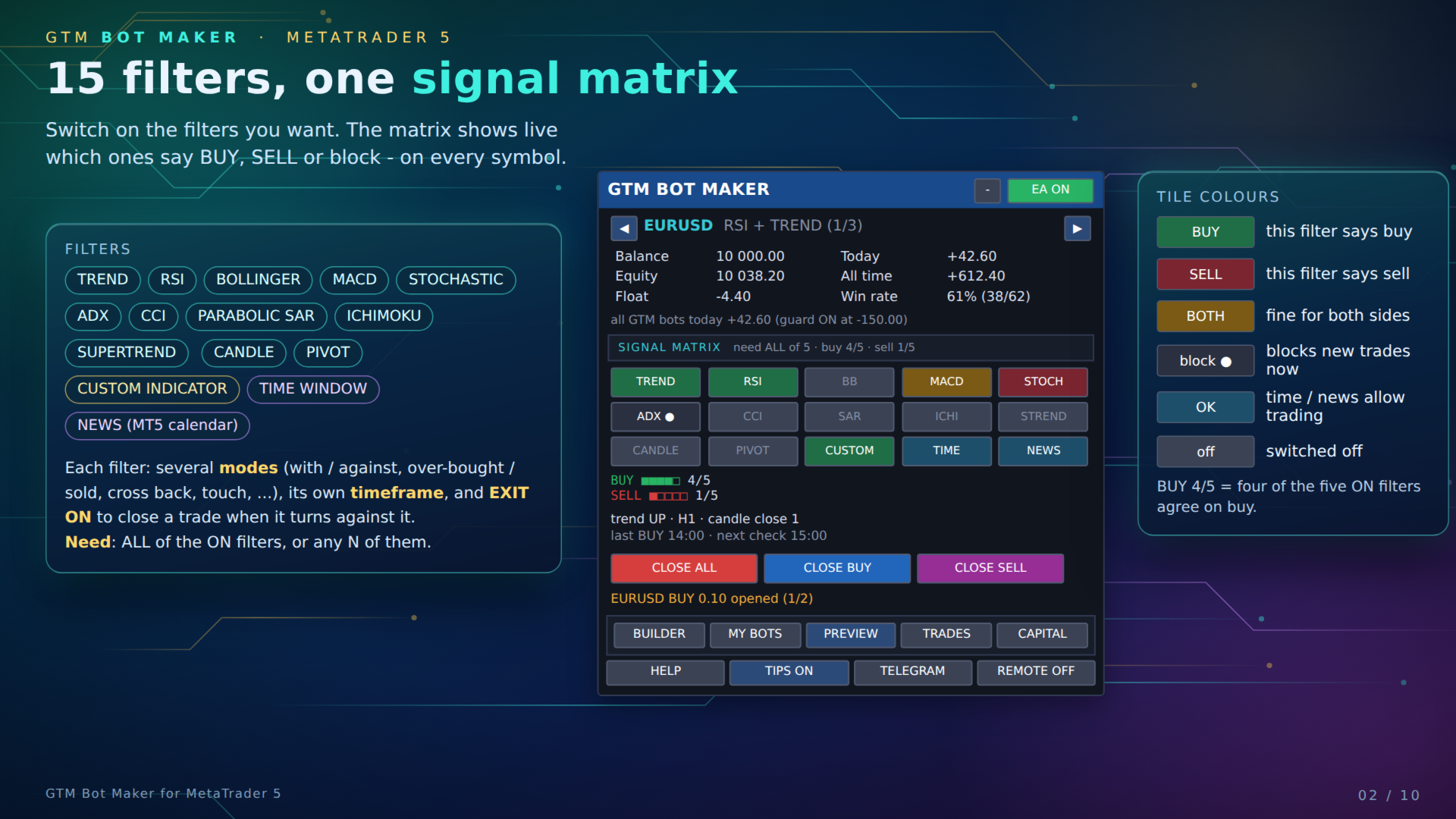
- 3. Run - EA ON. The SIGNAL MATRIX shows live which filters say BUY, SELL or block. The guide robot tells you in words why a signal was taken or skipped.
━━━━━━━━━━━━━━━━━━━━━━━━━━━━━━
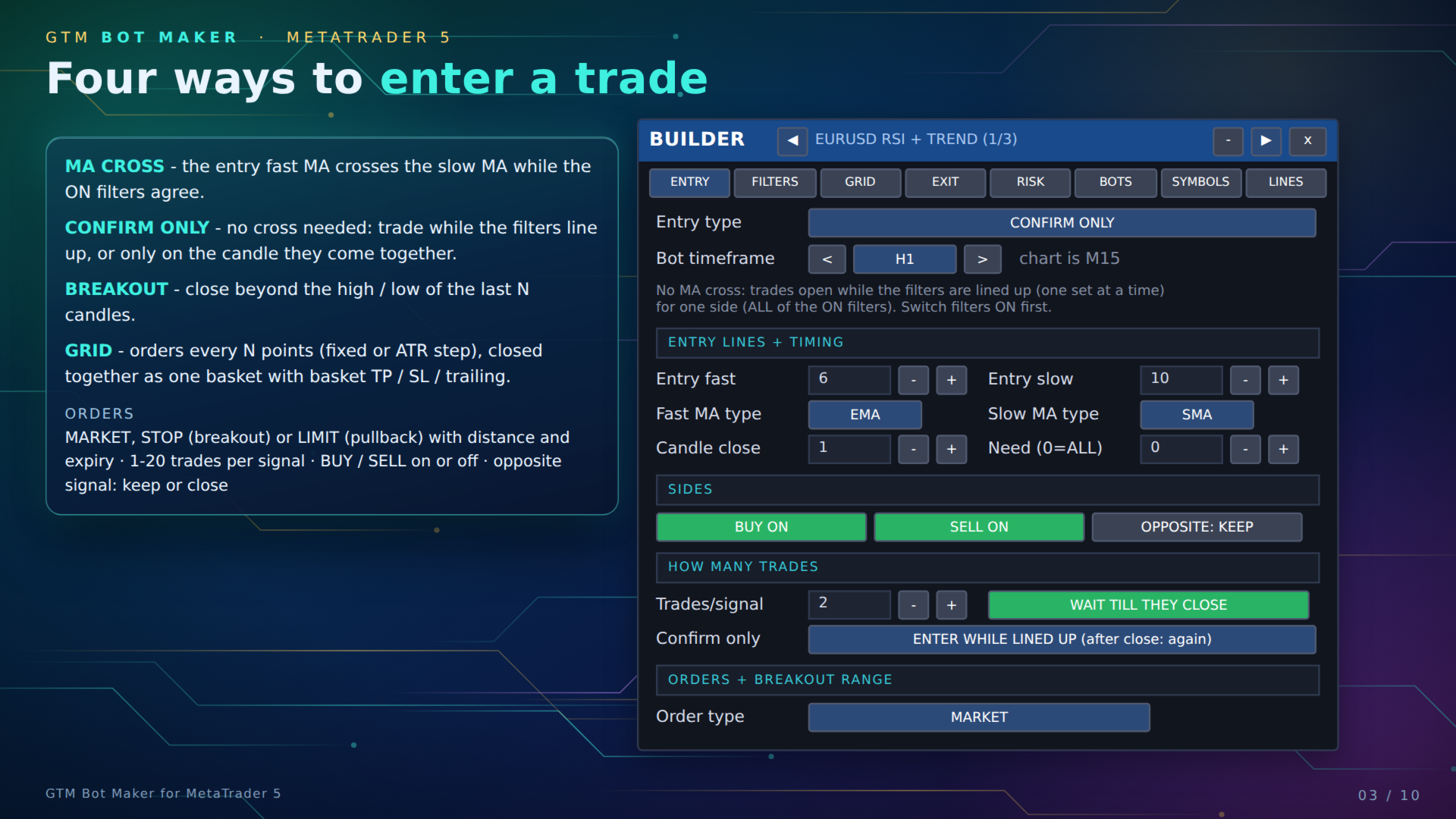
■ ENTRY TYPES
| Entry | What opens a trade |
| MA CROSS | The entry fast MA crosses the entry slow MA (SMA / EMA / SMMA / LWMA) while the ON filters agree. |
| CONFIRM ONLY | No cross needed. Trade while the filters are lined up, or only on the candle they come together. |
| BREAKOUT | A close beyond the high / low of the last N candles. |
| GRID | Orders every N points (fixed or ATR step, optional step multiplier), closed together as one basket with basket TP, basket SL and basket trailing. The first order can wait for the filters. |
Orders: MARKET, STOP (beyond the signal candle) or LIMIT (pullback) with distance and expiry in candles. 1-20 trades per signal, BUY / SELL on or off, wait until the bot's trades close, opposite signal: keep or close. Candle close 0 = live bar, 1 = on candle close.
━━━━━━━━━━━━━━━━━━━━━━━━━━━━━━
■ 15 FILTERS
Switch on the ones you want. Each has its own modes, numbers and timeframe, and EXIT ON closes a trade when that filter turns against it. Need: ALL of the ON filters must agree, or any N of them.
| Filter | Modes |
| TREND - two moving averages | with trend, against |
| RSI | 50 line, over-bought / over-sold, cross back, strong |
| BOLLINGER BANDS | touch, breakout, middle, re-entry |
| MACD | above signal, cross, zero line, rising |
| STOCHASTIC | K above D, over-bought / over-sold, cross back, K/D cross |
| ADX | DI + strong, strong only, weak only |
| CCI | zero line, over-bought / over-sold, cross back, strong |
| PARABOLIC SAR | price vs SAR, SAR flip |
| ICHIMOKU | above cloud, TK cross, tenkan > kijun, cloud break |
| SUPERTREND (ATR bands) | direction, flip |
| CANDLE CLOSE | colour, N in a row, break of high / low, strong body |
| PIVOT POINTS (day / week / month) | above pivot, bounce S1 / R1, break R1 / S1 |
| CUSTOM INDICATOR | A > level, A vs B, A cross B, arrows |
| TIME WINDOW (server hours) | trade inside, skip inside |
| NEWS (MT5 economic calendar) | avoid, avoid + close; minutes before / after, high or high + medium impact |
━━━━━━━━━━━━━━━━━━━━━━━━━━━━━━
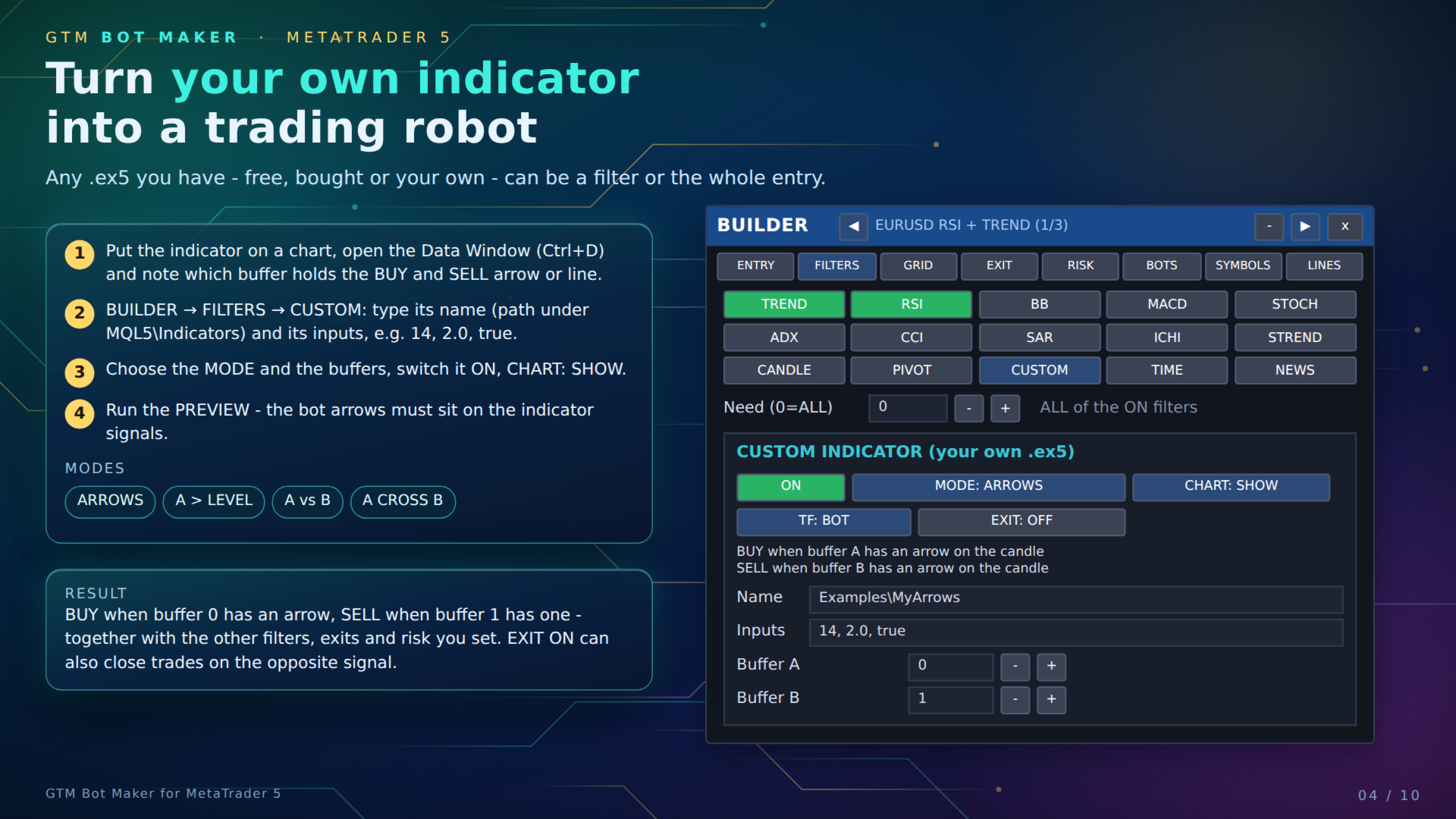
■ YOUR OWN INDICATOR AS A FILTER OR AS THE WHOLE ENTRY
Any indicator you have - free, bought on the Market, or your own .ex5 - can drive the bot. In BUILDER > FILTERS > CUSTOM type its name (the path under MQL5\Indicators, for example Examples\ZigZag or Market\Name) and its inputs in order (for example 14, 2.0, true). Choose the buffers from the indicator's Data Window and a mode:
- ARROWS - buffer A = buy arrow, buffer B = sell arrow; an arrow on the candle is a signal
- A > LEVEL - buy when line A is above the level
- A vs B / A CROSS B - two lines
CHART: SHOW draws it; PREVIEW shows whether the bot arrows sit on its signals. If a name is wrong, the guide says custom indicator not found.
━━━━━━━━━━━━━━━━━━━━━━━━━━━━━━
■ EXITS
- TP / SL in account money, or AUTO from ATR (SL = ATR x mult, TP = ATR x mult)
- Trailing stop (money or ATR), start and step
- Break-even with a locked amount
- Partial close at a profit, then optional break-even for the rest
- Exit when any filter with EXIT ON turns against the trade
- Grid: basket TP, basket SL and basket trailing
━━━━━━━━━━━━━━━━━━━━━━━━━━━━━━
■ RISK AND MONEY CONTROL
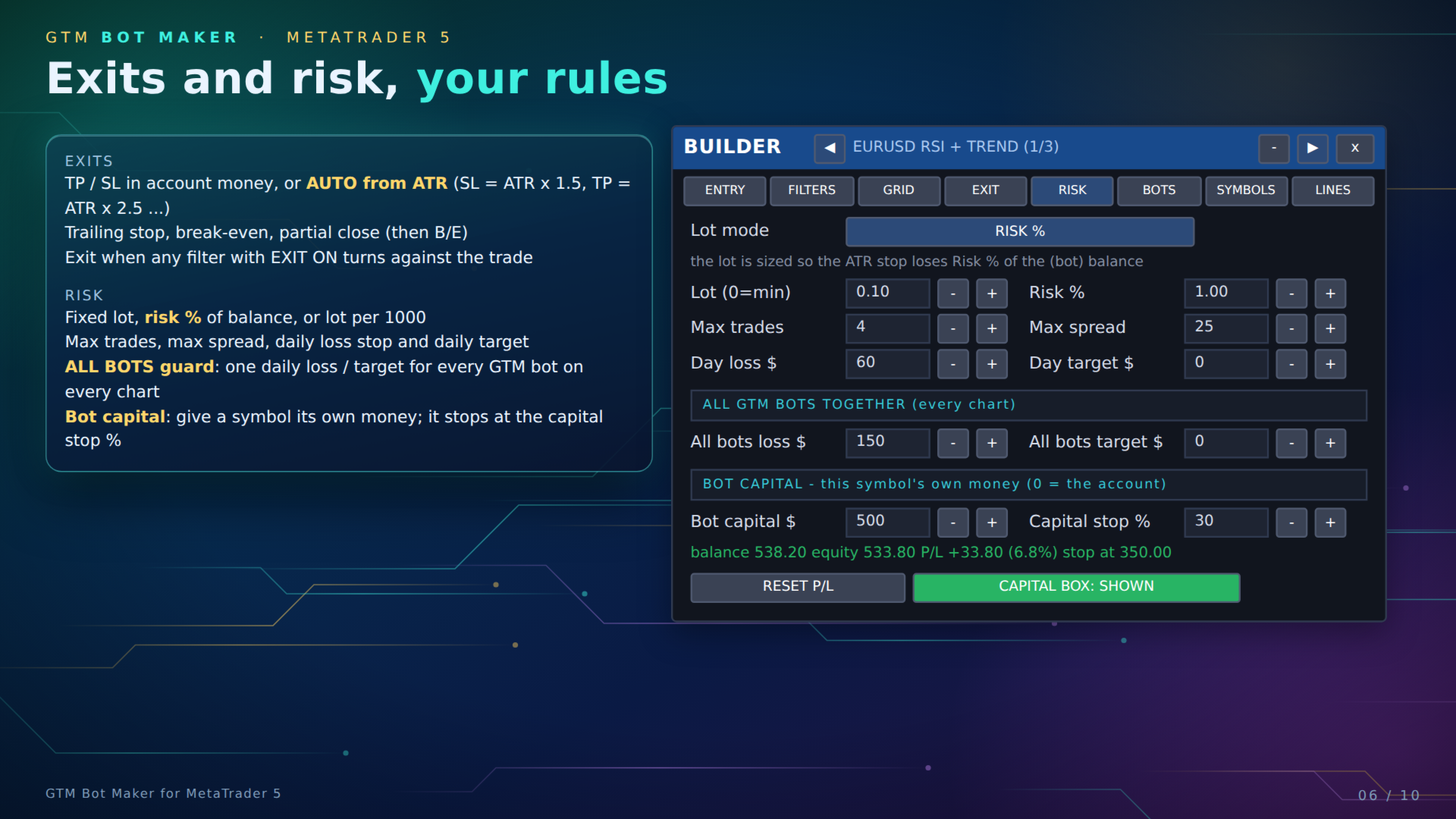
- Lot mode: fixed lot, risk % of the (bot) balance with the ATR stop, or lot per 1000 of balance
- Max open trades, max spread, daily loss stop and daily target (closes and stops for the day)
- ALL BOTS guard: one daily loss / target for every GTM bot on every chart together
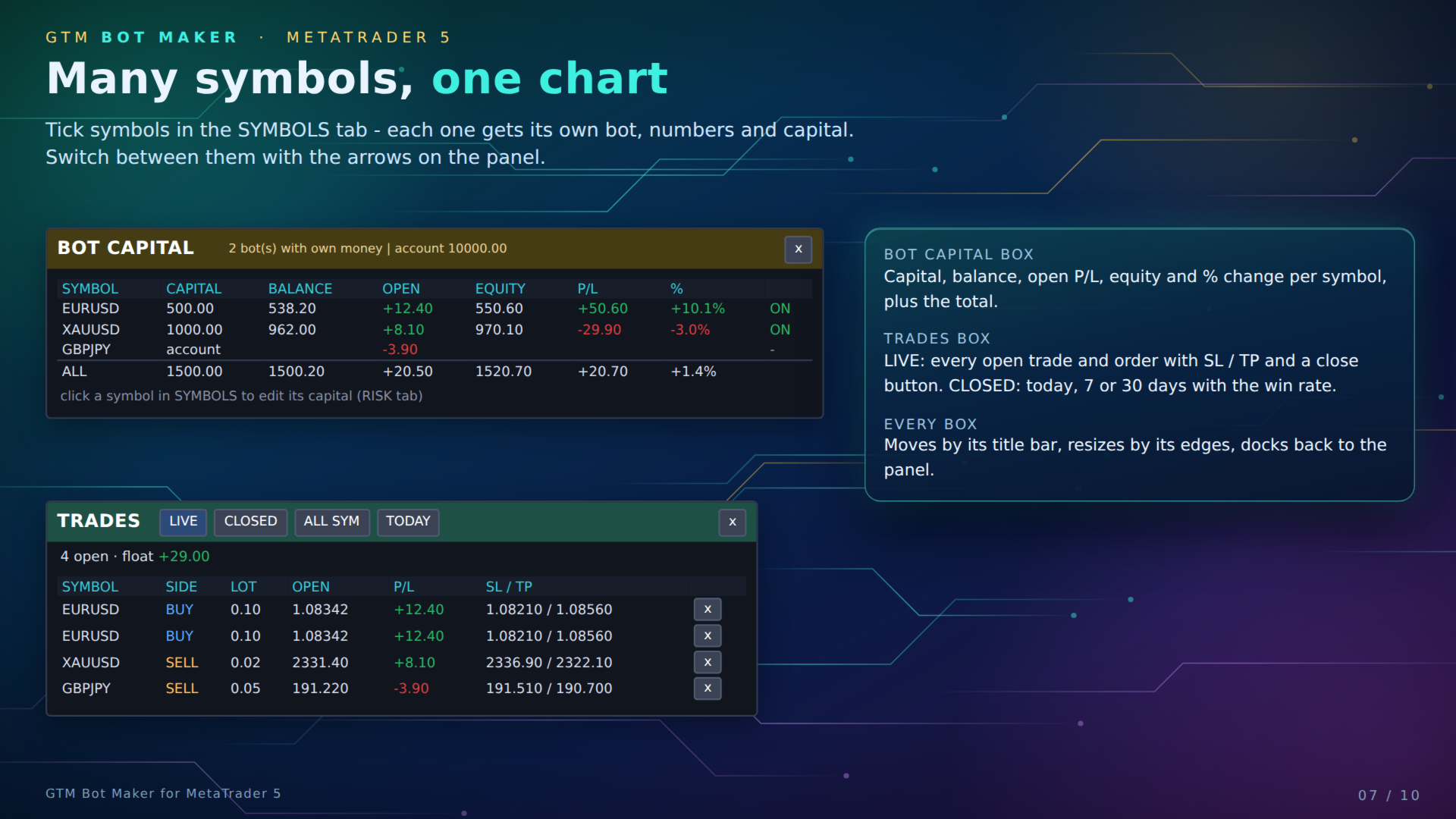
- Bot capital: give a symbol its own money and a capital stop % - the CAPITAL box shows capital, balance, open P/L, equity and % per symbol
- Own magic number and order comment
━━━━━━━━━━━━━━━━━━━━━━━━━━━━━━
■ MANY SYMBOLS ON ONE CHART
Tick symbols in the SYMBOLS tab. Each one gets its own bot (entry, filters, numbers and capital) and runs on the same chart; the arrows on the panel switch between them. The TRADES box lists every open trade and order with SL / TP and a close button, and closed trades for today, 7 or 30 days with the win rate. Every box moves by its title bar, resizes by its edges and docks back to the panel.
━━━━━━━━━━━━━━━━━━━━━━━━━━━━━━
■ LIVE GUIDE ROBOT
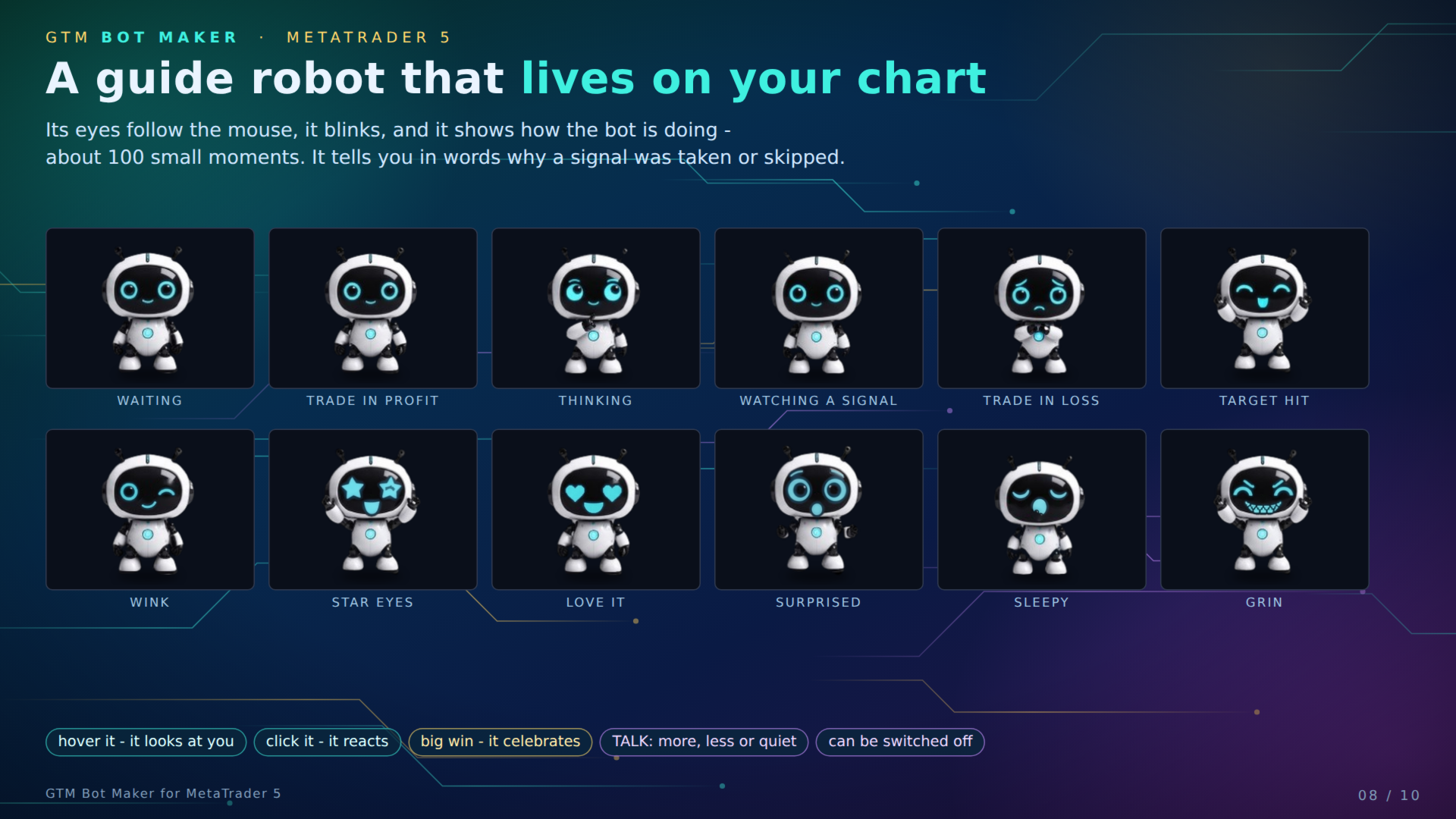
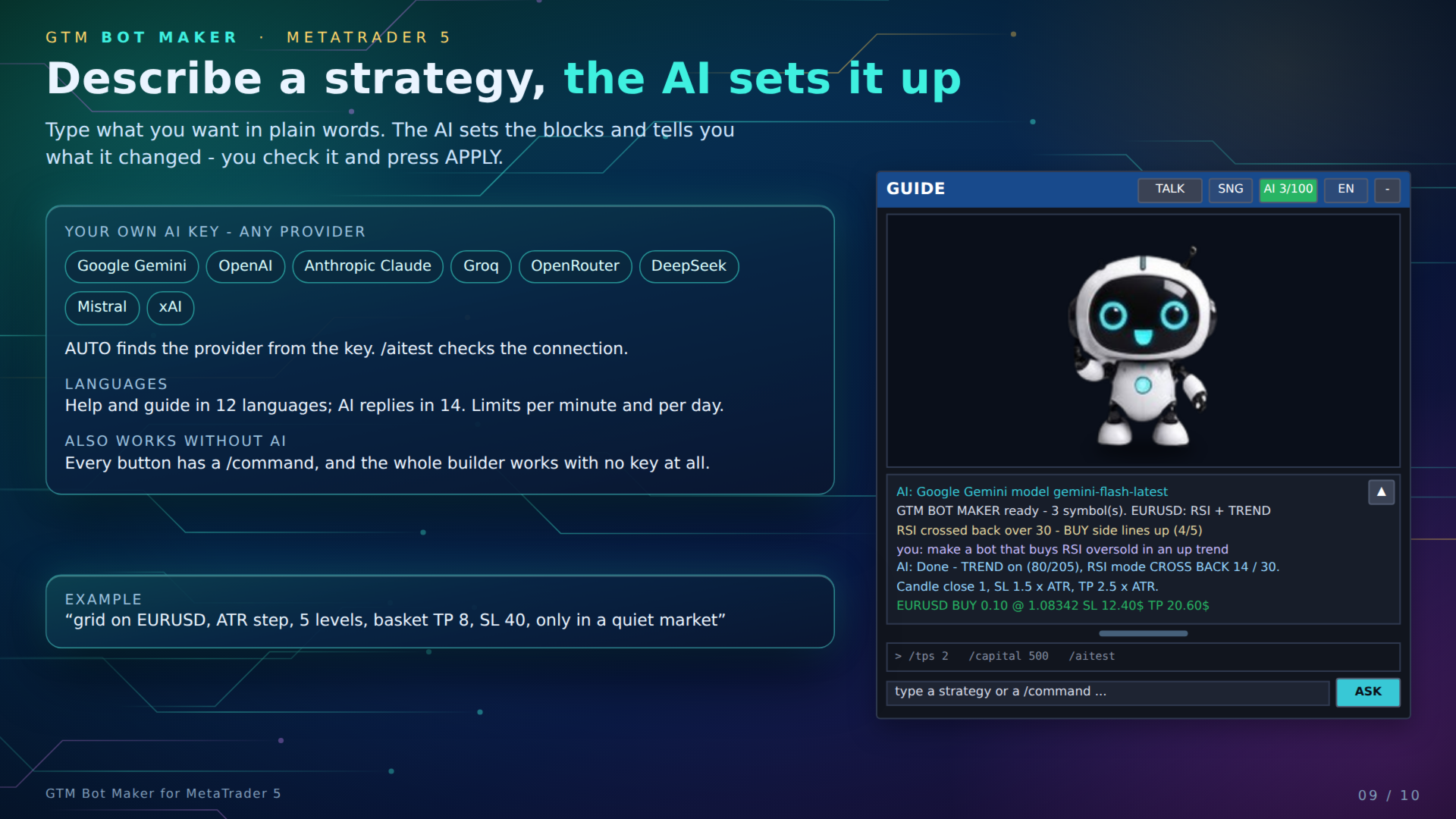
A small robot sits beside the panel. Its eyes follow the mouse, it blinks, and it shows about 100 small expressions for waiting, signals, profit, loss and targets. It explains in plain words what the bot is doing and why a signal was taken or skipped. TALK sets how much it speaks; the pictures and the animation can be switched off. Help and guide texts come in 12 languages (English built in; the others are translated once with your AI key).
━━━━━━━━━━━━━━━━━━━━━━━━━━━━━━
■ AI CHAT - OPTIONAL, WITH YOUR OWN KEY
Describe a strategy in plain words, for example "grid on EURUSD, ATR step, 5 levels, basket TP 8, SL 40, only in a quiet market". The AI sets the blocks and says what it changed; you check it and press APPLY. It also answers questions about the bot and its trades and can give a short review when a trade opens or closes.
- Providers: Google Gemini, OpenAI, Anthropic Claude, Groq, OpenRouter, DeepSeek, Mistral, xAI, Perplexity, or any OpenAI-style server (base URL). AUTO finds the provider from the key; /aitest checks the connection.
- Replies in 14 languages. Limits per minute, per day and per answer keep the cost under your control.
- You pay your AI provider directly (many have a free tier). The AI is optional - every button also has a /command and the whole builder works without any key.
━━━━━━━━━━━━━━━━━━━━━━━━━━━━━━
■ TELEGRAM REMOTE - OPTIONAL
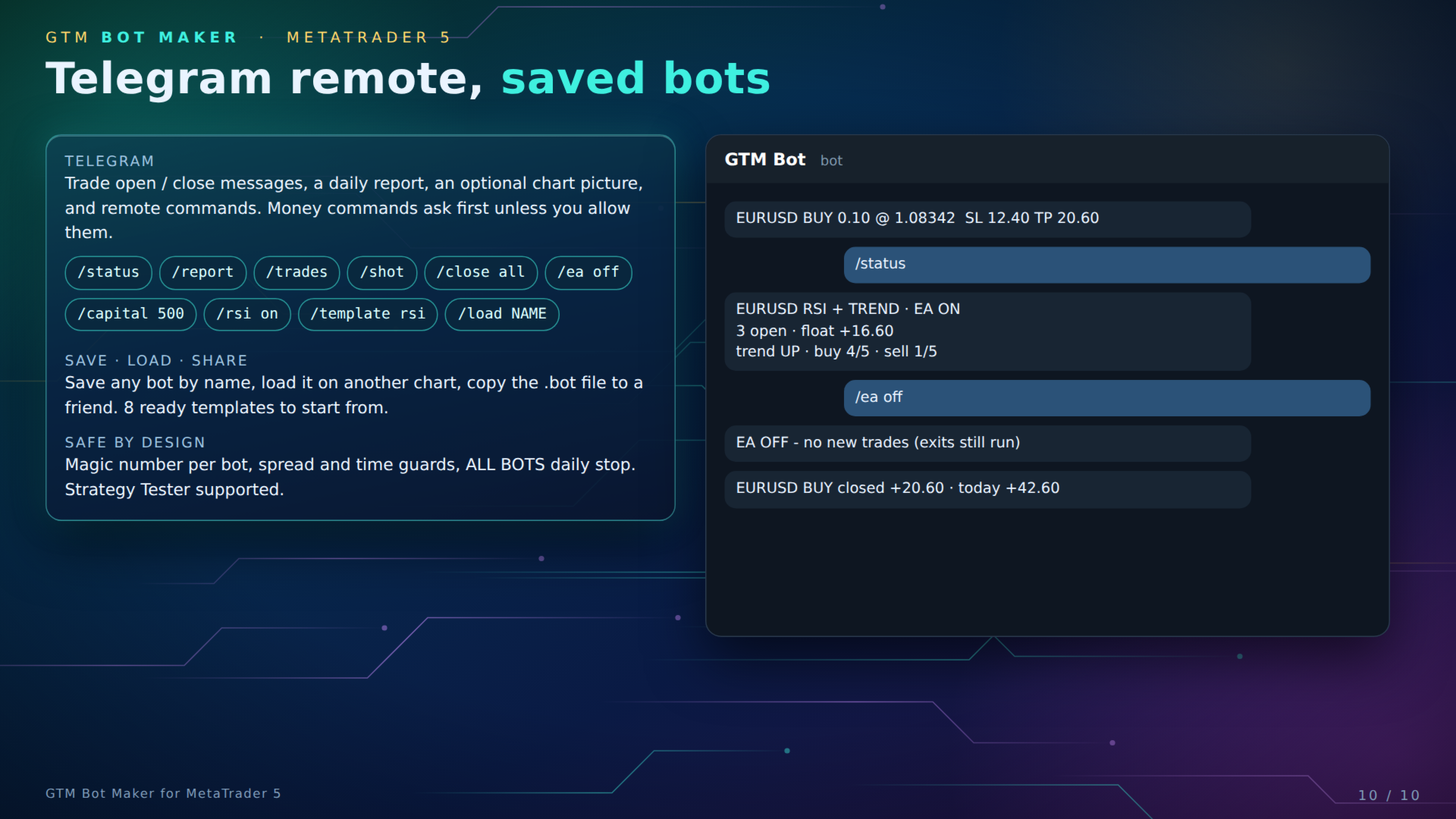
Trade open / close messages, an optional chart picture, a daily report, and remote commands such as /status, /report, /trades, /shot, /close, /ea off, /capital 500, /rsi on, /template rsi, /load NAME. Commands that move money ask for a yes first unless you allow them.
━━━━━━━━━━━━━━━━━━━━━━━━━━━━━━
■ SAVE, LOAD, SHARE
Save any bot by name, load it on another chart or at start, and copy the .bot file to another terminal. 8 templates: BLANK, MA CROSS, RSI REVERSAL, BB BOUNCE, MACD MOMENTUM, BREAKOUT, GRID CLASSIC, GRID + RSI. Panel changes are remembered for the next start.
■ WHAT GTM BOT MAKER DOES NOT DO
|
━━━━━━━━━━━━━━━━━━━━━━━━━━━━━━
■ SETUP
- Drag GTM Bot Maker onto any chart and tick Allow Algo Trading. The panel and the guide appear.
- For AI or Telegram only: Tools > Options > Expert Advisors > Allow WebRequest and add the address of your provider, e.g. https://generativelanguage.googleapis.com, https://api.openai.com, https://api.anthropic.com, https://api.groq.com, https://openrouter.ai, https://api.telegram.org. Then paste the key in the inputs.
- Saved bots and settings are kept in Terminal\Common\Files\GTM.
- Works on any symbol and timeframe offered by your broker (forex, metals, indices, crypto CFDs).
- A full PDF user guide with examples is available from the author on request.
━━━━━━━━━━━━━━━━━━━━━━━━━━━━━━
■ INPUT PARAMETERS
The inputs are only the starting values - almost everything is changed live in the builder and saved with the bot.
| Group | Inputs |
| BOT | Bot name; Load this saved bot at start; Remember panel changes; Entry type; Filters that must agree (0 = ALL); Order type; STOP / LIMIT distance (points) and expiry (candles); BREAKOUT candles; Trades per signal; Wait until trades close; CONFIRM ONLY mode; Bot capital $; Capital stop % |
| Timeframe | Timeframe for all lines and signals |
| Trend filter | ON; mode; fast / slow MA period; fast / slow MA method; price |
| Entry lines | Entry fast / slow MA period and method; price; Confirm bars (0 = live bar, 1 = candle close) |
| RSI / Bollinger / MACD / Candle / Stochastic / ADX | ON; mode; periods and levels of each filter |
| Time window | ON; trade inside / skip inside; start hour; end hour (server time) |
| News | ON; avoid / avoid + close; minutes before; minutes after; impact level |
| GRID | Direction; type; first order waits for filters; step (points); step multiplier; max orders per side; lot multiplier; basket TP $; basket SL $; basket trailing $; draw grid levels |
| Trading | EA ON; BUY ON; SELL ON; lot (0 = broker minimum); max open trades; max spread (points); close on opposite signal; magic number; order comment |
| SYMBOLS | Extra symbols to trade, comma separated |
| RISK | Lot mode; risk %; daily loss stop $; daily target $; all bots daily loss $; all bots daily target $ |
| TP / SL / Trailing | Use TP, TP $; use SL, SL $; trailing on, distance, start, step; break-even on, trigger, lock; partial close on, trigger, %, then break-even |
| AUTO SL / TP (ATR) | ON; ATR period; SL multiplier; TP multiplier; trailing from ATR |
| Panel | Show panel; X / Y; draw the MA lines and their colours; show the bot face; builder open at start; panel and guide size; robot pictures; live animation; face beat (ms); face background; guide X / Y; help + guide language; how much the guide talks; help box; filter indicators on the chart; hover tips |
| AI CHAT | AI ON; provider (AUTO); API key; model and backup model (blank = auto); base URL; reply language; max calls per minute / per day; max words; timeout; short review on trade open / close |
| TELEGRAM | Telegram ON; bot token; chat ID; group / channel ID; remote commands ON; run money commands without asking; poll seconds; trade open / close messages; chart picture on close; daily report |
| Risk warning. Trading forex and CFDs on margin carries a high level of risk and may not be suitable for all investors. Past results, previews and optimizer results do not guarantee future results. Only trade money you can afford to lose. GTM Bot Maker trades the rules you set; you are responsible for them. Test every bot in the Strategy Tester and on a demo account first. |