Smart Chandelier Exit EA
- Experts
- Versione: 1.0
- Attivazioni: 20

Smart Chandelier Exit EA
Smart Chandelier Exit EA is the Expert Advisor for the Smart Chandelier Exit indicator. It runs the indicator's chandelier engine by itself, with the same formula, the same default settings and the same fake-flip confirmation, and turns the confirmed flips into trades. A flip is traded only when it agrees with the higher timeframe, and every position carries a stop on the broker's server that follows the chandelier line and is never loosened. By default there is no fixed profit target: a trade ends at its stop or when the trend flips the other way. An ATR stop with three targets can be chosen instead; in testing it did worse.
If you use Smart Chandelier Exit, you already know how to read this EA. It acts at the moment the indicator confirms a flip, the moment its arrow appears, and it does the two things a trader following the indicator by hand has to keep doing: checking the higher timeframe before entering, and moving the stop with the line on every bar. The indicator is free on the Market and is not required; the EA computes the line itself.
The default has no target because a trend follower earns most of its result from a small number of large trends. In the test described below, the ten largest trades out of 261 produced 89% of the total. A fixed target would have closed each of them early; the optional exit with three targets, simulated on the same signals, made less than half as much.
Run it on a VPS. An Expert Advisor works only while its MetaTrader terminal is running and connected: if the computer is switched off, goes to sleep or loses its connection, it cannot open, trail or close anything until the terminal is back. That is how MetaTrader works, not a fault of the EA, so for uninterrupted operation keep it on a VPS - MetaTrader's built-in virtual hosting, or any server that stays on.
Release notes, chart examples and new product announcements are posted on the TrendTower channel: https://www.mql5.com/en/channels/trendtower
Smart Chandelier Exit and the EA
What is the same. The chandelier line is calculated with Smart Chandelier Exit's formula and default settings: the highest high or the lowest low of the last 22 bars, 3 times the ATR of 22 bars away, moving only in the trend's favour until price closes through it. A flip counts only after it survives the indicator's fake-flip window of 5 bars. In a strong trend the opposite side of the line trails far behind price, so a single close through the line is often undone on the next bar; that is the fake flip the window removes. Confirmed directions alternate exactly as the indicator's confirmed arrows do, and the EA opens its trade at the moment the indicator draws that arrow, at the close of the bar that confirms the flip.
What the EA adds. Not every confirmed arrow becomes a trade: the EA also requires the last closed bar of the higher timeframe (H4 by default) to point the same way. Its stop is not placed on the line itself but half an ATR behind it, because in testing a stop exactly on the line was taken out by ordinary noise too often. The Pearson R regime shown on the indicator's panel stays information for you; the EA does not filter on it, because in testing that filter made the results worse.
Using both on one chart. The two do not interfere: they use different object names, so neither removes the other's drawings, and the indicator's panel opens in the top-left corner while the EA's dashboard opens in the top-right. With the same settings they draw the same line and confirm the same flips. The indicator starts its calculation further back than the EA does; measured on GOLD H1 and M15 at 60 different attach times each, the two agreed on every bar from at most 116 bars after the first bar the EA reads. The EA reads 3000 bars and draws the last 300. Both place a flip's arrow on the bar where the flip was confirmed, the bar the EA trades; since version 1.5 the indicator also marks the bar where the flip began with a small dot. The indicator's dotted stop is a separate setting from the EA's stop: set its Buffer behind the line (ATR) to 0.5 and the dotted line follows the same rule as the EA's stop. The two can differ in the first bars of a trade, because the indicator starts its dotted line at the flip and the EA starts its stop at the entry.
How a trade runs
A trade opens at the close of the bar that confirms the flip, in the direction of the flip, with its stop sent together with the order. On every closed bar the stop moves with the chandelier line, half an ATR behind it, and never away from price.
A trade ends in one of two ways: its stop is hit, or an opposite flip is confirmed. An opposite confirmed flip closes the position and opens the new direction if the higher timeframe agrees. After a stop-out the EA stays flat until the next opposite confirmed flip.
Exit modes
Chandelier line, the default. It works as described in 'How a trade runs', and every figure in 'Know the trading style before you use it' and 'What was tested' belongs to this exit.
ATR stop with three targets, optional. The stop is placed 1 ATR from the entry price and sent with the order, using the ATR of the bar that confirmed the flip. Targets at 2, 3 and 4 ATR each close 25% of the opening size. When target 1 is taken the stop starts to follow the chandelier line, half an ATR behind it, and never moves back; what is left after target 3 keeps following the line until its stop is hit or an opposite flip is confirmed. Every distance and share is a setting. One R is the stop distance, so at the default settings one R is one ATR.
The targets are closed by the EA, not held by the broker: they are taken only while the terminal is running, while the stop always sits on the server. A share that does not come out in whole lot steps is rounded up, and less than the minimum lot is never left open, so a 0.01 lot position cannot be split and target 1 closes all of it; the journal says so at the entry. After the last part closes, no new trade opens in the same direction; the next trade waits for the next confirmed flip, as with the default exit. A position keeps the exit it was opened with when the setting is changed.
How the two compared. Both exits were simulated on the same GOLD H1 signals over the same three years, on one-minute data with spread and swap, outside the MetaTrader tester. The structure of the optional exit was chosen on the first two years with the last year kept aside until the choice was made. The chandelier exit made +0.36 R per trade over 255 trades, +91 R in total, with a deepest drawdown of 14.0 R. The ATR exit at its default distances and 25% shares made +0.15 R per trade, +37 R in total, with a deepest drawdown of 24.4 R, and lost 19.4 R in 2024, a year the chandelier exit finished at +3.1 R. In the kept-aside last year it made +0.14 R per trade against +0.37 R. These figures assume the position splits into 25% shares, which needs at least 0.04 lot; at the default 0.01 lot, target 1 closes the whole trade. The exit is offered because some traders want fixed targets, not because it tested better.
Know the trading style before you use it
Results are given in R. One R is the amount a trade risks when it opens: the distance from the entry price to the initial stop. At 0.5% risk per trade, +10 R is roughly +5% of the balance.
With the default exit this EA wins less than half of its trades. In the three-year test, 41 of every 100 trades were winners. The average winner was 2.7 times the size of the average loser, and that is where the result comes from. A run of 10 losing trades happened, and the longest stretch without a new high in the cumulative result lasted 165 days.
The result is concentrated. The ten largest trades produced 89% of the total; the other 251 trades together made +11 R, about +0.04 R each. A year without large trends can end nearly flat: 2024 finished at +5.2 R over 89 trades, while 2025 finished at +43.1 R. Stopping the EA after a run of small losses is the most likely way to miss the trade that pays for them.
What was tested
MetaTrader 5 Strategy Tester, GOLD on H1 with the H4 filter and the default chandelier exit, from 1 September 2023 to 12 September 2026, modelled with Every tick based on real ticks on XM Global data. All inputs were at their defaults except the lot size, a fixed 0.25 lot. This is a backtest over past data, not live trading.
261 trades. Winners 40.6%. Average winner +2.14 R, average loser -0.80 R. Expectancy +0.40 R per trade. Profit factor measured in R: 1.83. Deepest drawdown: 14.2 R. Longest losing streak: 10 trades. Largest single trade: +15.9 R. Swap is not included in these R figures; in money, swap reduced the result of the test by about 5%.
By year: September to December 2023 +39.0 R over 22 trades, 2024 +5.2 R over 89, 2025 +43.1 R over 87, January to September 2026 +15.8 R over 63. Dollar results are not quoted: they depend on the lot and on the price of gold, which more than doubled over the period, while R does not.
The EA runs on any symbol and timeframe. These tests cover GOLD H1 only. The same rules were also simulated on GOLD M15 over the same three years, on one-minute data outside the MetaTrader tester, and lost money there: about -0.09 R per trade after swap. Test any other market or timeframe yourself before you trade it; when the EA starts on anything other than GOLD H1, the journal says so.
Getting started
Run it on a VPS. An Expert Advisor works inside the MetaTrader terminal and only while that terminal is running and connected. If the computer is switched off, goes to sleep or loses its connection, the EA cannot open, manage or close trades until the terminal is back - that is how MetaTrader works, not a fault of the EA. For uninterrupted operation keep it on a VPS: MetaTrader's built-in virtual hosting, or any server that stays on. While the terminal is off, the stop of an open position stays on the broker's server where it was last moved, but it does not follow the chandelier line, no new flip is traded and, with the ATR exit, no target is taken until the terminal returns. After migrating to the built-in hosting, switch algo trading off in the terminal on your own computer, or remove the EA there; otherwise both copies trade the same account.
Enable Algo Trading in the terminal toolbar, attach the EA to a chart and tick Allow Algo Trading in its Common tab. The tested setup is GOLD H1. A hedging account is recommended. On a netting account positions on one symbol merge, so do not trade the same symbol by hand, with another EA, or with a second copy of this one on another timeframe.
The EA ships in a safe state. It opens no trade until 'I accept all risks, allow live trading' is set to true, and its default size is a fixed 0.01 lot. That size is a starting point, not a recommendation. For a size that follows the account, set 'Lot mode' to 'Risk percent of balance'. For this trading style 0.5% per trade is a conservative start: at 0.5%, the 14.2 R drawdown of the test is about 7% of the balance.
Run one copy per symbol. The magic number is derived from the symbol, so the EA never touches trades it did not open. A second copy on the same symbol notices the first, says so in the journal and on its dashboard, and trades nothing while the first one runs; when the first is removed, the second takes over within a second, on the timeframe of any position it inherits. On a netting account the journal says so when the EA starts.
On the chart and in the log
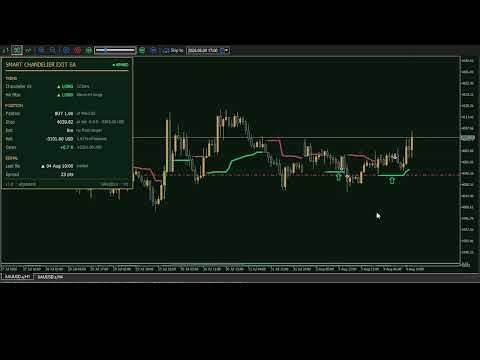
The chart. The EA dresses the chart in its Emerald Vault colours: a deep green ground, rising candles in solid gold and falling candles hollow, so the direction of a candle does not rest on colour alone. Your own colours are stored before anything changes and come back when the EA is removed; switch the Emerald Vault chart colours setting off to keep them on the chart.
The line and the arrows. The green or red line is the chandelier line the EA trades, drawn with Smart Chandelier Exit's own glow from the values the EA stored, not recalculated for display. A heavy arrow in full colour marks a confirmed flip the higher timeframe agreed with, the setup the EA trades; a thin, dimmed arrow marks one it disagreed with. Arrows from before the EA started follow the same rule, so the chart shows which past flips the EA would have traded. With the higher timeframe filter off, every arrow is heavy. Whether a flip was actually traded is written in the journal and on the dashboard's last flip row.
The dashboard. It shows the chandelier direction and how many bars it has lasted, the higher timeframe's direction and whether it allows or blocks the chart's direction - a direction it blocks is dimmed and marked no entry - the open position with its entry price, its stop and what the stop already locks in, the exit - with the ATR exit, the next target - the position's risk in money and as a share of the balance, the open result, the last confirmed flip with what happened to it, and the spread. Its top line says whether the EA can trade: ARMED; NOT ARMED while live trading is not allowed; ALGO OFF while algo trading is off in the terminal; DAY LOCK or DD LOCK when a loss limit is reached; DUPLICATE when another copy works on the symbol. While history loads, the first rows say what the EA is waiting for. The dashboard can be dragged with the mouse. When the terminal is not on a VPS and algo trading is on, a line above its footer reminds you to run the EA on one.
The journal. Every confirmed flip gets one plain sentence: the trade that was opened, with its size, stop and risk in money and as a share of the balance, or the reason it was not traded. When the hard lot cap cuts a size, the sentence says so.
The trade log is a CSV file in the terminal's common Files folder, named after the symbol and timeframe, with _live or _tester at the end. It lists every confirmed flip with the reason it was or was not traded, and every deal with its price, the reason for a close, its profit, swap and commission. The common folder is used because the Strategy Tester runs in a separate agent folder; it is the one place where the log of a live chart and the log of a test can both be found. The log stays on your computer.
Account loss limits
A daily loss limit and a maximum drawdown limit are included for funded and prop-firm accounts. Both are off by default. They measure the whole account - its equity, including every open trade, also those of other EAs and your own - but the EA only ever closes the position it opened.
The daily loss is measured from the balance or the equity at the start of the day, as set, and the day starts at the server hour you choose. If the EA is attached in the middle of a day, that day is measured from the moment it starts. The drawdown is measured from the highest equity the EA has seen, or from a fixed amount such as the size of a funded account. When a limit is reached the EA closes its position and opens no new trade or, if set so, only stops opening trades and keeps managing the position. The daily limit clears when the next day starts; the drawdown limit stays until its settings are changed. Changing them also starts the drawdown measurement again: measured from the highest equity, the peak seen so far is forgotten and a new one starts from the equity at that moment. Both are remembered when the EA or the terminal restarts normally; after a crash of the terminal, a new equity high made in its last two seconds can be lost. The dashboard shows how much of each limit is used, and a notification is sent when one is reached and when the daily limit clears.
The limits are checked by the EA once a second while prices arrive; the broker does not hold them. A fast move or a closed terminal can take the account past a limit before the EA acts, so set them with a margin below the limits of your account's rules.
Notifications
Terminal alerts, push notifications to the MetaTrader app on your phone and e-mails are switched on separately, and all three are off by default. Trade events are entries, targets taken, loss limits reached, stop-outs, closes on an opposite confirmed flip and forced closes; errors are rejected orders, stop moves and closes, and each group has its own switch. Every message names the symbol and the timeframe; entry and close messages also name the side, the price and the size, and a close carries its result in R and in money. Push notifications need your MetaQuotes ID in the terminal options and e-mail needs the terminal's e-mail settings. Nothing is sent from the Strategy Tester.
Behaviour that has no setting
On start the EA reads up to 3000 closed bars to rebuild the line and the last confirmed direction. A signal that closed before the EA started never opens a trade, so attaching the EA or restarting the terminal does not open a position on an old signal. A position that is on the wrong side of the last confirmed direction after a restart is closed: exits are never blocked. The stop of a position on the right side is moved at once to where the last closed bar puts it, and a position found without any stop gets its initial stop back within a second, even while history is still loading.
After every fill the EA reads the stop back from the server. If it is missing it is set again, and if that fails the position is closed. If the server refuses the close as well, the EA does not wait for the next bar: once a second it tries the stop again and then the close, until one of them holds - which, like everything the EA does, needs the terminal to be running. If a new stop level is already beyond the current price, the position is closed, which is what the stop would have done.
A position stays with the timeframe it was opened on. If you switch the chart to another timeframe while a position is open, the EA keeps working on the position's timeframe - that line moves the stop and that timeframe's flips close the trade - and moves to the chart's timeframe once the position is closed. It opens no new trade on the old timeframe, so an opposite flip there closes the position without reversing it. The journal says both.
Gold and some other markets open for trading a moment after the new bar starts. When an order, a stop move or a close is refused because the market is still closed, the EA tries again once a second until that bar ends. A reversal waits for its close and then opens.
There is no grid, no martingale, no averaging into a losing trade, no hedging of its own positions, no DLL and no web request of any kind.
Every setting, with its default and exactly as it is named in the properties dialog, is listed in the full manual, which is published on the TrendTower channel.
About the author
Smart Chandelier Exit EA and the Smart Chandelier Exit indicator are developed and maintained by algoteknik, a developer of indicators and Expert Advisors for MetaTrader 5. Every published product and every update is listed on the author's MQL5 profile.
Questions, bug reports and feature requests are welcome on the TrendTower channel: https://www.mql5.com/en/channels/trendtower
Risk disclaimer
This Expert Advisor opens and closes real trades once you allow it to. Backtest results are simulations over past data and do not indicate future results. Trading gold, foreign exchange, indices and CFDs carries a high level of risk and may not be suitable for every investor. Test the EA on a demo account first and trade only with money you can afford to lose.
algoteknik
Support, updates and every other product: mql5.com/en/users/bugraky123
Product channel: mql5.com/en/channels/trendtower
Smart Chandelier Exit EA version 1.0