MultiMarket Trader Pro
- Experts
- Versione: 1.27
- Attivazioni: 5

Multi-Symbol Trading • Currency Strength • Risk Management • Manual & Automatic Trading
MultiMarket Trader PRO is a professional multi-symbol trading dashboard designed for MetaTrader 5.
Instead of opening multiple charts and managing every instrument separately, the Expert Advisor centralizes market monitoring, trade execution, position management and risk controls inside one compact dashboard.
The objective is simple: trade multiple markets from one interface while keeping execution structured, controlled and efficient.
ONE DASHBOARD — MULTIPLE MARKETS
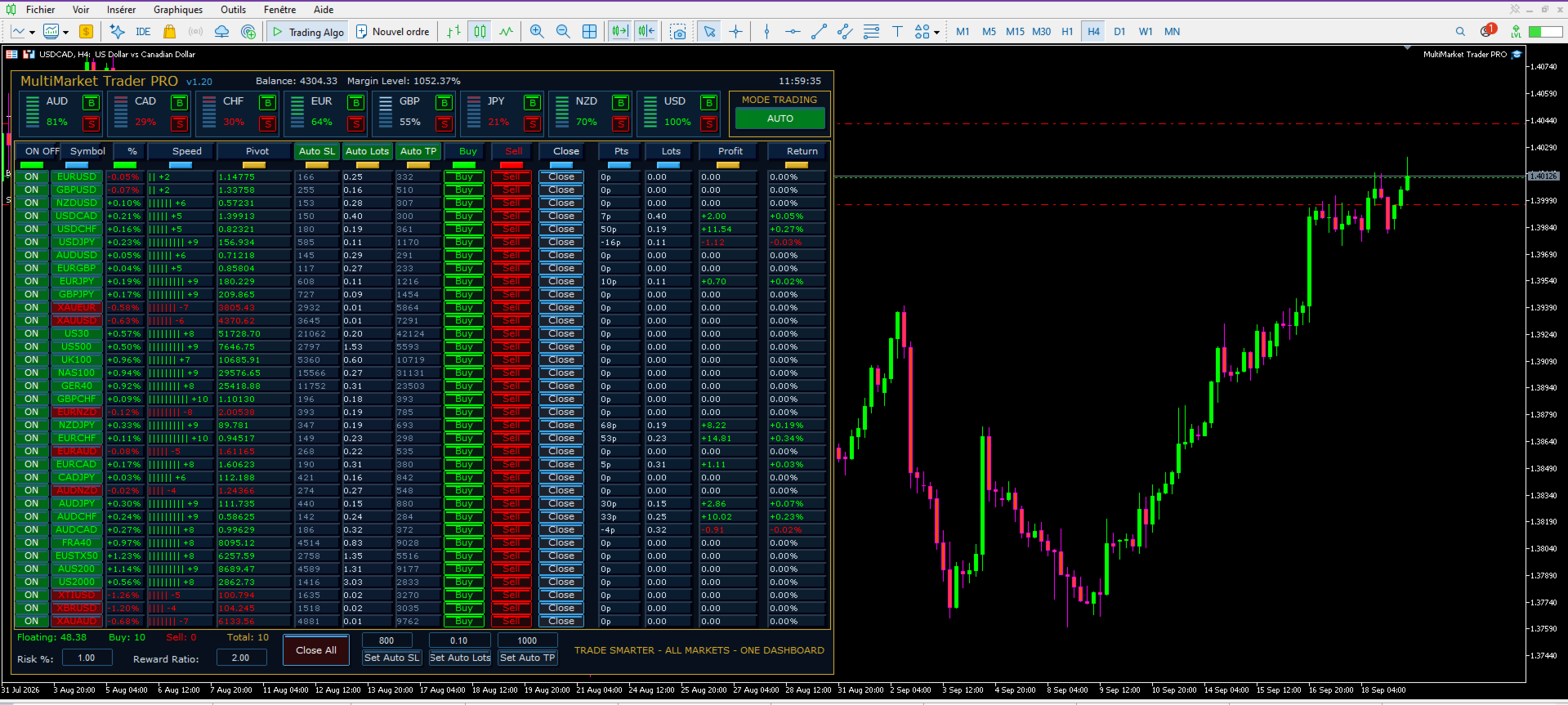
MultiMarket Trader PRO automatically reads the symbols available in MetaTrader 5 Market Watch and displays them in a single trading panel.
For every monitored symbol, the dashboard provides essential information such as:
-
Market direction and percentage movement
-
Market speed
-
Pivot level
-
Automatic Stop Loss
-
Automatic lot calculation
-
Automatic Take Profit
-
Floating points
-
Open volume
-
Current profit
-
Return percentage
-
Individual BUY, SELL and CLOSE controls
This allows the trader to supervise a large number of instruments without constantly switching between charts.
MANUAL AND AUTOMATIC TRADING
MultiMarket Trader PRO combines discretionary trading and automated execution.
The AUTO / MANUAL control allows the trader to choose how the dashboard should operate.
MANUAL Mode
The trader remains in full control of entries.
Each symbol has dedicated:
BUY — SELL — CLOSE
buttons directly inside the dashboard.
This makes MultiMarket Trader PRO particularly useful for traders who want market analysis and centralized risk management while keeping final control over trade execution.
AUTO Mode
Automatic mode uses the dashboard's currency-strength logic to identify situations where a strong currency is opposed to a weaker currency.
The EA can then execute the corresponding trade while still respecting its internal trading protections.
Automatic trading is therefore integrated into the same risk-management architecture as manual trading.
INDIVIDUAL SYMBOL ON/OFF CONTROL
Every instrument has its own ON/OFF button.
This is an important feature for multi-symbol automated trading.
You can keep an instrument visible in the dashboard while preventing new entries on that specific symbol.
For example, a trader may temporarily disable a market because of:
-
Important economic news
-
Abnormally high spread
-
Low liquidity
-
Unwanted volatility
-
Personal trading restrictions
The rest of the dashboard can continue operating normally.
CURRENCY STRENGTH ENGINE
The upper section of the dashboard continuously monitors the relative strength of the eight major currencies:
AUD • CAD • CHF • EUR • GBP • JPY • NZD • USD
Strength is displayed on a normalized scale from 0% to 100%.
The system analyzes the symbols available in Market Watch and evaluates the relative performance of each currency.
This provides an immediate visual overview of which currencies are currently stronger or weaker.
TRADE STRONG AGAINST WEAK
The automatic strategy is based on a straightforward market principle:
Strong Base Currency + Weak Quote Currency → BUY opportunity
Weak Base Currency + Strong Quote Currency → SELL opportunity
The strength thresholds can be adjusted through the EA parameters.
This approach allows the dashboard to search for relative strength differences instead of treating every currency pair independently.
DIRECT CURRENCY BASKET TRADING
Each currency-strength block includes dedicated:
B — Buy Currency
and
S — Sell Currency
controls.
This provides rapid access to currency basket execution across compatible Forex instruments available in Market Watch.
It can be useful when the trader identifies significant strength or weakness in one particular currency and wants centralized execution from the dashboard.
CONTROLLED TRADE FREQUENCY
MultiMarket Trader PRO includes several protections designed to avoid unnecessary order multiplication.
The EA can limit the maximum number of managed positions allowed on each symbol.
By default:
Maximum Positions Per Symbol = 1
This helps prevent repeated signals from continuously opening additional positions on the same instrument.
A configurable trade cooldown also imposes a minimum delay between consecutive entries on the same symbol.
These mechanisms are especially important when running an automated multi-symbol strategy on a VPS.
The objective is to maintain disciplined execution rather than generate unnecessary trading activity.
EFFICIENT SERVER COMMUNICATION
MultiMarket Trader PRO was designed with continuous VPS operation in mind.
The architecture separates dashboard refresh, market calculations and trading actions.
ATR calculations are cached instead of unnecessarily recreating indicator calculations on every dashboard refresh.
Trade-entry protections also reduce duplicate execution attempts.
The trailing-stop system only attempts to advance the Stop Loss when its configured conditions are satisfied and the new level represents an improvement over the existing protection.
This architecture is intended to reduce unnecessary processing and avoid excessive trading operations while maintaining responsive dashboard operation.
AUTOMATIC STOP LOSS
The dashboard includes an Auto SL system based on ATR — Average True Range.
Instead of applying the same fixed Stop Loss distance to every market, the EA can calculate protection according to the current volatility of each instrument.
Parameters include:
-
ATR timeframe
-
ATR period
-
ATR multiplier
This makes the risk-management engine adaptable to instruments with different volatility characteristics.
Auto SL can also be disabled when the trader prefers a manually defined Stop Loss distance.
AUTOMATIC POSITION SIZE
The Auto Lots system calculates trade volume according to:
-
Account balance
-
Selected risk percentage
-
Stop Loss distance
-
Symbol tick value
-
Tick size
-
Broker minimum volume
-
Broker maximum volume
-
Volume step
This provides a more structured alternative to using the same lot size on instruments with very different volatility and contract specifications.
The trader can also disable Auto Lots and use a fixed manual volume.
AUTOMATIC TAKE PROFIT
When Auto TP is enabled, the Take Profit is calculated using the Stop Loss distance and the selected Reward Ratio.
Example:
Risk = 1
Reward Ratio = 2
The system targets a theoretical risk/reward relationship of approximately 1:2, subject to execution conditions and symbol specifications.
The Reward Ratio can be modified directly from the dashboard.
THREE INDEPENDENT RISK CONTROLS
The trader can independently activate or deactivate:
Auto SL
Auto Lots
Auto TP
This means MultiMarket Trader PRO does not force one fixed money-management configuration.
For example, you can use:
Automatic SL + Automatic Lots + Automatic TP
or:
Manual SL + Automatic Lots + Automatic TP
or a fully manual configuration.
TRAILING STOP MANAGEMENT
MultiMarket Trader PRO includes an integrated trailing-stop system.
The trader can configure:
-
Trailing activation
-
Profit trailing
-
Trailing distance
-
Trailing step
The system is designed to move protection only when the new Stop Loss represents an improvement over the existing level.
This helps avoid unnecessary repeated modifications when the market has not moved sufficiently.
CENTRALIZED POSITION MONITORING
For every instrument, the dashboard displays important live position information directly in its corresponding row.
You can monitor:
Points — Lots — Profit — Return
without opening the MetaTrader Toolbox for every decision.
At the bottom of the dashboard, MultiMarket Trader PRO also displays a global summary including:
BUY positions
SELL positions
Total positions
Floating profit/loss
This provides an immediate overview of current EA exposure.
ONE-CLICK POSITION MANAGEMENT
Each symbol has its own CLOSE button.
A global CLOSE ALL function is also available for positions managed by the Expert Advisor.
This gives the trader centralized control when rapid exposure reduction is required.
MAGIC NUMBER PROTECTION
MultiMarket Trader PRO uses its own Magic Number.
When the corresponding management option is enabled, position-management functions operate only on trades belonging to the EA's Magic Number.
This is useful when several Expert Advisors or trading strategies operate simultaneously on the same MetaTrader 5 account.
DESIGNED FOR MULTI-SYMBOL VPS TRADING
MultiMarket Trader PRO is particularly suitable for traders who operate MetaTrader 5 continuously on a VPS.
Its architecture focuses on:
Centralized monitoring
Controlled trade frequency
Reduced duplicate entries
Configurable execution cooldown
ATR calculation caching
Selective symbol activation
Magic Number filtering
Structured risk management
Manual and automatic execution from the same interface
The goal is not to generate the maximum possible number of transactions.
The goal is to provide a controlled multi-market trading environment where analysis, execution and risk management are centralized in one dashboard.
KEY FEATURESMulti-symbol trading dashboard
Manual and automatic trading modes
Individual ON/OFF control for every symbol
Currency Strength analysis for AUD, CAD, CHF, EUR, GBP, JPY, NZD and USD
Strong-versus-weak automatic Forex logic
Currency basket BUY/SELL controls
One-click BUY / SELL / CLOSE
Global CLOSE ALL
Automatic ATR Stop Loss
Automatic risk-based lot calculation
Automatic Reward Ratio Take Profit
Integrated trailing stop
Maximum positions per symbol protection
Trade-entry cooldown
Magic Number position filtering
Dynamic Market Watch symbol detection
Live floating P/L monitoring
Per-symbol points, lots, profit and return display
Optimized ATR calculation cache
Designed for continuous multi-symbol operation
IMPORTANT
MultiMarket Trader PRO is a trading and trade-management tool. It does not guarantee profits.
Automatic position sizing, Stop Loss, Take Profit, currency strength and trailing-stop functions are risk-management and execution tools, not guarantees against trading losses.
Trading conditions depend on the broker, instrument, spread, liquidity, leverage, execution environment and market volatility.
Before using automatic trading on a live account, users should understand all parameters and test their configuration in the MetaTrader 5 Strategy Tester and/or on a demo account.
Trade Smarter — All Markets — One Dashboard