Asia Sweep Shift EA
- Experts
- Versione: 1.0
- Attivazioni: 5

Short Description
Asia Sweep Shift EA marks the Asian session's high and low, waits for price to sweep one of those levels and reject it during London or New York, confirms the reversal, then enters at a precision zone with a defined stop and target. One clean, rules-based setup per day — no guesswork, no overtrading.
Full Description
Asia Sweep Shift EA automates a well-known institutional trading concept: liquidity is often taken just beyond the Asian session's range before price reverses in the opposite direction. Instead of guessing when that reversal is real, this EA watches the range, waits for the market to prove itself, and only then acts.
What it does, from a trader's point of view:
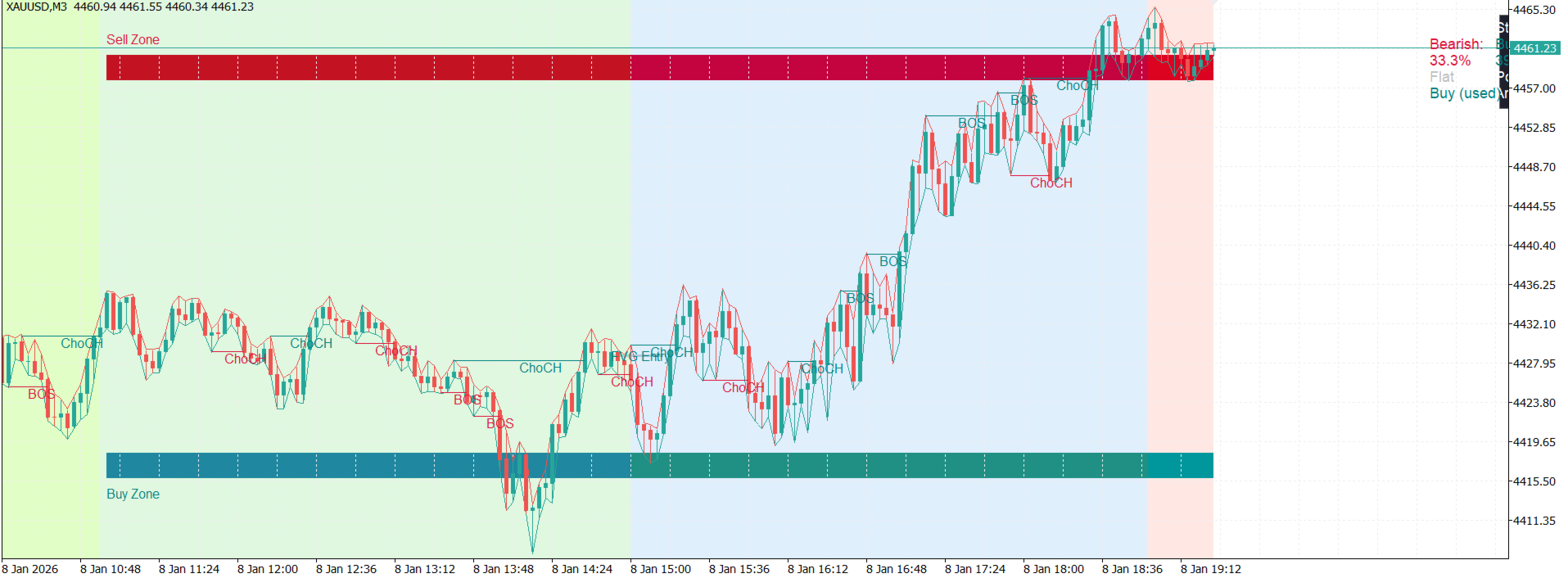
- Marks the Asian range automatically. As soon as the Tokyo/Asia session closes each day, the EA draws the session high as a "Sell Zone" and the session low as a "Buy Zone" directly on your chart.
- Waits for a genuine liquidity sweep. Rather than reacting to the first touch of either level, the EA looks for price to push beyond the zone and then reject it — a signature of stop hunts and liquidity grabs, not a real breakout.
- Confirms before committing. After a qualifying sweep, the EA drops to a lower timeframe to confirm that market structure has actually turned before considering an entry. Premature entries are the single most common reason discretionary traders lose on this style of setup — the EA simply refuses to enter until that confirmation exists.
- Enters with precision, not at market. Entries are placed as limit orders at a well-defined technical zone left behind by the reversal move, rather than chasing price with a market order.
- Manages risk automatically. Every trade has a protective stop placed beyond the sweep itself, and a target set at the opposite side of the Asian range — with the option to let winners run further if the market continues in your favor instead of capping every trade at a fixed target.
- One setup per day. Once a trade has been taken from a sweep, the EA stands down for the rest of the day. This isn't a scalper or a grid system — it's a single, high-conviction setup executed the same disciplined way every time.
- Full visual context. London, New York, Tokyo, and Sydney session ranges are shaded directly on the chart, market structure shifts are labeled as they happen, and an on-chart dashboard shows you exactly what state the EA is in — armed, waiting, in a position, or flat — at all times.
- Works alongside you, not behind your back. Every zone, sweep, and structure break the EA acts on is drawn on the chart in real time, so you can watch its reasoning unfold rather than trading blind.
This EA is built for traders who already understand the value of session-based liquidity concepts and want that process executed consistently, without hesitation, fear, or fatigue — the same way, every single day.
This product does not guarantee profits. All trading involves risk of loss. Past performance of any strategy, automated or discretionary, is not indicative of future results. Please read the Risk Disclaimer below before use.
Key Features
- Automatic Asian session range detection and Buy/Sell zone marking
- Liquidity sweep + rejection detection (not simple level-touch)
- Lower-timeframe structure confirmation before any entry
- Precision limit-order entries, never market-order chasing
- Automatic stop-loss and take-profit placement
- Optional profit-trailing once the initial target is reached
- One-trade-per-day discipline, built in
- Full multi-session visual overlay (London / New York / Tokyo / Sydney)
- Live market structure (BOS/CHoCH) labeling on chart
- On-chart dashboard: structure stats, current position, and setup status
- Percentage-of-balance or fixed-lot position sizing
- Broker-safe execution: respects each symbol's minimum stop distance, margin requirements, and trading hours automatically
- Fully configurable via input parameters — no coding required
How to Use
1. Installation
- Copy Asia Sweep Shift EA.ex5 into your MetaTrader 5 Experts folder (or install directly from the Market tab inside MT5).
- Restart MetaTrader 5 or refresh the Navigator panel.
- Drag the EA from the Navigator onto any chart.
2. First-time setup
- In the Common tab of the EA properties window, make sure "Allow Algo Trading" is checked.
- In the terminal toolbar, make sure the Algo Trading button is enabled (green).
- Review the input groups (see below) and adjust to your preference, or simply use the defaults to start.
- Click OK to attach the EA.
3. Recommended setup for first use
- Symbol: Major and minor forex pairs with a clear, liquid Asian session tend to work best (e.g. EURUSD, GBPUSD, USDJPY, AUDUSD).
- Chart timeframe: The EA reads session and structure data independently of your chart's timeframe, so you can run it on whichever timeframe you prefer to monitor — H1 is a comfortable default for visual monitoring.
- Test first: As with any automated strategy, run it on a demo account (or in the Strategy Tester) across a meaningful stretch of history before committing real funds.
4. Understanding the input groups
- London / New York / Tokyo / Sydney Session — toggle each session on/off, set its hours (in your broker's server time), and choose its display color.
- Asia Session Buy/Sell Zones — toggle the zone boxes, choose their colors, and set how many bars of history to display on attach.
- Market Structure — toggle and color the structure break labels and optional support/resistance lines.
- Trading — the master trading switch, position sizing method (percentage risk or fixed lot), and stop-distance buffer.
- SMC Execution Refinement — the confirmation timeframe and take-profit behavior.
- Dashboard — toggle and position the on-chart status panel.
5. Reading the dashboard
The on-chart panel shows, at a glance:
- Bullish / Bearish — how often each type of structure break has occurred and converted into a follow-through move
- Position — Flat, Long, or Short
- Armed — whether a sweep has occurred and the EA is waiting for confirmation, and whether today's one setup has already been used
6. Turning trading off (visual-only mode)
If you'd rather use this as a pure analysis and visualization tool without any live orders, simply switch the trading input to off. All the session, sweep, and structure visuals continue to run normally.
Risk Disclaimer
Trading foreign exchange, CFDs, and other leveraged instruments carries a high level of risk and may not be suitable for all investors. Automated trading systems, including this Expert Advisor, do not eliminate risk and can produce losses as well as gains. Market conditions change, and no strategy performs identically in every environment. You should only trade with capital you can afford to lose, and it is strongly recommended that you test this EA thoroughly on a demo account before using it with real funds. The author provides this software as a tool to execute a defined set of rules and makes no guarantee, express or implied, of any specific trading result.