
Kito Hybrid Divergence Scanner
- Indicatori
- Versione: 1.11
- Aggiornato: 23 agosto 2026
- Attivazioni: 20

Multi-Symbol • Multi-Timeframe • Classic + Structural + Hybrid Divergence for MT5
Finding divergence is easy.
Finding divergence worth investigating is harder.
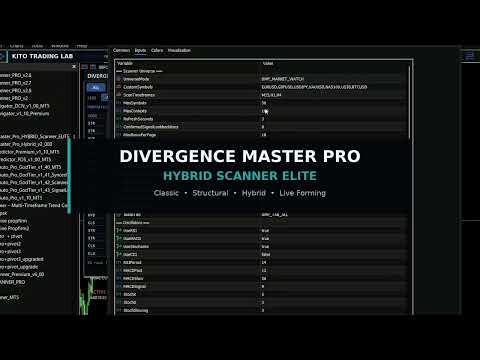
Kito Hybrid Divergence Scanner continuously searches multiple markets and timeframes for Regular and Hidden bullish/bearish divergence, then ranks and organizes the strongest opportunities on one dashboard.
THREE DETECTION ENGINES
CLASSIC
Traditional divergence using RSI, MACD, Stochastic and optional CCI.
STRUCTURAL
Combines divergence with price behaviour including structure, liquidity interaction, reclaim, displacement, volume and location.
HYBRID
Requires Structural and Classic analysis to support the same directional thesis for stronger confluence.
SEE EXACTLY WHAT THE SCANNER SAW
This is where Kito Hybrid Divergence Scanner is different.
Click any signal and the scanner opens the correct symbol and timeframe on a separate chart.
It then reconstructs the actual divergence:
PRICE A → PRICE B
against
OSC A → OSC B
The price pivots and oscillator pivots used by the algorithm are drawn directly on the chart.
For example:
Bearish Regular: PRICE HH | OSC LH
Bullish Regular: PRICE LL | OSC HL
You don't have to blindly trust a dashboard signal.
You can inspect the evidence yourself.
SMART OSCILLATOR CONFIRMATION
The chart does not simply display a random oscillator.
It identifies the oscillator that actually supported the detected divergence and can automatically evaluate Stochastic, MACD, RSI or CCI to find valid confirmation.
DASHBOARD
Monitor:
-
Multiple Market Watch symbols
-
Multiple timeframes
-
Regular + Hidden divergence
-
Bullish + Bearish signals
-
Classic / Structural / Hybrid setups
-
LIVE / PIVOT / ARMED / CONF states
-
A / A+ quality setups
-
Signal age
-
Forming setups
Default scanning timeframes:
M15 • H1 • H4
Symbols and timeframes can be customized.
ALERTS
Receive alerts for newly detected setups, including:
-
Confirmed signals
-
ARMED + Confirmed
-
Broader developing setups
-
MT5 push notifications
ONE-CLICK WORKFLOW
Scan → Find → Open → Verify → Decide
Attach the scanner to one chart and let it monitor your selected markets.
When something interests you, click it.
The scanner opens the chart and shows you why the signal exists.
KEY FEATURES
-
Multi-symbol / multi-timeframe scanner
-
Regular & Hidden divergence
-
RSI, MACD, Stochastic & CCI
-
Classic divergence engine
-
Structural confirmation engine
-
Hybrid confluence engine
-
Closed-bar confirmed signals
-
Early forming-setup detection
-
Quality scoring
-
Bull/Bear filtering
-
One-click chart drilldown
-
Exact price-pivot visualization
-
Exact oscillator-pivot visualization
-
Intelligent oscillator selection
-
Popup & push alerts
-
Standalone MT5 scanning engine
-
No separate companion indicator required
Kito Hybrid Divergence Scanner
Scan the market. Find the setup. See the evidence. Then decide.









































This divergence scanner is very well made and good. Fast scanning, multiple options to filter and the best utility of this is to choose both structural and divergence confirmation.