Pure HFT
- Experts
- Versione: 1.1
- Attivazioni: 5

PURE HFT – Automated Basket and Grid Trading Expert Advisor
OVERVIEW
Pure HFT is an automated Expert Advisor designed for systematic entry, basket management, grid recovery, and controlled profit closing.
The EA automatically detects whether the trading account uses Hedging or Netting mode and adjusts its trading process to suit the account environment.
Pure HFT does not require DLL access, external licensing, or WebRequest connections.
KEY FEATURES
• Automatic detection of Hedging and Netting account modes
• Automated Buy and Sell trade management
• OCO Buy Stop and Sell Stop entries in Hedging mode
• Grid and basket recovery management
• Multiple lot calculation modes
• Volume-weighted basket Take Profit
• Optional total-profit closing in account currency
• Spread and price-deviation protection
• Margin availability check before placing orders
• Maximum basket-loss protection
• Weekend and market-session protection
• Automatic handling of pending orders
• Built-in trading dashboard
• Support for symbols with different decimal digits
HOW PURE HFT WORKS
Hedging Account Mode
On a Hedging account, Pure HFT uses the complete trading system:
• Places Buy Stop and Sell Stop pending orders
• Uses an OCO process where the opposite entry is managed after execution
• Adds recovery positions according to the selected lot mode
• Calculates the basket Take Profit from the average entry price and total volume
• Manages opposite pending orders when extending-pending mode is enabled
• Closes the basket when its profit target is reached
Netting Account Mode
On a Netting account, Pure HFT automatically switches to a more conservative execution process:
• Maintains only one net market position per symbol
• Does not use simultaneous Buy and Sell positions
• Does not use the full stacking process
• Uses the latest market movement to select the trading direction
• Manages the position using its Take Profit
• Applies additional equity and margin protection
The full basket and recovery system is best suited to Hedging accounts. Netting mode is provided for account compatibility and controlled execution.
LOT CALCULATION MODES
Fix
Every recovery level uses the base lot size.
LotStep
The lot size increases by the value specified in InpLotStep.
SumLot
The next lot size is calculated from the previous position volumes. This produces a progressive lot sequence and may increase exposure quickly.
INPUT PARAMETERS
InpUseKeepPending
Keeps the recovery pending-order process active while a Hedging basket is running.
InpLotMode
Selects the lot calculation method:
• Fix – Uses the same base lot
• LotStep – Increases the lot by a fixed step
• SumLot – Calculates the next lot from previous position volumes
InpBaseLot
Sets the initial trading volume for a new cycle.
InpLotStep
Sets the lot increment used by LotStep mode and the initial progression of SumLot mode.
InpGridDistancePoints
Sets the minimum distance, measured in points, between recovery levels.
A larger value reduces trade frequency and increases the distance between positions. A smaller value creates positions more frequently and increases exposure faster.
InpMaxStackLevels
Sets the maximum number of recovery levels allowed in one basket.
A high value can significantly increase margin usage and risk.
InpBasketTakeProfitPoints
Sets the basket profit distance in points. The EA calculates the target from the volume-weighted average entry price.
InpMaxBasketLossMoney
Sets the maximum permitted floating loss for a basket in account currency.
When the basket loss reaches this value, the EA closes the managed basket. Set the value to zero or below to disable this protection.
EnableExtendingPending
Enables the additional opposite pending-order process used during basket recovery.
LevelFactor
Controls the recovery-level condition used by the extending-pending process. A value greater than 1 permits this stage of the recovery logic.
KeepMaxProfit
When enabled, the EA can preserve the strongest profitable position while managing the remaining basket.
CloseByTotalProfit
Enables basket closing based on the combined floating profit of all managed positions.
TargetClose
Sets the total-profit target in account currency when CloseByTotalProfit is enabled.
InpMaxSpreadPoints
Defines the maximum spread allowed for opening new trades.
The EA will wait when the current spread is higher than this value.
InpMaxDeviationPoints
Sets the maximum permitted price deviation when sending market trade requests.
DASHBOARD INFORMATION
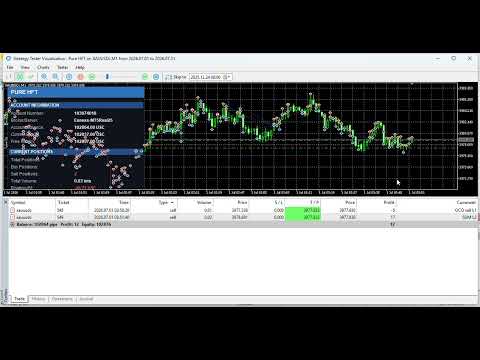
The built-in dashboard displays important trading information, including:
• Account balance and equity
• Current margin information
• Total positions
• Buy and Sell positions
• Buy and Sell volume
• Total trading volume
• Floating profit or loss
• Current profit target
• Daily trading performance
RECOMMENDED USE
• Test the EA in the Strategy Tester before using it on a live account
• Start with the minimum lot size
• Adjust grid distance according to the symbol’s volatility and decimal digits
• Use a suitable maximum spread for the selected symbol
• Select a maximum number of recovery levels appropriate for the account capital
• Use a stable VPS for continuous operation
• Avoid changing critical parameters while a basket is active
• Run one EA instance per symbol unless different Magic Number management is specifically configured
IMPORTANT RISK INFORMATION
Pure HFT uses grid, basket, and progressive lot-management techniques. These methods can create prolonged floating drawdown and increased margin usage during strong or one-directional market movements.
Increasing the lot size, reducing the grid distance, or allowing a large number of recovery levels will increase trading risk.
No Expert Advisor can guarantee profit or eliminate the possibility of loss. Always test the selected parameters on a demo account and use settings appropriate for your capital, leverage, broker conditions, and risk tolerance.