Arcane Ict Multi Confluency Trade Engine
- Indicatori
-
Gabriel Alejandro Sanchez Lledo
 Programador +20 años de experiencia- Trader profesional - Developer
 - Versione: 2.0
- Attivazioni: 5
The most sophisticated Smart Money Concepts indicator on the MQL5 marketplace.
Built for traders who demand institutional-grade precision — not just signals, but the exact price level where banks place their orders.
⚡ WHAT MAKES ARCANE DIFFERENT
Most indicators tell you when to trade. ARCANE tells you where to place your order — down to the exact price, calculated from the same confluency framework used by institutional desks worldwide.
ARCANE Professional is a complete trade management system built on ICT (Inner Circle Trader) methodology — the same Smart Money Concepts taught by Michael Huddleston and used across hedge funds and proprietary trading firms. It doesn't chase price. It identifies where institutional orders are waiting and marks that level on your chart for you.
Every signal must pass a 14-point weighted scoring engine before appearing on your screen. Only setups scoring ≥ 8/14 are displayed — guaranteeing a minimum calculated probability of 80% on every signal. If it doesn't qualify, you won't see it. That's institutional-grade filtering.
🏦 CORE METHODOLOGY — ICT / SMART MONEY CONCEPTS
ARCANE is built on five pillars of institutional trading:
1. Order Block Detection (OB)
Automatically identifies the last significant candle before a major swing move — the exact zone where institutional buy/sell orders were placed. These are the most powerful support and resistance levels on any chart. ARCANE scans the most recent OB in your lookback window and marks it as the optimal entry zone.
2. Fair Value Gap Detection (FVG)
Detects 3-candle price gaps that represent imbalance zones where institutions need to return to fill unfilled orders. FVGs act as high-magnetic price targets and confirm the Draw on Liquidity.
3. Market Structure Analysis
Tracks swing highs and swing lows to determine Higher Highs/Higher Lows (bullish structure) or Lower Highs/Lower Lows (bearish structure). Structural alignment adds confluency to every signal.
4. Liquidity Mapping
Identifies Buy-Side and Sell-Side Liquidity pools — the pools of stop-loss orders that institutions specifically target. ARCANE marks the Draw on Liquidity direction so you always know where price is being drawn.
5. Optimal Trade Entry (OTE)
Instead of entering at market price, ARCANE calculates the ideal limit order price at the nearest institutional level:
- Order Block zone (highest priority)
- MA20 level (dynamic support/resistance)
- MA200 level (institutional trend anchor)
- Market price (fallback when no closer level exists)
A dedicated arrow is drawn at the optimal entry price — exactly where to place your limit order.
📊 WEIGHTED SCORING ENGINE — 14-POINT SYSTEM
Every bar is evaluated across 14 weighted conditions. Signals only display when the score meets your minimum threshold:
| Condition | Weight | Description |
|---|---|---|
| Price vs MA200 | +2 pts | Most important trend alignment |
| MA200 Direction | +2 pts | Institutional trend direction |
| Price vs MA20 | +1 pt | Short-term alignment |
| MA20 Direction | +1 pt | Short-term momentum |
| MA20 vs MA200 | +1 pt | Golden/Death cross alignment |
| RSI Filter | +1 pt | Not overbought/oversold against direction |
| Stochastic Crossover | +1 pt | K/D cross confirmation |
| Volume Confirmation | +1 pt | Above-average institutional activity |
| Candle Momentum | +1 pt | 3-bar directional consistency |
| Fair Value Gap | +1 pt | FVG in signal direction |
| Order Block Bonus | +1 pt | Active OB detected for direction |
| Session Bonus | +1 pt | London or New York session (peak liquidity) |
Probability Formula: 48% + score × 4% → capped at 96%
Default minimum (InpMinScore=8): every displayed signal carries ≥ 80% calculated probability
Grade system:
- 🔴 WEAK — score at minimum threshold
- 🟡 MODERATE — score 8–9/14
- 🟢 STRONG — score 10–11/14
- 👑 ELITE — score 12–14/14 → highest-conviction institutional setups
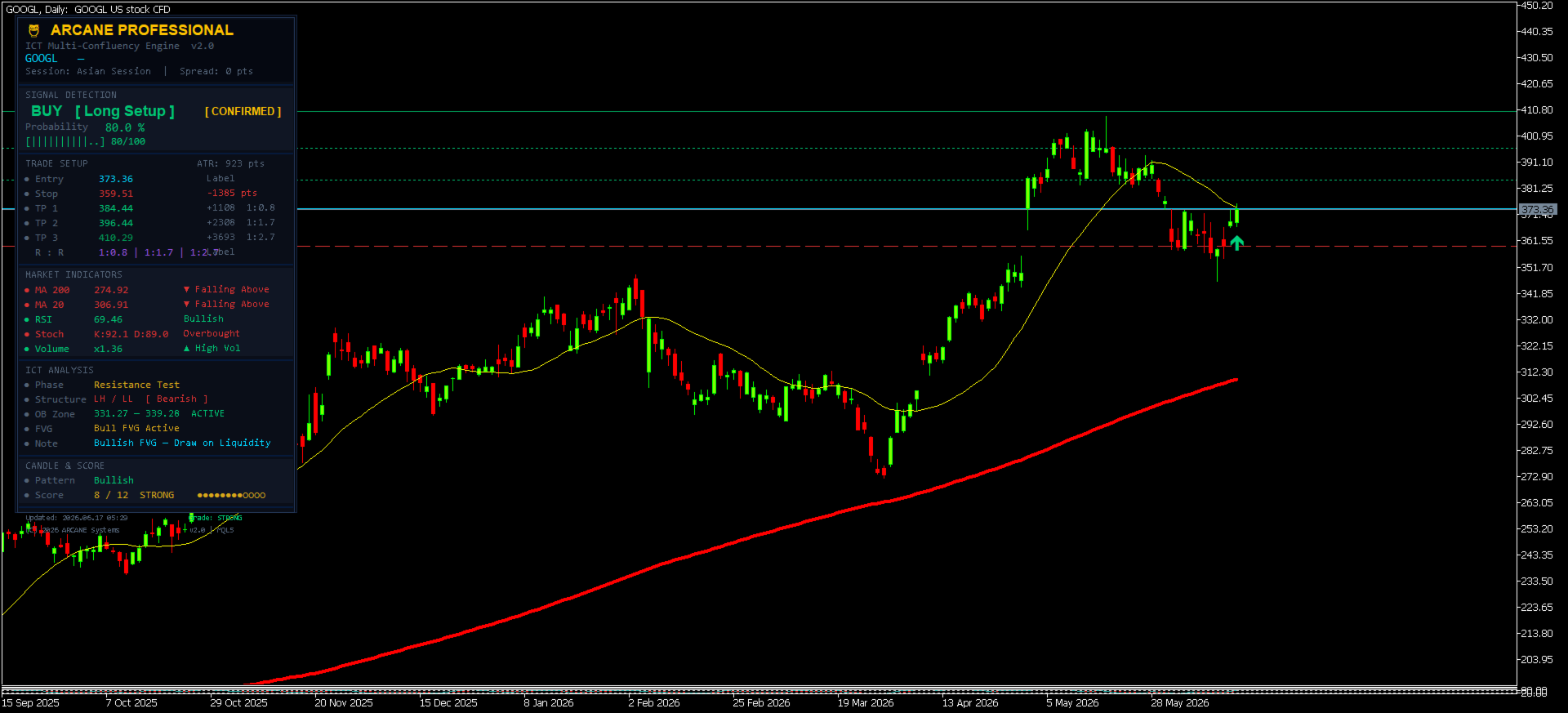
When a signal reaches ELITE grade, the [ CONFIRMED ] gold badge appears on the dashboard — your clearest signal that multiple institutional factors have aligned.
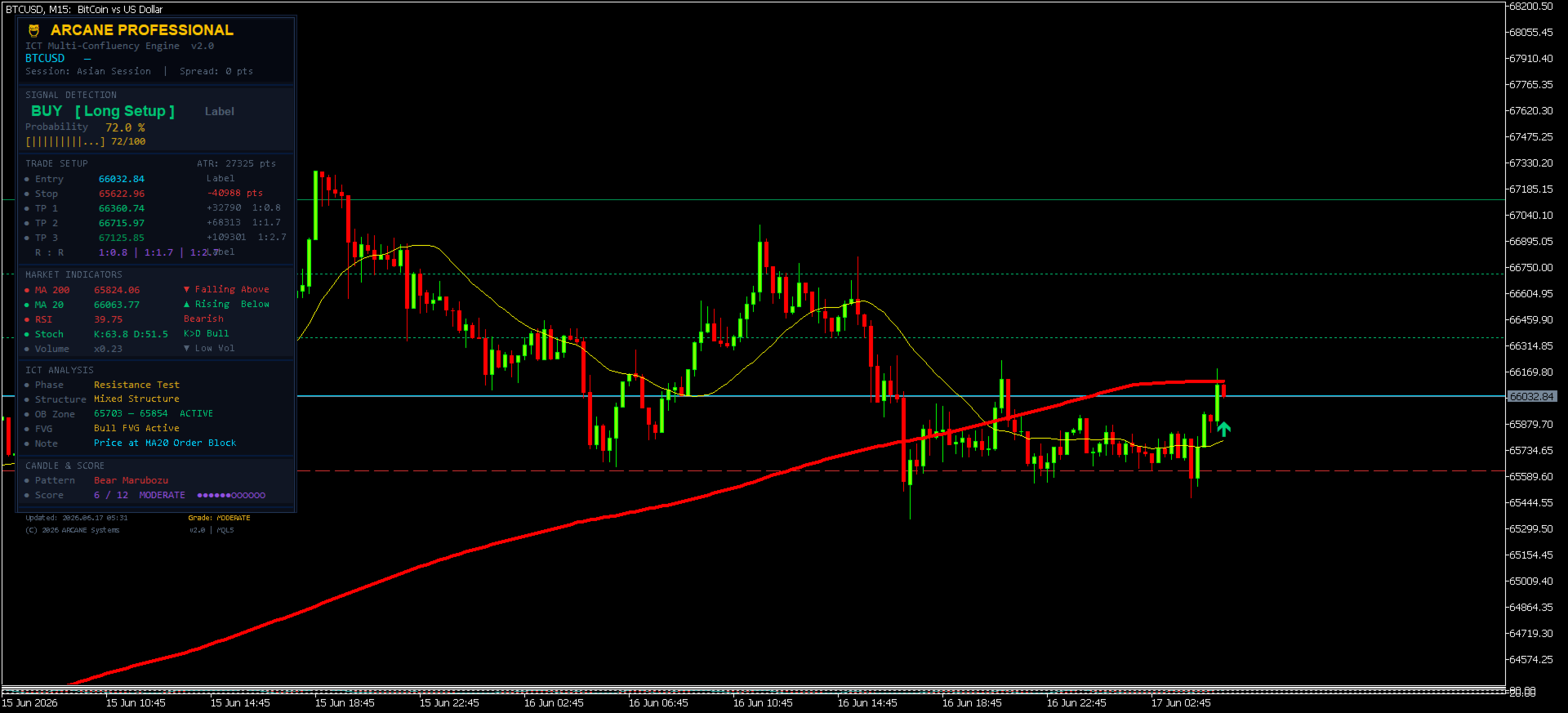
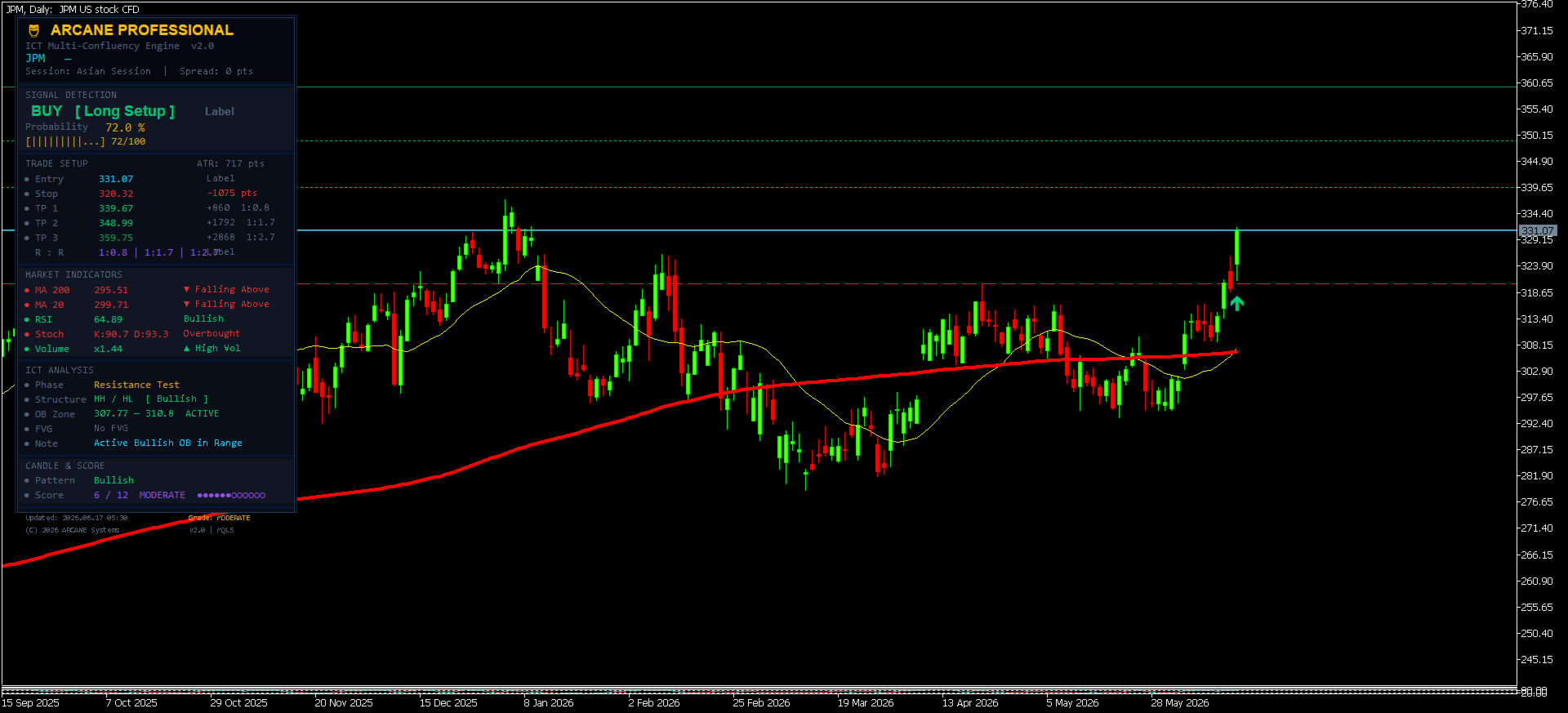
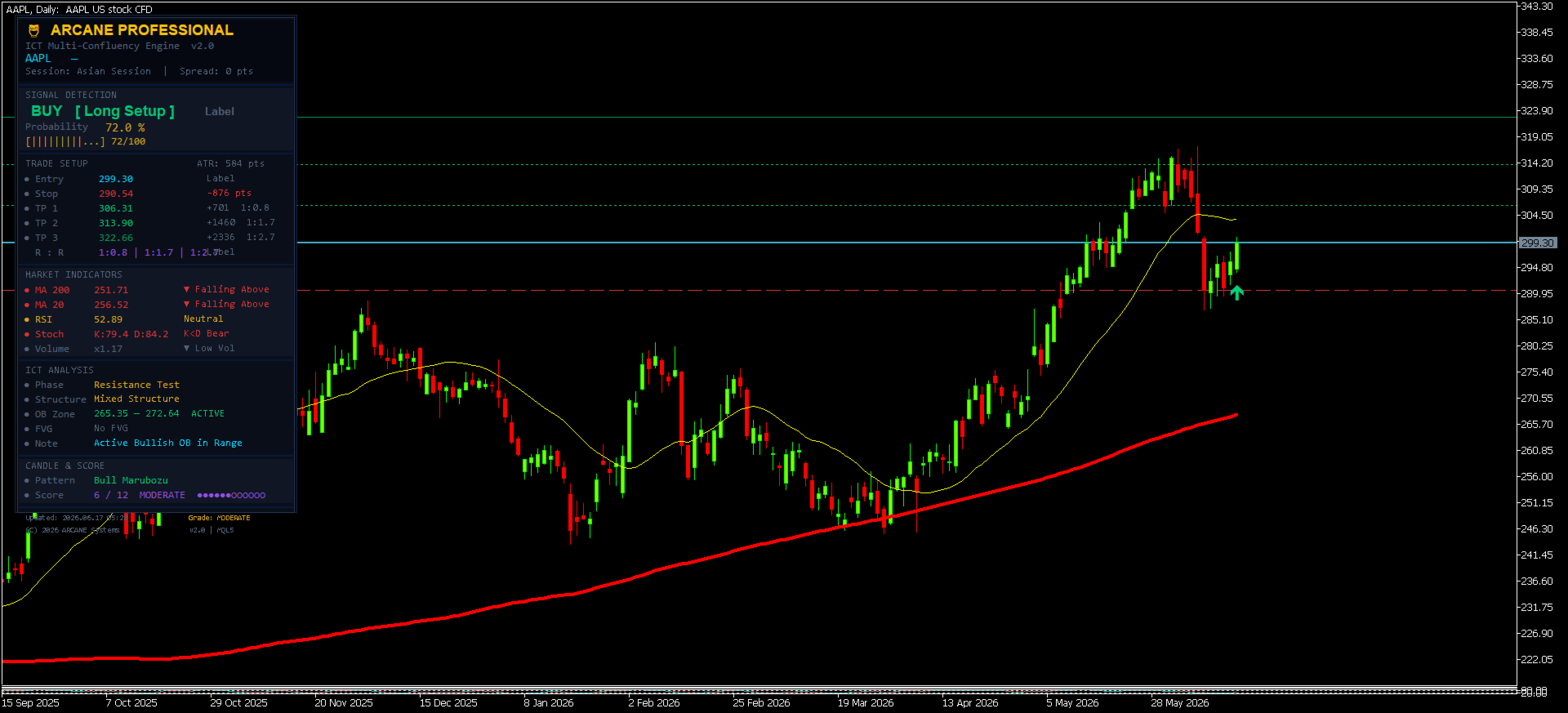
📋 PROFESSIONAL DARK DASHBOARD
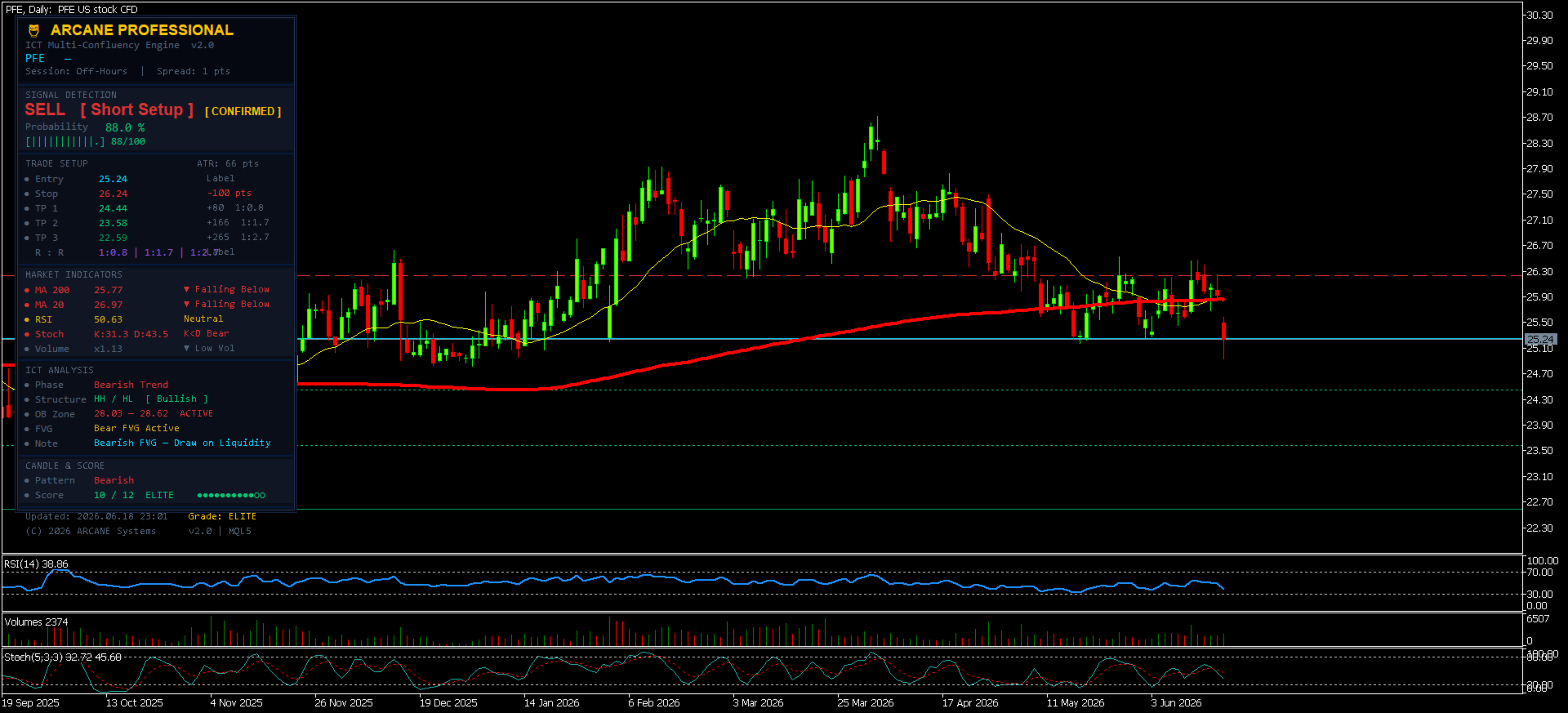
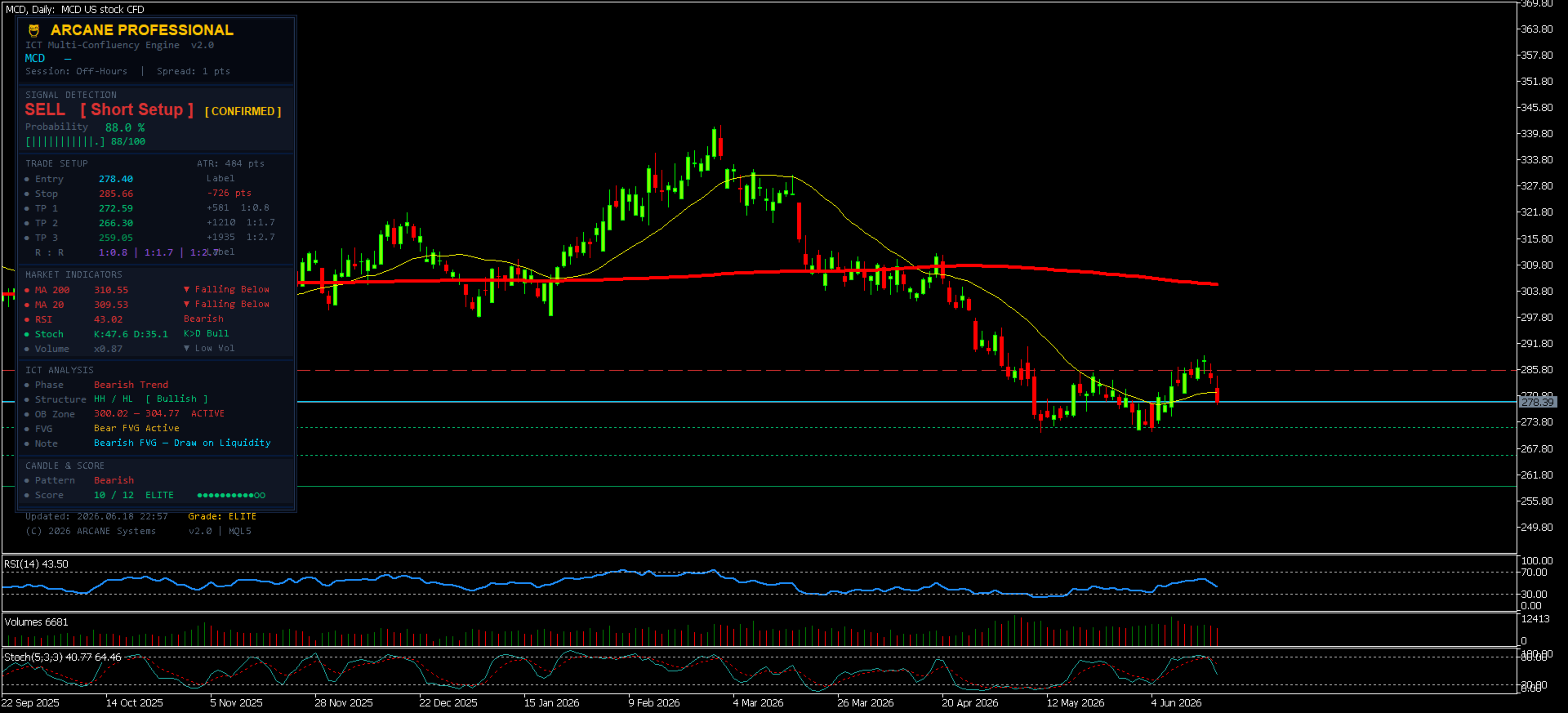
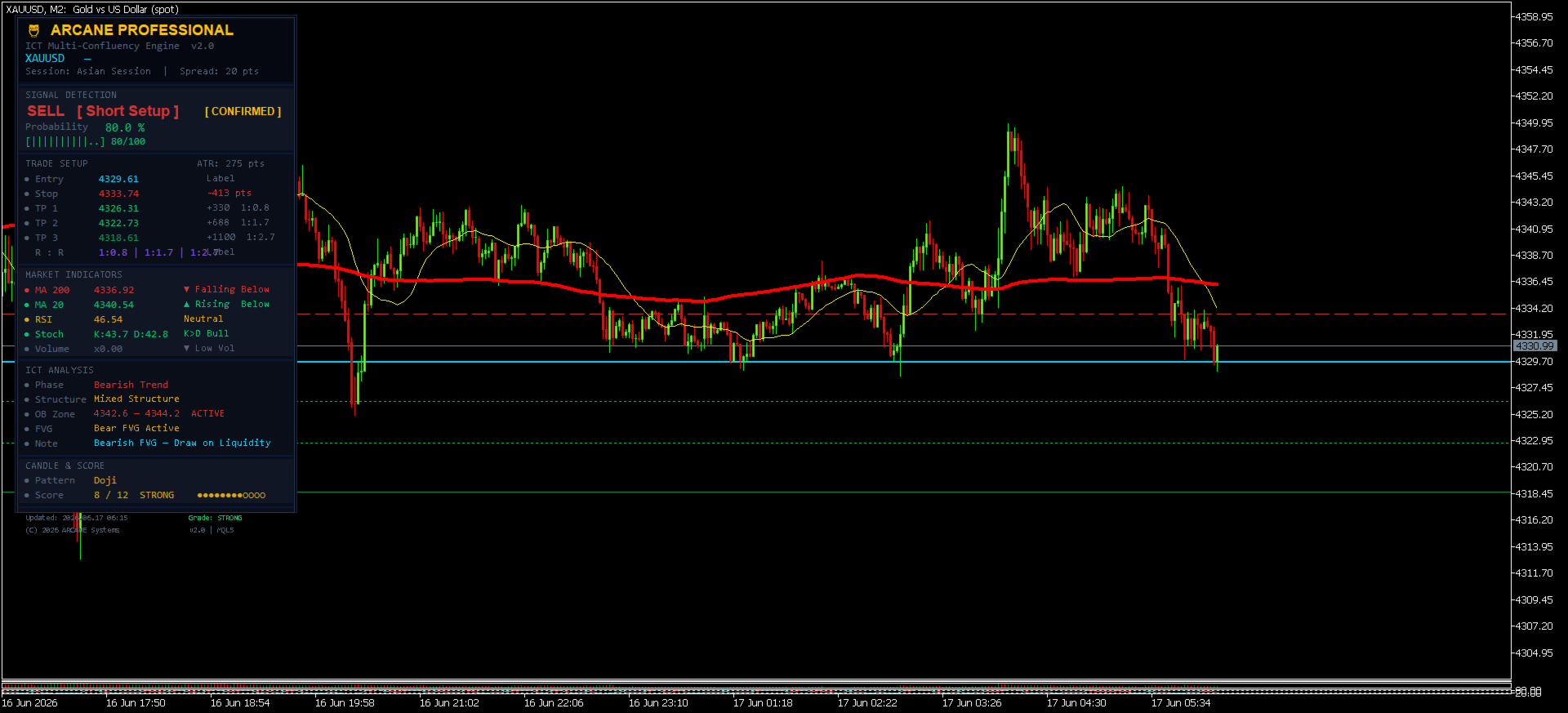
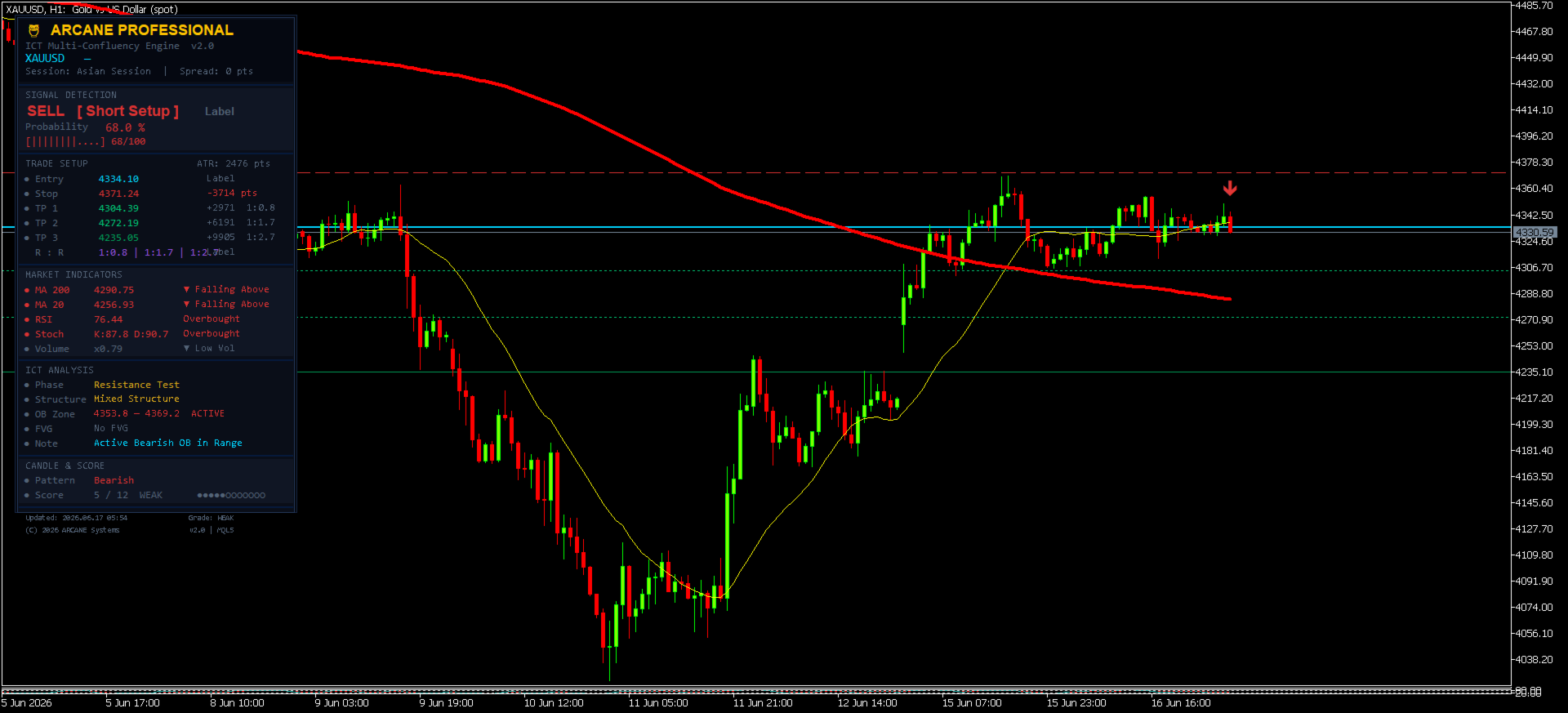
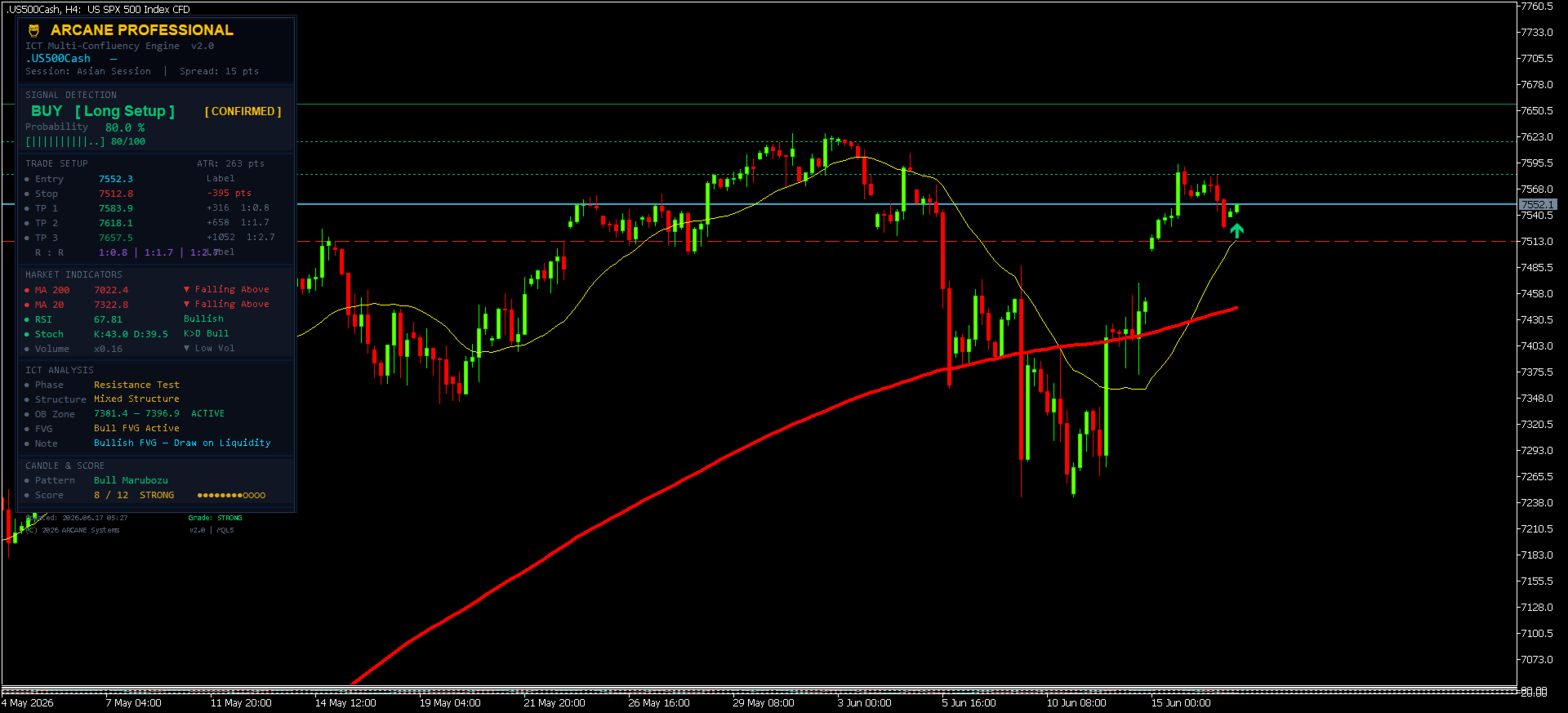
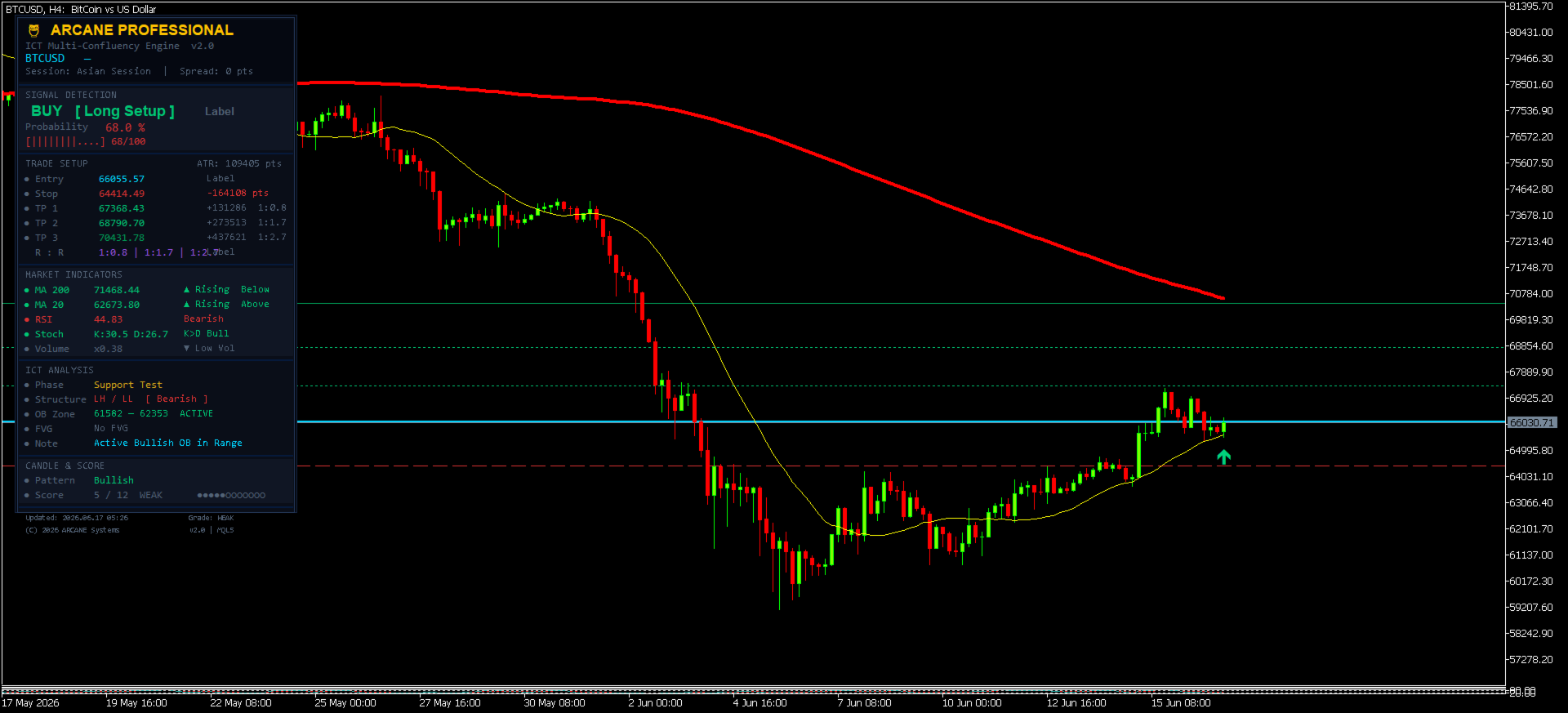
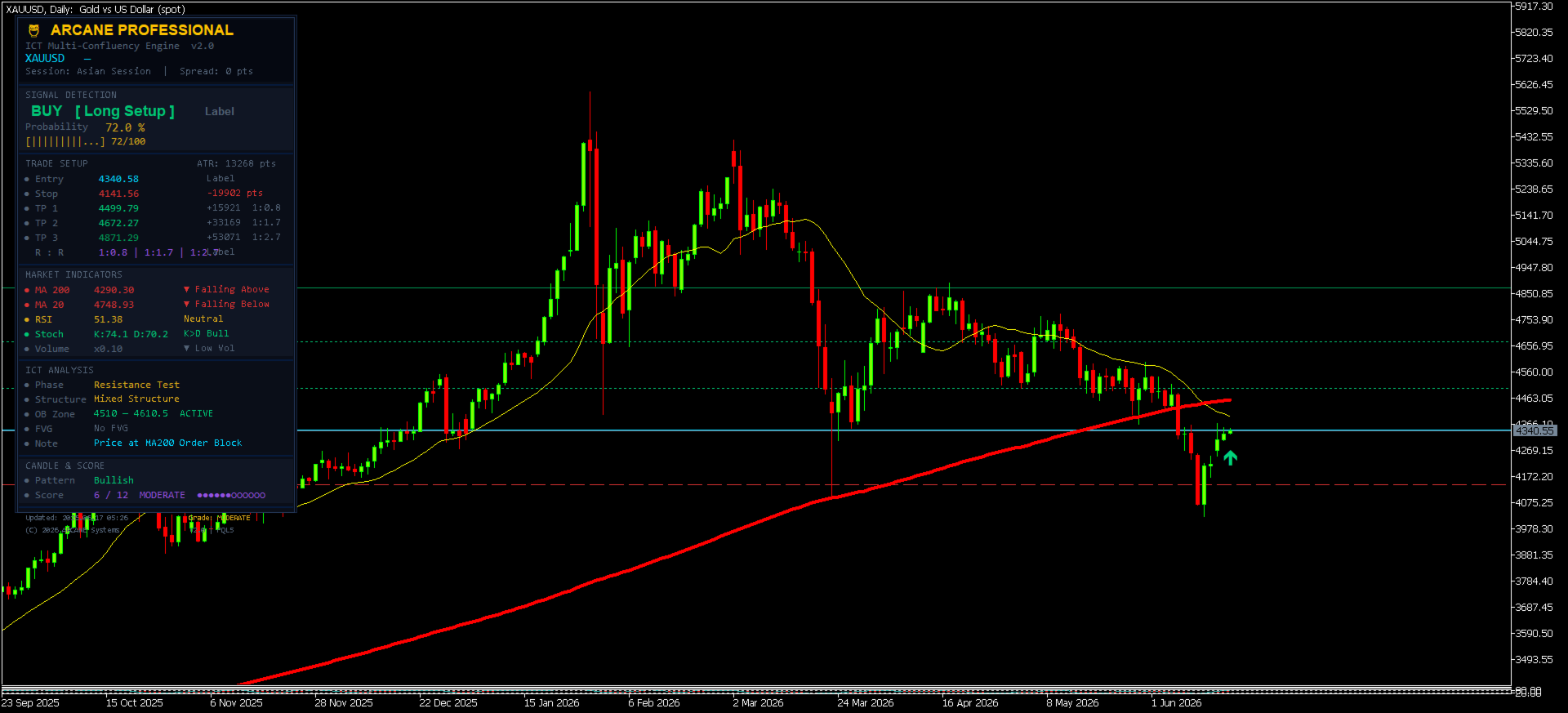
A fully self-contained dark-theme panel displays everything a professional trader needs — organized into six sections:
🔲 SECTION 1 — Header
- Symbol and timeframe
- Active trading session (Asian / London Pre-Open / London / London-NY Overlap / NY Afternoon)
- Live spread in points
🔲 SECTION 2 — Signal Detection
- Direction: BUY [ Long Setup ] or SELL [ Short Setup ]
- [ CONFIRMED ] gold badge on elite setups
- Live probability percentage updated every tick
- Visual probability bar [||||||||....] 84/100
🔲 SECTION 3 — Trade Setup
- Optimal Entry Price — exact limit order level (not just current price)
- Stop Loss with distance in points
- TP1, TP2, TP3 — three progressive take-profit levels with distance and R:R ratio
- R:R summary — all three reward-to-risk ratios at a glance
- Live ATR in points (updates every tick)
🔲 SECTION 4 — Market Indicators
- MA200: value, direction (▲/▼), price position (Above/Below)
- MA20: value, direction (▲/▼), price position (Above/Below)
- RSI — LIVE (updates every tick, matches chart subwindow exactly)
- Stochastic K/D — LIVE (updates every tick, matches chart subwindow exactly)
- Volume ratio vs 20-bar average
🔲 SECTION 5 — ICT Analysis
- Market Phase (Bullish Trend / Bearish Trend / Pullback / Support Test / Resistance Test / Ranging)
- Market Structure (HH/HL Bullish / LH/LL Bearish / Mixed)
- Active Order Block zone with price range
- Fair Value Gap status
- ICT Setup Note (OB entry, FVG liquidity draw, MA confluence)
🔲 SECTION 6 — Candle & Score
- Current candle pattern (Hammer / Shooting Star / Doji / Bull Marubozu / Bear Marubozu / Bullish / Bearish)
- Score: X / 14 with grade label
- Visual score dots ●●●●●●●●○○○○○○ — 14 dots, filled for each point earned
🎯 CHART FEATURES
Zero-Repaint Signal Arrow
- Arrow appears at the optimal entry price level — exactly where to place your limit order
- Drawn using open[0] at bar open → position is permanently locked — zero repaint
- Only ONE arrow ever visible on the chart at any time (full buffer history cleared on each new signal)
- When direction changes, old arrow disappears, new arrow appears at the new optimal entry
Horizontal Level Lines
- Entry line — cyan solid (thicker) — your limit order level
- Stop Loss line — red dashed
- TP1 line — green dotted
- TP2 line — green dotted
- TP3 line — dark green solid
All lines update when a new signal fires and disappear automatically when there is no active setup.
⚙️ FULL INPUT PARAMETER GUIDE
Moving Averages
| Parameter | Default | Description |
|---|---|---|
| InpMA200 | 200 | MA200 period — institutional trend anchor |
| InpMA20 | 20 | MA20 period — short-term directional bias |
| InpMAMethod | EMA | Moving average calculation method |
| InpMAPrice | Close | Applied price for MA calculation |
RSI Settings
| Parameter | Default | Description |
|---|---|---|
| InpRSIPeriod | 14 | RSI lookback period |
| InpRSIOB | 70 | RSI overbought threshold |
| InpRSIOS | 30 | RSI oversold threshold |
Stochastic Settings
| Parameter | Default | Description |
|---|---|---|
| InpStochK | 5 | %K period |
| InpStochD | 3 | %D smoothing |
| InpStochSlow | 3 | Slowing period |
| InpStochOB | 80 | Stochastic overbought |
| InpStochOS | 20 | Stochastic oversold |
Risk Management
| Parameter | Default | Description |
|---|---|---|
| InpATRPeriod | 14 | ATR period for dynamic levels |
| InpSLMult | 1.5 | Stop Loss = Entry ± (ATR × 1.5) |
| InpTP1Mult | 1.2 | TP1 = Entry ± (ATR × 1.2) → R:R ~0.8 |
| InpTP2Mult | 2.5 | TP2 = Entry ± (ATR × 2.5) → R:R ~1.7 |
| InpTP3Mult | 4.0 | TP3 = Entry ± (ATR × 4.0) → R:R ~2.7 |
| InpMinScore | 8 | Minimum score to display signal (default = 80% min probability) |
Pro tip on InpMinScore:
- Set to 8 → shows signals with ≥ 80% probability (default, recommended)
- Set to 10 → shows only STRONG and ELITE setups (≥ 88% probability)
- Set to 12 → shows only the highest-conviction ELITE setups (≥ 96% probability)
- Set to 6 → wider filter, more signals, ≥ 72% probability (less selective)
ICT Settings
| Parameter | Default | Description |
|---|---|---|
| InpOBLookback | 40 | Bars to scan for Order Block detection |
| InpSwingLookback | 30 | Bars to scan for Market Structure swings |
Dashboard
| Parameter | Default | Description |
|---|---|---|
| InpDashX | 18 | Dashboard X position in pixels |
| InpDashY | 18 | Dashboard Y position in pixels |
| InpCorner | UPPER_LEFT | Dashboard anchor corner |
| InpShowLevels | true | Show Entry/SL/TP horizontal lines on chart |
| InpShowArrows | true | Show signal arrows at optimal entry price |
Alerts
| Parameter | Default | Description |
|---|---|---|
| InpAlertPopup | false | MetaTrader popup alert on new signal |
| InpAlertPush | false | Mobile push notification on new signal |
| InpAlertCooldown | 60 | Minimum seconds between alerts |
📱 HOW TO USE — STEP BY STEP
Step 1: Installation
- Open MetaTrader 5
- Navigate to File → Open Data Folder → MQL5 → Indicators
- Copy ARCANE_Professional.mq5 into that folder
- In MetaEditor, press F7 to compile
- Drag the indicator from the Navigator onto your chart
Step 2: Configuration
- Keep default settings to start — InpMinScore = 8 ensures only 80%+ probability signals
- For scalping (M1-M5): consider reducing InpOBLookback to 20
- For swing trading (H4-Daily): increase InpOBLookback to 60-80
- Enable InpAlertPopup = true to receive trade alerts when away from screen
- Enable InpAlertPush = true to receive mobile notifications on your phone
Step 3: Reading a Signal
When a BUY signal appears:
- Dashboard shows BUY [ Long Setup ] in green
- Check the Probability — should be ≥ 80% (default filter)
- Check the [ CONFIRMED ] badge — present on MODERATE/STRONG/ELITE grades
- The arrow on the chart marks the EXACT price for your limit BUY order
- The Entry line (cyan) shows the limit order level
- Set your Stop Loss at the red dashed line on the chart
- Set your three take-profits at TP1 (green dotted), TP2 (green dotted), TP3 (dark green)
Professional execution approach:
- Place a limit order at the Entry price shown (not a market order)
- Use 30% position size at TP1 (R:R ~0.8 — quick partial profit)
- Use 40% position size at TP2 (R:R ~1.7 — main target)
- Use 30% position size at TP3 (R:R ~2.7 — extended institutional target)
- Move Stop Loss to breakeven once TP1 is hit
Step 4: Evaluating Signal Quality
Highest quality setups combine:
- ✅ ELITE or STRONG grade ( ●●●●●●●●●●○○○○ or higher)
- ✅ London Session or London/NY Overlap (peak institutional liquidity)
- ✅ Active Order Block zone shown in ICT Analysis section
- ✅ FVG in signal direction
- ✅ Market Structure aligned (HH/HL for BUY, LH/LL for SELL)
- ✅ Bullish Marubozu or Hammer (BUY) / Bearish Marubozu or Shooting Star (SELL)
Use extra caution when:
- Session shows "Off-Hours" or "Asian Session" (lower institutional volume)
- Market Structure shows "Mixed Structure"
- RSI is approaching OB/OS (risk of mean reversion)
- Score is at minimum threshold (WEAK grade)
🔧 TECHNICAL SPECIFICATIONS
| Specification | Detail |
|---|---|
| Platform | MetaTrader 5 |
| Indicator type | Chart indicator (no subwindow) |
| Buffers | 2 (Buy arrow, Sell arrow) |
| Chart window | Main price chart |
| Repaint | ❌ Zero repaint — arrows locked at bar open |
| Arrows on chart | Maximum 1 at any time |
| Strategy Tester | ✅ Fully compatible |
| Works on | Any symbol (Forex, Gold, Bitcoin, Indices, Stocks) |
| Works on | All timeframes M1 through Monthly |
| Dashboard | Dark professional panel, 340px wide |
| RSI/Stoch update | ✅ Every tick (live values matching chart subwindow) |
| CPU load | Minimal — heavy calculation runs once per bar only |
🌍 COMPATIBLE MARKETS
ARCANE Professional works on any symbol available in your MetaTrader 5 broker:
- Forex: EURUSD, GBPUSD, USDJPY, XAUUSD (Gold), XAGUSD (Silver), and all pairs
- Crypto: BTCUSD, ETHUSD, BNBUSD, and all crypto CFDs
- Indices: US30 (Dow Jones), US500 (S&P 500), NAS100 (Nasdaq), JP225, DE40, UK100
- Commodities: Oil (WTI/Brent), Natural Gas, Copper, Agricultural commodities
- Stocks: Individual stock CFDs available on your broker
💡 BEST PRACTICES FOR MAXIMUM PERFORMANCE
Timeframe recommendations by trading style:
| Style | Recommended TF | InpMinScore | Notes |
|---|---|---|---|
| Scalping | M1, M2, M5 | 7-8 | Quick setups, tight SL, reduce OB lookback |
| Day Trading | M15, M30, H1 | 8 | Best balance of frequency vs quality |
| Swing Trading | H4, Daily | 9-10 | Wait for STRONG/ELITE only |
| Position | Daily, Weekly | 10-11 | Highest conviction, widest ATR levels |
Multi-timeframe confirmation workflow:
- Check H4 or Daily for overall trend and OB zones
- Drop to H1 or M15 to find the optimal entry signal from ARCANE
- Execute on M5 or M15 using the exact limit price shown
Session timing for highest probability:
- London Open (08:00-12:00 UTC): Highest institutional volume — prioritize ARCANE signals
- London/NY Overlap (13:00-17:00 UTC): Maximum liquidity — best signals of the day
- NY Afternoon (17:00-20:00 UTC): Good volume, watch for reversals
- Asian Session / Off-Hours: Reduce position size or wait for London open
❓ FREQUENTLY ASKED QUESTIONS
Q: Why does the entry price sometimes differ from the current market price?
A: This is intentional and one of ARCANE's most powerful features. The indicator uses ICT Optimal Trade Entry logic to identify the best limit order price at a key institutional level (Order Block, MA20, or MA200). This is superior to entering at market price — you wait for price to come to you at a level where institutions are also active.
Q: Why does the arrow show below/above the current candle instead of at the wick?
A: The arrow is placed at the optimal entry price, not at current market price. If ARCANE identifies MA20 as the best entry and MA20 is below current price, the arrow correctly shows below — indicating "place your limit BUY order here."
Q: Can I use this indicator with an Expert Advisor?
A: Yes. The indicator outputs standard DRAW_ARROW buffers. You can read Buffer 0 (BUY signal, value = optimal entry price) and Buffer 1 (SELL signal) from any EA using iCustom() .
Q: Does ARCANE repaint?
A: No. Arrows are set using open[0] at the moment the bar opens. This price is fixed permanently and never changes. The ArrayInitialize call before each draw ensures historical arrows are also cleared, so only the most current signal is visible.
Q: Why do I sometimes see no signal for long periods?
A: This means market conditions don't meet the minimum quality threshold. ARCANE is selective by design. A filtered no-signal is better than a low-quality signal. You can lower InpMinScore to 6 or 7 to increase signal frequency while accepting lower minimum probability.
Q: Is this compatible with MetaTrader 5 Strategy Tester?
A: Yes, fully. All handles are properly initialized in OnInit() , released in OnDeinit() , and the OnCalculate() function returns correct values at all times.
⚠️ RISK DISCLAIMER
Trading financial instruments carries substantial risk of loss. ARCANE Professional is a technical analysis tool designed to assist experienced traders in identifying high-probability setups based on ICT/Smart Money Concepts methodology. It does not guarantee profits. Past performance does not guarantee future results.
Always use proper risk management:
- Never risk more than 1-2% of your capital per trade
- Always use the provided Stop Loss level
- Test thoroughly on a demo account before live trading
- ARCANE is a decision-support tool, not a fully automated trading system
🔄 VERSION HISTORY
v2.0 (Current)
- ✅ CRITICAL FIX: RSI and Stochastic now update on every tick (live values matching chart subwindow)
- ✅ CRITICAL FIX: Order Block detection now finds the MOST RECENT OB (loop direction corrected)
- ✅ CRITICAL FIX: Both OB struct fields always initialized (eliminates random/stale values)
- ✅ NEW: FindOptimalEntry() — ICT-based best limit-order price calculation
- ✅ NEW: OB bonus point (+1) and Session bonus point (+1) in scoring engine
- ✅ NEW: Maximum score increased to 14 points
- ✅ NEW: Single arrow only — full buffer history cleared before each draw
- ✅ NEW: Arrow drawn at optimal entry price, not at raw bar open
- ✅ InpMinScore default changed to 8 (guaranteed ≥ 80% probability on all signals)
- ✅ Scoring upgrade: WEAK / MODERATE / STRONG / ELITE grade system
v1.0
- Initial release with 12-point scoring, dashboard, OB/FVG detection
© 2026 ARCANE Systems. All rights reserved. ARCANE Professional is built for MetaTrader 5 and distributed exclusively through the MQL5 Marketplace.