KLine Replay
- Indicatori
- Versione: 3.88
- Aggiornato: 15 giugno 2026
- Attivazioni: 10

KLine Replay - Professional Candlestick Replay Tool | Manual Backtest & Trading Training for MT5
Native MT5 Indicator: Step-by-Step Historical Replay · Blind Trading Practice · Multi-Timeframe Synchronization
What it solves for you, in one sentence
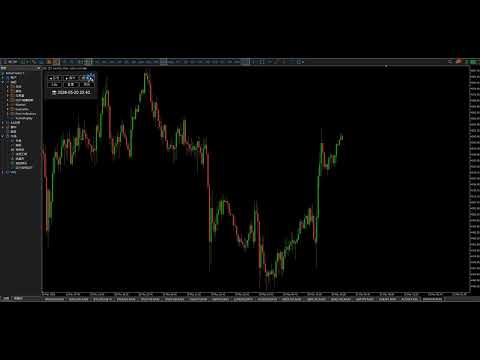
No EA required, no data export, no third-party software. Replay historical candlesticks right in your MT5 terminal like watching a video — fixing the three biggest pain points of manual backtesting: accidental future data peeking, slow manual scrolling, and messy multi-timeframe analysis.
Do any of these sound familiar?
✅ New traders: You keep scrolling ahead to see what happens next, so you never build real market intuition — hindsight bias kills your practice. ✅ Strategy testers: Flipping through candles one by one manually takes half a day to validate one system. It’s slow, tedious, and inefficient. ✅ Multi-timeframe traders: Switching back and forth between timeframes makes you miss confluence entries and divergence signals. ✅ Trading educators: You can’t control chart progress precisely during lessons, so students miss how patterns form step by step. ✅ Security-focused traders: Third-party tools with external DLLs and online connections make you worry about account safety and platform lag.
If you checked even one box, this tool will drastically upgrade your trading workflow.
What you will get
- Realistic blind practice: Step-by-step playback with zero future data leakage, recreating live market conditions 1:1. Train your decision-making and discipline, and end the "great on backtest, terrible in live" cycle.
- 3x faster backtesting: Keyboard shortcuts for single-bar navigation, one-click jump, and 6 speed levels — finish a full day of backtesting in 1 hour.
- Accurate strategy validation: Built from M1 tick data for all timeframes, with support for non-standard periods. Your backtest results are reliable and rigorous.
- Hassle-free user experience: Pure native MQL5 development, no DLLs. Install and use instantly, compatible with all MT5 builds.
Full Feature Breakdown
🎬 Precision Playback Controls — Down to Every Single Candle
- One-click Play/Pause to simulate live price movement exactly as it unfolded
- Step Forward / Step Backward for single-bar control — never miss a price swing or pattern detail
- 6 adjustable speed levels from 0.5x to 8x: slow down for pattern study, speed up through ranging markets
- One-click Reset to jump back to the starting point for repeated practice on the same price segment
🖱️ Instant Jump Navigation — No More Slow Scrolling
- Hover your cursor over any candle on the chart, press the B key, and jump instantly to that exact point in time.
- No more clicking through hundreds of bars one by one. Navigate years of historical data in seconds.
📊 Multi-Timeframe Synchronized Replay
- Link multiple timeframe charts of the same symbol for simultaneous playback: use higher timeframes for trend direction, lower timeframes for entry timing
- Switch timeframes without losing your current replay position — no future data is ever revealed
- All periods are built accurately from M1 historical data, with full support for non-standard timeframes (e.g. 12min, 20min)
🎨 Immersive Blind-Replay Visuals, Fully Customizable
- 4 preset color themes to match your trading setup
- Fully customizable bullish / bearish candle colors to fit your daily chart style
- Auto-hides default chart candles to eliminate visual clutter and create a clean, distraction-free training environment
⌨️ Fully Customizable Hotkeys
- All controls can be remapped in settings to fit your workflow:
Function Default Key Description Play/Pause Ctrl Start or pause candle advancement Forward X Advance one candle forward Backward Z Go back one candle Jump B Jump to the candle at mouse position
🎛️ Intuitive Control Panel
- Clean graphical interface with real-time display of your current replay timestamp. All core functions are accessible at a glance, no need to dig into settings.
Who this is built for
📚 New & Learning Traders
- Watch candlestick patterns form bar by bar to master price action logic
- Practice entries and exits in blind mode — build your technical analysis foundation without risking real capital
🔍 Experienced & Professional Traders
- Validate your trading strategy on historical data efficiently, and refine your complete trading system
- Review past live trades to break down winning and losing decisions, and improve your entry/exit rules
- Build trading discipline and emotional control, and overcome FOMO and impulsive trading habits
📈 Trading Educators & Mentors
- Demonstrate market evolution in live lessons with full control over teaching pace
- Walk students through the full formation of patterns, trends, and support/resistance levels
Quick 30-Second Installation
- Download the indicator file
- Open MT5, go to File → Open Data Folder
- Copy the file into the MQL5/Indicators folder
- Right-click the Navigator panel → Refresh
- Drag the indicator onto any chart to start using it
Technical Highlights
- Pure native MQL5 development, zero external DLL dependencies — safe and reliable
- All timeframes built from M1 historical data for maximum accuracy
- Lightweight and low-resource: runs smoothly without slowing down your MT5 terminal
- Compatible with all MT5 terminal builds and all brokers
- Automatic language detection: supports English and Chinese
Version Information
Current Version: v3.88
- v3.88 Update: Performance optimizations for smoother playback
Support & Feedback
If you have any questions, bug reports, or feature suggestions, please leave a comment in the review section. We read all feedback and update the tool continuously.