
AlphaForge Range Chart
- Utilità
- Versione: 1.20
- Aggiornato: 15 luglio 2026
- Attivazioni: 5

Overview
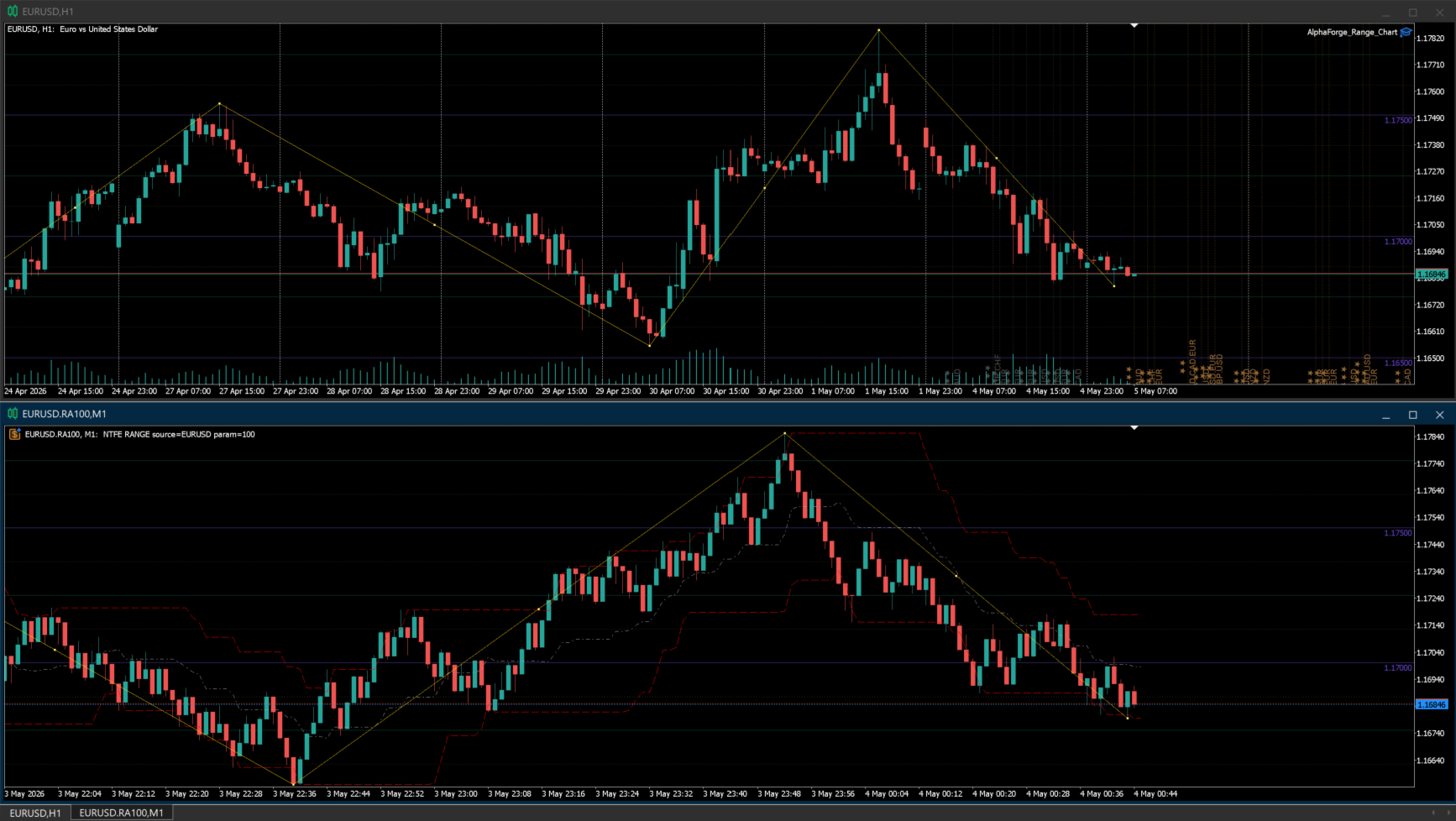
AlphaForge Range Chart is a professional non-trading range-bar charting utility for MetaTrader 5. It generates live Range charts as MT5 custom symbols, helping traders analyze price movement through fixed-range bars instead of standard time-based candles.
Unlike visual-only overlays, the generated Range chart behaves like a real MT5 custom-symbol chart. This means you can open it as a normal chart, apply templates, draw analysis objects, and add indicators directly to the Range chart for deeper market analysis.
AlphaForge Range Chart is designed for chart analysis only. It does not open, modify, or close trades.
Why use Range charts
Standard MT5 charts are built from time-based candles, where each candle represents a fixed time period. Range charts use a different approach: each completed bar represents a fixed amount of price movement.
This helps reduce time-based noise and makes price movement easier to read during both active and quiet market conditions. Range charts can help traders focus on volatility, directional movement, pullbacks, consolidations, and breakout areas without being tied to a fixed timeframe.
Main features
- Live Range chart generation for MetaTrader 5.
- Adjustable range size in points.
- Range bars built from source tick data when available.
- M1 fallback support when tick history is not available.
- Generated as an MT5 custom symbol, not just a visual overlay.
- Compatible with MT5 indicators on the generated Range chart.
- Optional Bid and Ask price lines.
- Object synchronization between the source chart and the generated Range chart.
- Supports synced horizontal lines, vertical lines, trend lines, rectangles, Fibonacci objects, and equidistant channels.
- Remembered options for faster repeated setup.
- Optional custom MT5 template application.
- Organized AlphaForge output group for generated symbols.
- Automatic cleanup of the generated chart and custom symbol when the EA is removed.
- Non-trading utility: no orders, no signals, no account operations.
How to use
- Attach AlphaForge Range Chart to a regular MT5 chart.
- If you want to change the settings, disable "Use remembered options" and adjust the inputs.
- Set the desired Range size in points.
- Enable or disable Bid and Ask lines if needed.
- Optionally enter an MT5 template name to apply a custom template to the generated Range chart.
- The tool will create and update a generated Range custom symbol/chart for analysis.
- Add your preferred MT5 indicators directly to the generated Range chart if needed.
- Draw supported objects on the source chart, and they will be synchronized with the generated Range chart.
Input overview
- Use remembered options: loads the previously saved AlphaForge settings for this chart tool when available.
- Range size in points: sets the fixed price range for each completed Range bar using symbol points.
- Show bid line: displays the live Bid price line on the generated Range chart.
- Show ask line: displays the live Ask price line on the generated Range chart.
- Output group: defines the AlphaForge output group used for generated custom symbols.
- Template name: optionally applies an MT5 chart template to the generated chart.
Important notes
- To manually change inputs such as range size, Bid/Ask lines, output group, or template name, disable "Use remembered options" first.
- To apply a custom chart template, enter the template name exactly as it exists in MT5.
- Since the Range output is generated as an MT5 custom symbol, you can apply indicators directly to the generated Range chart.
- The Range chart is based on source tick data when available. If historical tick data is not available, the tool can use M1 fallback data for historical construction.
- When the EA is removed from the source chart, AlphaForge Range Chart closes its generated chart and removes the generated custom symbol to help keep Market Watch clean.
- AlphaForge Range Chart is a charting and analysis utility only. It does not place trades, send signals, or manage orders.












































L'utente non ha lasciato alcun commento sulla valutazione.