TrendView Zero Automator
- Utilità
- Versione: 1.0
- Attivazioni: 5

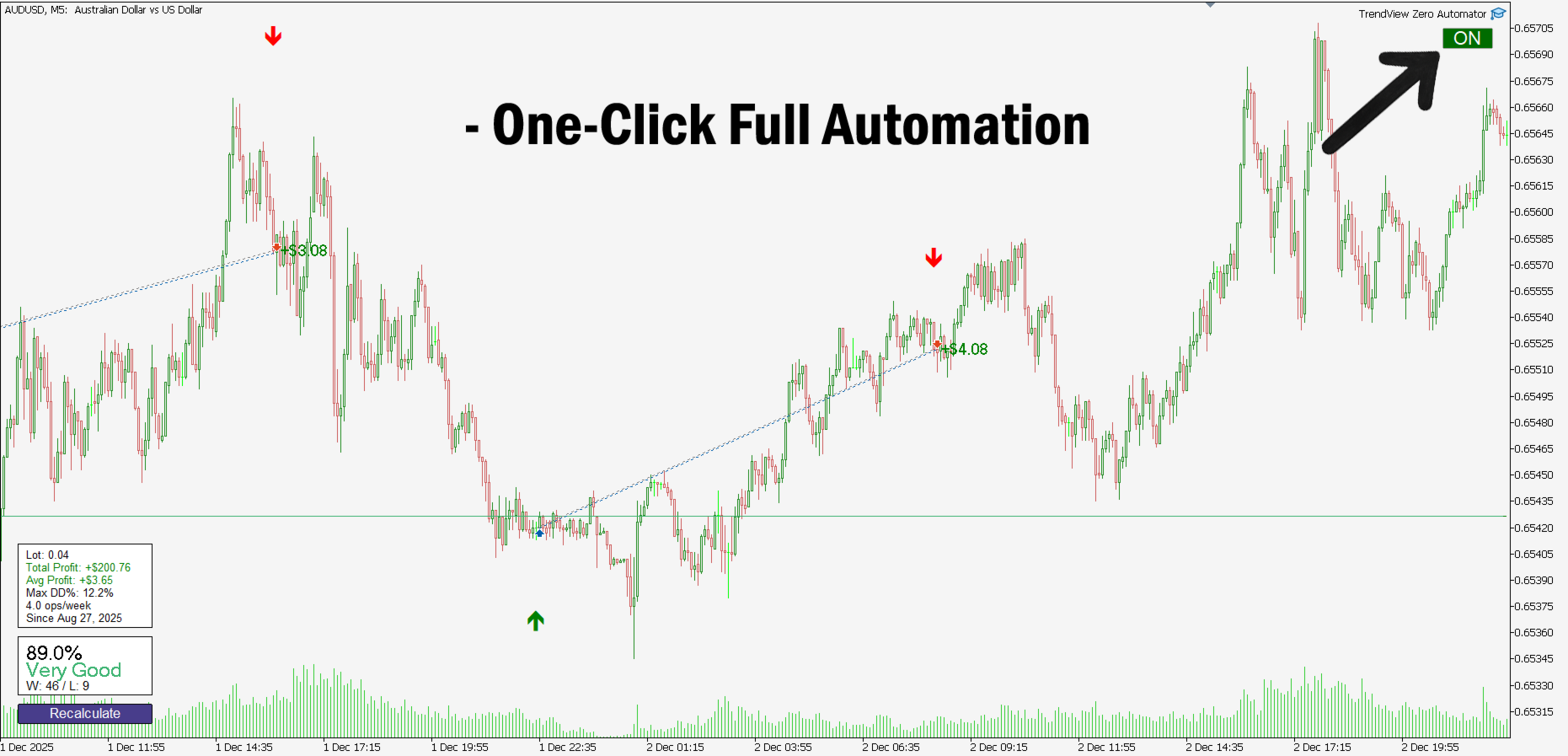
📌 TrendView Zero Automator — Full Automation with One Click
TrendView Zero Automator is the official automation module designed to work seamlessly with the TrendView Zero indicator. While the indicator analyzes the market, selects the best internal configuration, and generates trading signals, the Automator transforms those signals into fully automated trades.
It follows the same philosophy as TrendView Zero: zero complexity and maximum clarity. A single on-screen button controls the entire system, while the inputs remain minimal and intuitive.
⚙️ How It Works
The Automator monitors the buy and sell signals generated by TrendView Zero and automatically executes trades on the trader’s behalf.
Because TrendView Zero must always be attached to the same chart, the Automator will never open trades without it. If the indicator is missing or has invalid settings, the Automator remains disabled for safety.
The result is a clean, stable, and fully automated system that preserves the simplicity of the indicator while giving traders the option to let the strategy run autonomously.
🛠️ Inputs Explained
- Use automatic Recommended Lots from indicator
When enabled, the Automator uses the lot size calculated by TrendView Zero based on historical performance and account balance.
This is the default option, providing consistent position sizing.
- Manual lots (only used when automatic lots are disabled)
If the trader prefers to define the lot size manually, the automatic mode can be turned off and a custom lot size entered here.
This value is ignored when “Use automatic Recommended Lots” is set to true.
- Allow entering trades already started by indicator
If set to false (default), the Automator will wait for the next new signal created by TrendView Zero before opening a trade.
If set to true, the EA may enter trades that the indicator already started earlier, effectively joining a trade mid-way when one already exists.
- Minimum status required to allow trades
This defines the lowest Strategy Score rating allowed for new trades.
If the indicator’s score falls below this threshold, the Automator will temporarily stop opening new positions.
However, ongoing positions may still be closed normally.
When the score rises again to the required level, the Automator automatically resumes normal operation.
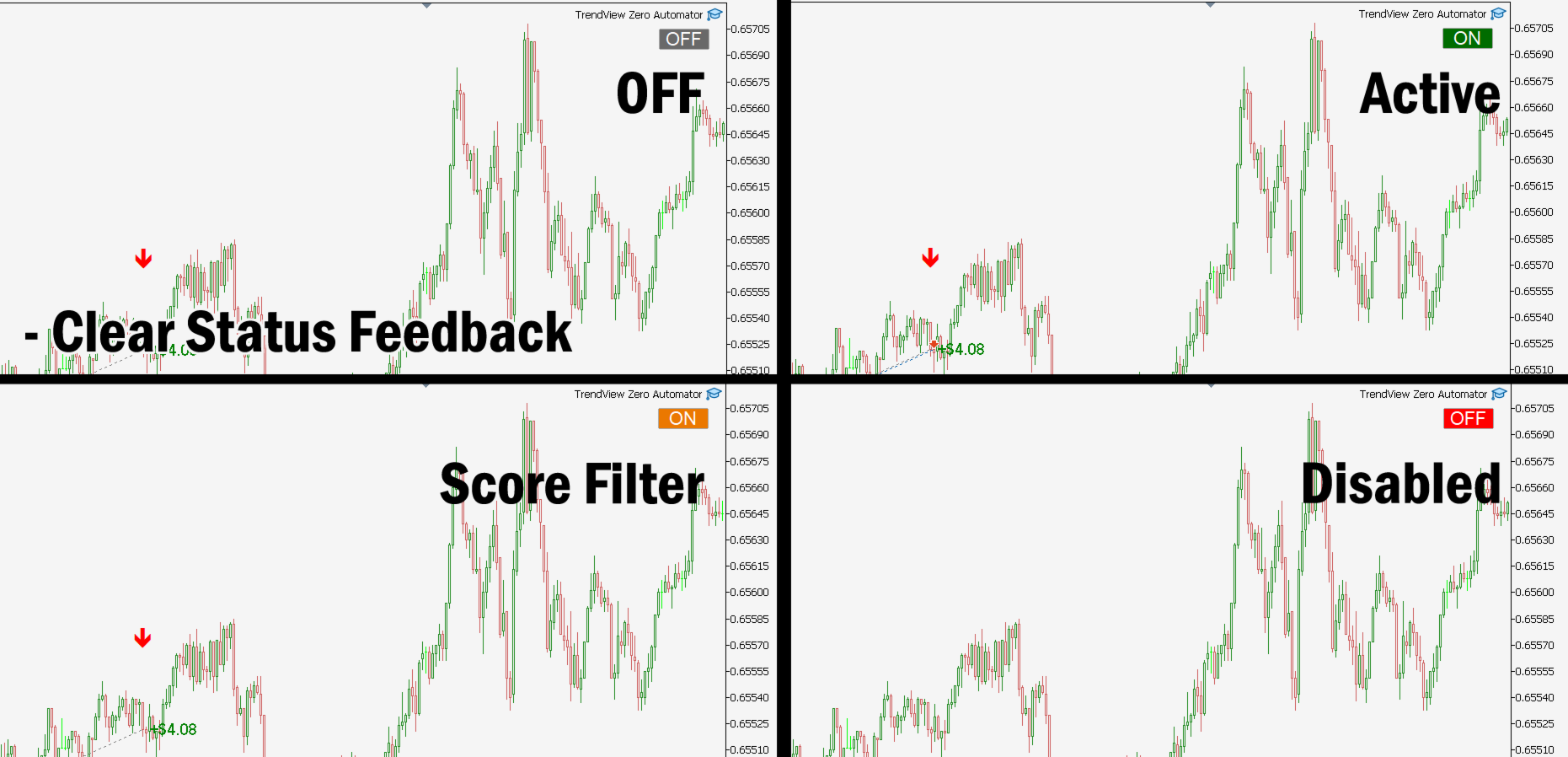
🎛️ Automation Button (On-Chart Control)
The Automator displays a single graphical button in the top-right corner of the chart.
This button is the center of control and real-time feedback.
-
OFF (Gray)
Default state. Every time the Automator is added to the chart, or when the user changes symbol or timeframe, the system resets to OFF for safety.
-
ON (Green)
The Automator is active, fully connected to the market, and ready to open or close trades based on the signals of TrendView Zero.
-
ON (Orange)
The EA is active but will not open new trades because the Strategy Score is below the minimum allowed. It will still manage and close existing positions when required.
-
OFF (Red)
The Automator detected a problem: TrendView Zero is missing from the chart, misconfigured, or not generating valid data.
In this state, trading is disabled to prevent accidental execution.
The button changes color automatically based on the current system state, allowing the user to see at a glance whether trading is active, restricted, or disabled.
🔄 Market Open Requirement
The button only works when the market is receiving live ticks. If the market is closed, the EA cannot update the button state and it cannot be turned ON or OFF.
This prevents syncing issues and ensures the Automator always operates with live market data.
📈 Multi-Timeframe Compatibility
TrendView Zero Automator can manage trades independently across different timeframes of the same asset.
Each trade contains a comment indicating the timeframe that generated it, ensuring full separation and avoiding interference between multiple charts.
This allows traders to automate multiple strategies simultaneously. For example, one setup on M15 and another on H1 on the same asset: each one respecting its own TrendView Zero configuration and signals.
🚀 TrendView Zero + Automator: A Complete Automated System
Together, TrendView Zero and TrendView Zero Automator form a complete intelligent and automated trading solution.
The indicator finds the best strategy while the Automator executes it.
Just a clean, reliable, fully automated trading workflow.
---
TrendCore Labs — Professional Trading Tools for Modern Traders